Metals: Import-missing-symbol doesn't seem to work with coc.nvim
Describe the bug
Using coc.nvim + coc-metals with metals 0.7.6+727-60d73c7e-SNAPSHOT.
The import missing symbol action works as expected in VS Code, but doesn't show up in the code actions list in vim. When I request code actions for the line containing the error, I get an empty list.
To Reproduce
Steps to reproduce the behavior:
- Write
val x = Future(1)in a Scala file, without adding an import forscala.concurrent.Future. - The line is marked with a compilation error.
Futureis underlined. Hovering shows[bloop] [E] not found: value Future - Type
:CocAction<Enter> - An empty list of code actions is shown.
Expected behavior
Two items in the code actions list:
- `Import 'Future' from package 'scala.concurrent'
- `Import 'Future' from package 'java.util.concurrent'
Screenshots
The code containing a missing symbol:

The empty actions list:

Installation:
- Operating system: macOS
- Editor: neovim + coc.nvim + coc-metals
- Metals version: v0.7.6+727-60d73c7e-SNAPSHOT
Additional context
I rebuilt metals locally so I could log the code actions request that coc.nvim is sending. It looks like this:
Code actions request from coc.nvim
CodeActionParams [
  textDocument = TextDocumentIdentifier [
    uri = "file:///Users/chris/code/pbdirect/src/main/scala/pbdirect/PBScalarValueWriter.scala"
  ]
  range = Range [
    start = Position [
      line = 13
      character = 0
    ]
    end = Position [
      line = 14
      character = 0
    ]
  ]
  context = CodeActionContext [
    diagnostics = ArrayList (
      Diagnostic [
        range = Range [
          start = Position [
            line = 13
            character = 10
          ]
          end = Position [
            line = 13
            character = 16
          ]
        ]
        severity = Error
        code = null
        source = "bloop"
        message = "not found: value Future"
        relatedInformation = null
      ]
    )
    only = null
  ]
]
Note that the missing symbol is on line 13 (zero-indexed) of the file.
Search terms
vim coc.nvim import missing symbol
 cb372
cb372
All 9 comments
Thanks for the report @cb372. I actually have a report of this on the coc-metals repo as well https://github.com/ckipp01/coc-metals/issues/19. I'll dive into this and see what's going on. I was actually having major problems before with just coc.nvim before coc-metals and code actions (only with Metals though, they were working fine with Typescript), but then they worked fine. It seems that something is going awry. For now I'll leave this issue here, but after investigating I'll potentially close this and copy it over to coc-metals if that's the issue.
 ckipp01
on 10 Jan 2020
ckipp01
on 10 Jan 2020
@cb372 following up from the issue in coc-metal, you can see how to get this to work correctly here https://github.com/scalameta/coc-metals/issues/19.
@gabro thoughts on whether we should change how we filter or do you think it's sufficient since you can just use the coc-codeaction-selected to make the work as expected in coc.nvim.
ckipp01
on 11 Jan 2020
@ckipp01 the idea behind that filter is that if you have something like:
val x = Future.successful(Instant.now)
        ^^^^^^            ^^^^^^^
I only want to propose relevant fixes for the error under the cursor.
If we considered the diagnostics of the entire line, we would propose all the relevant imports for Future and Instant together.
Does it make sense?
 gabro
on 11 Jan 2020
gabro
on 11 Jan 2020
Yea, but I'm wondering why that's a bad thing? In this situation for example, if the user triggers a code action on this line, I'd actually expect it to return both the options of importing Future and Instant. I don't mean in the same action, but receive both actions, allowing the user to choose.
I believe this is how the typescript code actions work? At least in vim, when I trigger code actions for the full line as pictured below, I get all available actions for that line.
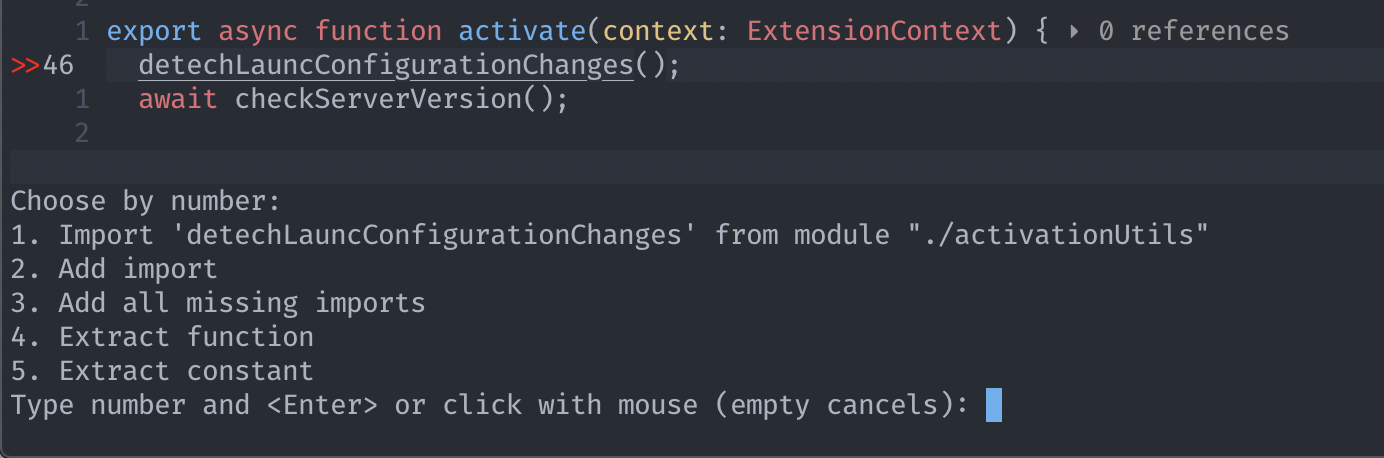
So I'd expect a similar thing in your example returning like
Choose by number:
1. Import 'Future' from "scala.concurrent.Future"
2. Import 'Instant' from "java.time.Instant"
Type number and <Enter> or click with mouse (empty cancels):
That's a fair assumption, although it's a bit of a stretch regarding the spec.
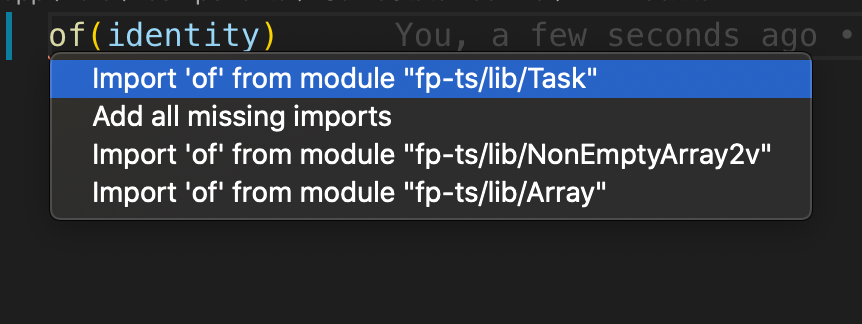
I would expect code actions to work contextually to where the cursor is positioned on a line. This is the way they work in TypeScript too:
Given this
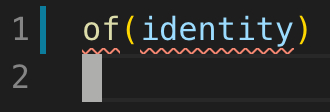
if I trigger a code action from of I get
and when I move to identity I get
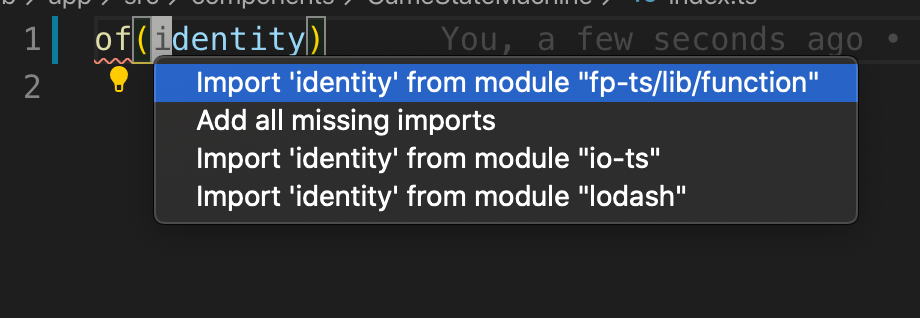
The "Add all missing imports" is always present in the TypeScript implementation, and it works on the entire file (not just the single line), so I don't think it's relevant here.
gabro
on 11 Jan 2020
I would expect code actions to work contextually to where the cursor is positioned on a line. This is the way they work in TypeScript too:
So some of this may be a client difference, but I do think this example is relevant. For example, here is an example with typescript and coc.nvim essentially showing your exact example from up above with two missing imports on one line.
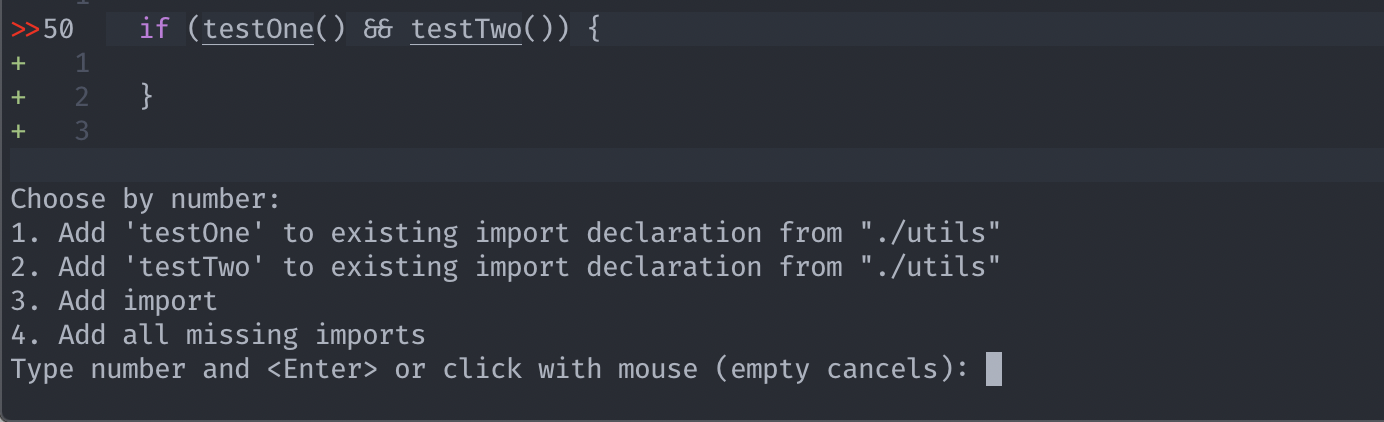
So I guess it's also a question on what we mean by contextually because to me, triggering on a line for the entire line is just one context.
ckipp01
on 11 Jan 2020
Ah, that's interesting! I'm indeed able to reproduce when manually selecting a range in VSCode
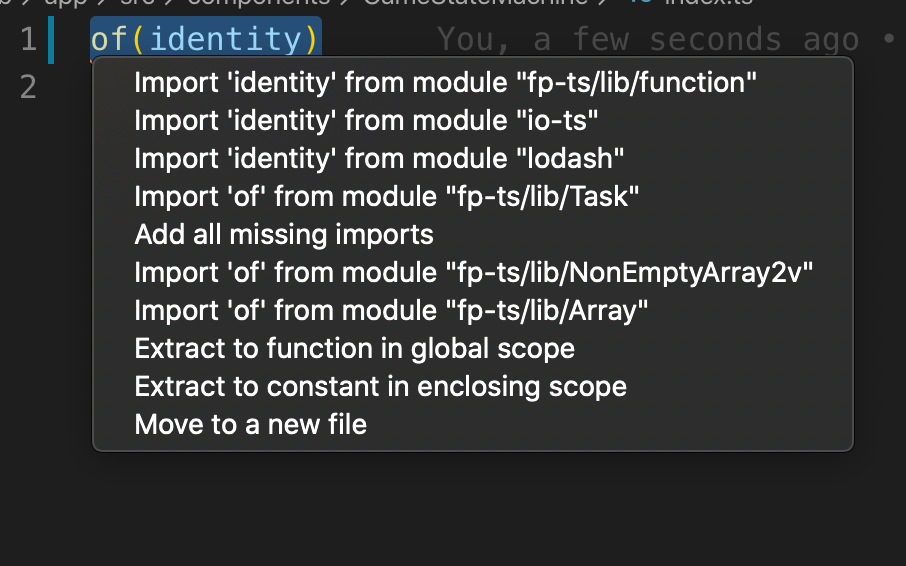
Makes sense, I need to think about this a little. Thanks for making me aware
gabro
on 11 Jan 2020
Totally, I haven't thought about it before either, so it's probably good we stumbled on this.
ckipp01
on 11 Jan 2020
@cb372 / @ckipp01 Thanks again for pointing this out. I have a fix ready at #1286. The way we treated ranges before was making me uneasy and I think now it finally makes sense!
gabro
on 11 Jan 2020
Related issues
 olafurpg
·
14Comments
olafurpg
·
14Comments
 mpilquist
·
13Comments
mpilquist
·
13Comments
 Atry
·
21Comments
olafurpg
·
19Comments
Atry
·
21Comments
olafurpg
·
19Comments
 oharboe
·
12Comments
oharboe
·
12Comments