Messagekit: [Example] Subview Example - messageInputBar not following keyboard when dragging down
Describe the bug
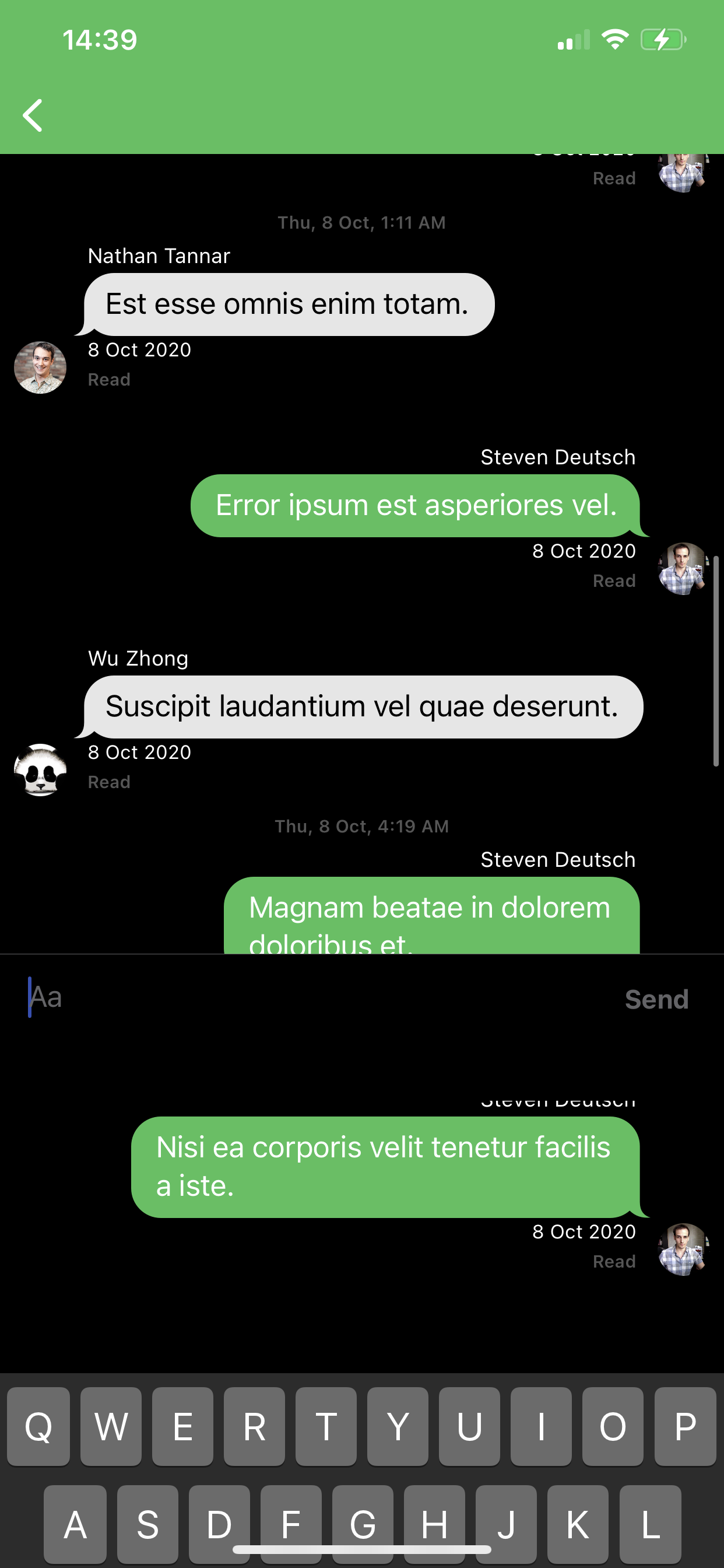
When dragging keyboard down to dismiss messageInputBar is staying fixed until keyboardWillChangeFrame notification is sent
To Reproduce
as above - Example -> Subview Example -> drag keyboard down
Expected behavior
View follows keyboard
Screenshots
Environment
- What version of MessageKit are you using? 3.4.1
- What version of iOS are you running on? 14.0
- What version of Swift are you running on? 5
- What device(s) are you testing on? Are these simulators? 11 Pro Max
- Is the issue you're experiencing reproducible in the example app? Yes
 michalPietraszko
All 4 comments
Message for PPL googling in the future:
Example project for InputBarAccessoryView also has "Subview" examples
I had to modify it slightly and it's working like a charm:
KeyboardManager.swift
callbacks[.willChangeFrame] = { [weak self] (notification) in
let keyboardHeight = notification.endFrame.height
guard
self?.isKeyboardHidden == false,
notification.isForCurrentApp else { return }
if keyboardHeight == 69 { return } // add this line
UIView.performWithoutAnimation { // change whatever was in this line to this
self?.constraints?.bottom?.constant = -keyboardHeight
self?.inputAccessoryView?.superview?.layoutIfNeeded()
}
}
Fix is only for InputBarAccessoryView Example project - it has to be ported to MessageKit I might submit a pull request once I do that. Anyways should be pretty straight forward.
michalPietraszko
on 30 Sep 2020
This issue has been marked as stale because it has not had recent activity. It will be closed if no further activity occurs.
![stale[bot] picture](https://avatars.githubusercontent.com/in/1724?v=4&s=40) stale[bot]
on 1 Nov 2020
stale[bot]
on 1 Nov 2020
This issue has been auto-closed because there hasn't been any activity for at least 21 days. However, we really appreciate your contribution, so thank you for that! 🙏 Also, feel free to open a new issue if you still experience this problem 👍.
stale[bot]
on 26 Nov 2020
MessageKit subview example is not correct, because there is a one missing line.
if you want to interactively dismiss the keyboard, you need to bind the keyboard manager to the message collection view, as shown below.
import Foundation
import UIKit
import InputBarAccessoryView

final class MessageSubviewViewController: BasicExampleViewController {

    private let keyboardManager = KeyboardManager()
    private let subviewInputBar = InputBarAccessoryView()

    // MARK: - View Life Cycle

    override func viewDidLoad() {
        super.viewDidLoad()

        view.addSubview(subviewInputBar)

        // Binding the inputBar will set the needed callback actions to position the inputBar on top of the keyboard
        keyboardManager.bind(inputAccessoryView: subviewInputBar)

        // Binding to the messagesCollectionView will enable interactive dismissal
        keyboardManager.bind(to: messagesCollectionView)
    }
    override func inputBar(_ inputBar: InputBarAccessoryView, didPressSendButtonWith text: String) {
        processInputBar(subviewInputBar)
    }
}
 IrelDev
on 15 Feb 2021
IrelDev
on 15 Feb 2021
Related issues
 ChandraPrakashJangid
·
3Comments
ChandraPrakashJangid
·
3Comments
 omaralbeik
·
4Comments
omaralbeik
·
4Comments
 adri4silva
·
4Comments
adri4silva
·
4Comments
 mlequeux
·
3Comments
mlequeux
·
3Comments
 NiklasWilson
·
4Comments
NiklasWilson
·
4Comments
Most helpful comment
MessageKit subview example is not correct, because there is a one missing line.
if you want to interactively dismiss the keyboard, you need to bind the keyboard manager to the message collection view, as shown below.