Messagekit: MessageInputBar covering tabbar on iPad
This has been addressed numerous times but no one seemed to have encountered this issue on the iPad: When you have a master/detail layout, holding the iPad in landscape gives you no opportunity to change tabs. On an iPhone, you wouldn't want the tab bar to be shown in a conversation. But on iPad, you cannot "leave" a conversation as it's a split view.
How can I make it respect the tab bar?
 tulssinep
All 12 comments
Just played around a bit with the constraints and realized this shouldn't even be necessary as the bar should sit in the detail controller instead of even covering what the splitviewcontroller shows on the left for the master section.
Am I doing something wrong here? I've literally only replaced the code for the standard detail controller with the conversation controller template thinking this would suffice.
tulssinep
on 20 Jan 2019
Are you having the same issue as #929 ?
Sent with GitHawk
 nathantannar4
on 20 Jan 2019
nathantannar4
on 20 Jan 2019
Hey, thanks for the link, I just went through it but 2 issues
1) I need to lift it above the TabBar, left-right padding isn't much of a concern to me. Overlapping into the master wouldn't hurt as much as covering the entire TabBar
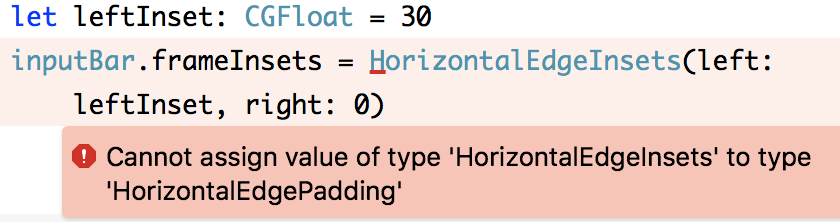
2) the code won't compile, 'HorizontalEdgeInsets' and 'HorizontalEdgePadding' mismatch, the latter of which I cannot seem to find an initializer on.
tulssinep
on 21 Jan 2019
Oh and even hardcoding a padding for the bottom would be fine, I could simply get TabBar height and apply that. I'm perfectly fine with some "ugly" code but I don't know where to do that
tulssinep
on 21 Jan 2019
@tulssinep As a general UI/UX rule, I would recommend having the tabbar hidden on views that have input. If you want to go that route you will have to add the input bar as a subview and manage its size directly.
Sent with GitHawk
nathantannar4
on 21 Jan 2019
But on iPad there is no "back" button in the master-detail flow. You are right for iPhones, I'd always want to have a conversation in "fullscreen". But on iPad this statement is false. There is no "Back" button on an iPad's master-detail split because both are displayed simultaneously. It means that as soon as you click a chat and the Input bar appears, you'd have to restart the whole app in order to change tabs/ chats.
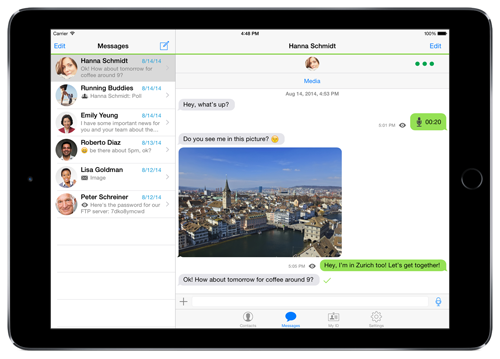
Please take a look at how Threema looks on iPad. Input is above TabBar because otherwise you wouldn't be able to ever change tabs after opening a chat. I hope this helps explaining my issue
tulssinep
on 21 Jan 2019
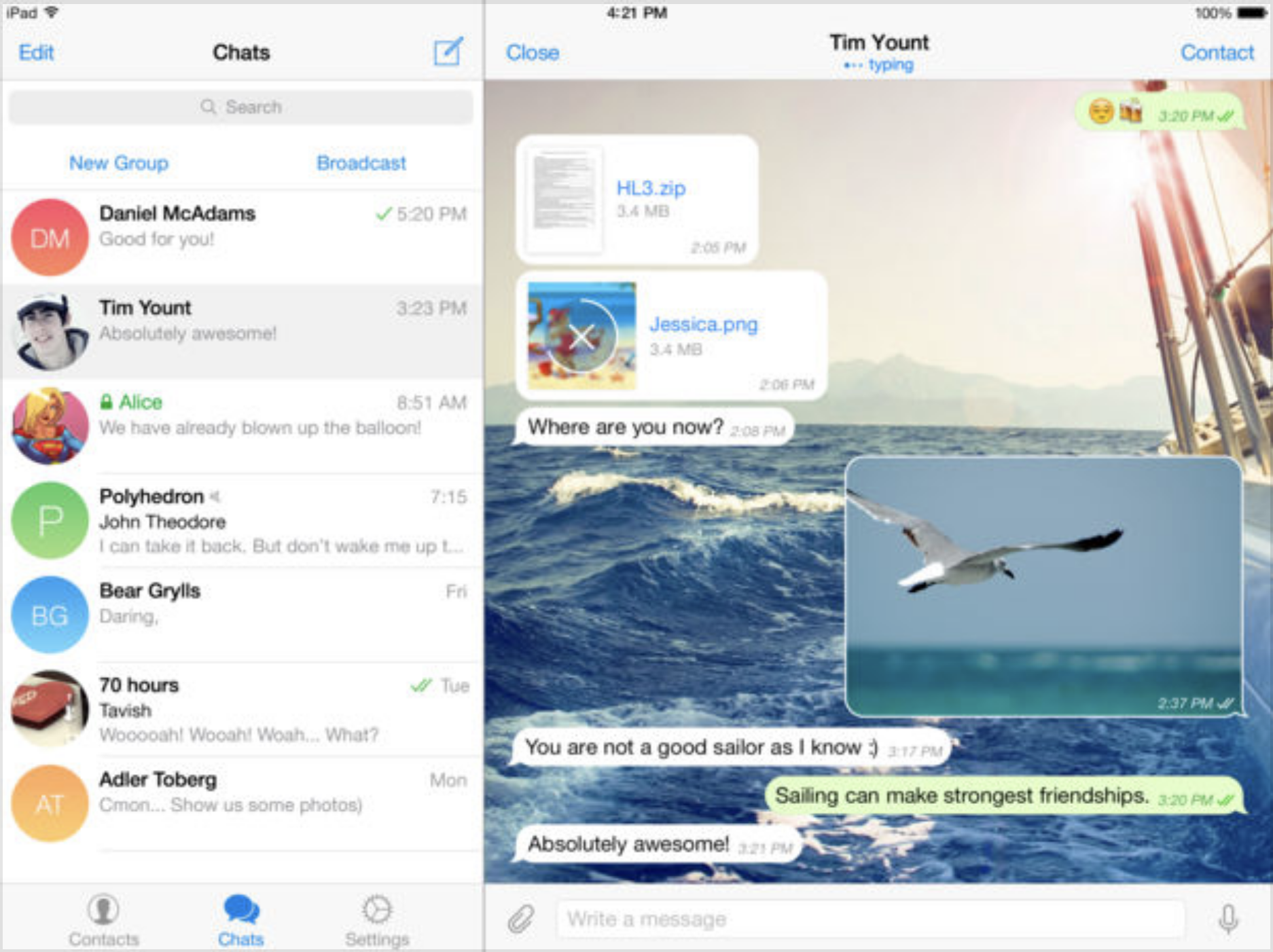
Here is how telegram handles it. They put it in the master so your frameInset option would work if I would find out how to make the code work
tulssinep
on 21 Jan 2019
Ok so I followed your advice of adding it manually: but got one last question
how do I tell the messagesCollectionView that it shouldn't draw under the inputBar? Like, right now it's covering the last message. How can I see the property where it should stop?
To everyone interested: I used the FB Messenger example from here https://github.com/MessageKit/MessageInputBar/blob/master/Example/Example/Style%20Examples/FacebookInputBar.swift
and then did
    let inputBarRect = CGRect.init(x: 0, y: view.frame.height-(self.tabBarController?.tabBar.frame.size.height ?? 32)-48, width: view.frame.width-320, height: 48)
    let newInputBar = CustomInputBar(frame: inputBarRect)
    view.addSubview(newInputBar)
-320 is for the space taken up by the master
tulssinep
on 21 Jan 2019
Ok so this is what I have now. Yes, pretty ugly but it seems to work. I think MessageKit should be able to solve that automatically with the "standard" input but I'm a happy person now. And I'm not smart enough to create a clean pull request hahaha
    override func didRotate(from fromInterfaceOrientation: UIInterfaceOrientation) {
        print("DID ROTATE")
        screenSetup()
    }

    func screenSetup(){
        if(UIDevice.current.userInterfaceIdiom == .pad) {
            iPadSetup()
        }
    }

    func iPadSetup(){

        messageInputBar.isHidden = true
        let inputBarRect = CGRect.init(x: 0, y: view.frame.height-(self.tabBarController?.tabBar.frame.size.height ?? 32)-48, width: view.frame.width, height: 48)
        if(iPadInputBar != nil) {
            iPadInputBar?.removeFromSuperview()
            iPadInputBar = nil
        }
        iPadInputBar = CustomInputBar(frame: inputBarRect)
        if(iPadInputBar != nil) {
            view.addSubview(iPadInputBar!)
        }
        additionalBottomInset = 48
    }
This issue has been marked as stale because it has not had recent activity. It will be closed if no further activity occurs.
![stale[bot] picture](https://avatars.githubusercontent.com/in/1724?v=4&s=40) stale[bot]
on 5 Feb 2019
stale[bot]
on 5 Feb 2019
Using UIDevice.current.userInterfaceIdiom == .pad won't be sufficient since iPad apps can be run in side-by-side mode. In that case, you'd want the input bar to take up the full width of the window. See https://developer.apple.com/design/human-interface-guidelines/ios/system-capabilities/multitasking/
 moshegutman
on 5 Feb 2019
moshegutman
on 5 Feb 2019
This issue has been auto-closed because there hasn't been any activity for at least 21 days. However, we really appreciate your contribution, so thank you for that! 🙏 Also, feel free to open a new issue if you still experience this problem 👍.
stale[bot]
on 12 Feb 2019
Related issues
 omaralbeik
·
4Comments
omaralbeik
·
4Comments
 robertoferraz
·
3Comments
robertoferraz
·
3Comments
 pawankmrai
·
3Comments
pawankmrai
·
3Comments
 JulienLevallois
·
4Comments
JulienLevallois
·
4Comments
 Leon12345679
·
3Comments
Leon12345679
·
3Comments
Most helpful comment
Using
UIDevice.current.userInterfaceIdiom == .padwon't be sufficient since iPad apps can be run in side-by-side mode. In that case, you'd want the input bar to take up the full width of the window. See https://developer.apple.com/design/human-interface-guidelines/ios/system-capabilities/multitasking/