Messagekit: Issues with Swift 4.2
- What version of MessageKit are you using? 2.0.0
- What version of iOS are you running on? same failure on different versions
- What version of Swift are you running on? 4.2
- What device(s) are you testing on? Are these simulators? Simulator, Real, Generic
- Is the issue you're experiencing reproducible in the example app? Not sure
Hello,
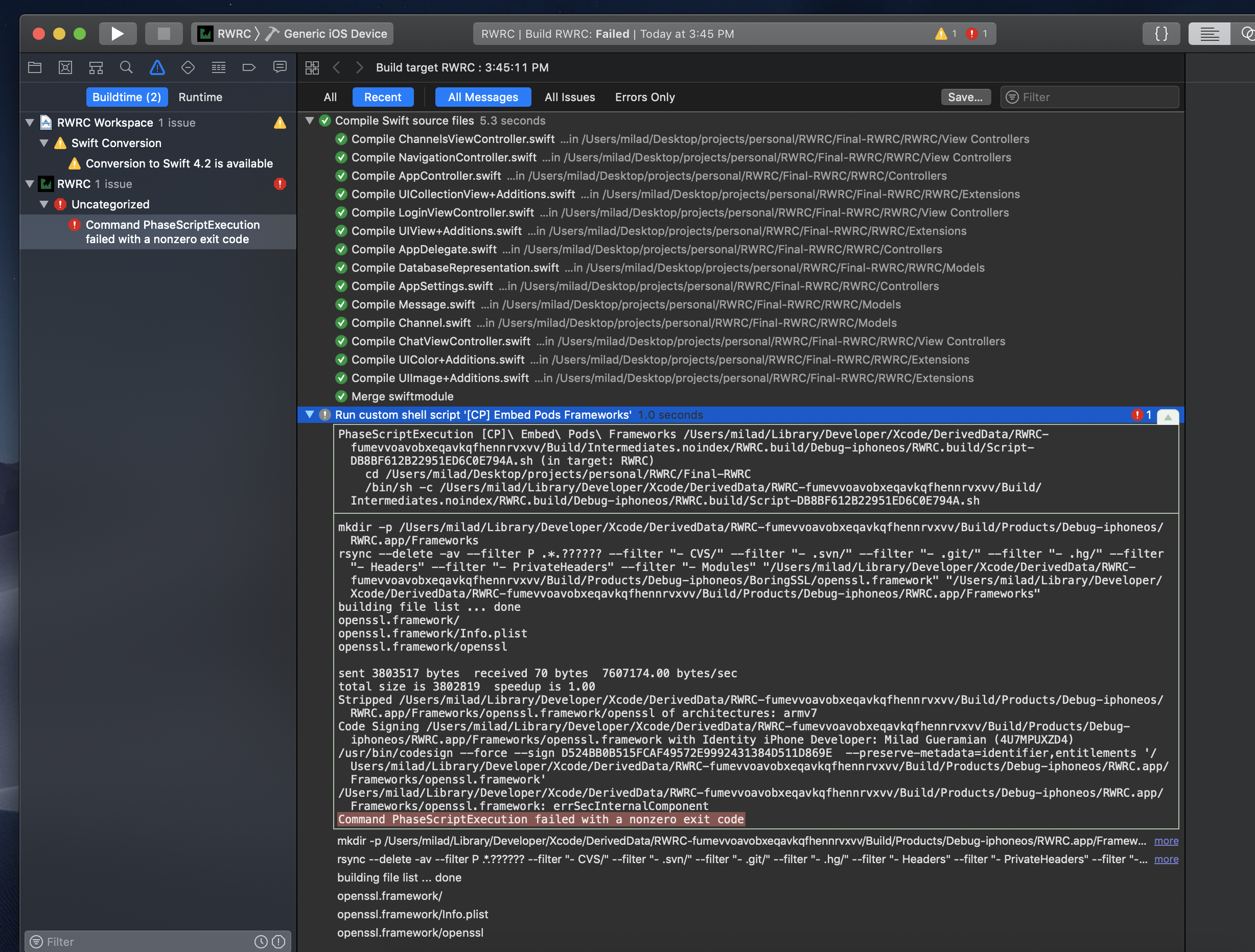
I was trying to build a chat app using this Ray Wenderlich (tutorial) [https://www.raywenderlich.com/5359-firebase-tutorial-real-time-chat]. The first problem here is that building the Final version of this project for archiving or on a real device fails due to code signing when embedding pods. The second issue is that it seems that the MessageKit still needs to be converted to Swift 4.2. The comments section fo the tutorial is full of people having various problems and solutions but this is still all confusing to me. Can someone explain what is going on please?
 Miladinho
All 8 comments
@Miladinho Can I see your Podfile?
 SD10
on 19 Dec 2018
SD10
on 19 Dec 2018
Hello @SD10 ,
Thank you for your prompt response. My pod file is below:
# Uncomment the next line to define a global platform for your project
# platform :ios, '9.0'

target 'iOSClient' do
  use_frameworks!

  # Pods for iOSClient
  pod 'Firebase/Core'
  pod 'Firebase/Auth'
  pod 'Firebase/Storage'
  pod 'Firebase/Firestore'
  pod 'MBProgressHUD', '~> 1.0'
  pod 'MessageKit'

  target 'iOSClientTests' do
    inherit! :search_paths
    # Pods for testing
  end

  target 'iOSClientUITests' do
    inherit! :search_paths
    # Pods for testing
  end

end
I tried have changing build settings to compile Swift 4, or using:
  post_install do |installer|
    installer.pods_project.targets.each do |target|
      if target.name == 'MessageKit'
        target.build_configurations.each do |config|
          config.build_settings['SWIFT_VERSION'] = '4.0'
        end
      end
    end
  end
at the end of pods declaration in the podfile (default project Podfile came like this), but no combination worked
Miladinho
on 19 Dec 2018
@Miladinho You shouldnt be specifiying 4.0 in the post_install. Try removing that then run pod repo update master before your next pod install
Sent with GitHawk
 nathantannar4
on 19 Dec 2018
nathantannar4
on 19 Dec 2018
@Miladinho You shouldnt be specifiying 4.0 in the
post_install. Try removing that then runpod repo update masterbefore your nextpod installSent with GitHawk
I've tried doing it to no avail, also I am not the one that made that specification, I'm just downloading the RW tutorial and trying to archive. I want to add that trying to build and run on simulator when I take out the pod_install part actually fails, while keeping it in there and building for simulator succeeds
Update:
I think one would need to remove cocoa pods "deintegrate" and then install again. I notice that following your steps continues to install MessageKit (0.13.1)
Now I am getting some
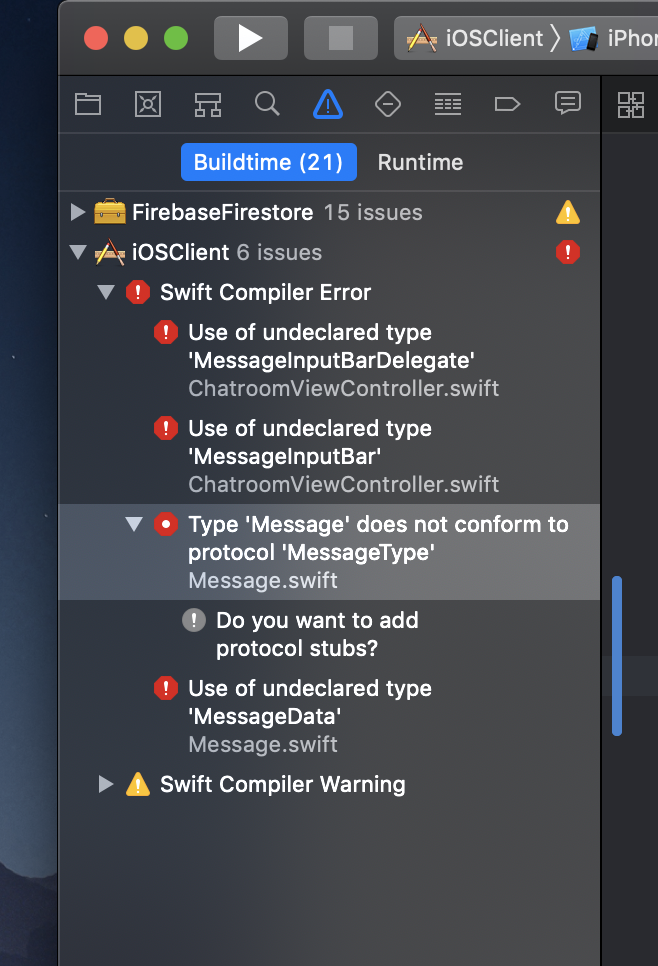
build errors, one that seems to be a 'MessageInputBar' error. I'm still not sure if the code signing issue is gone because I haven;'t had the chance to do a build without compile errors...
Miladinho
on 19 Dec 2018
@SD10 @nathantannar4
My specific issue here has to do with code signing. I would like to know if you guys can reproduce this issue when downloading the RW tutorial I mentioned in the issue description and building for device or archiving. If so, what is the solution. I am not well versed with the details of how CocoaPods deals with dependency mangement, but I did read somewhere that Swift frameworks need be code signed, so since I am wondering if this is the issue when using MessageKit
Miladinho
on 19 Dec 2018
@Miladinho Sorry this is not reproducible, nor an issue with MessageKit. If your install continues to install 0.13.1 then it's something wrong on your end that I'm not sure what the solution is. Maybe you should reinstall cocoapods.
Sent with GitHawk
nathantannar4
on 19 Dec 2018
@nathantannar4
Thank you for trying to reproduce the issue. I will explain what happened: tldr - had nothing to do with MessageKit. Essentially i ran into this issue with codesigning on a device and for archiving, there were so many windows asking for the Keychain 'login' access that I pressed deny after the third time and even went about to reset the password. Days later, while still struggling with a code signing error (but not getting the keychain access popup on device/archive builds anymore) I realized by chance what had happened when I got the keychain access request while building on a different mac. All I had to go on during this time was the build errors I was getting while using an older version of MessageKit because the Podfile lock was referencing the older version.
Miladinho
on 25 Dec 2018
@Miladinho, so what did you do at the end to solve this problem?
 akgulem
on 16 Feb 2020
akgulem
on 16 Feb 2020
Related issues
 emmanuelay
·
3Comments
emmanuelay
·
3Comments
 mlequeux
·
3Comments
mlequeux
·
3Comments
 ahmedwasil
·
3Comments
ahmedwasil
·
3Comments
 adri4silva
·
4Comments
adri4silva
·
4Comments
 asn111
·
3Comments
asn111
·
3Comments