Messagekit: Random crash when calling "reloadItems(at: )" 'NSInternalInconsistencyException' invalid number of sections
Hi Everyone,
Thanks for such an awesome library,
I recently switched from JSQmessages and I am implementing read receipts on my messaging app,
The concept is to send the message and by default the bottom label will say "sent" and then when the message is seen by the other party, Only that cell's bottom label will be updated to "seen" and that same cell will only be reloaded to reflect the change that happened on the cell.
the code im using to reload the cell in a block that loops through the messageslist and finds the cell that needs to be updated based on the ID is this:
DispatchQueue.main.async {
   self.messagesCollectionView.reloadItems(at: [IndexPath(row: 0, section: i)])
}
The block that processes the data coming from the server and that updates the read receipts is running on a global thread thats why the reload line is wrapped within a main thread queue.
My thinking is that reloading the cell only instead of using reloadData() or reloadDataAndKeepOffset() will have less impact on the memory because theoretically the rest of the cells don't need to be reloaded.
If I send one message at a time everything works fine but when both phones starting sending messages continuously then the app will crash at a random moment while the messages are being sent back and forth with this error code:
*** Terminating app due to uncaught exception 'NSInternalInconsistencyException', reason: 'Invalid update: invalid number of sections. The number of sections contained in the collection view after the update (52) must be equal to the number of sections contained in the collection view before the update (51), plus or minus the number of sections inserted or deleted (0 inserted, 0 deleted).'
I guess that the list size is different some how at some point, hence, this happens when sending alot of messages and from both sides at the same time.
 lshannak
All 13 comments
How are you refreshing your message list? Socket? Refresh timer? You are right in that you have an inconsistency somewhere but it sounds to be client side and not a MessageKit error
Sent with GitHawk
 nathantannar4
on 14 Nov 2018
nathantannar4
on 14 Nov 2018
I use reloadData() and scrolltobottom() whenever a new message is received.
The app uses firestore, so that happenes on a snapshot listener thread.
lshannak
on 14 Nov 2018
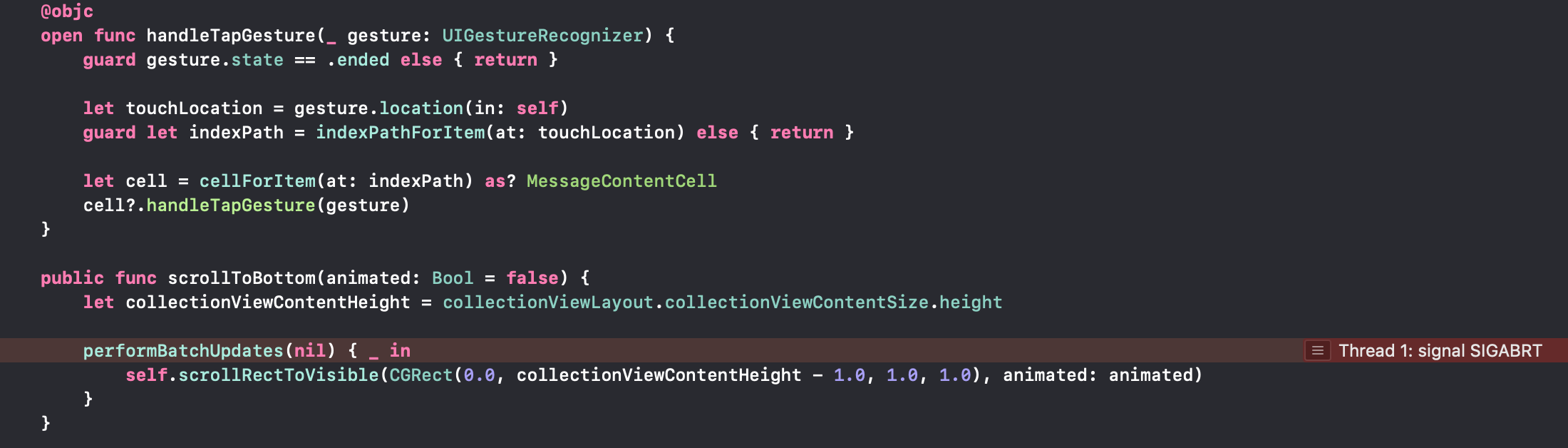
I also tried to replace reloadItemsat() with reloadData() and I get the same error but from a different line, the initial issue reported throws the error at the reloadItemsat line.
When I used reloadData() it throws the error here:
lshannak
on 14 Nov 2018
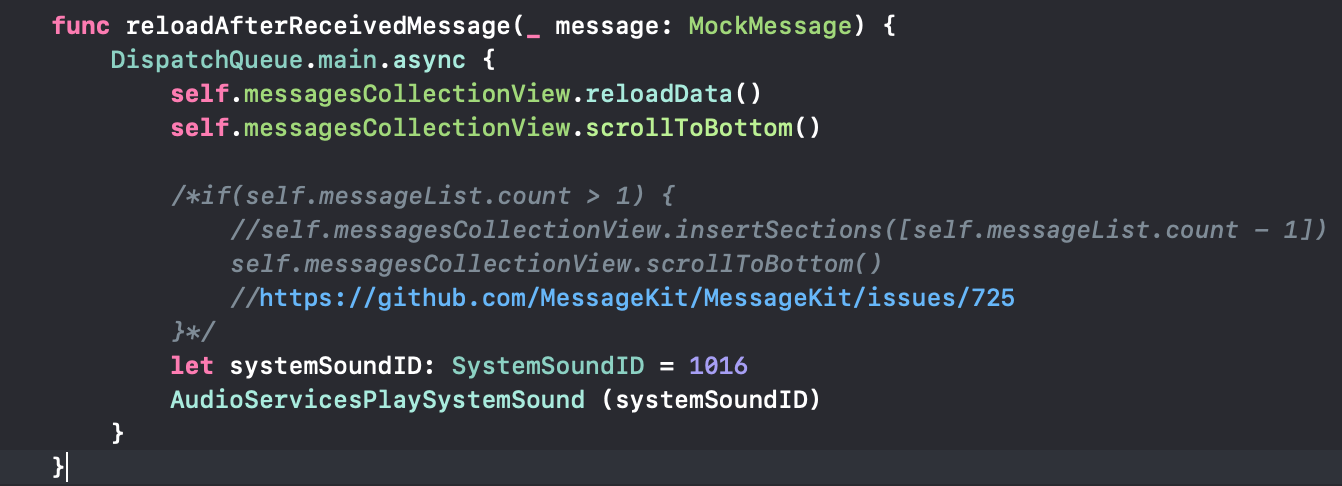
I had a similar issue when I was trying to implement the scroll to bottom after receiving a message, but that was when I was using scrollToBottom(animated: true).
Then I looked at different issues reported especially the #725 issue.
The solutions there never worked for me and now this is the code that reliably works for me as far as that part:
lshannak
on 14 Nov 2018
@lshannak This is a known issue. I would probably implement your own scrollsToBottom method
 SD10
on 14 Nov 2018
SD10
on 14 Nov 2018
@lshannak This is a known issue. I would probably implement your own
scrollsToBottommethod
Do you think I need to do that even though I am NOTT calling scrollToBottom() in my code???
Please not that the last piece of code is working with no issues, but I did experience an issue previously when I was using the animated flag.
The issue in my first comment (initial one) does not use scrollToBottom(), it calls reloadItems(at: ) ORR reloadDataAndKeepOffset(). Nothing else, but it also fails.
What is the best way to use this reliably, I think the question is, what should I use to update a cell that has been added to the view already???
If the answer is to implement my own scroll to bottom function, what does this mean in terms of using best practice coding, and the fact that code in Pods should not be updated.
Your help is greatly appreciated!!!!
lshannak
on 14 Nov 2018
This issue has been marked as stale because it has not had recent activity. It will be closed if no further activity occurs.
![stale[bot] picture](https://avatars.githubusercontent.com/in/1724?v=4&s=40) stale[bot]
on 28 Nov 2018
stale[bot]
on 28 Nov 2018
I think you want to do
self.messagesCollectionView.performBatchUpdates({
    self.messagesCollectionView.reloadSections(IndexSet([indexPath.row]))
})
instead of
reloadItems(at:)
, and when you need to scroll to bottom after doing a batch update animation, you put the call to scroll to bottom in the animation completion block.
Lastly, you can prevent collectionView's performBlock from animating by wrapping the call with UIView.performWithoutAnimation.
 austinwright
on 28 Nov 2018
austinwright
on 28 Nov 2018
fwiw, I would love to re-evaluate the scrollToBottom() method to remove the batch updates call. we did that because it was the best solution from a UI perspective, not stability/compatibility. open to better solutions if anyone finds one
SD10
on 29 Nov 2018
@SD10 I suppose we just implement the basic logic, use setContentOffset:(CGPoint)contentOffset animated or scrollRectToVisible:(CGRect)rect animated:, remove performBatchUpdates and any tricky calculation. If user wants scrollToBottom work in their all cases, he can do some trick to implement from user side, I think it's not difficult 😂 .
 zhongwuzw
on 1 Dec 2018
zhongwuzw
on 1 Dec 2018
Agreed 👍
SD10
on 4 Dec 2018
I also encountered by the same issue, I wasn't able to fix this issue. i.e to insert multiple messages simultaneously, so after some research I found a solution.Steven is right this is not a message kit bug, It's a collectionview bug. So the solution is you just need to append the element in array in perform batch updates method like this.It will not crash .I just checked by appending the dummy elements in array after retrieveing all the messages.Below is the following code .
Correct
// Reload last section to update header/footer labels and insert a new one
```
self.messagesCollectionView.performBatchUpdates({
self.chatArray.append(message)
self.messagesCollectionView.insertSections([self.chatArray.count - 1])
if self.chatArray.count >= 2 {
self.messagesCollectionView.reloadSections([self.chatArray.count - 2])
self.messagesCollectionView.reloadDataAndKeepOffset()
        }
    }, completion: { [weak self] _ in
        if self?.isLastSectionVisible() == true {
            self?.messagesCollectionView.scrollToBottom(animated: true)
        }
    })
```
Thanku for the awesome library
 hassanshafi
on 27 Mar 2020
hassanshafi
on 27 Mar 2020
@hassanshafi thank you
 CharuwanNoi
on 15 Jun 2020
CharuwanNoi
on 15 Jun 2020
Related issues
 robertoferraz
·
3Comments
robertoferraz
·
3Comments
 ahmedwasil
·
3Comments
ahmedwasil
·
3Comments
 adri4silva
·
4Comments
adri4silva
·
4Comments
 asn111
·
3Comments
asn111
·
3Comments
 pawankmrai
·
3Comments
pawankmrai
·
3Comments