Messagekit: MessagesDataSource methods are not calling
- iOS version 10.0
- Xcode Version 9.4.1
- Simulator iPhone8
I want create Chat bot app .. Without using Firebase
@IBOutlet weak var messagesCollectionView: MessagesCollectionView!
private var chatMessages = [String]()
var messageInputBar : MessageInputBar?
let ClientSenderId = "Client"

override func viewDidLoad() {
    super.viewDidLoad()
        chatMessages = ["SomeType", "SomeType"]
        DispatchQueue.main.async {
            self.messagesCollectionView.reloadData()
            self.messagesCollectionView.scrollToBottom()
        }
        messageInputBar?.delegate = self as? MessageInputBarDelegate
        messagesCollectionView.messagesDataSource = self
        messagesCollectionView.messagesLayoutDelegate = self
        messagesCollectionView.messagesDisplayDelegate = self
        messagesCollectionView.messageCellDelegate = self as? MessageCellDelegate
}
// MARK :- MessagesDataSource
extension ChatViewController: MessagesDataSource {
    func currentSender() -> Sender {
         return Sender(id: ClientSenderId, displayName: “Some Name”)
    }
    func messageForItem(at indexPath: IndexPath, in messagesCollectionView: MessagesCollectionView) -> MessageType {
        return chatMessages[indexPath.section] as MessageType
    }
    func numberOfItems(inSection section: Int, in messagesCollectionView: MessagesCollectionView) -> Int {
        return chatMessages
    }
    func numberOfSections(in messagesCollectionView: MessagesCollectionView) -> Int {
        return chatMessages
    }
    func cellTopLabelAttributedText(for message: MessageType,
                                    at indexPath: IndexPath) -> NSAttributedString? {
        let name = “Some Name”
        if indexPath.section % 3 == 0 {
            return NSAttributedString(
                string: name,
                attributes: [
                    .font: UIFont.preferredFont(forTextStyle: .caption1),
                    .foregroundColor: UIColor(white: 0.3, alpha: 1)
                ]
            )
        }
        return nil
    }
}
But i'm not seeing MessageKit UI
I know am wrong.. Please provide me code of without using firebase
 SreekanthGudisi
All 13 comments
Hey @SreekanthGudisi, without seeing more of how the ViewController that you are working in is put together it is hard to say what the issue could be. You can take a look at the Example though that MessageKit provides to compare what you are doing with what the Example does. The Example code is all in the Example directory.
You really just need to look at the ConversationViewController to see how to work with the MessagesViewController that MessageKit provides. The MessagesViewController takes care of displaying the UI so if your ViewController is not inheriting from it as the Example does, this could be your issue.
 brandon-haugen
on 18 Sep 2018
brandon-haugen
on 18 Sep 2018
@brandon-haugen thank u very much ... The thing is i didn't see Example code.. Right now i'm using working fine.. May i know, why not able to see MessageInputBar in MyViewController ?.. am i missed anything?
SreekanthGudisi
on 18 Sep 2018
@SreekanthGudisi, from the code you shared in your initial message, we cannot see if your ViewController is inheriting from the MessagesViewController. If your ViewController inherits from MessagesViewController the UI for displaying and sending text messages should appear just as it does in the Example.
brandon-haugen
on 19 Sep 2018
@SreekanthGudisi, I think your screenshot did not upload before you pushed the button to send the comment.
If the declaration of your ViewController class does not look like this snippet from the Example, then this is what you need to change to make the MessageInputBar display
class ConversationViewController: MessagesViewController
ConversationViewController should be changed to be whatever you have named your ViewController, it looks like you have named it ChatViewController given the declaration of the extension for the MessagesDataSource so the declaration of your ViewController class should be
class ChatViewController: MessagesViewController
It looks like you also have defined your own MessagesCollectionView instead of using the one that the MessagesViewController provides.
@IBOutlet weak var messagesCollectionView: MessagesCollectionView!
Unless you are doing something extremely unique for your project, I would suggest inheriting from MessagesViewController
brandon-haugen
on 19 Sep 2018
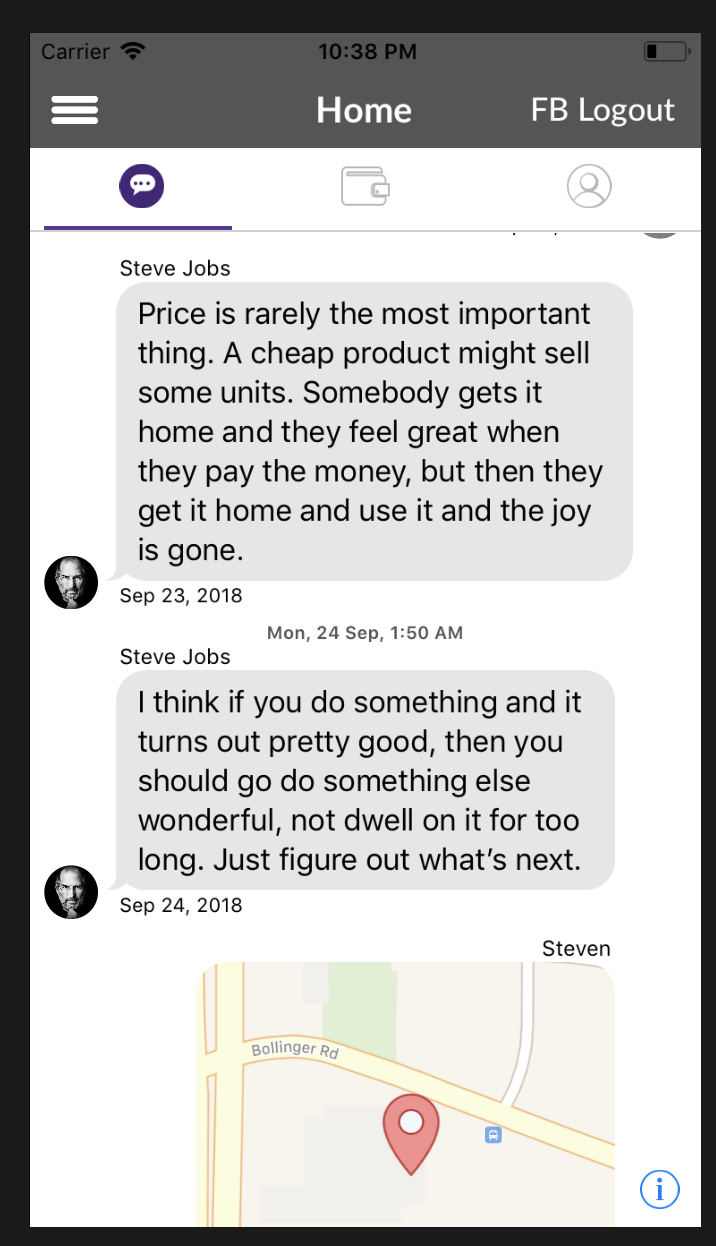
@brandon-haugen i did same what u have suggested above the comment MessageKitIssue.txt
see image getting like this ....
SreekanthGudisi
on 19 Sep 2018
Oooooh! Okay, you do have a more complex layout/implementation somewhat. If you use the view debugger in Xcode, are you able to determine whether the MessageInputBar is being drawn off-screen?
brandon-haugen
on 19 Sep 2018
@brandon-haugen There is no MessageInputBar
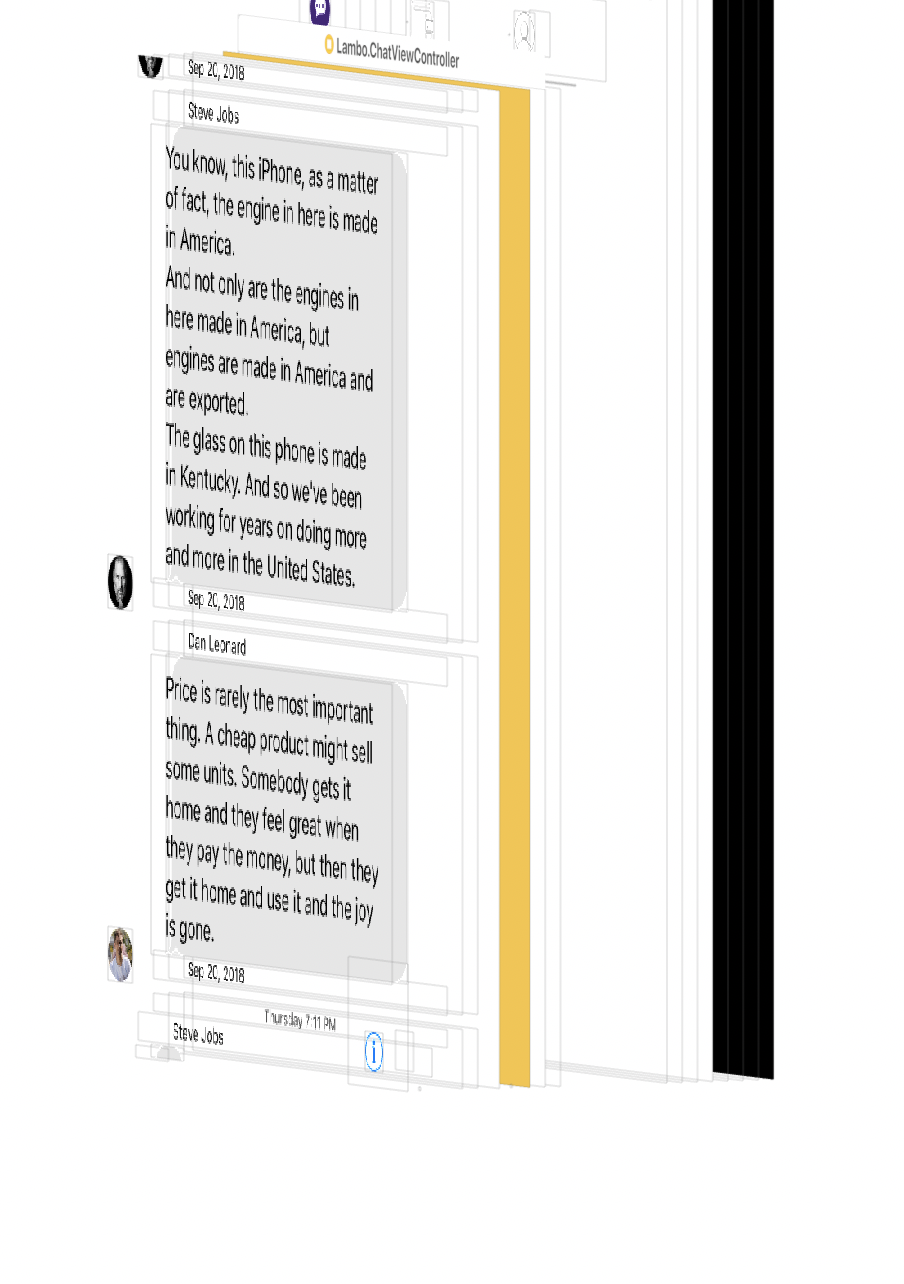
... Right now I have given ChatViewController freedom (Height is 563).. If i give ChatViewController Height is Fixed, at that time _MessageInputBar_ is coming...
SreekanthGudisi
on 19 Sep 2018
Yeah, I haven't gone too far into how MessageKit actually does the layout for the MessagesViewController, it does seem logical though that it needs to have something that defines the constraint for the bottom of the screen so that it can position the MessageInputBar at the bottom of the MessagesCollectionView.
If i give ChatViewController Height is Fixed, at that time MessageInputBar is coming...
It sounds like you have the MessageInputBar displaying now though and you just need to determine what constraints your app needs to specify to keep all of the UI from MessageKit on screen.
brandon-haugen
on 19 Sep 2018
@brandon-haugen Can u confirm me this is right or not ?
I didn't give IBOutLet @IBOutlet weak var messagesCollectionView: MessagesCollectionView! to UIVIew .. I have defined Class name as MessageContainerView to UIView. See below image
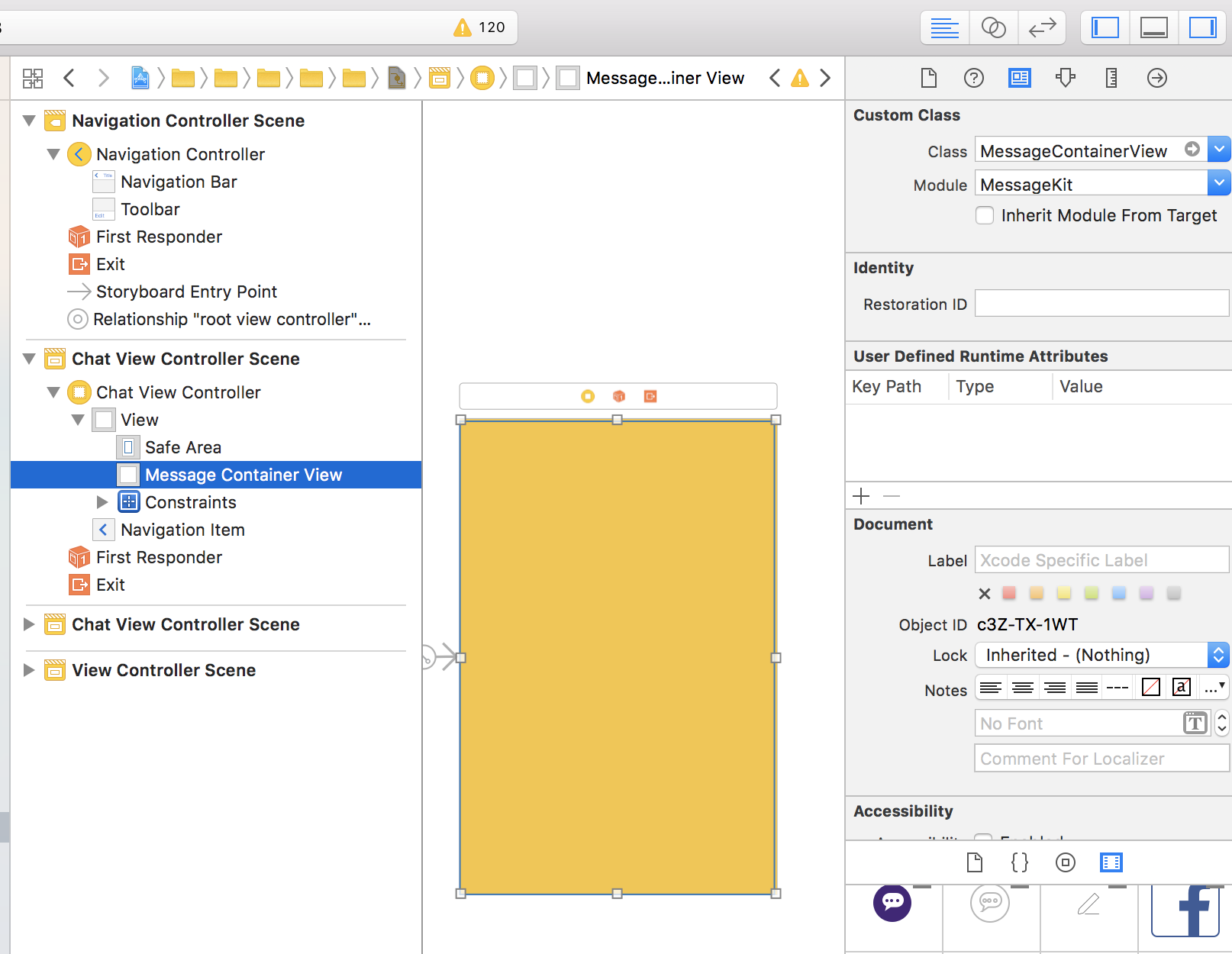
And please look into
MessageKit.pdf
SreekanthGudisi
on 19 Sep 2018
Sorry @SreekanthGudisi, the PDF you linked to does not open in Preview on macOS and the contents of the file are encrypted so I am not going to open it with any other PDF viewing application.
I am not sure what you are looking to confirm is correct or not in the image you shared either. In the App I am using MessageKit in, I don't do anything with MessageKit in a Storyboard though so I may not be of help there if that is what you are looking for.
brandon-haugen
on 19 Sep 2018
This issue has been marked as stale because it has not had recent activity. It will be closed if no further activity occurs.
![stale[bot] picture](https://avatars.githubusercontent.com/in/1724?v=4&s=40) stale[bot]
on 4 Oct 2018
stale[bot]
on 4 Oct 2018
This issue has been auto-closed because there hasn't been any activity for at least 21 days. However, we really appreciate your contribution, so thank you for that! 🙏 Also, feel free to open a new issue if you still experience this problem 👍.
stale[bot]
on 11 Oct 2018
I have an issue where the input bar works and im able to type and the send button shows as its clicking but the method func messageInputBar() is not getting called. Does anyone know how to fix this? I also have messageInputBar.delegate = self.
 OuriLiveCare
on 4 Nov 2019
OuriLiveCare
on 4 Nov 2019
Related issues
 ahmedwasil
·
3Comments
ahmedwasil
·
3Comments
 yspreen
·
3Comments
yspreen
·
3Comments
 omaralbeik
·
4Comments
omaralbeik
·
4Comments
 anandatswayam
·
4Comments
anandatswayam
·
4Comments
 emmanuelay
·
3Comments
emmanuelay
·
3Comments
Most helpful comment
Hey @SreekanthGudisi, without seeing more of how the
ViewControllerthat you are working in is put together it is hard to say what the issue could be. You can take a look at the Example though that MessageKit provides to compare what you are doing with what the Example does. The Example code is all in the Example directory.You really just need to look at the ConversationViewController to see how to work with the
MessagesViewControllerthat MessageKit provides. TheMessagesViewControllertakes care of displaying the UI so if your ViewController is not inheriting from it as the Example does, this could be your issue.