Messagekit: [Question] How to customize cellTopLabel?
- What version of MessageKit are you using?
1.0.0 - What version of iOS are you running on?
iOS 10+ - What version of Swift are you running on?
4.1
I've run the example project and I noticed that it uses cellTopLabel to show grouped date time.
Is there any way to customize the cellTopLabel, for example: change background, put text inside rounded-corner rect, decorate with images?
Or maybe I should use sectionHeaderView to achieve my goal?
 chiahsien
All 14 comments
Hi @chiahsien. I recommend adding a custom section header or overriding cellForRowAt, get the super cell and then make your changes.
Sent with GitHawk
 nathantannar4
on 5 Sep 2018
nathantannar4
on 5 Sep 2018
@chiahsien
Is there any way to customize the cellTopLabel, for example: change background, put text inside rounded-corner rect, decorate with images?
You may want to try using NSTextAttachment. You can actually put images inside of an NSAttributedString. You can find the method to return the text for the cellTopLabel here
 SD10
on 5 Sep 2018
SD10
on 5 Sep 2018
I recommend adding a custom section header or overriding cellForRowAt, get the super cell and then make your changes.
Thanks @nathantannar4
@SD10
You may want to try using NSTextAttachment.
But how to do something like "put text inside a rounded corner rect and filled background with specific color"?
chiahsien
on 5 Sep 2018
@chiahsien Yeah there's no good way to do that unfortunately. The solution by Nathan is probably your best bet if you're looking to do that amount of customization
SD10
on 5 Sep 2018
Understand, I'll give it a try. Thank you all!
chiahsien
on 5 Sep 2018
were you able to achieve this @chiahsien please do share
 tobitech
on 6 Sep 2018
tobitech
on 6 Sep 2018
Not yet, will try it later this or next week.
chiahsien
on 6 Sep 2018
Hi @tobitech ,
This approach works, you can do it like how you handle headerView in UITable/CollectionView.
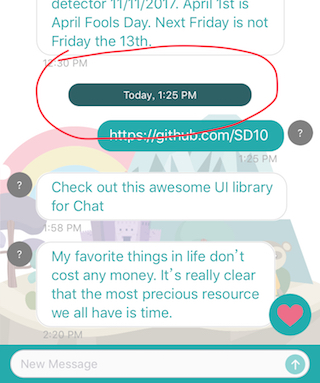
chiahsien
on 12 Sep 2018
@chiahsien so which of the MessagesViewController would i override, currently i'm overriding cellTopLabelAttributedText(for message: MessageType, at indexPath: IndexPath) -> NSAttributedString? it returns an attributed string not a UIView? besides MessageKit has a layout delegate that sets header so which one would i override? Please if you could show me some code on how you achieved it
tobitech
on 12 Sep 2018
@tobitech you need to create your own reusable header view, not using cellTopLabel.
- Create your header view which subclass
MessageReusableView.
class HeaderReusableView: MessageReusableView {
    // MARK: - Private Properties
    static private let attributes: [NSAttributedStringKey: Any] = [
        .font: UIFont.systemFont(ofSize: 12),
        .foregroundColor: UIColor.white
    ]
    static private let insets = UIEdgeInsets(top: 12, left: 80, bottom: 12, right: 80)

    private var label: UILabel!

    // MARK: - Public Methods
    static var height: CGFloat {
        return insets.top + insets.bottom + 27
    }

    override init(frame: CGRect) {
        super.init(frame: frame)
        createUI()
    }

    required init?(coder aDecoder: NSCoder) {
        super.init(coder: aDecoder)
        createUI()
    }

    /// Setup the receiver with text.
    ///
    /// - Parameter text: The text to be displayed.
    func setup(with text: String) {
        label.attributedText = NSAttributedString(string: text, attributes: ChatHeaderReusableView.attributes)
    }

    override func prepareForReuse() {
        label.attributedText = nil
    }

    // MARK: - Private Methods
    private func createUI() {
        let insets = HeaderReusableView.insets
        let frame = UIEdgeInsetsInsetRect(bounds, insets)
        label = UILabel(frame: frame)
        label.preferredMaxLayoutWidth = frame.width
        label.numberOfLines = 1
        label.textAlignment = .center
        label.autoresizingMask = [.flexibleWidth, .flexibleHeight]
        label.backgroundColor = Theme.darkColor
        label.layer.cornerRadius = 13
        label.clipsToBounds = true
        addSubview(label)
    }
}
- Register it as
messagesCollectionView's reusable header view.
messagesCollectionView.register(HeaderReusableView.self, forSupplementaryViewOfKind: UICollectionElementKindSectionHeader)
- In
MessagesDisplayDelegate
    func messageHeaderView(for indexPath: IndexPath, in messagesCollectionView: MessagesCollectionView) -> MessageReusableView {
        let header = messagesCollectionView.dequeueReusableHeaderView(HeaderReusableView.self, for: indexPath)
        if (should show header view) {
            let message = messageForItem(at: indexPath, in: messagesCollectionView)
            header.setup(with: MyCustomizedString(from: message.sentDate))
        }
        return header
    }
- In
MessagesLayoutDelegate
    func headerViewSize(for section: Int, in messagesCollectionView: MessagesCollectionView) -> CGSize {
        if (should show header view) {
            return CGSize(width: messagesCollectionView.bounds.width, height: HeaderReusableView.height)
        } else {
            return .zero
        }
    }
That's it.
By the way, @SD10 , why the function in MessagesLayoutDelegate is headerViewSize(for section: Int, in messagesCollectionView: MessagesCollectionView)? Shouldn't headerViewSize(for indexPath: IndexPath, in messagesCollectionView: MessagesCollectionView) be better?
See the different? I suggest it should be indexPath instead of section.
chiahsien
on 14 Sep 2018
@chiahsien works perfectly. THANKS
tobitech
on 14 Sep 2018
By the way, @SD10 , why the function in
MessagesLayoutDelegateisheaderViewSize(for section: Int, in messagesCollectionView: MessagesCollectionView)? Shouldn'theaderViewSize(for indexPath: IndexPath, in messagesCollectionView: MessagesCollectionView)be better?See the different? I suggest it should be
indexPathinstead ofsection.
@chiahsien I guess that isn't indexPath because we are using only one item by section in MessageKit. Then, we will be only one section by message.
 thiagocenturion
on 28 Nov 2019
thiagocenturion
on 28 Nov 2019
Refering to customization of cellTopLabel, I just want to add 1 more property label.accessibilityTraits = [.header] in:
    open var cellTopLabel: InsetLabel = {
        let label = InsetLabel()
        label.numberOfLines = 0
        label.textAlignment = .center
        return label
    }()
Which is found in open class MessageContentCell. Any help please? I do not want to unlock pod file.
 MumtazCitrusbits
on 13 Dec 2019
MumtazCitrusbits
on 13 Dec 2019
hi, in ios 14 the label height is 0, can u help?
May be line of code cause this problem:
UIEdgeInsetsInsetRect(bounds, insets)
 fukemy
on 29 Mar 2021
fukemy
on 29 Mar 2021
Related issues
 anandatswayam
·
4Comments
anandatswayam
·
4Comments
 Abacaxi-Nelson
·
4Comments
Abacaxi-Nelson
·
4Comments
 TheDarkCode
·
3Comments
TheDarkCode
·
3Comments
 NiklasWilson
·
4Comments
NiklasWilson
·
4Comments
 adri4silva
·
4Comments
adri4silva
·
4Comments
Most helpful comment
@tobitech you need to create your own reusable header view, not using
cellTopLabel.MessageReusableView.messagesCollectionView's reusable header view.MessagesDisplayDelegateMessagesLayoutDelegateThat's it.
By the way, @SD10 , why the function in
MessagesLayoutDelegateisheaderViewSize(for section: Int, in messagesCollectionView: MessagesCollectionView)? Shouldn'theaderViewSize(for indexPath: IndexPath, in messagesCollectionView: MessagesCollectionView)be better?See the different? I suggest it should be
indexPathinstead ofsection.