Messagekit: How to change the avatar's position according to Sender's attributes?
Hello.
I've updated this library to 1.0.0.
So I have a problem.
How to change the avatar's position according to Sender's attributes?
For example, when v0.13.5, I was doing as follows.
extension MessagesLayoutDelegate {

    func avatarPosition(for message: MessageType, at indexPath: IndexPath, in messagesCollectionView: MessagesCollectionView) -> AvatarPosition {
        switch message.sender.displayName {
        case "Steven", "Tim Cook":
            return AvatarPosition(horizontal: .cellTrailing, vertical: .messageBottom)
        default:
            return AvatarPosition(horizontal: .cellLeading, vertical: .messageBottom)
        }
    }

}
Please give me advice.
General Information
MessageKit Version: 1.0.0
iOS Version: 10 & 11
Swift Version: 4
Devices/Simulators: Both
===
The original text:
こんにちは。
私は最近このライブラリを1.0.0にアップデートしました。
そこで、少し問題を抱えています。
Senderの属性に応じてアバターの位置を変えるにはどうしたらいいでしょうか?
例えばv0.13.5の時、私は下記の様にしていました。
アドバイスをお願いいたします。
 k2tt
k2tt
All 11 comments
Hey @k2tt,
In MessageKit 1.0 we made some changes as to how you do this. You would need to set the incomingAvatarPosition and outgoingAvatarPosition properties of the MessageSizeCalculator object.
You can check the FAQs section for an example of how to change the avatar size for different cells based on whether they're incoming or outgoing. The same strategy applies to AvatarPosition.
 SD10
on 9 Jul 2018
SD10
on 9 Jul 2018
@SD10
*Please know that English is not my native language, and I may make some confusing mistakes.
Thank you for your quick reply!
I checked the Release Information and FAQ Section before asking questions and tried to solve the problem in a similar way.
However, it has not been done put out incoming messages left and right depending on Sender 's attributes (eg name or id).
I will think more about this solution on my own.
Thank you.
k2tt
on 11 Jul 2018
Hello!
I have not solved it yet.
Could anyone help me find a solution?
k2tt
on 16 Jul 2018
Currently, the Sender's id is what is used to determine whether a MessageType is incoming or outgoing
SD10
on 16 Jul 2018
@SD10
I solved the problem with the following code.
Thank you for your kindness!
extension MessagesDataSource {
    func isFromCurrentSender(message: MessageType) -> Bool {
        switch message.sender.id {
        case "xxxxx", "yyyyy":
            return true
        default:
            return false
        }
    }
}
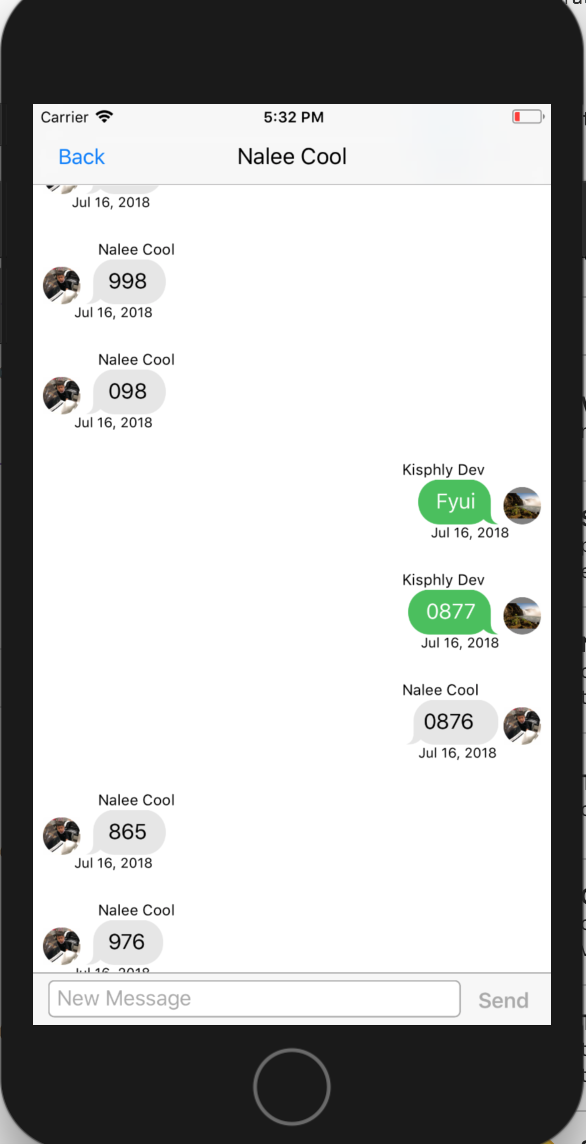
I have an issue with similar topic. My avatar sometime move to the left or right of message. Look at my screenshot of message 0876
Anyone know please advice.
 kpsdeveloper
on 4 Aug 2018
kpsdeveloper
on 4 Aug 2018
@kpsdeveloper what version of MessageKit are you using? Make sure you are up to date and double check the logic in your layout delegate methods.
Sent with GitHawk
 nathantannar4
on 4 Aug 2018
nathantannar4
on 4 Aug 2018
@nathantannar4 Thank you!
I'm using MessageKit 0.13.5 Swift 4 Xcode 9.
It was occur after I refreshed the view self.messagesCollectionView.reloadDataAndKeepOffset() for purpose of loading older messages
kpsdeveloper
on 4 Aug 2018
This is probably related to a caching issue that we removed in v1.0 @SD10 is my assumption correct? Else there is some improper logic in your code
Sent with GitHawk
nathantannar4
on 4 Aug 2018
@nathantannar4 It's fixed after updated version to 1.0.0 and modified a piece of codes. Thank you so much very appreciated your helps.
kpsdeveloper
on 4 Aug 2018
Currently, the
Sender's id is what is used to determine whether aMessageTypeis incoming or outgoing
SD10, you made the comment above... I havjimplemented message kit, but my outgoing messages appear on the left and the incoming on the right, that does not seem right.
Am I doing something wrong or is there a setting too changes this behavior?
Any help is appreciated!!!!
 LilMoke
on 22 Aug 2019
LilMoke
on 22 Aug 2019
Related issues
 anandatswayam
·
4Comments
anandatswayam
·
4Comments
 TheDarkCode
·
3Comments
TheDarkCode
·
3Comments
 nitrag
·
3Comments
nitrag
·
3Comments
 yspreen
·
3Comments
yspreen
·
3Comments
 robertoferraz
·
3Comments
robertoferraz
·
3Comments