Messagekit: Issue with MessagesViewController as child view controller and scrolling
Hi, In one of my view controller in my project I need to display MessagesViewController below some custom UIView. What I did is in storyboard xib I created 2 UIView which act as content container for both the custom header view and the messages view controller view. Until today I used version 0.13.5 of MessageKit and everything worked as expected but today I upgrade the library from 0.13.5 to 1.0.0 and suddenly MessageInputBar hide the content inside my MessageCollectionView and I also cannot scroll to the end of the collection view.
This is how I add MessagesViewController as child view: (ChatViewController is a subclass of MessageViewController and chatContainerView is the container of it.
    lazy var chatViewController : ChatViewController! = {[weak self] in
        guard let strongSelf = self else {return nil}
        let chatViewController = ChatViewController()
        chatViewController.setInputBarStyle()
        chatViewController.messagesCollectionView.messagesDataSource = strongSelf
        chatViewController.messagesCollectionView.messagesLayoutDelegate = strongSelf
        chatViewController.messagesCollectionView.messagesDisplayDelegate = strongSelf
        chatViewController.messageInputBar.delegate = strongSelf
        strongSelf.addChildViewController(chatViewController)
        chatViewController.view.frame = strongSelf.chatContainerView.bounds
        strongSelf.chatContainerView.addSubview(chatViewController.view)
        chatViewController.didMove(toParentViewController: strongSelf)

        return chatViewController
        }()
Somebody have a clue why I have this issue after upgrading to 1.0?
Thanks.
 ranhsd
All 22 comments
Hey @ranhsd,
We changed the bottom inset calculation in 1.0.0 -- see #707 -- maybe this will help you resolve it.
Do you think you may need to account for some padding on the collectionView.contentInset.top?
 SD10
on 9 Jul 2018
SD10
on 9 Jul 2018
Hi @SD10 I think that this change may work for part of the scenarios but not to all of them. a good option is to be able to modify the contentInset (bottom part) of the messages collection view so the scroll will have some padding
ranhsd
on 9 Jul 2018
@ranhsd Have you tried extendedLayoutIncludesOpaqueBars = true property of MessagesViewController? Just 2 days ago I finally upgraded my app to MessageKit 1.0 -- and I set to set this to true to fix the same bug you are experiencing.
I will look into giving users better control of the bottom inset 😢
SD10
on 9 Jul 2018
Hi @SD10 I tried it all. I finally managed to find the piece of code which is doing the troubles and this is the change:
https://github.com/MessageKit/MessageKit/pull/707/files#diff-8e002faecf437ebfd65253e8ebe13df3
What I did in my code is just change this specific code and it works now as expected. I am not saying that we simply need to go back and use this code because I assume that this change was for nothing, but I think we should make sure that the code work for all scenarios .
ranhsd
on 9 Jul 2018
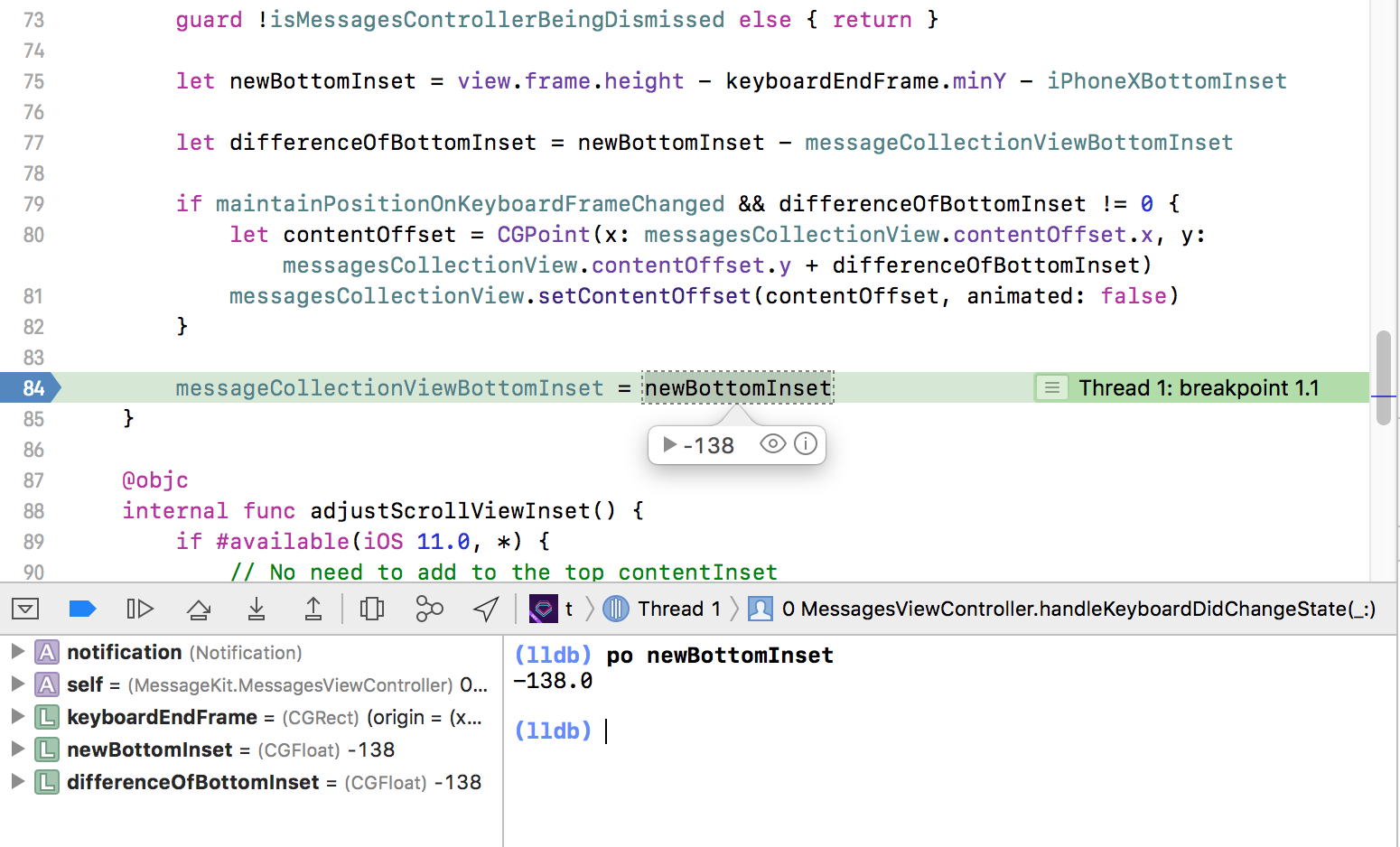
Hi @SD10 after some more investigations I think that it is a bug in the new code. I debug my app in both versions and saw that there is a major difference in the calculation between both. It goes like this:
- In the new version the calculated value of messageCollectionViewBottomInset is: -138
- In the old version the calculated value is: 46
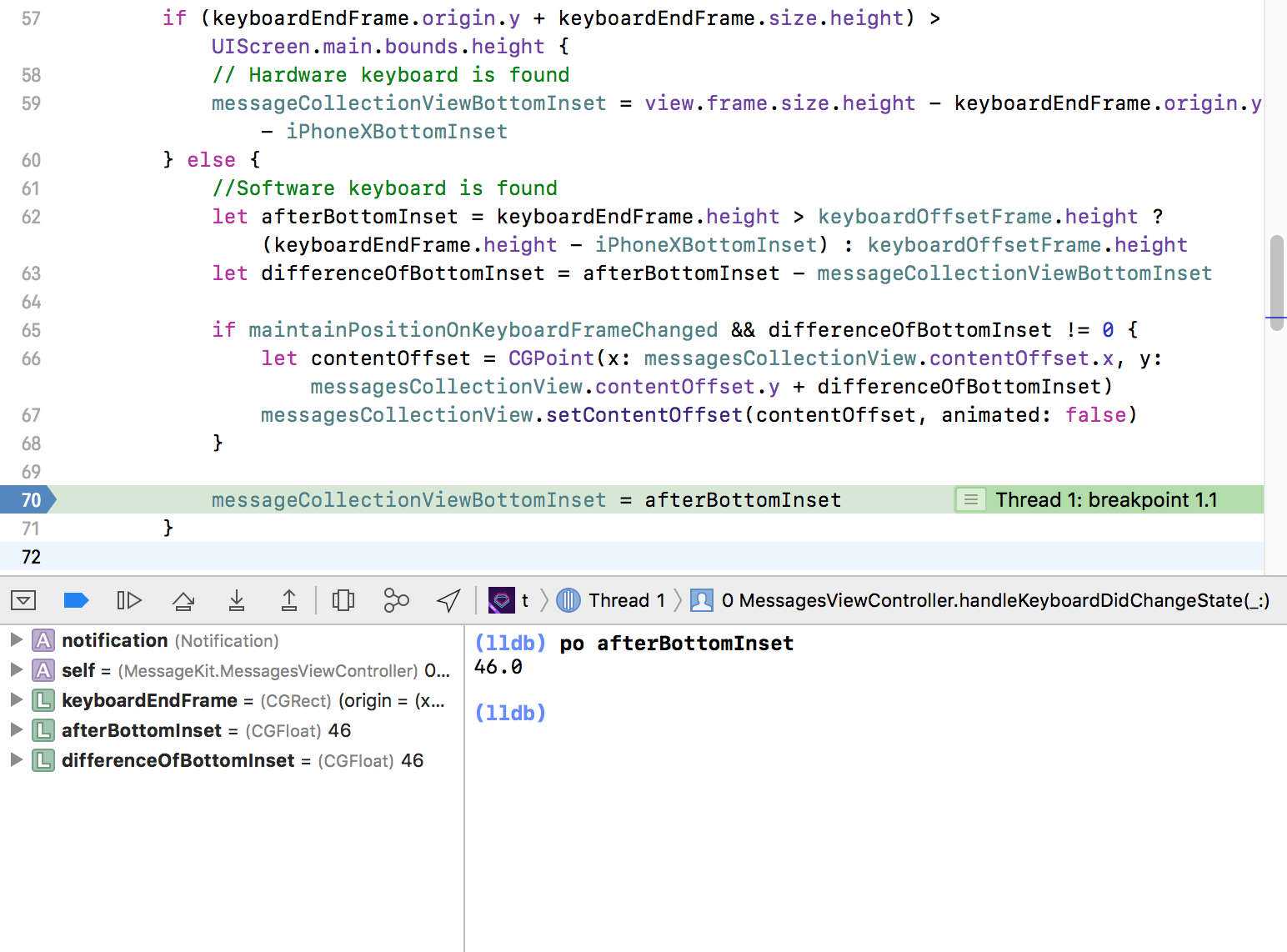
Please notice that both results are for the same piece of code.
Thanks!
ranhsd
on 9 Jul 2018
I'm going to tag @zhongwuzw for more info because he made this change
SD10
on 9 Jul 2018
@ranhsd does the issue only occur on the simulator?
Sent with GitHawk
 nathantannar4
on 9 Jul 2018
nathantannar4
on 9 Jul 2018
@ranhsd I created a ContainerViewController and try to reproduce, but it did not success, the behavior seems correctly.
Can you post a demo which I can debug? and describe the steps of reproduce, device version, iOS version?
class ContainerViewController: UIViewController {
    let chatViewController = ConversationViewController()

    override func viewDidLoad() {
        super.viewDidLoad()

        self.addChildViewController(chatViewController)
        chatViewController.view.frame = view.bounds
        view.addSubview(chatViewController.view)
        chatViewController.didMove(toParentViewController: self)
    }

}
 zhongwuzw
on 10 Jul 2018
zhongwuzw
on 10 Jul 2018
Hi
@nathantannar4 it occur on both simulator and real device
@zhongwuzw the view should be part of the screen and not the all of it. So in my case I am using storyboard and have 2 views there.
- header view - container view with height of 120
- Chat view - located under the header view
Please notice that I am using auto-layout with constraints
Here is how to storyboard looks like (I put some color just to explain how it looks like):

So the black background is the header view and the grey one is the chat view (where I add MessagesViewController as subview)
ranhsd
on 10 Jul 2018
Are you able to create the container programmatically rather than storyboard? That could be the issue as you could be missing something
Sent with GitHawk
nathantannar4
on 10 Jul 2018
Hi @nathantannar4 yes I can. And like I wrote above it seems that the issue is with the code because when I change back to the code of the old version it worked
ranhsd
on 10 Jul 2018
This issue has been marked as stale because it has not had recent activity. It will be closed if no further activity occurs.
![stale[bot] picture](https://avatars.githubusercontent.com/in/1724?v=4&s=40) stale[bot]
on 24 Jul 2018
stale[bot]
on 24 Jul 2018
Hi! I got this issue. How to solve it?
 danhhgl
on 25 Jul 2018
danhhgl
on 25 Jul 2018
Hi @danhhgl Please read above . I was needed to replace the code manually ...
ranhsd
on 25 Jul 2018
Sorry for the inconvenience this is causing 😭
SD10
on 26 Jul 2018
Hi @SD10 it's fine ... You made a great library. Thank you for that!
ranhsd
on 26 Jul 2018
Is there any progress on this? Replacing my storyboard-based code isn't really feasible.
 mglass
on 1 Aug 2018
mglass
on 1 Aug 2018
@mglass We're working on something in #787
SD10
on 1 Aug 2018
Should be fixed in #787 and in next release
SD10
on 7 Aug 2018
Hi, Thanks for the best library for messaging, but I am still having the issue that when adding MessagesViewController into a containerView its not showing input bar. how to fix that, as I am using the latest version as per date. Help would be appriciated.
 asn111
on 13 Apr 2020
asn111
on 13 Apr 2020
@asn111 Same here
 sergeifabian
on 30 Oct 2020
sergeifabian
on 30 Oct 2020
Same issue with me also.
If I add MessagesViewController as child view in the container it's not showing input bar.
Can you guys guide me on this?
Thnaks.
 dhaneshgosai
on 15 Jan 2021
dhaneshgosai
on 15 Jan 2021
Related issues
 JulienLevallois
·
4Comments
JulienLevallois
·
4Comments
 omaralbeik
·
4Comments
omaralbeik
·
4Comments
 yspreen
·
3Comments
yspreen
·
3Comments
 mlequeux
·
3Comments
mlequeux
·
3Comments
 robertoferraz
·
3Comments
robertoferraz
·
3Comments
Most helpful comment
Hi @SD10 it's fine ... You made a great library. Thank you for that!