Messagekit: How to add quick reply answers?
What is the best way to add quick replies to the message as on the image below. Quick reply options come with the message and when user select an option, it is sent to to the channel.
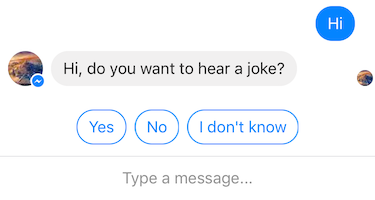
I am wondering what is the right direction to go...? It is a custom MessageCollectionVIewCell subclass or a MessageFooterView subclass, or it is rather a MessageInputBar Plugin?
There is another related issue open here #254.
Chat bots are becoming more and more popular and it would be nice to see broader support for common chat bot transactional messages in MessageKit as well.
 jjarv
jjarv
All 7 comments
You can place a collection view in the top MessageInputBar's stack view and have each cell be the quick reply
Sent with GitHawk
 nathantannar4
on 6 Feb 2018
nathantannar4
on 6 Feb 2018
Message me on slack if you need help implementing it
Sent with GitHawk
nathantannar4
on 7 Feb 2018
@jjarv Thanks for opening this issue. I'm going to close it for now. Feel free to reopen with any other questions 👍
 SD10
on 5 May 2018
SD10
on 5 May 2018
Here's how to "place a collection view in the top MessageInputBar's stack view and have each cell be the quick reply":
Step 1: Force intrinsicContentSize of the said collection view. Similar to how it's done here: viewhttps://github.com/MessageKit/MessageInputBar/blob/master/Plugins/AutocompleteManager/Views/AutocompleteTableView.swift
Step 2: Add the collection view instance to the messageInputBar of the MessageViewController instance using addArrangedSubview
```
// In the subclass of MessageViewController
override func viewDidLoad() {
super.viewDidLoad()
let quickReplyVC = QuickReplyCollectionViewController()
messageInputBar.topStackView.addArrangedSubview(quickReplyVC.collectionView)
....
}
 codemonza
on 19 Feb 2019
codemonza
on 19 Feb 2019
Placed a CollectionView with 3 Button (which when pressed prints a statement) on topStackView. When the CollectionView is "standalone", the print statements work. On topStackView they didn't.
How the button actions are set:- In the CollectionViewController's cellForItemAt:
let button: UIButton = {
         abutton.addTarget(self, action: #selector(buttonAction), for: .touchUpInside)
         return abutton
         }()
        cell.addSubview(button)
There is also now this error when I type into the inputbar and press Send. The three buttons disappeared and chat screen became inaccessible. Before putting anything on topStackView of course the inputbar was working fine.
API error: <_UIKBCompatInputView: 0x101a5d770; frame = (0 0; 0 0); layer = <CALayer: 0x282c6fac0>> returned 0 width, assuming UIViewNoIntrinsicMetric
codemonza
on 21 Feb 2019
May I request this issue be reopened?
codemonza
on 21 Feb 2019
i think u got pointer issues, the pointer is point to other, but the current does not release
 fukemy
on 3 Apr 2021
fukemy
on 3 Apr 2021
Related issues
 pawankmrai
·
3Comments
pawankmrai
·
3Comments
 nitrag
·
3Comments
nitrag
·
3Comments
 emmanuelay
·
3Comments
emmanuelay
·
3Comments
 JulienLevallois
·
4Comments
JulienLevallois
·
4Comments
 anandatswayam
·
4Comments
anandatswayam
·
4Comments
Most helpful comment
Message me on slack if you need help implementing it
Sent with GitHawk