Messagekit: Chat message custom font
General Information
Hi, I wanted to ask if it is possible to use custom font for the chat messages (the content inside the chat bubble)?
I tried to investigate the delegates and display delegates and didn't find a function to do so.
Thanks!
MessageKit Version: 0.11.0
iOS Version(s): 10.0+
Swift Version: 4.0
 ranhsd
All 15 comments
@ranhsd You need to set the messageLabelFont property of MessagesCollectionViewFlowLayout. Or you can just use MessageType.attributedText for your messages
Sent with GitHawk
 SD10
on 14 Dec 2017
SD10
on 14 Dec 2017
Hi @SD10 thanks for the quick response. If i want to set it on the layout i just need to case the
messagesCollectionView.collectionViewLayout to MessagesCollectionViewFlowLayout and perform the change? or there is an faster way to do it ?
Thanks!
ranhsd
on 14 Dec 2017
@ranhsd You are correct, that’s the best way to do it. However, I’m going to suggest again that you use MessageData.attributedText(NSAttributedString) if possible. When using this you don’t have to set the property on the layout object and it has a few performance benefits
Sent with GitHawk
SD10
on 14 Dec 2017
Hi @SD10 that's what i am planning to do anyway... I just wanted to test it and see how it looks like on the app :)
Thanks a lot for your quick response and support!
ranhsd
on 14 Dec 2017
Hi @SD10 , i tried to change and use attributed string but the text color is not working for attributed strings type of messages. It works only for Strings. I can send the text color when i'm creating a new chat message and then create the NSAttributedString with the relevant foreground color but according to the comments in MessageKit code the text color function in the MessagesDisplayDelegate should also support NSAttributedString type of cells.
// MARK: - Text Messages
/// Specifies the color of the text for a `TextMessageCell`.
///
/// - Parameters:
/// - message: A `MessageType` with a `MessageData` case of `.text` or `.attributedText` to which the color will apply.
/// - indexPath: The `IndexPath` of the cell.
/// - messagesCollectionView: The `MessagesCollectionView` in which this cell will be displayed.
///
/// The default value returned by this method is determined by the messages `Sender`:
///
/// Current Sender: UIColor.white
///
/// All other Senders: UIColor.darkText
func textColor(for message: MessageType, at indexPath: IndexPath, in messagesCollectionView: MessagesCollectionView) -> UIColor
am i missing something here ?
Thanks!
ranhsd
on 17 Dec 2017
@ranhsd It looks like it is my error. This is likely because we set textColor from the delegate and then apply the attributedText afterwards... which must overwrite the textColor.
(right @zhongwuzw? 🤣)
SD10
on 17 Dec 2017
Ok @SD10 so the workaround that i see now is just to send the text color when creating the MessageType. What i don't like about it is that you cannot use the isFromCurrentSender because you don't have a message yet...
ranhsd
on 17 Dec 2017
@ranhsd Yeah, you would have to do something like have an intermediate message without the color. Then update the message 😞 This will be fixed tomorrow though when I release 0.12.0. I can’t release it tonight because I want to revert the changes to the API of the cells configure methods
Sent with GitHawk
SD10
on 17 Dec 2017
Hi @SD10 no problem. Thanks a ton for your quick responses! I really like this library and think that you've created something amazing here. I used JSQMessagesViewController before
Thanks!
ranhsd
on 17 Dec 2017
hi There.
Can you tell me in simple terms how to change font of messages?
Thanks.
 AwaisFayyaz
on 15 Aug 2018
AwaisFayyaz
on 15 Aug 2018
Hi @AwaisFayyaz in MessageKind you have an option to create a new message with NSAttributedString
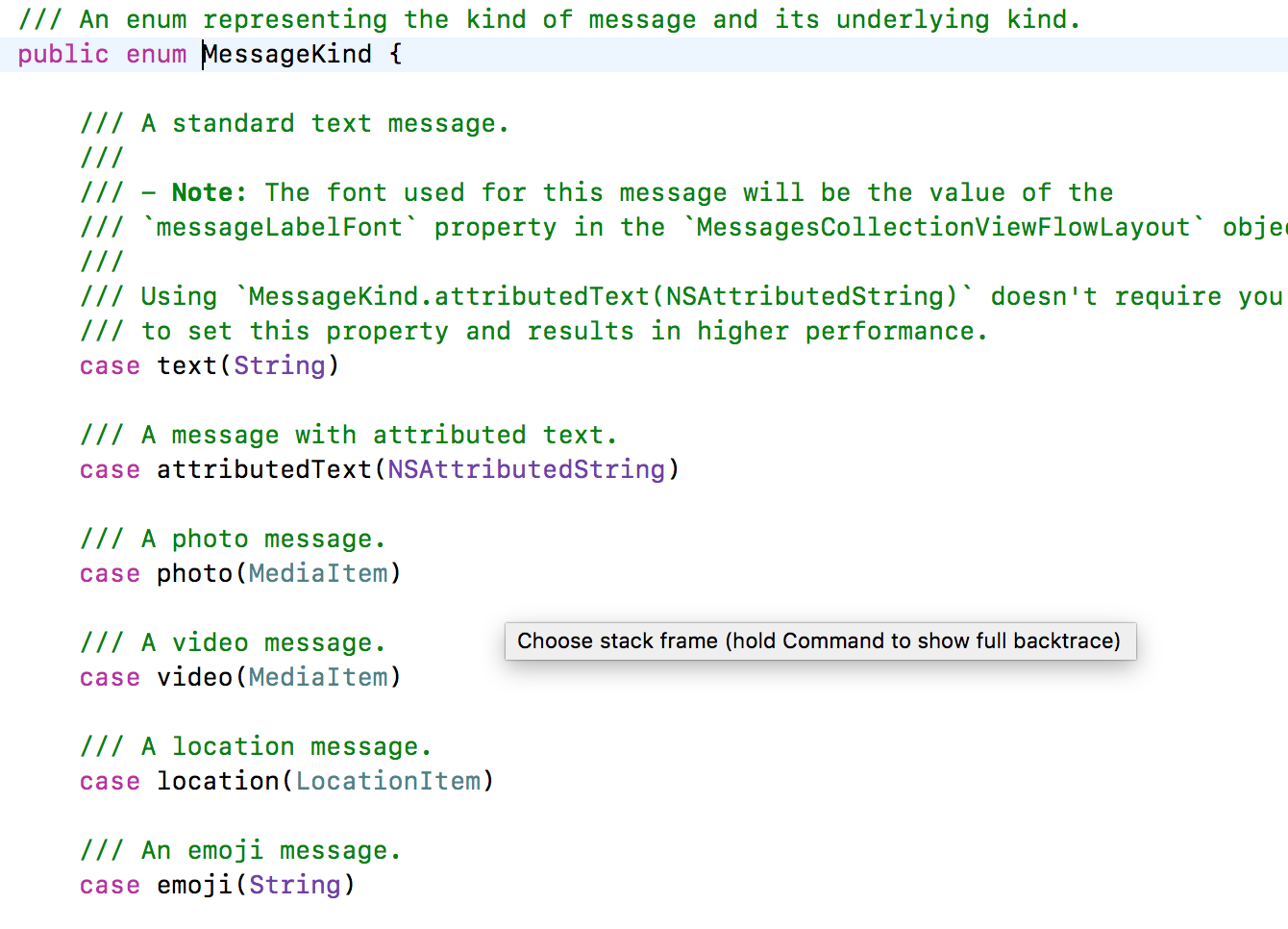
So just build the NSAttributedString and set the font that you want in it using the NSAttributedStringKey.font
ranhsd
on 15 Aug 2018
You can use NSAttributedString to change the font size like this:
    public var kind: MessageKind {
        let message = (self as? SBDUserMessage)?.message ?? ""
        let font = UIFont.systemFont(ofSize: 17)
        let attributes: [NSAttributedString.Key: Any] = [
            .font: font
        ]
        let attributed = NSAttributedString.init(string: message, attributes: attributes)
        return .attributedText(attributed)
    }
 anonrig
on 18 Dec 2018
anonrig
on 18 Dec 2018
Hello @anonrig when I try to implement your function it says Use of undeclared type 'SBDUserMessage' . what do I miss ?
 DanielWijonoJacksLabs
on 12 Jun 2019
DanielWijonoJacksLabs
on 12 Jun 2019
Sorry I was referring to a struct defined by Sendbird itself. Please omit the SBDUserMessage.
anonrig
on 12 Jun 2019
I still am having difficulty with implementing attributed text message color using anorig's method, any ideas? I particularly want to change the color based on if it is the sender or not.
 artalpade
on 9 Sep 2020
artalpade
on 9 Sep 2020
Related issues
 JulienLevallois
·
4Comments
JulienLevallois
·
4Comments
 adri4silva
·
4Comments
adri4silva
·
4Comments
 pawankmrai
·
3Comments
pawankmrai
·
3Comments
 mlequeux
·
3Comments
mlequeux
·
3Comments
 Leon12345679
·
3Comments
Leon12345679
·
3Comments
Most helpful comment
You can use NSAttributedString to change the font size like this: