Messagekit: First chat message is overlapping (hiding behind) navigation bar
General Information
MessageKit Version: 0.1.0
iOS Version(s): 10.3.3
Swift Version: 4
Devices/Simulators: iPhone6s Device
Reproducible in ChatExample? (Yes/No): No
What happened?
First chat message element is overlapping the navigation bar. find attached the screenshot.

I've tested this in iOS11 using iPhone6 simulator and it works just fine.
This issue is seen only if fewer messages are available. Once the messages fills the screens this issue no more exist.
What did you expect to happen?
Message element must not overlap the navigation bar.
 azhararmar
All 22 comments
@azhararmar Have you modified any of these properties?
extendedLayoutIncludedOpaqueBars
messagesCollectionView.contentInset.top
automaticallyAdjustsScrollInsets
 SD10
on 30 Oct 2017
SD10
on 30 Oct 2017
@azhararmar to add, are you using a standard UINavigationController?
 nathantannar4
on 31 Oct 2017
nathantannar4
on 31 Oct 2017
@SD10 I have modified only messagesCollectionView.contentInset after I noticed the issue, find below the code I use.
if SYSTEM_VERSION_LESS_THAN(version: "11.0") {
    self.messagesCollectionView.contentInset = UIEdgeInsetsMake(44, 0, 0, 0)
}
While I noticed this issue in iOS10, I am yet to test this on iOS9.
@nathantannar4 I am using custom navigation bar. here is the code I am using.
class CustomNavigationBar: UINavigationBar {
    override func awakeFromNib() {
        UINavigationBar.appearance().titleTextAttributes = [
            NSAttributedStringKey.foregroundColor: UIColor.black,
            NSAttributedStringKey.font: UIFont(name: "Montserrat-Light", size: 17)!
        ]
        UINavigationBar.appearance().tintColor = UIColor.black
        UINavigationBar.appearance().backgroundColor = UIColor.white
        // Hide Title Text
        UIBarButtonItem.appearance().setTitleTextAttributes([NSAttributedStringKey.foregroundColor: UIColor.clear], for: .normal)
        UIBarButtonItem.appearance().setTitleTextAttributes([NSAttributedStringKey.foregroundColor: UIColor.clear], for: .highlighted)
    }
}
I am also using several collectionview in my project, and none has this overlapping issue.
azhararmar
on 31 Oct 2017
Anyone else has tested this in iOS9/iOS10 and confirm this issue?
azhararmar
on 31 Oct 2017
I can't reproduce it on the example yet
nathantannar4
on 31 Oct 2017
I just noticed this today in an app I am working on that just recently started using MessageKit. It seems to only happen on iOS 10.x and it does happen in the simulator for iOS 10.3, you can see that the top of Steve Job's head is cut off under the nav bar.
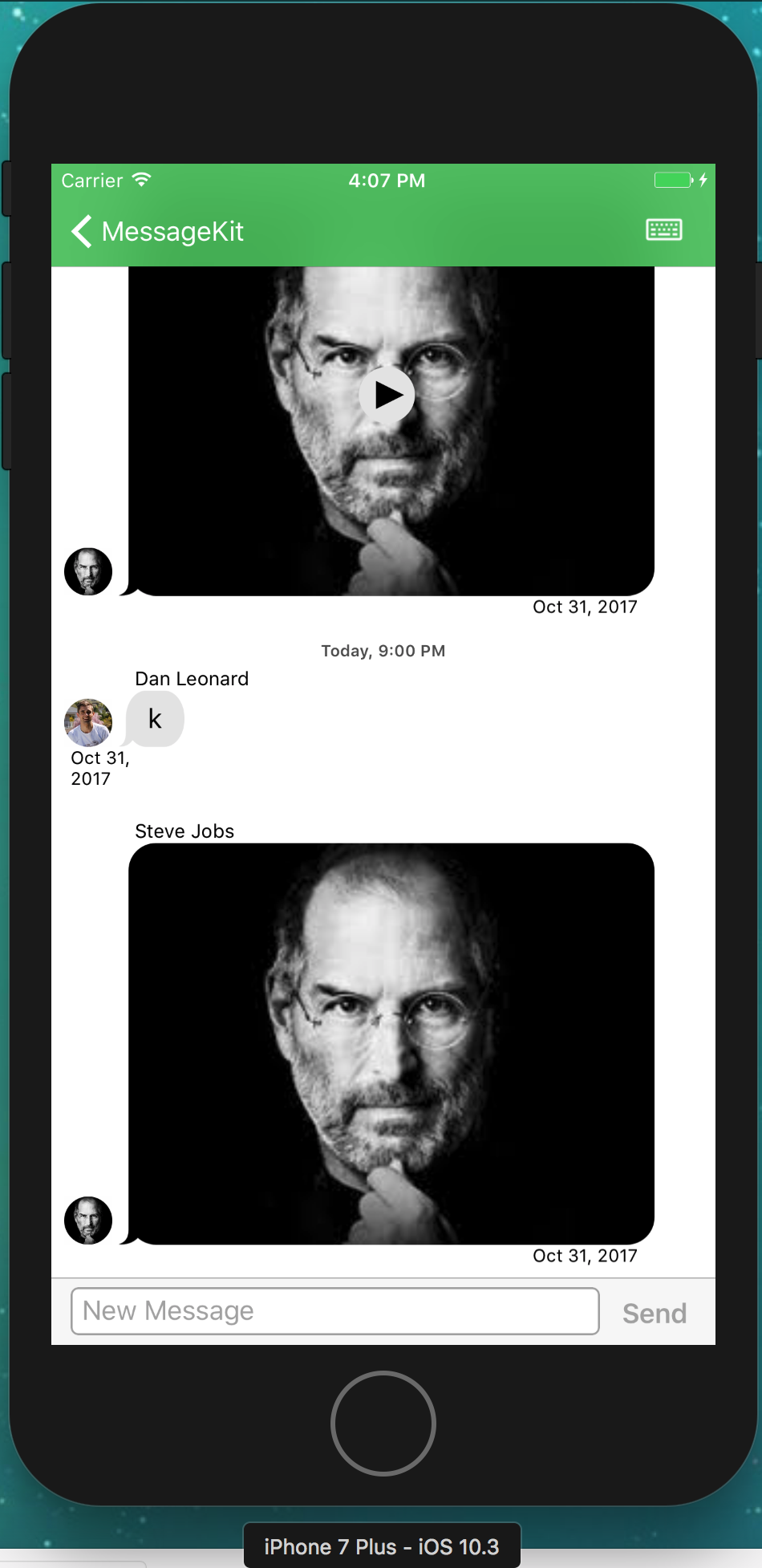
This was building from 5365fcf79c97ab69 with Xcode 9.0.1
 brandon-haugen
on 31 Oct 2017
brandon-haugen
on 31 Oct 2017
I found the issue. @SD10. In line 70 of MessagesViewController we set automaticallyAdjustsScrollInsets to false. In iOS 11 this doesn't seem to matter but in iOS < 11 it does. @SD10 do we need automaticallyAdjustsScrollInsets to be false? I tested it and this issue doesn't occur when true
nathantannar4
on 31 Oct 2017
Hmmm @nathantannar4 Apple documentation says:
Set this property to false if your view controller implementation manages its own scroll view inset adjustments.
I'll have to look into this further
SD10
on 31 Oct 2017
@SD10, correct, but we never actually manage the top content inset. Alternatively we could do that but right now we are only managing the bottom. So perhaps we should address the top inset. But I tried that and you have to also manage it when the device is rotated
nathantannar4
on 31 Oct 2017
Steven and I have looked at this. The issue is related to the differences of automaticallyAdjustsScrollInsets in iOS 11 and iOS < 11
A solution we are evaluating is
if SYSTEM_VERSION_LESS_THAN(version: "11.0") {
    self. automaticallyAdjustsScrollInsets = true
}
I feel like the inset is wrong because the code is wrong though. It doesn’t make sense for this flag to be true. I think it’s going to cause more problems by setting it
Sent with GitHawk
SD10
on 2 Nov 2017
@SD10 Lets talk about this during our next ScreenHero session
nathantannar4
on 6 Nov 2017
PR #334
nathantannar4
on 7 Nov 2017
@azhararmar This should be resolved in MessageKit 0.10.2, feel free to reopen if the problem continues
SD10
on 12 Nov 2017
It looks like this issue might not be resolved. As @brandon-haugen mentioned it only happens on the physical device. I don't have any devices with iOS 10 :(
It looks like you will have to manage the top inset yourself for now
SD10
on 13 Nov 2017
I didn't test it yet with the update. Will test it once I get some time and report back.
For now I am indeed manually setting the inset the following way which is working quite good for me.
func SYSTEM_VERSION_LESS_THAN(version: String) -> Bool {
    return UIDevice.current.systemVersion.compare(
        version,
        options: NSString.CompareOptions.numeric
    ) == ComparisonResult.orderedAscending
}
if SYSTEM_VERSION_LESS_THAN(version: "11.0") {
    self.messagesCollectionView.contentInset = UIEdgeInsetsMake(59, 0, 0, 10)
} else {
    self.messagesCollectionView.contentInset = UIEdgeInsetsMake(10, 0, 0, 10)
}
Hi - for iOS 11/12, setting the content inset works well, but for iOS 10 unfortunately the first message is still hidden behind the navigationController. Any suggestions on what to do?
I tried on iPhone 7 simulator / iOS 10.2.
messagesCollectionView.contentInset = UIEdgeInsets(top: 80, left: 0, bottom: 0, right: 0)
Thanks!
 fsjohnson
on 24 Mar 2019
fsjohnson
on 24 Mar 2019
I am struggling with the same issue. It is not working in IOS 10. Are there anybody found a solution for this issue?
 dizxlabs
on 9 Apr 2019
dizxlabs
on 9 Apr 2019
A fix was implemented for 3.0.0
Sent with GitHawk
nathantannar4
on 9 Apr 2019
@nathantannar4 do you know when that will be released? Or do I need to use a specific branch? I just used pod 'MessageKit' - thanks!
fsjohnson
on 17 Apr 2019
If anyone else still have this issue, check if you are not using IQKeyboardManagerSwift. I did use it and adding IQKeyboardManager.shared.disabledDistanceHandlingClasses.append(ChatViewController.self)
did solve my problem
 xsoti
on 17 Feb 2020
xsoti
on 17 Feb 2020
If anyone else still have this issue, check if you are not using IQKeyboardManagerSwift. I did use it and adding
IQKeyboardManager.shared.disabledDistanceHandlingClasses.append(ChatViewController.self)
did solve my problem
True hero
 alibstrd
on 10 Jan 2021
alibstrd
on 10 Jan 2021
Related issues
 robertoferraz
·
3Comments
robertoferraz
·
3Comments
 emmanuelay
·
3Comments
emmanuelay
·
3Comments
 nitrag
·
3Comments
nitrag
·
3Comments
 NiklasWilson
·
4Comments
NiklasWilson
·
4Comments
 asn111
·
3Comments
asn111
·
3Comments
Most helpful comment
If anyone else still have this issue, check if you are not using IQKeyboardManagerSwift. I did use it and adding
IQKeyboardManager.shared.disabledDistanceHandlingClasses.append(ChatViewController.self)did solve my problem