Describe the bug
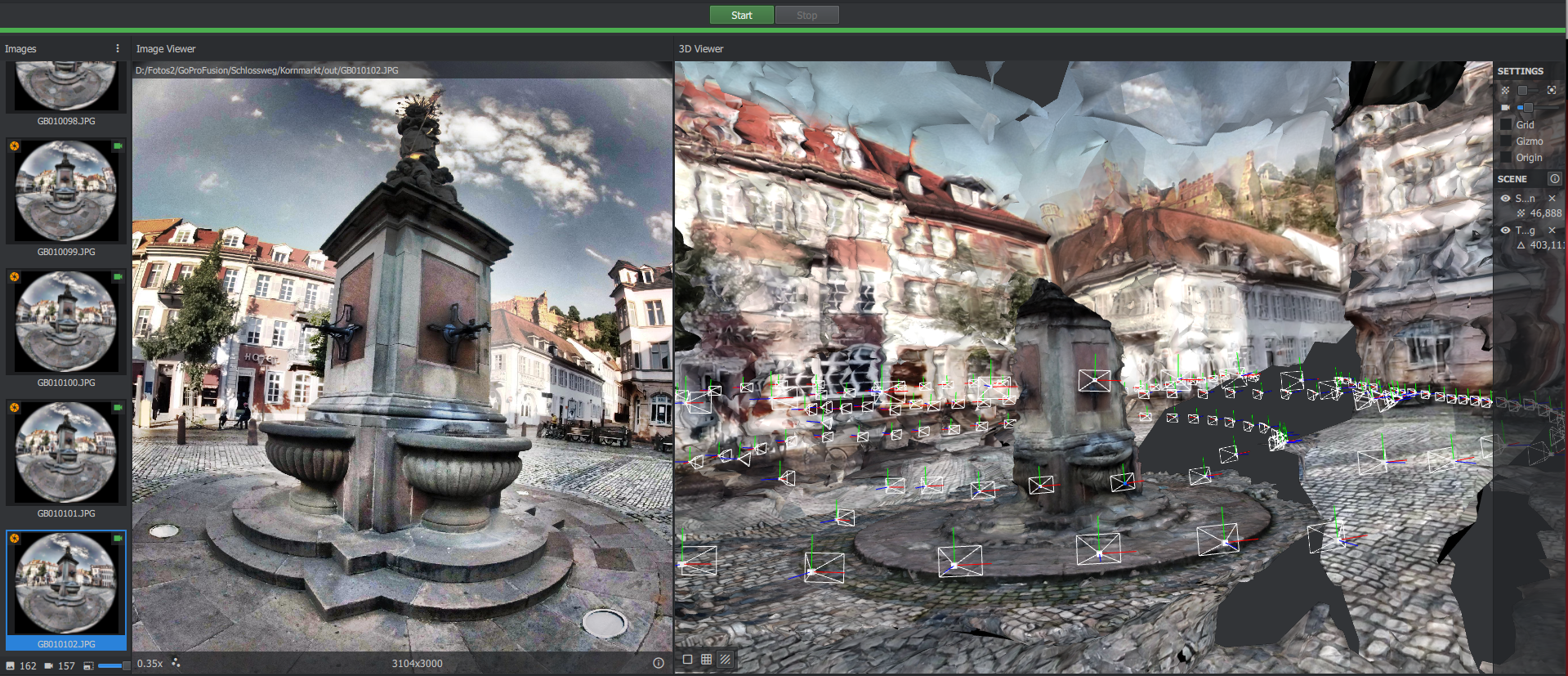
inaccurate/broken meshing. I guess it's not supposed to be like this
To Reproduce
- download dataset (162 Photos): http://hosting141203.a2e6d.netcup.net/Thomas/HDKornmarkt/HeidelbergKornmarkt.zip
- start meshroom 2019.2.0
- load images per drag&drop
- set initialization mode to: unknown (otherwise Structure From Motion fails)
- set SIFT describer preset to: medium
- force cpu: off
- click on "start"
all other parameters are the defaults
Expected behavior
meshing should be a way better with the default values and so many pictures.
Screenshots
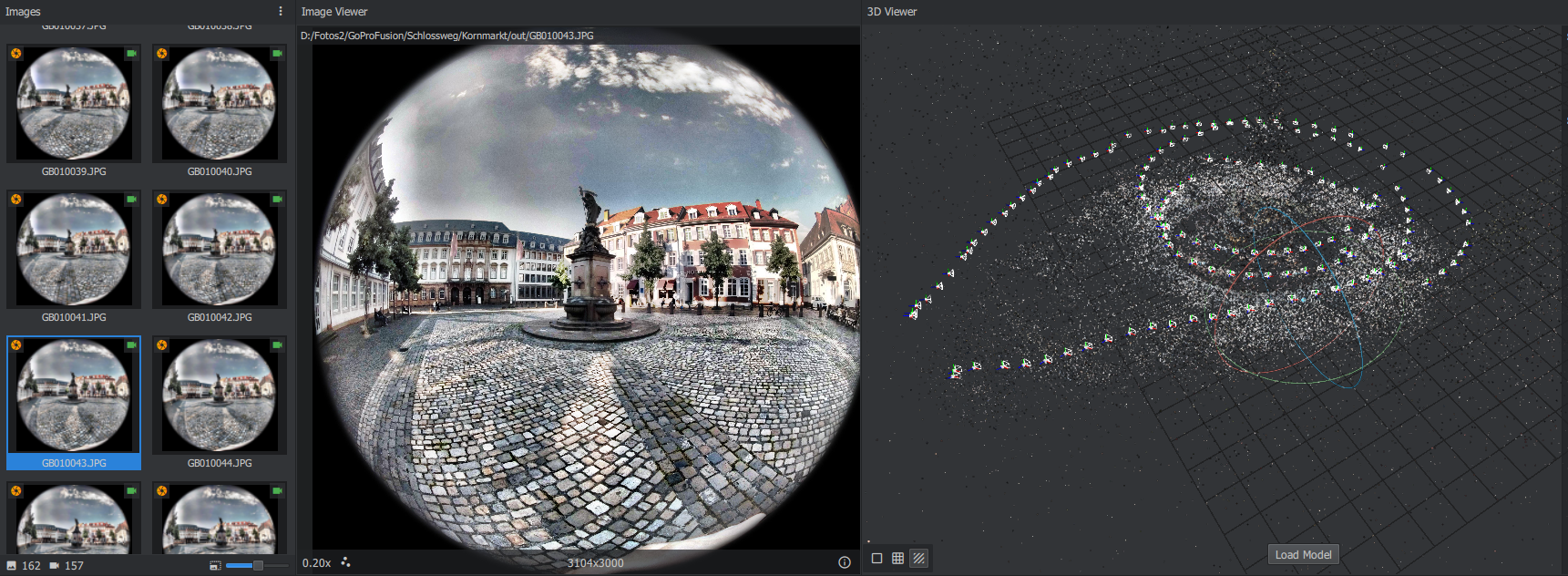
overview camera poses:
Logs
http://hosting141203.a2e6d.netcup.net/Thomas/HDKornmarkt/Logs.zip
Desktop (please complete the following and other pertinent information):
- OS: win 10
- Python version 3.7
- Meshroom version: release 2019.2.0
 TR7
TR7
All 15 comments
Look at the tooltip on the orange flag on your images. The camera model is probably missing from the sensor database.
 fabiencastan
on 16 May 2020
fabiencastan
on 16 May 2020

 natowi
on 16 May 2020
natowi
on 16 May 2020
i tried this model (GoPro;FUSION;6.17;dpreview) with following results:

i also tried with only 9 images, like you have done, and that works without problems.
it seems the problem occurs with more than one loop around the target object. also it seems like there are 3 layers of ground-floor-point-clouds in the SfM output instead of one.
i know, it will take some time to compute, but it would be a very helpful information for me if the reconstruction with all 162 images causes the same problems for you.
TR7
on 16 May 2020
good news, it seems to work with more SIFT-Points AND "min observation for triangulation = 3"
TR7
on 16 May 2020
@TR7 Do you have the other side of the gopro fusion 360? If yes, could you share it? It would be interesting to declare it as a rig of 2 cameras and see if it improves the results.
fabiencastan
on 16 May 2020
one the other side from the gopro, there is me standing in front of the camera, so not really useful. but i will take some other pictures and can of course share them (both sides with me only on the side).
is there a place or do you have a system, where to collect all the links to test-datasets? or just post it here?
TR7
on 16 May 2020
Here I proposed to collect user contributed datasets similar to the Monstree demo dataset to test 360 and fish eye images.
@fabiencastan can we create a new Repository under Alicevision to collect a few small test datasets?
natowi
on 16 May 2020
whats your prefered amount of front/back photos per dataset? special kind of objects/places?
TR7
on 16 May 2020
@TR7 It would be ideal if you could make an indoor and an outdoor dataset.
Share a link here and we will see if we should store it as a reference dataset for this use case. I'm not sure how to organize that for now.
fabiencastan
on 16 May 2020
another outdoor dataset with 2x 128 JPGs from GoPro Fusion (both sides, 0.5 Sec Photo Timelapse):
http://hosting141203.a2e6d.netcup.net/Thomas/Scans/08/rig08_2x128Images_Outdoor_GPFUSION.zip
TR7
on 20 May 2020
an here a small indoor dataset for test purposes:
http://hosting141203.a2e6d.netcup.net/Thomas/Scans/06/rig06B_FrontBack_2x21Images_Indoor_GPFUSION.zip
@fabiencastan
just tell me, if you need more or bigger datasets.
TR7
on 20 May 2020
@TR7 Thanks a lot! I see that you have already organized them as a rig of 2 cameras. Did you already tried to reconstruct them? And compare with/without using the rig?
fabiencastan
on 23 May 2020
@TR7 Thanks a lot! I see that you have already organized them as a rig of 2 cameras. Did you already tried to reconstruct them? And compare with/without using the rig?
yes i tested a lot with over 14 datasets from the GoPro Fusion.
I had several problems. Some of them I could solve or avoid by myself:
when importing the EXIF images into Meshroom they must be at least 1 second apart, otherwise they will be skipped. I wrote a Python script which automatically changes the recording time strings. Probably the problem arises because Meshroom creates an image identifier based on the name and time (second-based)?
the serial numbers in the EXIF tag must be different (but the GoPro Fusion creates the same serial number in the EXIF tag for the back and front sides). I wrote a Python script that inserts a "B" or "F" before the serial number string in the EXIF tag.
Some other (more about the rig) problems are unsolved yet:
in some datasets: with 1000+ images the reconstruction only works without "Use Rig Constraint". Otherwise it fails in SfM. But i'm still looking into it, though.
so far I haven't found out why sometimes the rig symbol (see marker on the 1st picture) is shown after the import and sometimes not.


TR7
on 24 May 2020
@TR7 Can I add a few of your images to https://github.com/natowi/meshroom-360-datasets under CC-BY-SA-4.0 license?
natowi
on 11 Jun 2020
yes!
TR7
on 12 Jun 2020
Related issues
 mobarre
·
5Comments
mobarre
·
5Comments
 JakubkrizAldaGames
·
3Comments
JakubkrizAldaGames
·
3Comments
 SBCV
·
3Comments
natowi
·
3Comments
SBCV
·
3Comments
natowi
·
3Comments
 haesenbaerg
·
3Comments
haesenbaerg
·
3Comments
Most helpful comment
yes i tested a lot with over 14 datasets from the GoPro Fusion.
I had several problems. Some of them I could solve or avoid by myself:
when importing the EXIF images into Meshroom they must be at least 1 second apart, otherwise they will be skipped. I wrote a Python script which automatically changes the recording time strings. Probably the problem arises because Meshroom creates an image identifier based on the name and time (second-based)?
the serial numbers in the EXIF tag must be different (but the GoPro Fusion creates the same serial number in the EXIF tag for the back and front sides). I wrote a Python script that inserts a "B" or "F" before the serial number string in the EXIF tag.
Some other (more about the rig) problems are unsolved yet:
https://github.com/alicevision/meshroom/issues/906
in some datasets: with 1000+ images the reconstruction only works without "Use Rig Constraint". Otherwise it fails in SfM. But i'm still looking into it, though.
so far I haven't found out why sometimes the rig symbol (see marker on the 1st picture) is shown after the import and sometimes not.