Meshery: [CI] [integration] [/index] Test if UI components are displayed on the Index Page
Current Behavior
There are no integration tests that validate if the UI components are well displayed on the Index Page
Desired Behavior
Have tests that validate that the main components are displayed correctly on the Index Page
Implementation
- Add integrations tests under
ui/cypress/integration/integrationfolder - This test will be an integration test, not validate the backend response, mock the response if it is necessary.
Acceptance Tests
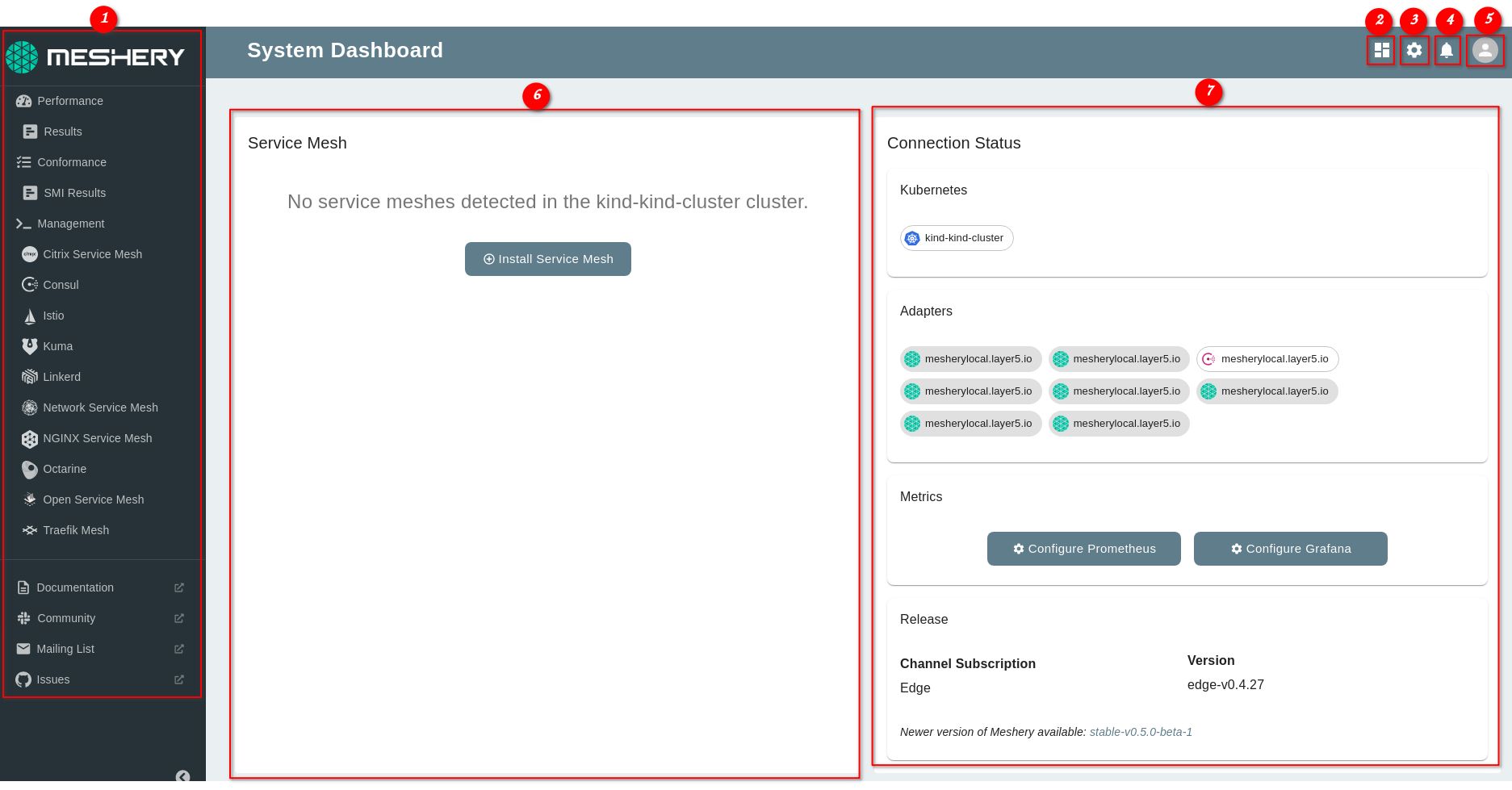
The tests should validate these main components:
- Left Navigation Panel
- "Index" button
- "Settings" button
- "Notifications" button
- "Profile" button
- "Service Mesh" section
- "Connection Status" section
You can see these components specified in the next image:
This issue is related to the umbrella issue: #1037
Reference:
 ramrodo
All 17 comments
@ramrodo @leecalcote I can look into this
 Maxgit3
on 2 Feb 2021
Maxgit3
on 2 Feb 2021
Sure! @Maxgit3 , please go ahead. Thanks.
ramrodo
on 2 Feb 2021
@ramrodo I'm trying to set up a dev environment in vscode with docker and the vscode remote container extension. do you know if this can be done? I have tried running make commands to set up the environment but run into errors with the command "make run-local"
Maxgit3
on 7 Feb 2021
@Maxgit3 I have not used that extension. But we can run the project locally. Which errors are you facing?
ramrodo
on 7 Feb 2021
0 verbose cli [
0 verbose cli '/home/ehrot/.nvm/versions/node/v15.2.1/bin/node',
0 verbose cli '/home/ehrot/.nvm/versions/node/v15.2.1/bin/npm',
0 verbose cli 'run',
0 verbose cli 'build'
0 verbose cli ]
1 info using [email protected]
2 info using [email protected]
3 timing config:load:defaults Completed in 4ms
4 timing config:load:file:/home/ehrot/.nvm/versions/node/v15.2.1/lib/node_modules/npm/npmrc Completed in 15ms
5 timing config:load:builtin Completed in 17ms
6 timing config:load:cli Completed in 9ms
7 timing config:load:env Completed in 1ms
8 timing config:load:file:/home/ehrot/opensource/meshery/provider-ui/.npmrc Completed in 31ms
9 timing config:load:project Completed in 67ms
10 timing config:load:file:/home/ehrot/.npmrc Completed in 1ms
11 timing config:load:user Completed in 1ms
12 timing config:load:file:/home/ehrot/.nvm/versions/node/v15.2.1/etc/npmrc Completed in 0ms
13 timing config:load:global Completed in 0ms
14 timing config:load:cafile Completed in 1ms
15 timing config:load:validate Completed in 0ms
16 timing config:load:setUserAgent Completed in 1ms
17 timing config:load:setEnvs Completed in 1ms
18 timing config:load Completed in 103ms
19 verbose npm-session 92398709af0c4ad7
20 timing npm:load Completed in 166ms
21 timing command:run-script Completed in 1018ms
22 verbose stack Error: command failed
22 verbose stack at ChildProcess.
22 verbose stack at ChildProcess.emit (node:events:329:20)
22 verbose stack at maybeClose (node:internal/child_process:1055:16)
22 verbose stack at Process.ChildProcess._handle.onexit (node:internal/child_process:288:5)
23 verbose pkgid [email protected]
24 verbose cwd /home/ehrot/opensource/meshery/provider-ui
25 verbose Linux 4.4.0-19041-Microsoft
26 verbose argv "/home/ehrot/.nvm/versions/node/v15.2.1/bin/node" "/home/ehrot/.nvm/versions/node/v15.2.1/bin/npm" "run" "build"
27 verbose node v15.2.1
28 verbose npm v7.0.8
29 error code 127
30 error path /home/ehrot/opensource/meshery/provider-ui
31 error command failed
32 error command sh -c next build
33 verbose exit 127
@ramrodo I get npm error code 127
Maxgit3
on 7 Feb 2021
@Maxgit3 I have a couple of questions:
- Which command or script are you executing?
- Which version of NodeJS you have?
Please be sure to use/install NodeJS 12.x and execute make run-local in the root folder (not execute npm run commands alone nor run them inside a folder, use the make commands in the root project folder)
ramrodo
on 7 Feb 2021
I am running Make build-ui. running node 12.18.0
Maxgit3
on 8 Feb 2021
cd provider-ui; npm run build && npm run export; cd ..
[email protected] build /home/ehrot/opensource/meshery/provider-ui
next build
sh: 1: next: not found
npm ERR! code ELIFECYCLE
npm ERR! syscall spawn
npm ERR! file sh
npm ERR! errno ENOENT
npm ERR! [email protected] build: next build
npm ERR! spawn ENOENT
npm ERR!
npm ERR! Failed at the [email protected] build script.
the error seems to come from the next build in the provide-ui directory
Maxgit3
on 8 Feb 2021
Hey @Maxgit3, you need to run make setup-ui-libs before you vould actually build the Meshery UI using the make build-ui command. The command make setup-ui-libs basically installs all the dependencies for running the Meshery UI. Please try the above command and see if it works or not (hopefully it will 🙂)
 Nikhil-Ladha
on 8 Feb 2021
Nikhil-Ladha
on 8 Feb 2021
Thanks @Nikhil-Ladha. Does it work now @Maxgit3 ?
ramrodo
on 10 Feb 2021
@ramrodo I did get the UI dev server to work
Maxgit3
on 16 Feb 2021
Hi @ramrodo I was working on this issue. however, I have few doubts, the classes or ids assigned to the elements aren't really specific. How I am exactly supposed to search for them using cy.get()??
 piyushsingariya
on 1 Mar 2021
piyushsingariya
on 1 Mar 2021
Hi @piyushsingariya , this issue is being worked by @Maxgit3 and I think you're working on this other one: https://github.com/layer5io/meshery/issues/2317
But answering your question here, if the selectors of the elements are not specific or they don't have any selector, you should add an attribute like data-cy= to the element in order to be taken by cy.get(). For example, for testing the Connection Status dashboard section, you should add it to that specific div:
<div className={classes.dashboardSection} data-cy="connectionStatusSection">
then, you can get that element using:
cy.get('[data-cy=connectionStatusSection]')
for more information of how to add/get those selectors, you can read it in the Cypress Documentation (it has different examples):
https://docs.cypress.io/guides/references/best-practices.html#Selecting-Elements
ramrodo
on 1 Mar 2021
@ramrodo I was working on getting the elements also through data attribute. doesnt look like it gets passed through any of the Material React library components and I am having to use native html elelments.
Maxgit3
on 2 Mar 2021
@Maxgit3 right, we can not add additional attributes to the Material React elements. So, one thing we can do for getting the HTML elements using CSS selectors is to use the Cypress Selector Playground, you can see how to use it in this community video: https://youtu.be/pIFSI7xtwFs?t=807 (minute 13:27):
Let me know if it worked for the element you're trying to use. If not, we can meet and figure out together.
ramrodo
on 2 Mar 2021
@ramrodo I didnt see UI element number 6 service mesh section. should I use "Kind" local development cluster?
Maxgit3
on 5 Mar 2021
@Maxgit3 the component number 6 is the _div_ with the title Service Mesh. You can find it here:
https://github.com/layer5io/meshery/blob/v0.5.0-rc.4/ui/components/DashboardComponent.js#L986
ramrodo
on 7 Mar 2021
Related issues
 leecalcote
·
4Comments
leecalcote
·
4Comments
 MukulMaheshwari
·
4Comments
MukulMaheshwari
·
4Comments
 chandrashritii
·
3Comments
leecalcote
·
4Comments
leecalcote
·
3Comments
chandrashritii
·
3Comments
leecalcote
·
4Comments
leecalcote
·
3Comments