Meshcentral: Feature Request: MeshRouter Links Per Device
Loving the mesh router links! However, being a global setting in config.json, it makes all links show up for all devices even if they don't have that service/port available. It would be great to be able to add/customize these per device, so users know what services a specific device has (as long as someone is setting it up properly of course).
I was also wondering if it's possible to use the custom links for relay maps in addition to the regular maps shown in the example config.json?
 MatinatorX
All 13 comments
So, you can customize the MeshCentral Router links with a filter per device group or per device:
      "deviceMeshRouterLinks": {
        "rdp": true,
        "ssh": true,
        "scp": true,
        "extralinks": [
          {
            "name": "HTTP",
            "protocol": "http",
            "port": 80,
            "filter": [ "mesh//xxxx", "node//xxxx" ]           <---------------
          },
          {
            "name": "HTTPS",
            "protocol": "https",
            "port": 443
          }
        ]
      }
I imagine your request is to do this, allow customization on the web interface for each device?
 Ylianst
on 4 Mar 2021
Ylianst
on 4 Mar 2021
Ah, my bad, I saw the filter section but couldn't work out how to use it or what it was for. I don't suppose you have an example so I don't screw up the syntax?
Was also hoping to use for relay maps, is this possible? Would I just stick an IP there, like so?
      "deviceMeshRouterLinks": {
        "rdp": true,
        "ssh": true,
        "scp": true,
        "extralinks": [
          {
            "name": "PRTG",
            "protocol": "https",
            "port": 8443,
            "ipaddress": 192.168.1.5
            "filter": [ "mesh//xxxx", "node//xxxx" ]           <---------------
          },
          {
            "name": "HTTPS",
            "protocol": "https",
            "port": 443
          }
        ]
      }
Also, I don't suppose MeshRouter can read the custom maps from here and add them to the quick maps on right click?
Sorry for all the questions! Really appreciate the help!
MatinatorX
on 4 Mar 2021
Ah, my bad, I saw the filter section but couldn't work out how to use it or what it was for. I don't suppose you have an example so I don't screw up the syntax?
Was also hoping to use for relay maps, is this possible? Would I just stick an IP there, like so?
      "deviceMeshRouterLinks": {
        "rdp": true,
        "ssh": true,
        "scp": true,
        "extralinks": [
          {
            "name": "PRTG",
            "protocol": "https",
            "port": 8443,
            "ipaddress": 192.168.1.5
            "filter": [ "mesh//xxxx", "node//xxxx" ]           <---------------
          },
          {
            "name": "HTTPS",
            "protocol": "https",
            "port": 443
          }
        ]
      }
Also, I don't suppose MeshRouter can read the custom maps from here and add them to the quick maps on right click?
Sorry for all the questions! Really appreciate the help!
@MatinatorX I can't give you an example because I don't want to give up my unique node and mesh id's, but if you look in your URL when you select a device or a device group you will see node= or mesh= and then an alpha numeric string. Just take that string and put it into the xxxx of "mesh//xxxx" or "node//xxxx"
 LPJon
on 5 Mar 2021
LPJon
on 5 Mar 2021
No support for relay maps right now... but let me work on adding that now.
Ylianst
on 5 Mar 2021
No support for relay maps right now... but let me work on adding that now.
@Ylianst Sweet! This was another feature on my wish list for requesting. This would allow one agent to relay from another IP in its local network right? Sort of like accessing computer B from computer A's meshagent? I've been trying to figure out how to relay iLO and iDRAC interfaces from a remote network to my desktop through MeshCentral.
LPJon
on 5 Mar 2021
No support for relay maps right now... but let me work on adding that now.
@Ylianst Sweet! This was another feature on my wish list for requesting. This would allow one agent to relay from another IP in its local network right? Sort of like accessing computer B from computer A's meshagent? I've been trying to figure out how to relay iLO and iDRAC interfaces from a remote network to my desktop through MeshCentral.
Even if it's just Aaa11AAaa111aa1A11aa as an example that would be fine, I know where to find the Mesh/Node ID, I'm just not sure how to stick it in the config file since no example was given. Do I keep the square brackets? Does it need both IDs? Does it need quotes? I just don't want to break my mesh for a few minutes if I bork the config file.
As for the relay mapping, this already exists in the MeshRouter app and works awesome, I just wanted a way to create custom links for them in the web portal too like we can with normal maps. The only caveat is it doesn't support layer 2 stuff like multicast.
I got around that by running an OpenVPN server on meshagent devices that's configured to only listen on localhost, and then I use MeshCentral to tunnel an OpenVPN client to it.
MatinatorX
on 5 Mar 2021
Just checked in the change. Starting with MeshCentral v0.7.82 you can do this:
      "deviceMeshRouterLinks": {
        "rdp": true,
        "ssh": true,
        "scp": true,
        "extralinks": [
          {
            "name": "HTTP",
            "protocol": "http",
            "ip": "192.168.2.147",             <---------------
            "port": 80,
            "filter": [ "node//Uqr1kHG7hV22kjOGQULZaoCde93GcAIk6fnwsYZyXAx8hjJlwbubn@$M$FxLPxPh" ]
          },
          {
            "name": "HTTPS",
            "protocol": "https",
            "ip": "192.168.2.147",
            "port": 443,
            "filter": [ "mesh//7b4b43cdad850135f36ab31124b52e47c167fba055ce800267a4dc89fe0e581c" ]
          }
        ]
      }
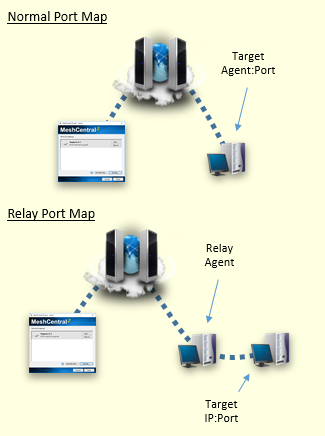
When the IP address is specified, the agent will relay the connection to that target IP address. When not specified, the target is the device running the agent (127.0.0.1).
In the above example, the "HTTP" link will only show for one specified device. The second "HTTPS" link will show for all devices in the specified device group.
Let me know if that makes sense.
Ylianst
on 5 Mar 2021
Awesome, thank you so much! I'll close this issue as soon as I can test.
MatinatorX
on 5 Mar 2021
@LPJon Yes, relay maps should allow you to go thru one device and connect to another. I have never tried it, but web interfaces like iLO and iDRAC should work. You can try it now using MeshCentral Router, click the "Add Relay App..." button.
Ylianst
on 5 Mar 2021
@Ylianst Sweet, and now we can create a link in MeshCentral to launch it! That's perfect.....well done!
@MatinatorX Hey very sorry if I offended that wasn't my intention. Now that you described that I see what you meant.
LPJon
on 5 Mar 2021
@Ylianst Sweet, and now we can create a link in MeshCentral to launch it! That's perfect.....well done!
@MatinatorX Hey very sorry if I offended that wasn't my intention. Now that you described that I see what you meant.
No worries, not offended at all! Sorry if it came off that way.
MatinatorX
on 5 Mar 2021
@MatinatorX You didn't exactly, I just know how I could of found that irritating. Just making sure I didn't was all. It's hard to tell who knows how much of what from a computer screen....lol....ya know?
LPJon
on 5 Mar 2021
Works awesome! I would still like to suggest a way to do this outside the config.json though, I plan to do this for hundreds of devices so my config.json is going to be pretty massive in a few days... will break that out into a different issue though. Thanks again!
MatinatorX
on 6 Mar 2021
Related issues
 guerby
·
3Comments
guerby
·
3Comments
 darryl-h
·
3Comments
darryl-h
·
3Comments
 nroach44
·
3Comments
nroach44
·
3Comments
 veitw
·
4Comments
veitw
·
4Comments
 whalehub
·
3Comments
whalehub
·
3Comments