Meshcentral: Feature Request - BackupPC Support Integration
I think this might be a very simple request I'm not sure though. I currently use BackupPC to backup most clients for customers. I would like to have a button, like the "Jitsi Meet" button, which I could program with a URL that would open on just my side, not the remote client side, to bring up that web interface for BackupPC. So a button that launches another website in a new browser tab on my side only that I can program. This would allow me to more easily access the backup system from MeshCentral and manage BackupPC tasks for my client.
Possible side Request: if it's not hard, would it be possible to proxy a website through meshagent to a local port on my pc much the same way that RDP is proxied through MeshCentral. If this is possible I would very much like to see this done. Then I can hide a website from public view and proxy it only through the MeshCentral Server.
 LPJon
LPJon
All 13 comments
For an additional button, it's certainly possible but we need to map a device on MeshCentral to a device on a different service. So, then you click the button on device A, it goes to web page A. If you have more thinking on how that would be done, let me know.
For the port mapping, yes, that's pretty simple. Just need more details on what your looking for. MeshCentral Router will map any port if you craft the right URL and click on it.
 Ylianst
on 24 Feb 2021
Ylianst
on 24 Feb 2021
Ok, so lets say I have BackupPC running on https://127.0.0.1:8443/BackupPC on the MeshCentral device (This is the server where MeshCentral is installed already). What I want to do is MAP port 8443 (or any other port) from the localhost of that server to my web browser from which I'm accessing the MeshCentral Web UI and I need to be able to craft the URL with the :8443/BackupPC directory location including the port.
Does that make sense. Basically I'm port mapping the the local port 8443 dedicated to BackupPC to my browser for access as though I was local to the server. This basically insinuates that a meshagent must be installed on the MeshCentral server for it to work and that would be fine. My goal is to get MeshCentral and BackupPC on the same server and then use BackupPC to run backups to the same server that MeshCentral is running on. LOL....does that help or make it worse?
LPJon
on 24 Feb 2021
For an additional button, it's certainly possible but we need to map a device on MeshCentral to a device on a different service. So, then you click the button on device A, it goes to web page A. If you have more thinking on how that would be done, let me know.
For the port mapping, yes, that's pretty simple. Just need more details on what your looking for. MeshCentral Router will map any port if you craft the right URL and click on it.
I just figured out what you are saying. Ok I would add an option to each device under "Tags" called "Designate as backup device" which when checked would enable the "Backup" button for the device group that device is in. I would then make that button right-clickable where you could fill-in the port you wanted to use and the directory location. Much like the noVNC and WebRDP links do. So in the first box would be the port to connect on such as 8443 and in the second box would be /BackupPC or just / for the web root. In this configuration you could designate a backup device for each device group and group together clients which have access to the designated backup device. When the button is clicked it would bring up the web interface for the backup device in that group. That web interface could be firewalled on the backup device so that it's only accessible through the MeshCentral relay when you click that button.
@Ylianst is this more what you are looking for in an explanation? Also, I would like more information on this
>
>
"For the port mapping, yes, that's pretty simple. Just need more details on what your looking for. MeshCentral Router will map any port if you craft the right URL and click on it."
If I can just craft a URL of my own what do I need to know about how to do that? I may be interested in just knowing how to craft the URL and ask for a button I can manually configure (using the right-click method) for each device or device group with my crafted URL. This seems like a much easier solution if it's possible.
LPJon
on 24 Feb 2021
Just published MeshCentral v0.7.75 with support for customizing MeshCentral Router links at the bottom of the device page. You can remove existing links and add new ones.
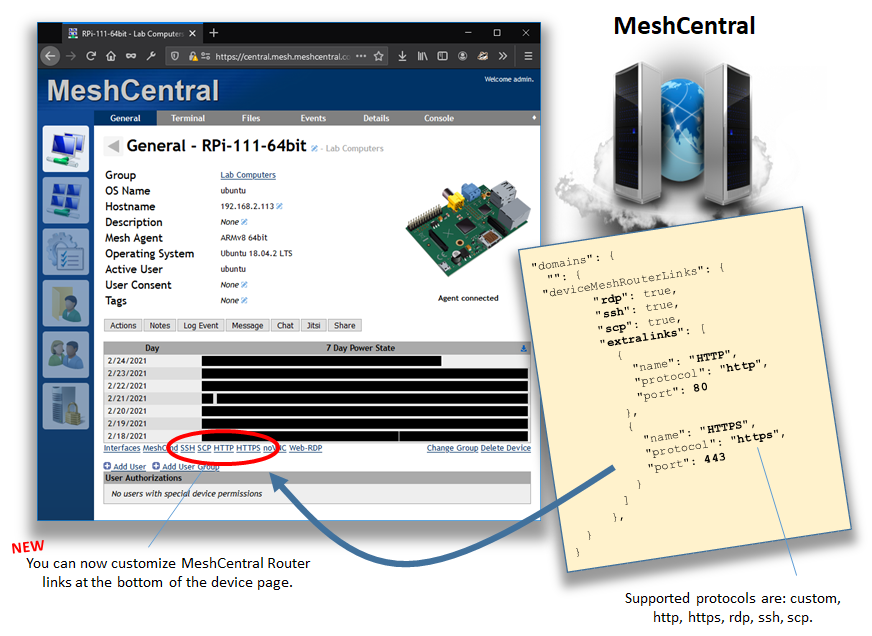
Let me know if that works.
Ylianst
on 25 Feb 2021
@Ylianst Just one question.....is the port specified the port on the client side or the server side? Like is it the remote port being proxied?
LPJon
on 25 Feb 2021
It's the port on the remote device side that is specified. MeshCentral Router will pick a random local port on it's side.
Ylianst
on 25 Feb 2021
It's the port on the remote device side that is specified. MeshCentral Router will pick a random local port on it's side.
Perfect....I'll report back soon on this
LPJon
on 25 Feb 2021
This is working perfectly! Very nice! I think I missed mentioning a small part though....I need to be able to specify a device group in the config. I need each link in the config to only show up in the device group that's assigned to it. Is that too much more to ask or maybe you would like me to make a separate request on it?
LPJon
on 25 Feb 2021
Ok, in upcoming MeshCentral v0.7.77you can do this:
      "deviceMeshRouterLinks": {
        "rdp": true,
        "ssh": true,
        "scp": true,
        "extralinks": [
          {
            "name": "HTTP",
            "protocol": "http",
            "port": 80,
            "filter": [ "mesh//xxxx", "node//xxxx" ]           <---------------
          },
          {
            "name": "HTTPS",
            "protocol": "https",
            "port": 443
          }
        ]
      }
"filter" is an array of device or device group identifiers that the link will show up on. If not specified, link shows up on all devices like before. Let me know if that works.
Ylianst
on 25 Feb 2021
This will be perfect! I'll report back on this as soon as 0.7.77 is available!
LPJon
on 26 Feb 2021
I will assume this is ok. If not, feel free to open a new issue.
Ylianst
on 3 Mar 2021
@Ylianst I'm still working on the code on my end for implementing this feature. To test the actual connection. I will still report back on this thread if it's working or not. Sorry for the delay.
LPJon
on 3 Mar 2021
No worries. Take you time. If you see any problem, just open a new issue.
Ylianst
on 3 Mar 2021
Related issues
 vish84
·
3Comments
vish84
·
3Comments
 petervanv
·
3Comments
petervanv
·
3Comments
petervanv
·
3Comments
petervanv
·
3Comments
 haxmachine
·
3Comments
haxmachine
·
3Comments
 darryl-h
·
3Comments
darryl-h
·
3Comments