MeshCentral Windows agents are disconnecting on some systems when updating to v0.7.47
This is affecting seriously due to last update is not allowing devices to appear as connected. It disconnects each 5 to 10 minutes, most are appearing as disconnected... we´re not able to work, not able to downgrade... this is really URGENT. - DON´T UPDATE TO 0.7.47 THERE IS A SERIOUS FAILURE ON THE UPDATE...
 MC-PM
MC-PM
All 108 comments
Same here. I don't see anyone from MC assigned to these tickets. Are they working on it?
 CCWTech
on 12 Jan 2021
CCWTech
on 12 Jan 2021
Same here also.
 pmoncho99
on 12 Jan 2021
pmoncho99
on 12 Jan 2021
I see a report that this impacts 0.7.46 as well.
I've not noticed it impacting Linux clients yet, only Windows impacted here, but we have very little Mac. I see another issue open about Mac clients, so I am guessing that it is happening there, too.
 scottalanmiller
on 12 Jan 2021
scottalanmiller
on 12 Jan 2021
Looking into it!
 Ylianst
on 12 Jan 2021
Ylianst
on 12 Jan 2021
If this helps a little. Posted on Mangolassi.it
C:\Program Files\Mesh Agent\Meshagent.update.exe is having issues.

From C:\Program Files\Mesh Agent\MeshAgent.log file ---

Agent\MeshAgent.update.exe , C:\Program Files\Mesh Agent\MeshAgent.exe
[2021-01-12 07:10:45 AM] SelfUpdate -> UpdaterVersion_ERROR: child_process.execFile(): Could not exec [C:Program FilesMesh AgentMeshAgent.update.exe]
[2021-01-12 08:11:10 AM] Microstack STUCK: @ [NtDelayExecution]
[SleepEx]
[FuncAddr: 0x1251E5D2F67F0000]
[FuncAddr: 0x8E5FE5D2F67F0000]
[FuncAddr: 0x56CCEED2F67F0000]
[FuncAddr: 0xC9CEEED2F67F0000]
[FuncAddr: 0x64B3EDD2F67F0000]
[FuncAddr: 0xFFBDEDD2F67F0000]
[FuncAddr: 0xFE23EED2F67F0000]
[FuncAddr: 0xF5B5E5D2F67F0000]
[FuncAddr: 0x14C4EFD2F67F0000]
[LsaLookupUserAccountType]
[BaseThreadInitThunk]
[RtlUserThreadStart]
Rolled back latest to [email protected]
Ylianst
on 12 Jan 2021
Do you know what server version you are updating from that is causing this issue?
 krayon007
on 12 Jan 2021
krayon007
on 12 Jan 2021
Unfortunately, I cannot remember. I do know that the last time the windows client tried to update was on 12-21 according to the MeshAgent.log
pmoncho99
on 12 Jan 2021
Scott posted it in GitHub,
adding him in...Also adding in Marcelo our Mesh tech.
Please do not send a new request for help to this email, the response may be delayed.
Need support? Please email mailto:[email protected] for a faster response.
We are a FULL SERVICE technology company.
I.T. Services, Managed I.T. Services, Telephony/VOIP, Web Design & Web Hosting, Customer service staffing, Marketing/Branding, Website SEO, Social Media Marketing and Gravity Payment Solutions Partners (Credit card processors)
Allen Crist, CEO
CCW Technology I.T. Services
Veterinary I.T. Specialists
Serving Small and Medium Business since 2008
(801)410-0203 x5002
http://www.facebook.com/CCWTechnology
---- On Tue, 12 Jan 2021 12:04:00 -0700 Bryan Roe notifications@github.com wrote ----
Do you know what server version you are updating from that is causing this issue?
—
You are receiving this because you are subscribed to this thread.
Reply to this email directly, https://github.com/Ylianst/MeshCentral/issues/2162#issuecomment-758870722, or https://github.com/notifications/unsubscribe-auth/ABJ2TJZOC5BOJLTVGO7K6D3SZSMKBANCNFSM4V7SVCZQ.
CCWTech
on 12 Jan 2021
Rolled back stable to [email protected]
That's weird. I checked stable a few minutes ago and it was 0.6.7. Now it has updated to .45, but it was really, really old before.
scottalanmiller
on 12 Jan 2021
Do you know what server version you are updating from that is causing this issue?
0.7.39 I believe.
scottalanmiller
on 12 Jan 2021
December 12-21 would be v0.7.30. So, we have a good update range to work with.
Ylianst
on 12 Jan 2021
Does updating/downgrading to v0.7.45 work for right now?
Ylianst
on 12 Jan 2021
No, I do not see them coming back after going to V.0.7.45
I am connected to a windows machine now (via additional remote software) and there are three Mesh Agent Service tasks running in Task Manager. One being MeshAgent.Update.exe which I believe is "stuck."
pmoncho99
on 12 Jan 2021
tested on v0.7.45 and the issue still persist
MC-PM
on 12 Jan 2021
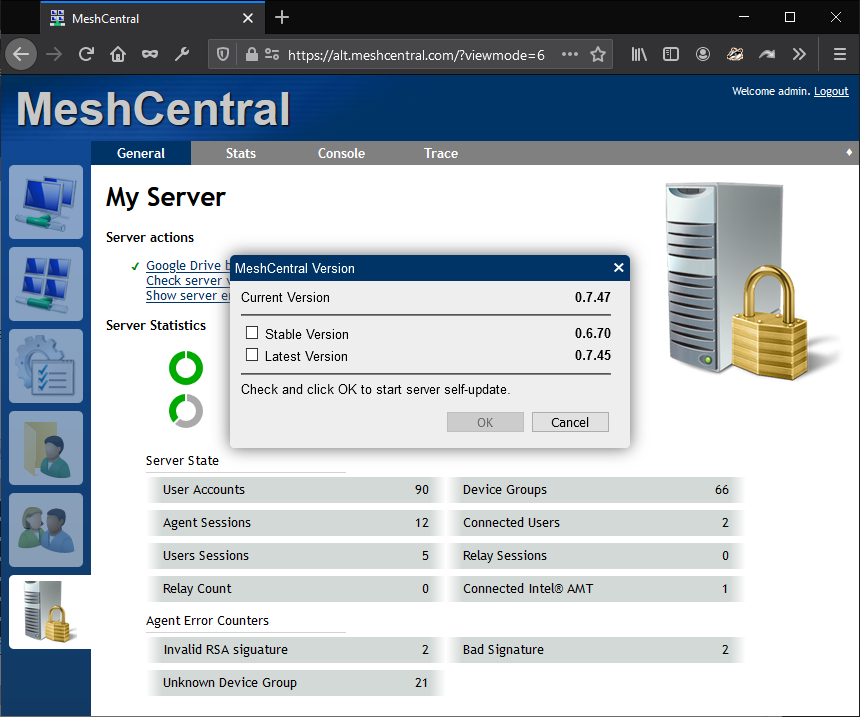
Update screen should show this now.
Ylianst
on 12 Jan 2021
It seems to only impact Windows, maybe the Windows agents need to downgrade? Was there a change made to them? But they can't downgrade, because they aren't connecting. So my guess is, if the Windows agents have failed from the update, we might be in rough shape to get them working again.
scottalanmiller
on 12 Jan 2021
Update screen should show this now.
now it does, yes
scottalanmiller
on 12 Jan 2021

this is how agents are working (not all, this is happening on random windows devices)
MC-PM
on 12 Jan 2021
No, I do not see them coming back after going to V.0.7.45
I am connected to a windows machine now (via additional remote software) and there are three Mesh Agent Service tasks running in Task Manager. One being MeshAgent.Update.exe which I believe is "stuck."
By any chance are you running a customized agent, where the service name is not the default 'Mesh Agent'? There was a issue when updating from v0.7.22 in this case that failed similarly to this
krayon007
on 12 Jan 2021
No, I do not see them coming back after going to V.0.7.45
I am connected to a windows machine now (via additional remote software) and there are three Mesh Agent Service tasks running in Task Manager. One being MeshAgent.Update.exe which I believe is "stuck."By any chance are you running a customized agent, where the service name is not the default 'Mesh Agent'? There was a issue when updating from v0.7.22 in this case that failed similarly to this
No, definitely using the default.
scottalanmiller
on 12 Jan 2021
No, I do not see them coming back after going to V.0.7.45
I am connected to a windows machine now (via additional remote software) and there are three Mesh Agent Service tasks running in Task Manager. One being MeshAgent.Update.exe which I believe is "stuck."By any chance are you running a customized agent, where the service name is not the default 'Mesh Agent'? There was a issue when updating from v0.7.22 in this case that failed similarly to this
No. Using default.
With the MeshAgent.Update.exe continuously running, I have to manually kill off the process in Task Manager and then restart Mesh Agent service is Services. The pc then shows up.
pmoncho99
on 12 Jan 2021
The other forum thread on this: https://mangolassi.it/topic/20976/meshcentral-updates/59
Ylianst
on 12 Jan 2021
The only thing the update.exe process does, is try to copy the binary over. If MeshAgent.exe is still running, the file is locked. Normally what happens is MeshAgent.exe exits, and the update.exe copies the binary, then restarts the service and exits. If the copy fails, it will retry in 60 seconds. It seems for some reason the main MeshAgent.exe process is stuck...
krayon007
on 12 Jan 2021
The only thing the update.exe process does, is try to copy the binary over. If MeshAgent.exe is still running, the file is locked. Normally what happens is MeshAgent.exe exits, and the update.exe copies the binary, then restarts the service and exits. If the copy fails, it will retry in 60 seconds. It seems for some reason the main MeshAgent.exe process is stuck...
Ok. I am going to have some of my users reboot tonight to see if that fixes the issue (I have already done a rollback to 0.7.45).
pmoncho99
on 12 Jan 2021
For any of the people having issues, can you send me an .msh file you are using? (Feel free to redact the server url, I'm mostly interested in the other parameters)
krayon007
on 12 Jan 2021
@Ylianst @krayon007 I can confirm this issue but don't believe it is related to the MechCentral Server. This is an agent issue where the previous agent service hangs during the update of the agent. You must force the old agent to stop through task manager and the agent update will continue to complete successfully on 99% of the Windows clients. About 1% have to be uninstalled and then reinstalled for the agent to work again. Therefore updating the MeshCentral server will NOT fix this because the agents are hung from the agent update when 0.7.47 was installed.
Note: My update was from 0.7.42 to 0.7.47
 LPJon
on 12 Jan 2021
LPJon
on 12 Jan 2021
@Ylianst I can confirm this issue but don't believe it is related to the MechCentral Server. This is an agent issue where the previous agent service hangs during the update of the agent. You must force the old agent to stop through task manager and the agent update will continue to complete successfully on 99% of the Windows clients. About 1% have to be uninstalled and then reinstalled for the agent to work again. Therefore updating the MeshCentral server will NOT fix this because the agents are hung from the agent update when 0.7.47 was installed.
It's indirectly related. The server version contains a specific agent version... There were specific changes to self-update on windows made to address issues with self-update for customized/branded agents. So far it looks like it may not be related, I just did a bunch of testing going between various versions, and couldn't reproduce this... The next thing I'm going to do, is modify the logic, so instead of retrying on a timer (inside the .update.exe) process, I'm going to make it forcefully terminate the service PID if it can't copy the binary. This should prevent this type of issue in the future... For those experiencing the issue right now, it should resolve the issue if you update the server then reboot/restart the client. However, if the logs from that other thread is indicative of what's going on here (that log about Microstack: STUCK), then this would actually resolve itself after 10 minutes, if the server is updated during that time, since the current logic, is that if the agent detects that it's main thread is stuck, it will forcefully terminate itself after 10 minutes, which is also when it writes that log message.
krayon007
on 12 Jan 2021
@krayon007 Awesome! So to be clear, the next update should be able to update the agents that are hung as well as detect a hang in the future and force a restart of the agent service in such an event. Right?
I should point out that restarts in my case did not resolve the issue and weirdly the original agent service would start again on startup but hang. Maybe upon the startup of the service after a reboot just prompted another update which caused the same hang issue again. I'm not sure why you can't reproduce this but my affected systems ranged from windows 7 to Server 2012R2 & Windows 10 Home/Pro
LPJon
on 12 Jan 2021
@krayon007 Awesome! So to be clear, the next update should be able to update the agents that are hung as well as detect a hang in the future and force a restart of the agent service in such an event. Right?
Theoretically yes... And yes, if you don't change the server version, when the agent restarts it will just try to download the update again... I have several systems trying to reproduce this, and haven't been able to... Are you able to share your .msh file with me, to help me troubleshoot what the update is doing? (You can redact the server url)
krayon007
on 12 Jan 2021
For people with this issue, you can add this line in the settings section of the config.json:
"noagentupdate": true
That may stop the agent from going in an update loop. You can also do this:
node node_modules meshcentral --noagentupdate
Let us know if that seems to work. You can run that like until a more permanent fix.
Ylianst
on 12 Jan 2021
@Ylianst I can confirm this issue but don't believe it is related to the MechCentral Server. This is an agent issue where the previous agent service hangs during the update of the agent. You must force the old agent to stop through task manager and the agent update will continue to complete successfully on 99% of the Windows clients. About 1% have to be uninstalled and then reinstalled for the agent to work again. Therefore updating the MeshCentral server will NOT fix this because the agents are hung from the agent update when 0.7.47 was installed.
It's indirectly related. The server version contains a specific agent version... There were specific changes to self-update on windows made to address issues with self-update for customized/branded agents. So far it looks like it may not be related, I just did a bunch of testing going between various versions, and couldn't reproduce this... The next thing I'm going to do, is modify the logic, so instead of retrying on a timer (inside the .update.exe) process, I'm going to make it forcefully terminate the service PID if it can't copy the binary. This should prevent this type of issue in the future... For those experiencing the issue right now, it should resolve the issue if you update the server then reboot/restart the client. However, if the logs from that other thread is indicative of what's going on here (that log about Microstack: STUCK), then this would actually resolve itself after 10 minutes, if the server is updated during that time, since the current logic, is that if the agent detects that it's main thread is stuck, it will forcefully terminate itself after 10 minutes, which is also when it writes that log message.
We have updated the Mesh Central server, no new updates after the last one which supposed solve this issue (have checked a few seconds ago), restarting the client doesn´t resolve the issue. actually, there are several MeshCentral tasks just running in the background, but even killing them, the issue still persist, and only works fine is the agent is fully reinstalled (which means a lot of work reorganizing tags and users), any advice?
MC-PM
on 12 Jan 2021
I can give you the log file. The .msh file does not have any information about errors just mesh and server ID with meshname=
Log:
[2020-12-11 03:50:41 PM] Info: No certificate was found in db
[2020-12-13 06:17:23 PM] SelfUpdate -> Checking Updater Version on: C:\\Program Files\\Mesh Agent\\MeshAgent.update.exe , C:\Program Files\Mesh Agent\MeshAgent.exe
[2020-12-13 06:17:24 PM] SelfUpdate -> UpdaterVersion: 0
[2020-12-18 10:50:36 PM] SelfUpdate -> Checking Updater Version on: C:\\Program Files\\Mesh Agent\\MeshAgent.update.exe , C:\Program Files\Mesh Agent\MeshAgent.exe
[2020-12-18 10:50:36 PM] SelfUpdate -> UpdaterVersion: 1
[2021-01-11 06:42:56 PM] SelfUpdate -> Checking Updater Version on: C:\Program Files\Mesh Agent\MeshAgent.update.exe , C:\Program Files\Mesh Agent\MeshAgent.exe
[2021-01-11 06:42:56 PM] SelfUpdate -> UpdaterVersion_ERROR: child_process.execFile(): Could not exec [C:Program FilesMesh AgentMeshAgent.update.exe]
@Ylianst I can confirm this issue but don't believe it is related to the MechCentral Server. This is an agent issue where the previous agent service hangs during the update of the agent. You must force the old agent to stop through task manager and the agent update will continue to complete successfully on 99% of the Windows clients. About 1% have to be uninstalled and then reinstalled for the agent to work again. Therefore updating the MeshCentral server will NOT fix this because the agents are hung from the agent update when 0.7.47 was installed.
It's indirectly related. The server version contains a specific agent version... There were specific changes to self-update on windows made to address issues with self-update for customized/branded agents. So far it looks like it may not be related, I just did a bunch of testing going between various versions, and couldn't reproduce this... The next thing I'm going to do, is modify the logic, so instead of retrying on a timer (inside the .update.exe) process, I'm going to make it forcefully terminate the service PID if it can't copy the binary. This should prevent this type of issue in the future... For those experiencing the issue right now, it should resolve the issue if you update the server then reboot/restart the client. However, if the logs from that other thread is indicative of what's going on here (that log about Microstack: STUCK), then this would actually resolve itself after 10 minutes, if the server is updated during that time, since the current logic, is that if the agent detects that it's main thread is stuck, it will forcefully terminate itself after 10 minutes, which is also when it writes that log message.
We have updated the Mesh Central server, no new updates after the last one which supposed solve this issue (have checked a few seconds ago), restarting the client doesn´t resolve the issue. actually, there are several MeshCentral tasks just running in the background, but even killing them, the issue still persist, and only works fine is the agent is fully reinstalled (which means a lot of work reorganizing tags and users), any advice?
Try only killing the "MeshAgent.exe" in task manager. Leave the "MeshAgent.update.exe" file alone. If things work out right "MeshAgent.update.exe" should close on its own and you should see your client come back online.
LPJon
on 12 Jan 2021
I can give you the log file. The .msh file does not have any information about errors just mesh and server ID with meshname= and meshtype=2
Log:
[2020-12-11 03:50:41 PM] Info: No certificate was found in db
[2020-12-13 06:17:23 PM] SelfUpdate -> Checking Updater Version on: C:\\Program Files\\Mesh Agent\\MeshAgent.update.exe , C:\Program Files\Mesh Agent\MeshAgent.exe
[2020-12-13 06:17:24 PM] SelfUpdate -> UpdaterVersion: 0
[2020-12-18 10:50:36 PM] SelfUpdate -> Checking Updater Version on: C:\\Program Files\\Mesh Agent\\MeshAgent.update.exe , C:\Program Files\Mesh Agent\MeshAgent.exe
[2020-12-18 10:50:36 PM] SelfUpdate -> UpdaterVersion: 1
[2021-01-11 06:42:56 PM] SelfUpdate -> Checking Updater Version on: C:\Program Files\Mesh Agent\MeshAgent.update.exe , C:\Program Files\Mesh Agent\MeshAgent.exe
[2021-01-11 06:42:56 PM] SelfUpdate -> UpdaterVersion_ERROR: child_process.execFile(): Could not exec [C:Program FilesMesh AgentMeshAgent.update.exe]
I was mostly interested if it contained any of the following fields:
companyName, meshServiceName, fileName, translation
krayon007
on 12 Jan 2021
Im running (still) MeshCentral 0.7.47 at Ubunt 18.04.05 LTS and all my clients are running normal Windows and Linux.
What os are they running maybe it could be an windows server issue ??!!??
 petervanv
on 12 Jan 2021
petervanv
on 12 Jan 2021
@krayon007 This particular line looks wrong. There are no backslashes in it and so it would never execute! Could this be the issue?
[2021-01-11 06:42:56 PM] SelfUpdate -> UpdaterVersion_ERROR: child_process.execFile(): Could not exec [C:Program FilesMesh AgentMeshAgent.update.exe]
LPJon
on 12 Jan 2021
@Ylianst I can confirm this issue but don't believe it is related to the MechCentral Server. This is an agent issue where the previous agent service hangs during the update of the agent. You must force the old agent to stop through task manager and the agent update will continue to complete successfully on 99% of the Windows clients. About 1% have to be uninstalled and then reinstalled for the agent to work again. Therefore updating the MeshCentral server will NOT fix this because the agents are hung from the agent update when 0.7.47 was installed.
It's indirectly related. The server version contains a specific agent version... There were specific changes to self-update on windows made to address issues with self-update for customized/branded agents. So far it looks like it may not be related, I just did a bunch of testing going between various versions, and couldn't reproduce this... The next thing I'm going to do, is modify the logic, so instead of retrying on a timer (inside the .update.exe) process, I'm going to make it forcefully terminate the service PID if it can't copy the binary. This should prevent this type of issue in the future... For those experiencing the issue right now, it should resolve the issue if you update the server then reboot/restart the client. However, if the logs from that other thread is indicative of what's going on here (that log about Microstack: STUCK), then this would actually resolve itself after 10 minutes, if the server is updated during that time, since the current logic, is that if the agent detects that it's main thread is stuck, it will forcefully terminate itself after 10 minutes, which is also when it writes that log message.
We have updated the Mesh Central server, no new updates after the last one which supposed solve this issue (have checked a few seconds ago), restarting the client doesn´t resolve the issue. actually, there are several MeshCentral tasks just running in the background, but even killing them, the issue still persist, and only works fine is the agent is fully reinstalled (which means a lot of work reorganizing tags and users), any advice?
Try only killing the "MeshAgent.exe" in task manager. Leave the "MeshAgent.update.exe" file alone. If things work out right "MeshAgent.update.exe" should close on its own and you should see your client come back online.
Thanks for the reply... tested on 2 devices and have not worked, with +700 devices using this, killing tasks, uninstalling, reinstalling each of them and then assigning to users, tags and groups, this is a mess...
MC-PM
on 12 Jan 2021
Thanks for the reply... tested on 2 devices and have not worked, with +700 devices using this, killing tasks, uninstalling, reinstalling each of them and then assigning to users, tags and groups, this is a mess...
When you simply restart the client machine, it doesn't try to connect to the server?
krayon007
on 12 Jan 2021
Instead of waiting for the machiine to restart, for testing, you can run the following command from an elevated command prompt:
wmic service "Mesh Agent" call stopservice
wmic service "Mesh Agent" call startservice
krayon007
on 12 Jan 2021
Im running (still) MeshCentral 0.7.47 at Ubunt 18.04.05 LTS and all my clients are running normal Windows and Linux.
What os are they running maybe it could be an windows server issue ??!!??
@petervanv It would seem that no Linux OS's are affected. What version did you update from?
LPJon
on 12 Jan 2021
Thanks for the reply... tested on 2 devices and have not worked, with +700 devices using this, killing tasks, uninstalling, reinstalling each of them and then assigning to users, tags and groups, this is a mess...
When you simply restart the client machine, it doesn't try to connect to the server?
@krayon007 It does try to reconnect but then immediately triggers another agent update causing the service to hang again.
LPJon
on 12 Jan 2021
Im running (still) MeshCentral 0.7.47 at Ubunt 18.04.05 LTS and all my clients are running normal Windows and Linux.
What os are they running maybe it could be an windows server issue ??!!??@petervanv It would seem that no Linux OS's are affected. What version did you update from?
Windows is the only OS that has to do some tomfoolery to get the binary to update, because all the other platforms, I can swap out the binary while the process is still running.
krayon007
on 12 Jan 2021
Im running (still) MeshCentral 0.7.47 at Ubunt 18.04.05 LTS and all my clients are running normal Windows and Linux.
What os are they running maybe it could be an windows server issue ??!!??@petervanv It would seem that no Linux OS's are affected. What version did you update from?
From 0.7.46, mostly i do an daily update.
PS im using the default database that comes with meshcentral
petervanv
on 12 Jan 2021
Im running (still) MeshCentral 0.7.47 at Ubunt 18.04.05 LTS and all my clients are running normal Windows and Linux.
What os are they running maybe it could be an windows server issue ??!!??@petervanv It would seem that no Linux OS's are affected. What version did you update from?
From 0.7.46, mostly i do an daily update.
Ok....I would hold tight....there is a work in progress which may only require another server update and rebooting the clients. That's a lot of clients but still better than going to each one and redoing them plus redoing your tags, user, groups, and device groups.
@krayon007 I totally understand about the "tomfoolery" with Windows. I would suggest having the update ALWAYS kill the PID process as part of the update and also have a "Failed Update" fallback in case the update fails completely it can at least go back to the previous agent version and report the agent update failure to MeshCentral. A fallback fail safe is very important with this type of situation. Is it possible you can do that?
LPJon
on 12 Jan 2021
Instead of waiting for the machiine to restart, for testing, you can run the following command from an elevated command prompt:
wmic service "Mesh Agent" call stopservice
wmic service "Mesh Agent" call startservice
Thanks. What I have tried on several devices so far:
- Stop / start the Mesh Agent service with different scripts, even with the last ones you sent.
- restart the Mesh Agent service
- kill the task and then run the agent from "zero"
- kill the task and then leaving the "MeshAgent.update.exe" file alone.
- stop services (mostly devices have it stopped), kill tasks, start services.
none of them worked, some just entered to the glitch appearing online by a few seconds and then going offline.
The only thing that works is reinstalling de agent, but need to kill the task first, because in this case reinstall is not possible due to in any device allow to reinstall until kill the tasks... this is a nightmare..
MC-PM
on 12 Jan 2021
Instead of waiting for the machiine to restart, for testing, you can run the following command from an elevated command prompt:
wmic service "Mesh Agent" call stopservice
wmic service "Mesh Agent" call startserviceThanks. What I have tried on several devices so far:
- Stop / start the Mesh Agent service with different scripts, even with the last ones you sent.
- restart the Mesh Agent service
- kill the task and then run the agent from "zero"
- kill the task and then leaving the "MeshAgent.update.exe" file alone.
- stop services (mostly devices have it stopped), kill tasks, start services.
none of them worked, some just entered to the glitch appearing online by a few seconds and then going offline.
The only thing that works is reinstalling de agent, but need to kill the task first, because in this case reinstall is not possible due to in any device allow to reinstall until kill the tasks... this is a nightmare..
@Ylianst said you can disable self updates on the server. He can chime in how to do that...
But based on what you said, it looks like restarting the service/device, does actually cause the agent to reconnect. It's just with your current server version, the agent tries to immediately download an update, and gets stuck again.
krayon007
on 12 Jan 2021
@MC-PM I saw
some just entered to the glitch appearing online by a few seconds and then going offline.
too. In that particular case I had to reinstall the agent as well, but that was not the behavior or case for all of my affected systems. In fact only 2 of them had that problem.
LPJon
on 12 Jan 2021
I mentioned it above, but for disabling agent updates from the server, add this line to the settings section of the config.json:
"noagentupdate": true
@krayon007
uncaughtException1: Error: => EventEmitter.emit(): Event dispatch for 'data' on 'childProcess.subProcess.stdout' threw an exception: TypeError: cannot string coerce Symbol in method '()'
msh
{
"MeshName": "Perso",
"MeshType": "2",
"MeshID": "0x715C62B823F854369D364C0168B8A93544566B640F0A9DA592E43BCC76492CD936C31BDAB518F0335CF07FF3FB7933D1",
"ServerID": "*",
"MeshServer": "wss://domain.tld:443/agent.ashx",
"installedByUser": "S-1-5-21-2372513995-3651633900-3963742467-500"
}
 Scaff31
on 12 Jan 2021
Scaff31
on 12 Jan 2021
I mentioned it above, but for disabling agent updates from the server, add this line to the settings section of the config.json:
"noagentupdate": true
@Ylianst Is it possible to add on to this feature? Can you add the ability to target a single client agent for update testing to be sure the agent is going to update correctly before deploying it across all clients?
LPJon
on 12 Jan 2021
Is anyone having issues using MeshCentral plugins? If so, which ones? - Thanks.
Ylianst
on 12 Jan 2021
@LPJon On the topic of targeted agent updates, yes, I can work on that.
Ylianst
on 12 Jan 2021
@Ylianst
23:02:21 - hoel → Session de bureau terminée "fq8bvlkcbi8" de xx.xx.xx.xx à yy.yy.yy.yy, 30 seconde(s)
23:01:51 - hoel → Bureau à distance lancé sans notification
always 30sec of remoting allowed for me =)
back to 0.7.45 with noagentupdate true on settings and reboot target
Scaff31
on 12 Jan 2021
@LPJon On the topic of targeted agent updates, yes, I can work on that.
That would be awesome!
LPJon
on 12 Jan 2021
@LPJon Do you use any MeshCentral plugin's? Still waiting someone to answer this.
Bryan and I are at a loss to figure out what is going on. This problem does not happen on any of our servers and would appreciate any added information. Is a reverse proxy in use? Are plugin's in use? Anti-virus in use? So far, we are just trying to guess what is going on. Any more leads would be appreciated.
Ylianst
on 12 Jan 2021
No reverse proxies on our servers here. no plugins, no AV. As far as we know, it's just a super vanilla basic install.
scottalanmiller
on 12 Jan 2021
@scottalanmiller Thanks.
Ylianst
on 12 Jan 2021
@LPJon Do you use any MeshCentral plugin's? Still waiting someone to answer this.
Bryan and I are at a loss to figure out what is going on. This problem does not happen on any of our servers and would appreciate any added information. Is a reverse proxy in use? Are plugin's in use? Anti-virus in use? So far, we are just trying to guess what is going on. Any more leads would be appreciated.
I do not have any plugins. Just the standard install from npm on Debian 10.7 Buster. I do have a reverse proxy going that actually has 2 downstream proxies. However I have all my clients back online so I don't believe it's a proxy issue. There is anti-virus in use on all of my Windows Clients (Comodo and Trend Mirco). Did you look at my log where i showed a file path without the "\" in it?
LPJon
on 12 Jan 2021
@LPJon @krayon007 Bryan tells me that the path with no slash in it is normal, however I have the same feeling you are having that I look at that log, it does not look right to me.
Ylianst
on 12 Jan 2021
HAProxy on OPNSENSE, no plugins, AV Webroot but not on all target
More info: meshcentral server install on ubuntu 20.04 you've my setting section on thread you close
Scaff31
on 12 Jan 2021
One thing that would be interesting to try is to add this line to the settings section of the config.json
"AgentPong": 20,
This will send traffic to the agent every 20 seconds. If by any change there has been some infrastructure changes in the last 24 hours that drops idle connections, this would solve it.
Ylianst
on 13 Jan 2021
I can give you the log file. The .msh file does not have any information about errors just mesh and server ID with meshname= and meshtype=2
Log:[2020-12-11 03:50:41 PM] Info: No certificate was found in db [2020-12-13 06:17:23 PM] SelfUpdate -> Checking Updater Version on: C:\\Program Files\\Mesh Agent\\MeshAgent.update.exe , C:\Program Files\Mesh Agent\MeshAgent.exe [2020-12-13 06:17:24 PM] SelfUpdate -> UpdaterVersion: 0 [2020-12-18 10:50:36 PM] SelfUpdate -> Checking Updater Version on: C:\\Program Files\\Mesh Agent\\MeshAgent.update.exe , C:\Program Files\Mesh Agent\MeshAgent.exe [2020-12-18 10:50:36 PM] SelfUpdate -> UpdaterVersion: 1 [2021-01-11 06:42:56 PM] SelfUpdate -> Checking Updater Version on: C:\Program Files\Mesh Agent\MeshAgent.update.exe , C:\Program Files\Mesh Agent\MeshAgent.exe [2021-01-11 06:42:56 PM] SelfUpdate -> UpdaterVersion_ERROR: child_process.execFile(): Could not exec [C:Program FilesMesh AgentMeshAgent.update.exe]I was mostly interested if it contained any of the following fields:
companyName, meshServiceName, fileName, translation
@krayon007 I missed this...sorry Brian. No the .msh file does not contain any of that information.
LPJon
on 13 Jan 2021
One thing that would be interesting to try is to add this line to the settings section of the config.json
"AgentPong": 20,This will send traffic to the agent every 20 seconds. If by any change there has been some infrastructure changes in the last 24 hours that drops idle connections, this would solve it.
We control the Client side network so I can say that for us, there were no changes in the last 24hrs
LPJon
on 13 Jan 2021
@Ylianst after change my setting on agentping and agentpong 20 that solve my remote time issue
00:03:44 - hoel → Session de bureau terminée "7mr48iqf5es" de xx.xx.xx.xx à yy.yy.yy.yy, 88 seconde(s) |
-- | --
| | 00:02:16 - hoel → Bureau à distance lancé sans notification
Scaff31
on 13 Jan 2021
@Scaff31 Oh. Interesting.
Ylianst
on 13 Jan 2021
"settings": {
    "MongoDb": "mongodb://127.0.0.1:27017/dbmeshcentral",
    "Cert": "mesh.domain.tld",
    "WAN": true,
    "Port": 43874,
    "AliasPort": 443,
    "MpsPort": 44330,
    "MpsAliasPort": 4433,
    "MpsTlsOffload": true,
    "AgentPing": 20,
    "Agentpong": 20,
    "TlsOffLoad": "ip_haproxy",
    "noagentupdate": true,
    "RedirPort": 80
  },
with this config meshcentral on version 0.7.45 works perfectly thank you @Ylianst
Scaff31
on 13 Jan 2021
@Scaff31 You probably don't need both 'agentping' and 'agentpong', you can remove one of them to reduce traffic the server needs to handle. The best is to find why in your case idle connections are being dropped after 30 seconds.
Ylianst
on 13 Jan 2021
agentping alone do the job
Scaff31
on 13 Jan 2021
@Ylianst I just figured out another piece to the puzzle. Its seems the agents that were installed/affected were from before i added the agent customization to MeshCentral config.json. I had a few windows agents with no issues.....they were installed after I added the custom agent configuration. Does that help any? I dont remember from what version i changed that config except it was between 0.7.35 to 0.7.41 I think.
LPJon
on 13 Jan 2021
For the agents that have this in the log:
[2021-01-11 06:42:56 PM] SelfUpdate -> UpdaterVersion_ERROR: child_process.execFile(): Could not exec [C:Program FilesMesh AgentMeshAgent.update.exe]
What does it show if you run the following command from the command prompt from installed folder (C:\Program Files\Mesh Agent)
MeshAgent -name
krayon007
on 13 Jan 2021
@Ylianst I just figured out another piece to the puzzle. Its seems the agents that were installed/affected were from before i added the agent customization to MeshCentral config.json. I had a few windows agents with no issues.....they were installed after I added the custom agent configuration. Does that help any? I dont remember from what version i changed that config except it was between 0.7.35 to 0.7.41 I think.
Which customizations did you add?
krayon007
on 13 Jan 2021
Oh yes. If you are using agent customization, this is CERTAINLY a factor! Bryan was asking if the .msh file you are using had any of these fields: companyName, meshServiceName, fileName, translation. These are customization fields.
If you can send your .msh file privately. I will send it over to Bryan for immediate analysis.
Ylianst
on 13 Jan 2021
@krayon007
c:\Program Files\Mesh Agent>MeshAgent -name
Mesh Agent
It's default agent no customization on this
Scaff31
on 13 Jan 2021
For the agents that have this in the log:
[2021-01-11 06:42:56 PM] SelfUpdate -> UpdaterVersion_ERROR: child_process.execFile(): Could not exec [C:Program FilesMesh AgentMeshAgent.update.exe]What does it show if you run the following command from the command prompt from installed folder (C:\Program Files\Mesh Agent)
MeshAgent -name
Mine says "Mesh Agent"
   "agentCustomization": {
    "displayName": "<Display Name>",
    "description": "<Service Description>",
    "companyName": "Laptop Pitstop",
    "serviceName": "<Service Name>",
    "fileName": "<The Chosen Agent Filename>"
  },
I will email you a link and password to download it...
LPJon
on 13 Jan 2021
So with agentping 20 i've no more issue on remote desktop but now something weird appears on remote terminal
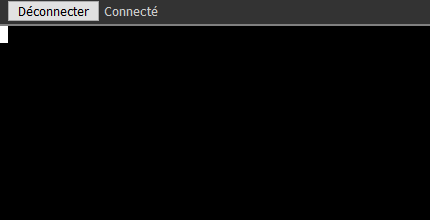
no prompt or prompt but no stdout appear after command
Scaff31
on 13 Jan 2021
So with agentping 20 i've no more issue on remote desktop but now something weird appears on remote terminal
no prompt or prompt but no stdout appear after command
Does KVM or Files work correctly?
krayon007
on 13 Jan 2021
Also, that machine with the non-funtional terminal... It is a laptop, running on batteries with the A/C power disconnected?
krayon007
on 13 Jan 2021
@krayon007 KVM and Files work fine I can create/delete folder and files
It's a Win R2 2008 server vm
Scaff31
on 13 Jan 2021
OS: Windows Server 2008 R2 Standard [7601].
Modules: amt-apfclient, amt-lme, amt-manage, amt-mei, monitor-border, smbios, sysinfo, wifi-scanner-windows, wifi-scanner, win-console, win-info, win-terminal, win-virtual-terminal.
Server Connection: true, State: 1.
Scaff31
on 13 Jan 2021
Oh yes. If you are using agent customization, this is CERTAINLY a factor! Bryan was asking if the .msh file you are using had any of these fields:
companyName, meshServiceName, fileName, translation. These are customization fields.If you can send your .msh file privately. I will send it over to Bryan for immediate analysis.
In the config.json yes!....nothing in the .msh file about it though. I just added a .msh file to that share that is from an agent with no issues and was installed after the customization.
LPJon
on 13 Jan 2021
@krayon007 it's seem terminal was mega laggy, so it's not a real problem I think terminal work fine on other PC it's my VM who've an issue
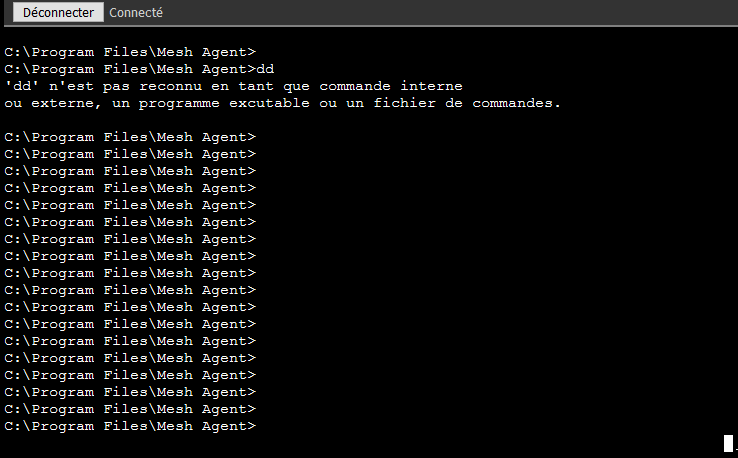
Terminal work fine with all basic command ipconfig / dir / type but when i do a Meshagent -name stdout no work
Scaff31
on 13 Jan 2021
I mentioned it above, but for disabling agent updates from the server, add this line to the settings section of the config.json:
"noagentupdate": true
Thanks now all is working fine, just need to start the service.
MC-PM
on 13 Jan 2021
@krayon007 it's seem terminal was mega laggy, so it's not a real problem I think terminal work fine on other PC it's my VM who've an issue
Terminal work fine with all basic command ipconfig / dir / type but when i do a Meshagent -name stdout no work
Terminal can be buggy when you use windows older than Oct 2018, becuase those versions of windows do not have Microsoft's PseudoConsole API. We dynamically try to use it if available... If you type osinfo in the console tab, the agent will report if it's supported, under ConPTY support.
krayon007
on 13 Jan 2021
@LPJon Yes, I got both your .msh files and Bryan is looking into it now. Just to make sure, you are saying that the larger .msh file with customization is NOT causing any issues, but the smaller .msh without customization is causing the agent update to fail? - Thanks.
Ylianst
on 13 Jan 2021
@LPJon Yes, I got both your .msh files and Bryan is looking into it now. Just to make sure, you are saying that the larger .msh file with customization is NOT causing any issues, but the smaller .msh without customization is causing the agent update to fail? - Thanks.
This is 100% correct!
LPJon
on 13 Jan 2021
@LPJon Yes, I got both your .msh files and Bryan is looking into it now. Just to make sure, you are saying that the larger .msh file with customization is NOT causing any issues, but the smaller .msh without customization is causing the agent update to fail? - Thanks.
This is 100% correct!
@LPJon, on one of your failed agents, can you run the following command, and tell me what the commitHash value is?
MeshAgent -info
krayon007
on 13 Jan 2021
@krayon007 Here it is but I was able to get all my agents back online by update so this agent is now working. Is that what you're looking for? This is a client agent that originally failed though
Hash: 12230f8ce7d1094275e5b5fa4c88fe88aa1293d5
LPJon
on 13 Jan 2021
Just an update on this issue. I have created a system to test agent update/downgrades and have found there is certainly a problem. I am replicate update issues quite quickly now. Bryan is working on it, I am probably going to hold off on any new releases for a few days until we root cause this.
Basically, I install MeshCentral servers of two different versions with the same configuration and database and stop one and start the other to force agent updates. It's not often, but agents do fail to update. My favorite theory is that significant speed improvements in v0.7.47 have made the server much faster and caused issues with the agent to show up a lot more. This is just a theory at this point, still investigating it.
Ylianst
on 13 Jan 2021
@Ylianst May try initially starting with a default agent config of MeshCentral and then try adding a custom agent config to the second server. In other words try to get the agent to update from a default agent config to a customized agent config on the client side and see how it handles it.
LPJon
on 13 Jan 2021
for what it is worth, im having also one laptop with an customized meshagent, and its is not causing any problems.
this is my config.
"agentCustomization": {
"displayName": "Remote support tool Peter IT",
"description": "Hiermee wordt door de agent op de achtergrond de externe monitoring, beheer en assistentie geregeld.",
"companyName": "Peter IT services",
"serviceName": "IT-support",
"fileName": "IT-support"
},
petervanv
on 13 Jan 2021
I applied the update to 7.47 yesterday before seeing this thread, also lost all my windows clients.
I have rolled back to 7.45 but want to check, to get the windows clients back are the fixes to add the following to the config ?:
"AgentPong": 20,
"noagentupdate": true,
Thanks
 drnikcuk
on 13 Jan 2021
drnikcuk
on 13 Jan 2021
I applied the update to 7.47 yesterday before seeing this thread, also lost all my windows clients.
I have rolled back to 7.45 but want to check, to get the windows clients back are the fixes to add the following to the config ?:
"AgentPong": 20,
"noagentupdate": true,Thanks
You don't need the agentpong, that was an unrelated issue.
krayon007
on 13 Jan 2021
Thanks for confirming, I've added the noagentupdate in ... is there any other step required (my windows clients are still missing)
drnikcuk
on 13 Jan 2021
Thanks for confirming, I've added the noagentupdate in ... is there any other step required (my windows clients are still missing)
If after waiting about 10 minutes, if the windows clients don't come back you may need to do one or all of the following:
- Rollback the server to 0.7.45
- Kill MeshAgent Update processes in Windows Task Manager
- Kill all MeshAgent process in Windows Task Manager
- Restart MeshAgent service on Windows Client
- Reboot windows client
I took the easier way and rolled back to 0.7.45 and rebooted Windows clients and they all came back.
For Windows server, I just killed the processes in Task Manager and restart MeshAgent service.
pmoncho99
on 13 Jan 2021
Thanks for the reply, 2,3,4,5 all require me to phone a whole load of clients.
I'm gonna sit on it for a couple of days too allow them to reboot without prompting !
drnikcuk
on 13 Jan 2021
what is happening to this? is it safe to upgrade to the latest version?
 uldiseihenbergs
on 17 Jan 2021
uldiseihenbergs
on 17 Jan 2021
I would hold off updating until v0.7.48 comes out. Many improvements have been made. Work is probably all done on it, but I will be doing a lot of testing tomorrow. Starting with v0.7.48:
- We now have two different ways for updating the MeshAgent using two completely different pathways.
- We have a new agent version indicator so when an agent connects, we can change the server behavior based on how old the agent is.
- We now have a way to manually update the agent so, if you want to turn off automatic agent update and do it manually, you can.
- We now have a way to stress test both agent update paths. So we can perform 1000's of agent updates before doing a new agent release.
- The existing agent update pathway was simplified and is way more stable.
Lots of work by Bryan on this. Hopefully will have a new version out in the next two days.
Ylianst
on 17 Jan 2021
Last night MeshCentral v0.7.48 was published with the improvements above. The biggest change is that there are two way for MeshCentral to update the agent now with two very different code paths.

If you want, you can turn off agent automatic update by adding the following line in the settings section of the config.json:
"noagentupdate": true
This will work on any version of MeshCentral. Then, you can go in the agent's console tab and type "versions" to see the agent version and starting with v0.7.48, you can type agentupdate to manually trigger an agent update.
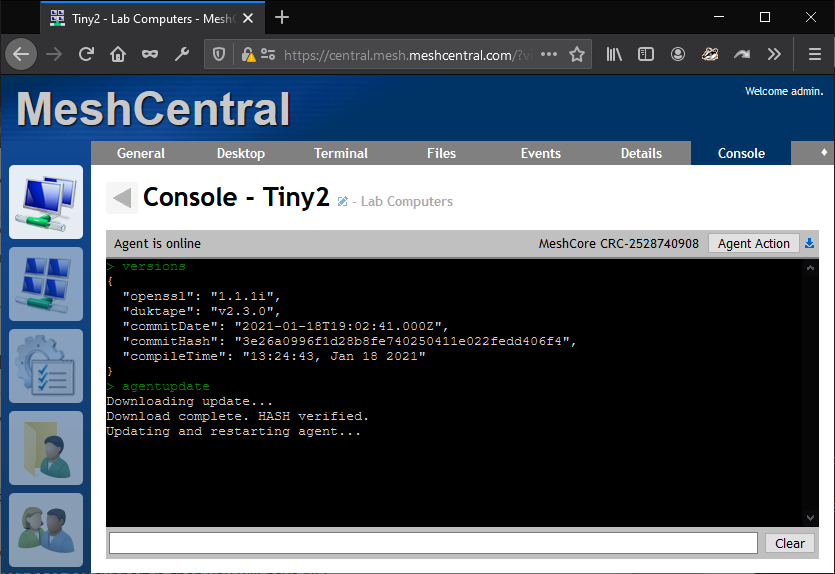
This said, I think the most important new development is that we have a automated way to test the agent update path 1000's of times before a release. This should make a big difference.
Ylianst
on 19 Jan 2021
@Ylianst I just updated from 7.43 to 7.48 and am seeing this disconnect behavior. It is happening every couple minutes as described and effect remote desktop as well as terminal.
 kevinh-csalabs
on 20 Jan 2021
kevinh-csalabs
on 20 Jan 2021
Our events state "Ended desktop session" and almost always end at _exactly_ 100 seconds - I see only 2 in my testing yesterday that were more: one was 126 seconds the other was 219 seconds across 15 attempts.
kevinh-csalabs
on 21 Jan 2021
Our events state "Ended desktop session" and almost always end at _exactly_ 100 seconds - I see only 2 in my testing yesterday that were more: one was 126 seconds the other was 219 seconds across 15 attempts.
This issue looks unrelated to the update issue described in the original post... Your issue looks like an idle-timeout issue on the tunnel connections. Do you have a proxy or reverse proxy between your client and server?
krayon007
on 21 Jan 2021
@krayon007 Meshcentral server is behind Cloudflare, but it has been since before this issue started. Agents are not behind a proxy.
kevinh-csalabs
on 21 Jan 2021
@Ylianst Confirmed this problem is still happening in 0.7.53 (Issue didn't happen <=0.7.43. I didn't try anything .44-.47). Problem happens both with standard and multiplex connections.
Issue appears to be related to: https://support.cloudflare.com/hc/en-us/articles/115003011431-Error-524-A-timeout-occurred#524error
kevinh-csalabs
on 26 Jan 2021
I have couple of clients with disconnecting issue, updated to latest 0.7.53, but issue is still there - here are the trace from MC2
17:49:13 - AGENT: Verified agent connection to 2LMrpni2OpnP@****** (92.207.xxx.xxx:47346).
17:49:12 - AGENT: New agent at 92.207.xxx.xxx:47346
17:48:10 - AGENT: Agent disconnect 2LMrpni2OpnP@****** (92.207.xxx.xxx:47328) id=3
17:46:57 - AGENT: Verified agent connection to k1xc3vGgt5RMWe@******* (92.207.xxx.xxx:59742).
17:46:56 - AGENT: New agent at 92.207.xxx.xxx:59742
17:46:16 - AGENT: Verified agent connection to 2LMrpni2OpnP@****** (92.207.xxx.xxx:47328).
17:46:14 - AGENT: New agent at 92.207.xxx.xxx:47328
17:45:54 - AGENT: Agent disconnect k1xc3vGgt5RMWe@******* (92.207.xxx.xxx:59660) id=3
17:45:13 - AGENT: Agent disconnect 2LMrpni2OpnP@****** (92.207.xxx.xxx:47306) id=3
17:36:57 - AGENT: Verified agent connection to k1xc3vGgt5RMWe@******* (92.207.xxx.xxx:59660).
17:36:56 - AGENT: New agent at 92.207.xxx.xxx:59660
17:36:16 - AGENT: Verified agent connection to 2LMrpni2OpnP@****** (92.207.xxx.xxx:47306).
17:36:15 - AGENT: New agent at 92.207.xxx.xxx:47306
17:35:54 - AGENT: Agent disconnect k1xc3vGgt5RMWe@******* (92.207.xxx.xxx:59615) id=3
17:35:13 - AGENT: Agent disconnect 2LMrpni2OpnP@****** (92.207.xxx.xxx:47279) id=3
17:31:09 - AGENT: Verified agent connection to k1xc3vGgt5RMWe@******** (92.207.xxx.xxx:59615).
 vitko-bg
on 26 Jan 2021
vitko-bg
on 26 Jan 2021
I confirmed that in my case at least it is 100% related to cloudflare closing out the websocket after 100 seconds per: https://support.cloudflare.com/hc/en-us/articles/115003011431-Error-524-A-timeout-occurred#524error
The issue goes away as soon as cloudflare is disabled. Not sure what changed on the meshcentral side, but it was working fine until recently. Would definitely feel much better behind a filtered connection.
@Ylianst any chance we can roll back whatever caused this to break? Could this commit causing the problems?
https://github.com/Ylianst/MeshCentral/commit/34b46f6346c1f649aa45c2571274a66fa06a88c9
kevinh-csalabs
on 1 Feb 2021
Not sure if it's related, just thinking out loud, as I don't think there were any changes that were made for a while that could affect this, but @Ylianst can chime in. However, I do know that by default the idle timeout on the agent for sending pings is 2 minutes which is slightly longer than 100 seconds, which could cause your connections to get dropped. Have you tried making the idle timeout on the agent smaller such that it would send pings more frequently?
krayon007
on 2 Feb 2021
Ok, still not sure why this broke, but at least so far setting AgentPing to 90 seems to have fixed things. @krayon007 Can we get a default that when Setting trustedproxy to Cloudflare it updates the agentping to <100 to avoid others running into the same issue?
kevinh-csalabs
on 5 Feb 2021
Related issues
 veitw
·
4Comments
veitw
·
4Comments
 robclay
·
3Comments
petervanv
·
3Comments
robclay
·
3Comments
petervanv
·
3Comments
 PathfinderNetworks
·
3Comments
PathfinderNetworks
·
3Comments
 MailYouLater
·
4Comments
MailYouLater
·
4Comments
Most helpful comment
I would hold off updating until v0.7.48 comes out. Many improvements have been made. Work is probably all done on it, but I will be doing a lot of testing tomorrow. Starting with v0.7.48:
Lots of work by Bryan on this. Hopefully will have a new version out in the next two days.