Meshcentral: "Unable to perform authentication" since 0.7.41
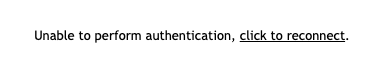
2FA is enabled
0.7.40 is still working fine, all versions after .40 give the error.
in front: caddy proxy with Lets Encrypt
"Settings": {
...
"TLSOffload": true
"Cert": "some.domain.com"
...
"Domains": {
...
"CertUrl": "https://some.domain.com/",
...
 vtacquet
All 26 comments
Oh, I think I can fix that. However, if you change:
"TLSOffload": true
to
"TLSOffload": "127.0.0.1"
That may fix it. Instead of 127.0.0.1, you should put the private IP address of Caddy. This is more secure that using "true" and will likely fix the problem until put out a fix for this.
 Ylianst
on 8 Jan 2021
Ylianst
on 8 Jan 2021
In "meshcentral-data", if you can post the last few errors in the "mesherrors.txt" file, that would be great. I would not need to guess what the problem is. Thanks.
Ylianst
on 8 Jan 2021
tried with
"TLSOffload": "caddy.docker_default"
and with
"TLSOffload": "caddy"
and with IP
"TLSOffload": "172.18.0.13"
none of the options are working
last error in mesherror.txt is still about the version prior to the name resolution fix
-------- 1/2/2021, 1:20:15 PM ---- 0.7.31 --------
/meshcentral/node_modules/proxy-addr/index.js:163
throw new TypeError('invalid IP address: ' + str)
^
TypeError: invalid IP address: caddy
at parseipNotation (/meshcentral/node_modules/proxy-addr/index.js:163:11)
at compileRangeSubnets (/meshcentral/node_modules/proxy-addr/index.js:126:23)
at Function.compile (/meshcentral/node_modules/proxy-addr/index.js:112:23)
at exports.compileTrust (/meshcentral/node_modules/express/lib/utils.js:238:20)
at Function.set (/meshcentral/node_modules/express/lib/application.js:372:34)
at serverStart (/meshcentral/node_modules/meshcentral/webserver.js:4887:68)
at /meshcentral/node_modules/meshcentral/webserver.js:262:17
at /meshcentral/node_modules/meshcentral/db.js:1181:107
at newArguments.
at Cursor.execFn (/meshcentral/node_modules/nedb/lib/datastore.js:484:12)
vtacquet
on 8 Jan 2021
I already disabled 2FA before upgrading just to confirm it is not 2FA, and the error remains
vtacquet
on 8 Jan 2021
Oh. So, on older versions like 0.7.31, it does not support performing DNS resolving for "TLSOffload" option. So this is expected to fail.
"TLSOffload": "caddy"
"TLSOffload": "caddy.docker_default"
It will only work on very latest versions. "TLSOffload": "172.18.0.13" should work??
Ylianst
on 8 Jan 2021
correct but with the newer versions neither "true", "ip" or "name" is working, I can no longer connect
vtacquet
on 8 Jan 2021
When you see the "Unable to perform authentication". Can you open your browser console and cut & paste any errors you see?
Ylianst
on 8 Jan 2021
noauth-2 - meshcentral.js:50
vtacquet
on 8 Jan 2021
Ha! Hold on.
Ylianst
on 8 Jan 2021
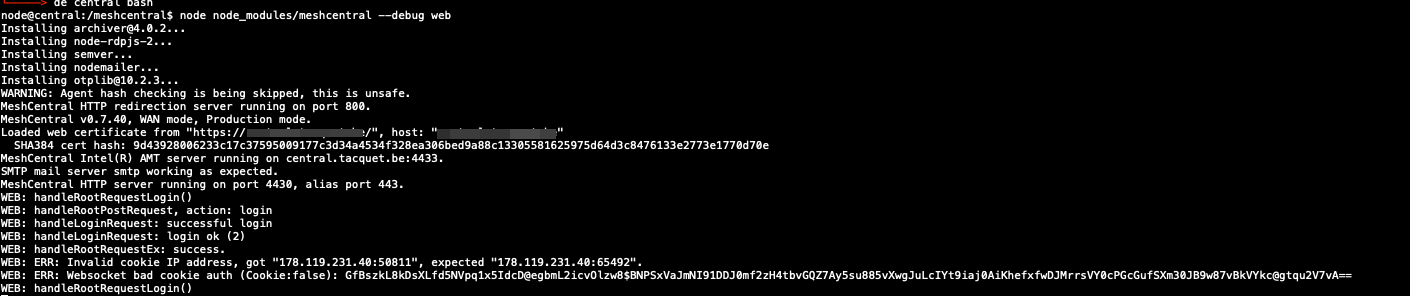
If you manually start the server using:
node node_modules/meshcentral --debug web
You will see the exact problem when you login, but looking into this.
Ylianst
on 8 Jan 2021
vtacquet
on 8 Jan 2021
oh wait I used the wrong build
vtacquet
on 8 Jan 2021
OHHH!!! Ok. In the settings section of the config.json, add this:
"cookieipcheck" : false
This will fix it for now. I need to look at why the port number was encoded in the cookie.
Ylianst
on 8 Jan 2021

vtacquet
on 8 Jan 2021
Yes, I see. Same problem, the port number is encoded in the cookie's IP address and so, being rejected. "cookieipcheck" : false will fix that.
Ylianst
on 8 Jan 2021
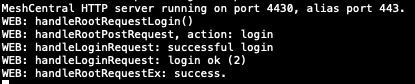
Perfect, thank you very much @Ylianst !
vtacquet
on 8 Jan 2021
If I can fix that, in future version you can turn on "cookieipcheck" again for extra security.
Ylianst
on 8 Jan 2021
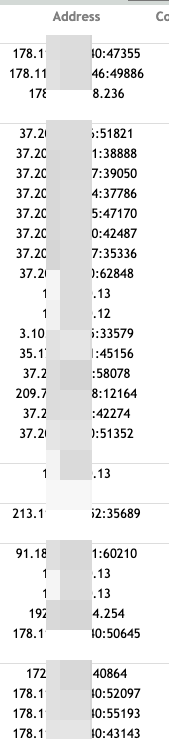
I can also confirm the Address part is working as expected and is now showing the real IP address and no longer the internal proxy IP !
vtacquet
on 8 Jan 2021
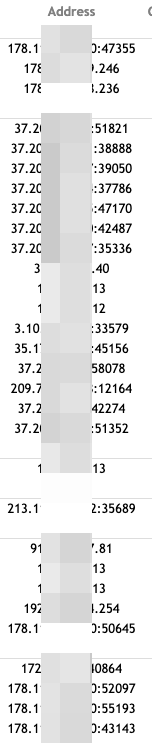
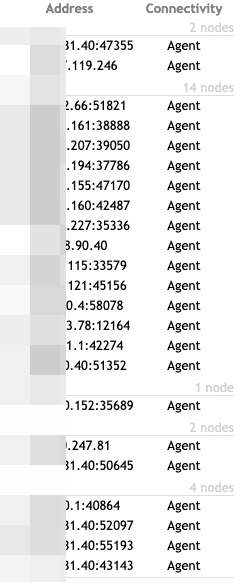
Yes, but it should not be showing the port numbers. The problem is Caddy seems to be setup to put the port number in the 'x-forwarded-for' header which is not expected. If you can change the configuration to remove the port, that would be great. I just finished making a change to detect and remove the port if present.
Ylianst
on 8 Jan 2021
I suspect the problem was not MeshCentral, but a change to the Caddy configuration. Not to worry, I am going to handle this case.
Ylianst
on 8 Jan 2021
MeshCentral v0.7.45 is out. I was releasing it anyway and added this fix. Let me know if it works. Ports should not show up and you can re-enable cookieipcheck. Let me know what you see.
Ylianst
on 8 Jan 2021
Ports are still showing with .45
vtacquet
on 8 Jan 2021
Arg. Ok, I must not have caught it at the right place.
Ylianst
on 8 Jan 2021
If it can help you... it seems that all Windows machines are only showing agent IPs and all Linux machines are showing agent IPs and ports !
vtacquet
on 8 Jan 2021
Oh, interesting.
Ylianst
on 8 Jan 2021
In the next version of MeshCentral, v0.7.47, you can now go in the "My Server / Trace" tab and have the server show the incoming HTTP headers in real time. Once it's released, if you can capture a few headers and send them over, it's going to be easier to see what is going on.
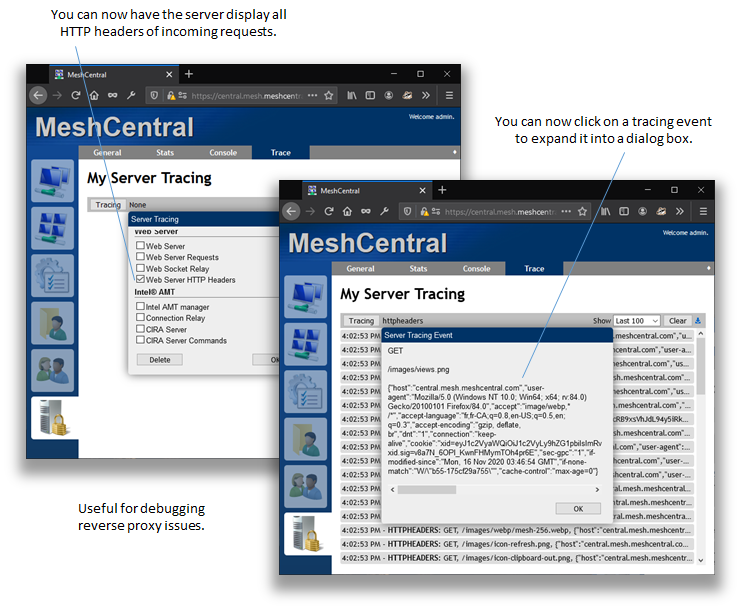
This new feature will make it easier to debug reverse-proxy issues. You can also do:
node node_modules/meshcentral --debug httpheaders
Related issues
 MailYouLater
·
4Comments
MailYouLater
·
4Comments
 hellofaduck
·
3Comments
hellofaduck
·
3Comments
 M1CK431
·
3Comments
M1CK431
·
3Comments
 Julien-asv
·
3Comments
Julien-asv
·
3Comments
 petervanv
·
3Comments
petervanv
·
3Comments