Meshcentral: Make desktop toolbar universal for all clients
I noticed that interactive agents are not "kept" listed in the device group when they go offline and stop running the agent. This is not like the regular agents.
It doesn't bother me that they are not listed, except that the user consent parameters do not stick. Specifically, I want all agents to have connection toolbar present. Actually, that's more of my problem. How can I make that a universal setting for all agents? Then I would not need them to be listed at all times. thank you.
 valnar1
All 10 comments
I looked in the advanced config.json example and do not see the setting.
valnar1
on 26 Nov 2020
Ha correct, right now interactive agent don't stay. This is because this sort of expected that the interactive agents would create a new device identifier each time and so, if we kept the device it's possible you would see a "new" device each time they connect. If you like, I could create a server setting to never remove a device when it's interactive?
 Ylianst
on 26 Nov 2020
Ylianst
on 26 Nov 2020
That would be useful, but my primary purpose is just to make the desktop toolbar universal for all clients. I cannot find that config setting, so that would be better. thanks.
valnar1
on 26 Nov 2020
I don't have a spare computer to test this with at the moment but what I believe should work would be setting the user consent options for the group that you're inviting these interactive agents to (either via the Add Agent or Invite links on the group itself). I know for background agents at least, I have a group that requires user consent and the privacy bar visible set on the group itself, not on the individual clients, and it functions as expected so I'd guess it would work the same if the temporary agent gets added to a group with those settings.
 PetieM
on 27 Nov 2020
PetieM
on 27 Nov 2020
I don't see the setting to set it for the group. I've checked all the config options.
There are settings to control consent but not the privacy bar all by itself, from what I can see. I don't need consent, just the privacy bar.
valnar1
on 27 Nov 2020
To make the desktop toolbar universal for all clients, add the following to the domain section of the config.json:
"userconsentflags": 64
Starting with MeshCentral v0.7.3, you can also do this:
      "userConsentFlags": {
        "desktopnotify": true,
        "terminalnotify": true,
        "filenotify": true,
        "desktopprompt": true,
        "terminalprompt": true,
        "fileprompt": true,
        "desktopprivacybar": true
      },
This allows you to specify the required user consent flags for the entire domain. Let me know if that works.
Ylianst
on 27 Nov 2020
To be clear, you don't need to update, just put this line in the domain section of your current version:
"userconsentflags": 64
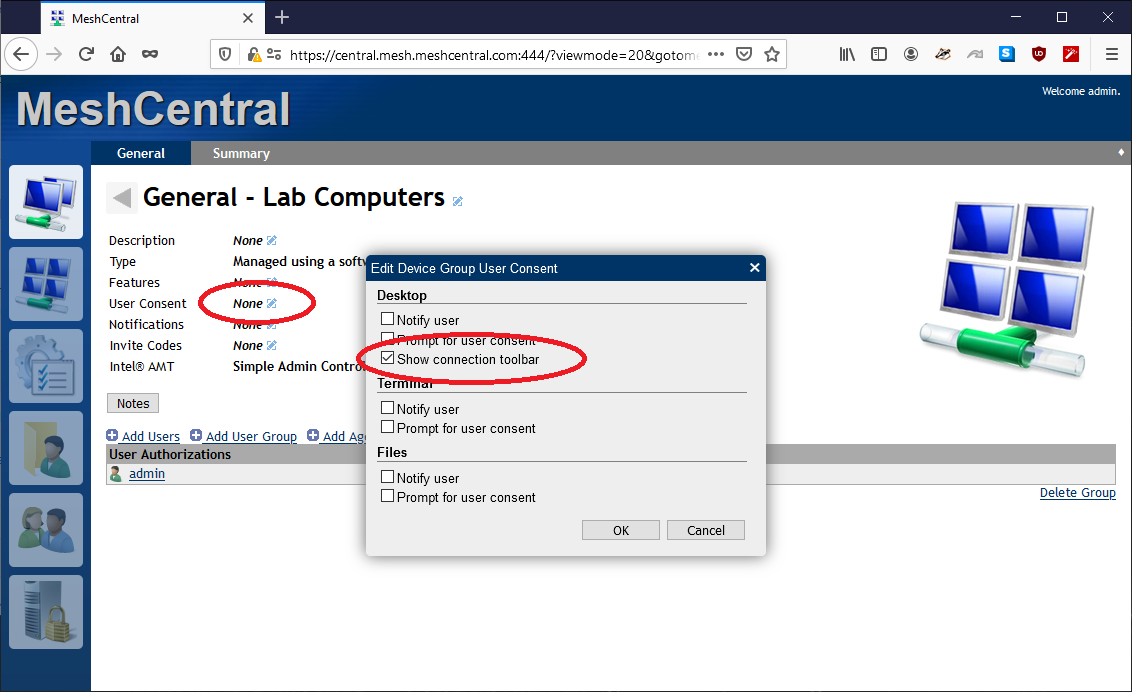
Ylian's method is definitely best for forcing it on the entire server but for reference, I was referring to settings on the web interface, not the config file. From the My Account tab, you can click on a group and then click the edit button next to User Consent to set required options for just that individual group if you don't want to apply it to the entire server/domain.
PetieM
on 27 Nov 2020
You are correct. You can set this option for a device group like this:
Ylianst
on 27 Nov 2020
Thanks everyone
valnar1
on 28 Nov 2020
Related issues
 coolwormgit
·
3Comments
coolwormgit
·
3Comments
 guerby
·
3Comments
guerby
·
3Comments
 veitw
·
4Comments
veitw
·
4Comments
 vish84
·
3Comments
vish84
·
3Comments
 LPJon
·
3Comments
LPJon
·
3Comments