Meshcentral: Add loginkey for MeshCentralRouter
Hey. It will be very cool if you add the key for the server to meshcentralrouter. In our network, each employee has access to his computer through it. And there are a couple of admins. I would like to be able to hide all admins if they quit. Otherwise, each employee will have to change the password in router. I would be glad if this is possible. thank
 vyacheslav25
All 8 comments
OMG. Excellent idea. I will add that tomorrow. Totally makes sense.
 Ylianst
on 18 Sep 2020
Ylianst
on 18 Sep 2020
I just check in all the changes for this, it will be in MeshCentral v0.6.42. This adds some level of added security as the websocket connection to "control.ashx" is now blocked by the loginkey. You will need to update MeshCentral Router because starting with v0.6.42, you can't connect anymore unless you have the login key.
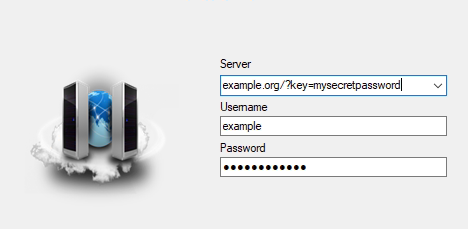
Note that in MeshCentral Router you add ?key=xxx to the server like this:
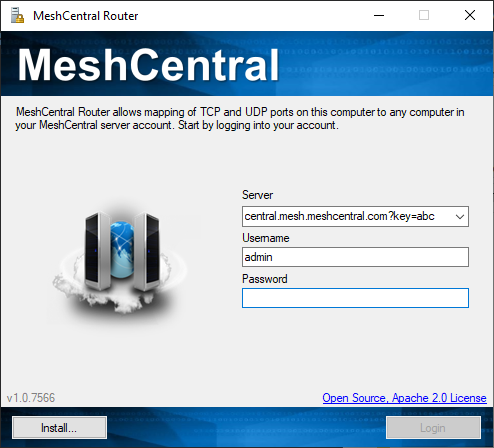
I also added login key support to MeshCtrl.js and MeshCmd since both of these are also impacted.
Ylianst
on 18 Sep 2020
Just published MeshCentral v0.6.42 with updated MeshCentral Router that includes LoginKey support and new file manager. Let me know if it works.

Ylianst
on 20 Sep 2020
The key works. But the program itself doesn't work. I can not connect via rdp and other protocols. The new menu opens, but does not connect.
vyacheslav25
on 21 Sep 2020
Ok, checking this.
Ylianst
on 21 Sep 2020
Just tried it and the port mapping works for me. Can you run MeshCentral Router with -debug, try again and send me the resulting debug.log file privately? My contact is here. Thanks.
Ylianst
on 21 Sep 2020
Sorry. We rolled back meshcentral to stable release. The new version of the router fully works with the stable release.
I can run it in debug if necessary
vyacheslav25
on 22 Sep 2020
Yes, please send over the debug.log when you can. Please clear the file, run -debug, make the error happen and then send me the file. Thanks.
Ylianst
on 22 Sep 2020
Related issues
 guerby
·
3Comments
guerby
·
3Comments
 nroach44
·
3Comments
nroach44
·
3Comments
 haxmachine
·
3Comments
haxmachine
·
3Comments
 LPJon
·
3Comments
LPJon
·
3Comments
 darryl-h
·
3Comments
darryl-h
·
3Comments
Most helpful comment
Just published MeshCentral v0.6.42 with updated MeshCentral Router that includes LoginKey support and new file manager. Let me know if it works.