Meshcentral: Feature Request/Question: Shared Clipboard
The manual set/get clipboard feature seems to be working very well so far but can be a little user-unfriendly at times. Are there any plans to implement a more transparent "shared" clipboard mode? Is this even feasible through a browser or would the method to poll and replace the clipboard need to be repeated so frequently for this to work that it just wouldn't be efficient?
 PetieM
All 13 comments
It's not possible to do this thru the browser as having a web application grab the clipboard automatically would be a security issue. This said, I am going to leave this one open since I had some related work I wanted to do.
 Ylianst
on 9 Aug 2020
Ylianst
on 9 Aug 2020
Makes sense. I had a feeling there was something preventing this from happening transparently. Thanks for the clarification regardless.
PetieM
on 9 Aug 2020
+1
 southeasterntech
on 10 Aug 2020
southeasterntech
on 10 Aug 2020
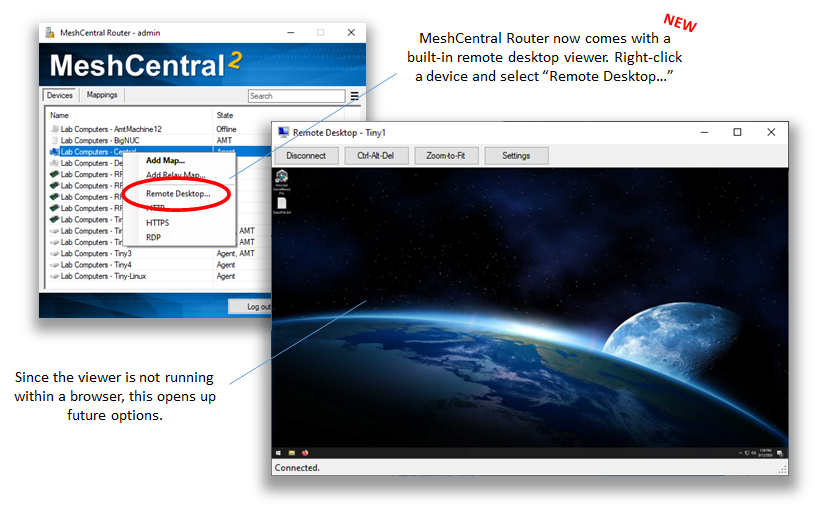
Just published MeshCentral v0.6.6. The new MeshCentral Router has a built-in remote desktop viewer. It's not great yet, plenty of things are not right, but since this viewer is not web based, there are more options for clipboard sync, etc.
Ylianst
on 12 Aug 2020
Have tried it - looks a great option, but still no clipboard transfer between client and my PC - both directions .....
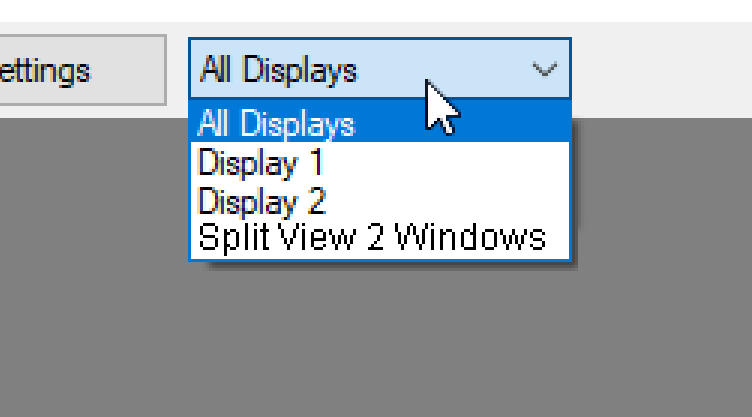
Also, on multiscreen client - may a screen split option be added please, so if 2 screens are on client PC so viewer can split on 2 different windows? I think it will be an amazing option! Just my thoughts :)
Sample :
 vitko-bg
on 13 Aug 2020
vitko-bg
on 13 Aug 2020
It's not possible to do this thru the browser as having a web application grab the clipboard automatically would be a security issue. This said, I am going to leave this one open since I had some related work I wanted to do.
@Ylianst I have to offer a correction here. It is possible and has been for some time. This is the browser API that makes it possible, which is supported by virtually all modern browsers: https://developer.mozilla.org/en-US/docs/Web/API/Clipboard_API
An example of an open-source web application which uses this API for real-time two-way clipboard synchronization is Neko: https://github.com/nurdism/neko
I recorded a little clip to show what it looks like in action: https://xbb.datahoarder.dev/VUSu3/cEnAXEri49.webm
 whalehub
on 14 Aug 2020
whalehub
on 14 Aug 2020
Oh my!!! I have to check this out. Thank you for the information. Also, the multi-display selector on the MeshCentral Router Desktop Viewer should work now, it's been fixed in a later version.
Ylianst
on 19 Aug 2020
@Ylianst You're welcome. 👍
whalehub
on 19 Aug 2020
Hi @Ylianst , when you say the multi-display selector on the MeshCentral Router Desktop Viewer should work now, it's been fixed in a later version. what did you meant?
Just tried it now with the latest MC version 0.6.13, redownloaded MC Router - and it is still the same - no clipboard is captured both directions ......
BTW - shall I open another enhancement issue in regards to Split Screen view? Thanks.
vitko-bg
on 19 Aug 2020
@vitko-bg I don't understand your comment. There is no clipboard sync yet in MeshCentral Router, this is normal, I did not build that yet. Does the multi-display selector work?
Ylianst
on 19 Aug 2020
Sorry @Ylianst - I thought it is releasead :) because in your comment about viewer you mentioned there are more options for clipboard sync, etc. Did not know that it is not implemented yet.
In regards to multi-display - yes, it is working fine, but only when MC Router is started as administrator. Possibly it is related to file location, in my case it is in Program Files/ Mesh Agent
When MC Router is started as normal user(let's say from MC webUI-> Lauch Router) - cannot connect to any of the devices ....

P.S. Is it possible to have two Router Viewers when connecting to a two screen clients? Viewer1 to show screen one, viewer 2 to show screen two ?!?!?
vitko-bg
on 19 Aug 2020
Just published MeshCentral v0.6.14 with new quick clipboard buttons. I will need to look at more automation, but for now, buttons a good improvement.

Ylianst
on 20 Aug 2020
Working great so far, thank you! This way is significantly more efficient than the older clipboard button (which now seems a bit redundant).
Also, double thanks for including this for Mac hosts as well - I just tested and it's working well with them too!
PetieM
on 20 Aug 2020
Related issues
whalehub
·
3Comments
 PathfinderNetworks
·
3Comments
PathfinderNetworks
·
3Comments
 hellofaduck
·
3Comments
hellofaduck
·
3Comments
 LPJon
·
3Comments
LPJon
·
3Comments
 Julien-asv
·
3Comments
Julien-asv
·
3Comments
Most helpful comment
Just published MeshCentral v0.6.6. The new MeshCentral Router has a built-in remote desktop viewer. It's not great yet, plenty of things are not right, but since this viewer is not web based, there are more options for clipboard sync, etc.