Meshcentral: Send invitation presenting an individual desktop
Is it, or would it be possible to send an invitation via email to present an individual desktop without a login? Or with an automatic login using a guest account?
 frankmcc
All 16 comments
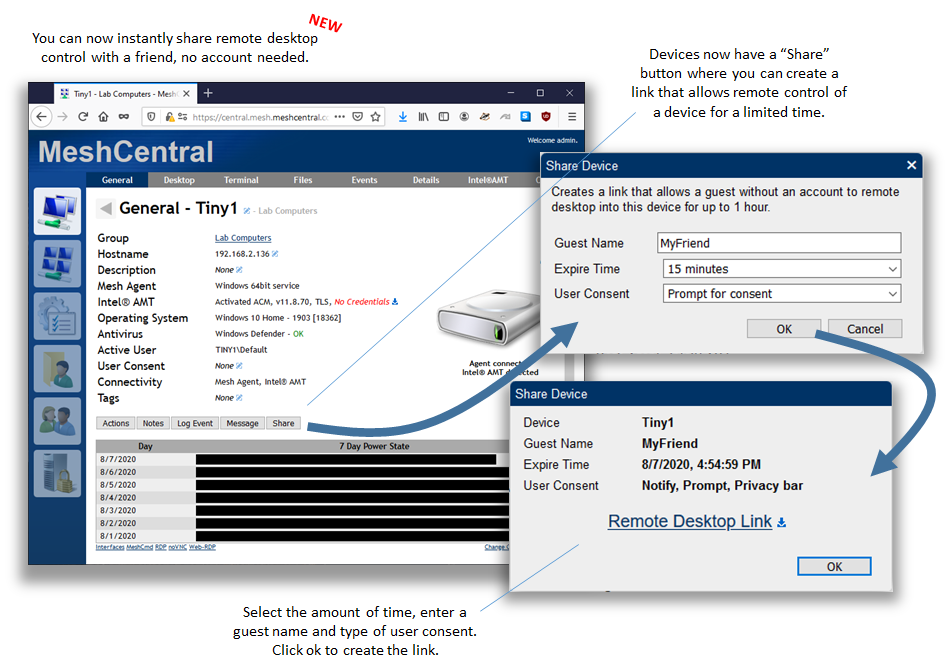
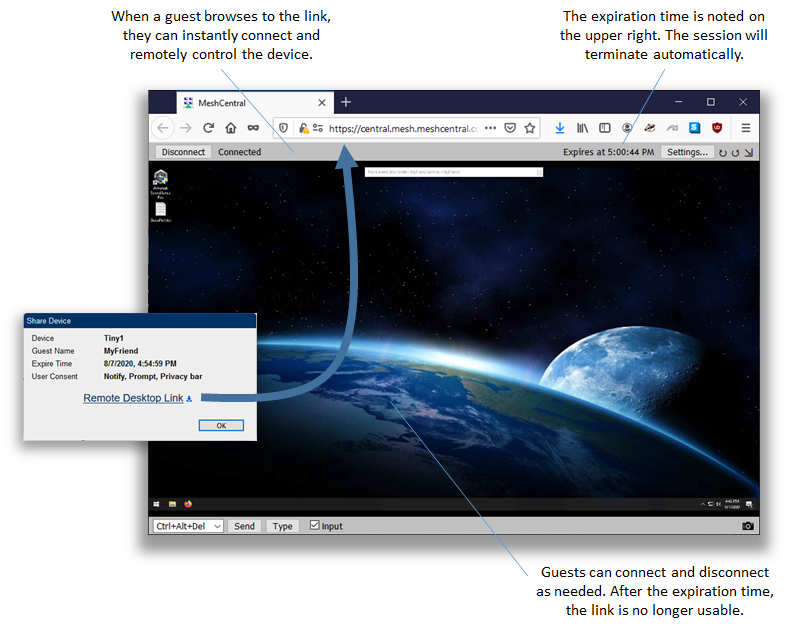
Just released that feature with MeshCentral v0.6.3. Feedback appreciated.
 Ylianst
on 8 Aug 2020
Ylianst
on 8 Aug 2020
@Ylianst, this is AMAZING! Such a handy feature! Just tested and it works beautifully!
 asasin114
on 8 Aug 2020
asasin114
on 8 Aug 2020
Dude, you rock!
On Fri, Aug 7, 2020, 7:53 PM Ylian Saint-Hilaire notifications@github.com
wrote:
Just released that feature with MeshCentral v0.6.3. Feedback appreciated.
[image: image]
https://user-images.githubusercontent.com/1319013/89696826-6f46e080-d8ce-11ea-88bd-9d5524de9482.png[image: image]
https://user-images.githubusercontent.com/1319013/89696831-740b9480-d8ce-11ea-87c0-112ab621e546.png—
You are receiving this because you authored the thread.
Reply to this email directly, view it on GitHub
https://github.com/Ylianst/MeshCentral/issues/1688#issuecomment-670788519,
or unsubscribe
https://github.com/notifications/unsubscribe-auth/AGJ33K2EJQDHLJYTEXSGXZTR7SHYBANCNFSM4PXUJV2A
.
frankmcc
on 8 Aug 2020
SUPER!!! Thanks this will be very handy indeed
 johnnyq
on 8 Aug 2020
johnnyq
on 8 Aug 2020
This seems like a potentially awesome feature but I'm running into an issue I suspect others might see as well - it respects the userAllowedIP setting which limits its usefulness for those who have locked down access to the server. Could this be exempted from that restriction or can an option be added to the config to optionally allow guest access outside of the allowed IPs?
 PetieM
on 8 Aug 2020
PetieM
on 8 Aug 2020
I just fixed it does that shared remote desktop links can be loaded from any IP address. This will be in MeshCentral v0.6.5.
Ylianst
on 10 Aug 2020
Ylian this is pretty amazing... testing it this AM, and it seems the remote user doesn't have keyboard, but can use the "type" button. Mouse works, they can see the screen fine as well. (FYI, Using Caddy reverse proxy)
 southeasterntech
on 11 Aug 2020
southeasterntech
on 11 Aug 2020
Your right, keyboard does not work. Fixing that now.
Ylianst
on 11 Aug 2020
MeshCentral v0.6.5 is out. has the desktop sharing keyboard fix and guest page should be loadable from any IP address. Let me know if that works.
Ylianst
on 11 Aug 2020
Confirmed guest access and keyboard are working even when access to the main interface is restricted. A couple of notes though:
- There does not seem to be a way to revoke guest access once they have the link. Having an option to do this would be useful.
- The prompt/notify feature for guest connections does not seem to be working. I'm not sure if it's because the computer I tested with is set to not require notification or consent but I'd think the guest invite would override that preference.
Those two issues combined are a potential security problem (albeit a minor one since the links do expire and need to be sent by a logged in user anyway) unless I'm misunderstanding something here.
PetieM
on 11 Aug 2020
Confirmed Keyboard fixed. Great work, great stuff!
Found a couple of new problems on 0.6.5 though
-Windows 2008R2 (yes I know it's EOL)
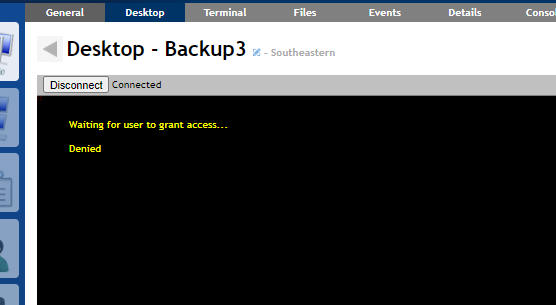
- Share Desktop, Prompt for Consent on.
- MC User does NOT connect to desktop yet
- Remote user connects to desktop first and is prompted with "Waiting for user to grant access" response.
- MC User connects 2nd
- MC User is also denied and presented with "Waiting for user to grant access" response
- Neither user can do anything
-Linux (Ubuntu Desktop 16.04? maybe)
- Share desktop, Prompt for Consent on.
- Remote user walks right in, no notification, no prompts for consent, has full control, no disconnect user bar.
- Gray bar at top does show two connected.
southeasterntech
on 12 Aug 2020
The user consent issue seems to be unrelated to this specific request. Even without using the sharing link, would this still happen?
Ylianst
on 16 Aug 2020
@Ylianst Is that directed at me or @southeasterntech? I was talking specifically about the consent options in the gust invite link creation dialogue not working as expected.
PetieM
on 16 Aug 2020
@Ylianst this feature rocks! But can you add an option in the share menu limit the access to view screen only without controls?
This would be most useful for presentations or software demo which we do very often.
 treicadani
on 20 Aug 2020
treicadani
on 20 Aug 2020
Following up on my previous security concerns, the prompt and privacy bar features now seem to work (as long as there is not an existing user connected via MeshCentral already - if there is, the prompt and privacy bar does not show up) but if prompt for consent was disabled when the link was created, there is no way to revoke access before the time limit expires. I'd like to propose showing a list of active sharing links on the device's general tab that can be revoked by an admin if needed to address this issue.
PetieM
on 26 Aug 2020
Can the share timeout be configured in the config.json? 1 hour is the current max and we sometimes need up to 8 hours.
frankmcc
on 9 Sep 2020
Related issues
 PathfinderNetworks
·
3Comments
PathfinderNetworks
·
3Comments
 robclay
·
3Comments
robclay
·
3Comments
 veitw
·
4Comments
veitw
·
4Comments
 unguzov
·
3Comments
unguzov
·
3Comments
 vish84
·
3Comments
vish84
·
3Comments
Most helpful comment
Just released that feature with MeshCentral v0.6.3. Feedback appreciated.