Meshcentral: Accept reject option during the Remote access
When ever we are taking the remote machine access the user might be working some confidential things. That time should we have any policy which will prompt the popup as "Accept" or "reject" the request like that?
This option is available in the Ultra VNC remote control Tool.
 aimdharma1990
All 9 comments
It is available on MC.
Check the documentation
 vitko-bg
on 21 Jul 2020
vitko-bg
on 21 Jul 2020
Hi.
Thanks for the communication, I have tried to find the documentation and i
couldn't find it. Can you please share the section which you are referring
to?
On Tue, Jul 21, 2020 at 4:50 PM vitko-bg notifications@github.com wrote:
It is available on MC.
Check the documentation—
You are receiving this because you authored the thread.
Reply to this email directly, view it on GitHub
https://github.com/Ylianst/MeshCentral/issues/1629#issuecomment-661796069,
or unsubscribe
https://github.com/notifications/unsubscribe-auth/ACFIMFZSEHDTTJA3VPAAWP3R4V2WBANCNFSM4PDKO56A
.
aimdharma1990
on 21 Jul 2020
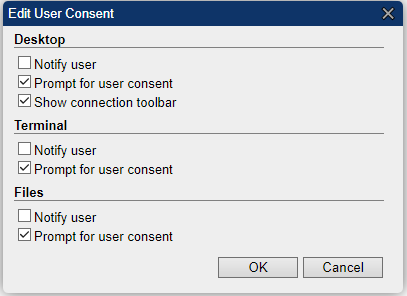
Use this option in your config.json file
"____UserConsentFlags__" : "Set to: 1 for desktop, 2 for terminal, 3 for files, 7 for all",
"UserConsentFlags" : 7,
OR
In user properties:
vitko-bg
on 21 Jul 2020
Thanks, It's working now.. In the target i am getting the popup
[image: image.png]
Will it be possible to change the time out for this? Can this message be
modified ?
On Tue, Jul 21, 2020 at 8:01 PM vitko-bg notifications@github.com wrote:
Use this option in your config.json file
"UserConsentFlags" : "Set to: 1 for desktop, 2 for terminal, 3 for
files, 7 for all",
"UserConsentFlags" : 7,OR
In user properties:
[image: image]
https://user-images.githubusercontent.com/59362521/88067702-3afdc100-cb67-11ea-8252-28dae185f594.png—
You are receiving this because you authored the thread.
Reply to this email directly, view it on GitHub
https://github.com/Ylianst/MeshCentral/issues/1629#issuecomment-661897316,
or unsubscribe
https://github.com/notifications/unsubscribe-auth/ACFIMF3HEFOHUPISRAEVSADR4WRFNANCNFSM4PDKO56A
.
aimdharma1990
on 22 Jul 2020
Currently the timeout is set to 30 seconds. If you open a different issue requesting this, I can make it configurable.
 Ylianst
on 23 Jul 2020
Ylianst
on 23 Jul 2020
" vitko-bg removed their assignment 11 seconds ago" - by mistake :)
vitko-bg
on 23 Jul 2020
Check that ( got it from different issue #1630 - may help you ):
"consentMessages": {
"Title": "MeshCentral",
"Desktop": "{0} ({1}) requesting remote desktop access. Grant access?",
"Terminal": "{0} ({1}) requesting remote terminal access. Grant access?",
"Files": "{0} ({1}) requesting remote files access. Grant access?"
},
"notificationMessages": {
"Title": "MeshCentral",
"Desktop": "{0} ({1}) started a remote desktop session.",
"Terminal": "{0} ({1}) started a remote terminal session.",
"Files": "{0} ({1}) started a remote files session."
}
vitko-bg
on 23 Jul 2020
@vitko-bg I just assigned you as a show of thank you for responding. No obligation on your part, but thanks for helping. Very much appreciated.
Ylianst
on 24 Jul 2020
@Ylianst no problems. Trying to help others as I was same in the beginning :)
You are alway welcome - thanks for all that you are doing for us!!!
@aimdharma1990 Did you managed to find and test those options? Is that resolving your issue?
vitko-bg
on 24 Jul 2020
Related issues
 penguinthingie
·
4Comments
penguinthingie
·
4Comments
 haxmachine
·
3Comments
haxmachine
·
3Comments
 MailYouLater
·
3Comments
MailYouLater
·
3Comments
 petervanv
·
3Comments
petervanv
·
3Comments
 hellofaduck
·
3Comments
hellofaduck
·
3Comments
Most helpful comment
@Ylianst no problems. Trying to help others as I was same in the beginning :)
You are alway welcome - thanks for all that you are doing for us!!!
@aimdharma1990 Did you managed to find and test those options? Is that resolving your issue?