Meshcentral: Meshcentral Router improvement
First of all thank you for MeshCentral, I love all of it, it's evolving and becoming better fast. A very good work!
I've recently discovered MeshCentral Router and, hey, it's super useful!!! In my use case I have several customers connected to MeshCentral and, using Router, I'm connecting to their SQL Server at port 1433 without having to connect to their desktop, that's super useful! Furthermore I'm connecting to LAN PanelPCs of some customers by having a customer server connected with MeshCentral.
So I mapped a port for every device/customer and stored those connections parameters in my SQL Server Management Studio and VNC client.
Then I discovered that closing and reopening the router all mappings are gone! That's a pity, would be so useful to store mappings so that you haven't to recreate them every time...
Do you think that could be an option for the future? :)
 energywave
All 5 comments
You can probably do that using meshcmd directly with a meshcmd config file
 TotallyNotElite
on 2 Jul 2020
TotallyNotElite
on 2 Jul 2020
Indeed, MeshCentral Router is pretty great. This is a valid ask, I will work on adding mappings load/save feature now. Hold on...
 Ylianst
on 3 Jul 2020
Ylianst
on 3 Jul 2020
I didn't used meshcmd, yet. It was on my roadmap 😉 thank you for the suggestion.
Hey, Ylian, I'm impressed about your productivity and how you're listening to your userbase. That's impressive. Thank you again 👍🏻
energywave
on 3 Jul 2020
I just updated MeshCentral Router with the ability to save and load port mappings. The new MeshCentral Rotuer will be in MeshCentral v0.5.79 when it's next published, but you don't need to wait. You can get it now here, or the multi-language version here.
In need to go in the mappings tab and hit the menu icon to open and save the mappings.
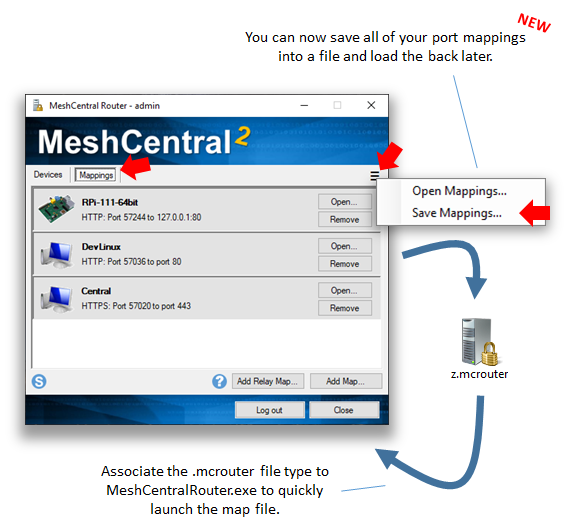
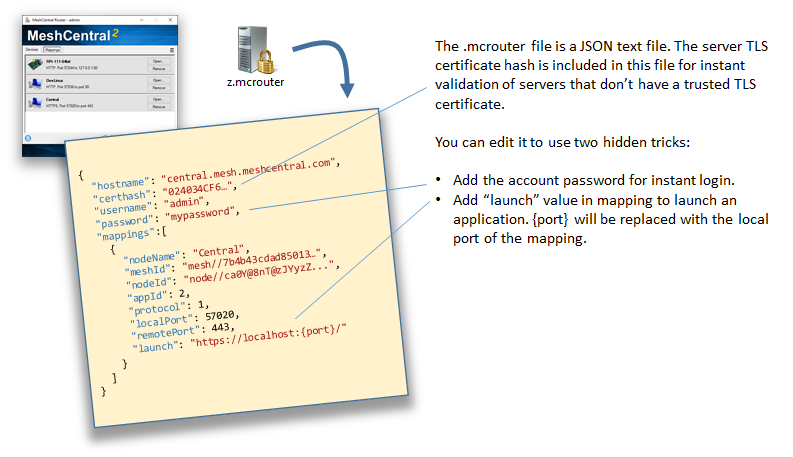
If you add a file association for .mcrouter to MeshCentralRouter.exe, you can double click on a .mcrouter file to open directly. Also, the .mcrouter file includes the hash of the TLS certificate of the server, so if you are not using a trusted TLS certificate, the validation will be automatic which is nice.
Lastly the .mcrouter files are JSON and you can edit them. Two tricks here, you can add your password in the file if you want instant login (but of course, could be a security risk). Also, you can add "launch" value to auto-launch a URL or executable. In the launch value, {port} is replaced with the local mapping port.
Hope this works for you.
Ylianst
on 4 Jul 2020
Hey! I'm astonished! In less than half a day you managed to create the update, test it, release it and mostly astonishing DOCUMENT it with some nice graphical documentation. Great work, Ylian.
Furthermore you made some valuable additions that's wonderful to have! The .mcrouter association with username and password and the LAUNCH parameter seems so promising to get things super speedy...
Thank you so much! I hope to test it monday at office.
energywave
on 4 Jul 2020
Related issues
 Julien-asv
·
3Comments
Julien-asv
·
3Comments
 penguinthingie
·
4Comments
penguinthingie
·
4Comments
 petervanv
·
3Comments
petervanv
·
3Comments
 LPJon
·
3Comments
LPJon
·
3Comments
 haxmachine
·
3Comments
haxmachine
·
3Comments