Meshcentral: Router: Quick mapping buttons grayed out?
Not sure when this started. Mesh Router related.
Mesh: 0.5.49
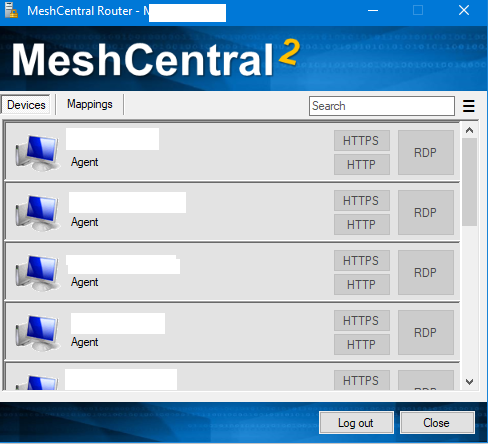
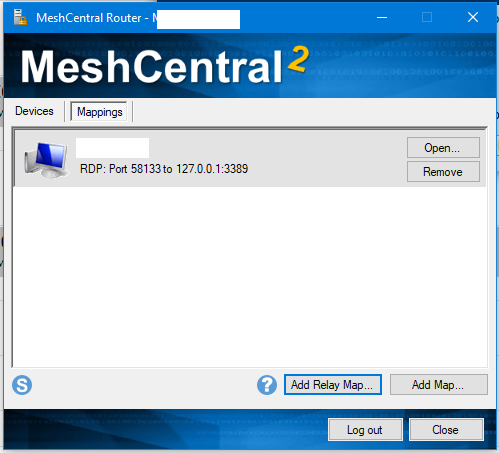
All the "RDP", "HTTP", "SSH" quick buttons are grayed out. However, you can do a map manually with no issue.
 MordyT
All 16 comments
@Ylianst - possibly is related to last post in #1309 ?!?!?!
@MordyT - I have the same issue, not sure what your setup is.
 vitko-bg
on 1 Jun 2020
vitko-bg
on 1 Jun 2020
@vitko-bg Maybe. I have (in each domain) a user in the managealldevicegroups that is local to mesh and in the primary domain I have both a local user and a SSO user there.
No users (admins, local, SSO, etc) have the quicklinks working.
MordyT
on 1 Jun 2020
The buttons are normally grayed out when your account does not have "Remote Control" rights to the devices. That is the permission required to perform traffic forwarding. If you have some detail as to how the permissions are granted (thru a user group?) I will debug this.
 Ylianst
on 2 Jun 2020
Ylianst
on 2 Jun 2020
The account is a member of a user group. That user group is a full administrator on a mesh device group.
If I manually add a specific user to a specific device as Remote Control, the button lights up right away.
MordyT
on 2 Jun 2020
Excellent, I see the same problem now. Working on it.
Ylianst
on 2 Jun 2020
Ok, fixed it. Will be in the next version of MeshCentral, however since the problem is with the MeshCentral Router only, you can get the latest version here.
Ylianst
on 2 Jun 2020
@Ylianst your link to meschcentral router is incorrect, this one is working http://info.meshcentral.com/downloads/MeshCentral2/MeshCentralRouter.exe
 petervanv
on 2 Jun 2020
petervanv
on 2 Jun 2020
Thanks @peteranv, fixed my link.
Ylianst
on 2 Jun 2020
New router does fix the buttons grayed out. However, I'm facing an issue on some PCs (even with old router) where the router can launch normally, but when launched from the webapp we get this error. Only on some machines - is there a dependency missing on those machines?
````
See the end of this message for details on invoking just-in-time (JIT) debugging instead of this dialog box.
*** Exception Text ***
System.UriFormatException: Invalid URI: The hostname could not be parsed.
at System.Uri.CreateThis(String uri, Boolean dontEscape, UriKind uriKind)
at MeshCentralRouter.MainForm.nextButton1_Click(Object sender, EventArgs e)
at MeshCentralRouter.MainForm.MainForm_Load(Object sender, EventArgs e)
at System.Windows.Forms.Form.OnLoad(EventArgs e)
at System.Windows.Forms.Form.OnCreateControl()
at System.Windows.Forms.Control.CreateControl(Boolean fIgnoreVisible)
at System.Windows.Forms.Control.CreateControl()
at System.Windows.Forms.Control.WmShowWindow(Message& m)
at System.Windows.Forms.Control.WndProc(Message& m)
at System.Windows.Forms.Form.WmShowWindow(Message& m)
at System.Windows.Forms.NativeWindow.Callback(IntPtr hWnd, Int32 msg, IntPtr wparam, IntPtr lparam)
*** Loaded Assemblies ***
mscorlib
Assembly Version: 4.0.0.0
Win32 Version: 4.8.4180.0 built by: NET48REL1LAST_B
CodeBase: file:///C:/Windows/Microsoft.NET/Framework64/v4.0.30319/mscorlib.dll
MeshCentralRouter
Assembly Version: 1.0.7458.922
Win32 Version: 1.0.7458.922
CodeBase: file:///C:/Program%20Files/Mesh/Router.exe
System.Windows.Forms
Assembly Version: 4.0.0.0
Win32 Version: 4.8.4150.0 built by: NET48REL1LAST_C
CodeBase: file:///C:/WINDOWS/Microsoft.Net/assembly/GAC_MSIL/System.Windows.Forms/v4.0_4.0.0.0__b77a5c561934e089/System.Windows.Forms.dll
System
Assembly Version: 4.0.0.0
Win32 Version: 4.8.4001.0 built by: NET48REL1LAST_C
CodeBase: file:///C:/WINDOWS/Microsoft.Net/assembly/GAC_MSIL/System/v4.0_4.0.0.0__b77a5c561934e089/System.dll
System.Drawing
Assembly Version: 4.0.0.0
Win32 Version: 4.8.3752.0 built by: NET48REL1
CodeBase: file:///C:/WINDOWS/Microsoft.Net/assembly/GAC_MSIL/System.Drawing/v4.0_4.0.0.0__b03f5f7f11d50a3a/System.Drawing.dll
System.Configuration
Assembly Version: 4.0.0.0
Win32 Version: 4.8.3752.0 built by: NET48REL1
CodeBase: file:///C:/WINDOWS/Microsoft.Net/assembly/GAC_MSIL/System.Configuration/v4.0_4.0.0.0__b03f5f7f11d50a3a/System.Configuration.dll
System.Core
Assembly Version: 4.0.0.0
Win32 Version: 4.8.4180.0 built by: NET48REL1LAST_B
CodeBase: file:///C:/WINDOWS/Microsoft.Net/assembly/GAC_MSIL/System.Core/v4.0_4.0.0.0__b77a5c561934e089/System.Core.dll
System.Xml
Assembly Version: 4.0.0.0
Win32 Version: 4.8.3752.0 built by: NET48REL1
CodeBase: file:///C:/WINDOWS/Microsoft.Net/assembly/GAC_MSIL/System.Xml/v4.0_4.0.0.0__b77a5c561934e089/System.Xml.dll
*** JIT Debugging ***
To enable just-in-time (JIT) debugging, the .config file for this
application or computer (machine.config) must have the
jitDebugging value set in the system.windows.forms section.
The application must also be compiled with debugging
enabled.
For example:
When JIT debugging is enabled, any unhandled exception
will be sent to the JIT debugger registered on the computer
rather than be handled by this dialog box.
````
This URL seems somewhat related although for another platform?
https://support.microsoft.com/en-us/help/976213/fix-error-message-when-you-run-a-managed-application-that-uses-a-webbr
MordyT
on 4 Jun 2020
Thanks for the report. I am pretty sure I found the problem and fixed it, you can try the latest MeshCentral Router here. Let me know if it works. The updated MeshCentral Router will be in the next version of MeshCentral v0.5.51 when it comes out.
Ylianst
on 5 Jun 2020
@Ylianst
Progress. Login works, but clicking the RDP icon crashes it with a similar message (Invalid URI: The hostname could not be parsed).
Strange how it works well on some of our PCs and others have this error.
MordyT
on 7 Jun 2020
One more version of MeshCentral Router here. This one should fix the Invalid URI exception, let me know if it works.
Ylianst
on 7 Jun 2020
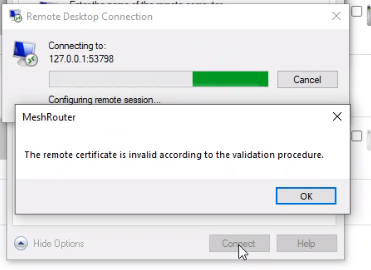
Tried the latest version, I'm still getting this when clicking the RDP button:

I have another user who reported getting this when trying any RDP from router:
MordyT
on 8 Jun 2020
HA!! Ok, I see the problem now. Thanks for posting the details, will work on this.
Ylianst
on 9 Jun 2020
I just did a quick, end of day fix... new MeshCentral Router is here. Let me know if it works now.
Ylianst
on 9 Jun 2020
@Ylianst My team is telling me that the newest version has fixed all reported issues. I'll close this for now and let you know if the issue returns.
THANK YOU!
MordyT
on 9 Jun 2020
Related issues
 whalehub
·
3Comments
whalehub
·
3Comments
 guerby
·
3Comments
guerby
·
3Comments
 vish84
·
3Comments
vish84
·
3Comments
 veitw
·
4Comments
veitw
·
4Comments
 unguzov
·
3Comments
unguzov
·
3Comments