Meshcentral: QoL Feature Request: Method to delete user from all domains from the command line that lends itself easily to automation
Method to delete user from all domains from the command line that lends itself easily to automation
Problem Description
We use MeshCentral in a way that has the same employees on many client domains. When an employee either leaves the company, or, moves to a different team, we have a requirement to then remove that user from every domain. This is not a stright forward process currently (or, I have not discovered it!), and the built in methods cannot easily be automated (or, I'm unable to figure out how to do it in a meaningful way)
Workaround:
Step 1: Find user
- Using
meshctrl.js --listusersfor each domain
Pros: Supported by the developer, should always work
Cons: Need to login to each domain to figure out if the user exists, cannot easily be automated.
/usr/bin/node /opt/meshcentral/node_modules/meshcentral/meshctrl.js listusers --loginuser admin --loginpass admin --url wss://192.168.1.102/domainname/
id, name, email
---------------
"admin", "admin", "[email protected]"
"UserToDelete", "UserToDelete", "[email protected]"
When a user is added, add them to a password database, find the user in the database, keep a list of the users and which domains they belong to.
Pros: This doesn't require any additional access to either the DB or the MeshCentral server
Cons: Password DB can become de-synchronized and is prone to human error, administrators could forget to add users, cannot be automatedFrom the MongoDB Database, we can execute the following query, which will give us a list of users.
Pros: Authoritative method, can be automated (see following script)
Cons: If the DB structure changes, the script fails, prone to script developer error (IE: Me)
db.getCollection("meshcentral").find({ "type": "user", "name": "UserToDelete"}, {}).sort({})
Step 2: Delete the user
These are matched to the Step 1 steps above.
- Using
meshctrl.js --removeuserfor each domain
Pros: Supported by developer, should always work
Cons: Cannot be easily automated, must run on each domain
/usr/bin/node /opt/meshcentral/node_modules/meshcentral/meshctrl.js removeuser --userid user/domainname/UserToDelete --loginuser admin --loginpass admin --url wss://192.168.1.102/domainname/
Login to the GUI, remove the user from each portal
Pros: Should always work
Cons: Cannot be automated, prone to human errorRemove the users in bulk
Pros: Can easily be automated (see script below)
Cons: If the DB structure changes, the script fails, does not remove users (cleanly) from the MeshCentral database, for example, the Nodes entry, or wsusers (not sure what that's used for)
mongo_mesh_delete_query = { '_id': 'user/' + .* + '/' + args.username }
delete_counter = mongo_mesh_collection.delete_many(mongo_mesh_delete_query)
I have created a small Python script that does option 3, but silly things can be done, like running this against the administrator user, as well, it's certainly not clean, more of a proof of concept.
#!/usr/bin/python3
# Author: Darryl H (https://github.com/darryl-h)
# Purpose: This script should remove *all* instances of a user from all domains in the MeshCentral MongoDB database.
# Version: 0.5
import pymongo # Talk to MongoDB
import sys # Exit codes
import argparse # Argument Parsing

# Configure MongoDB Connection
mongo_client = pymongo.MongoClient("mongodb://meshadmin:[email protected]:27017/meshcentral")
mongo_mesh_db = mongo_client["meshcentral"]
mongo_mesh_collection = mongo_mesh_db["meshcentral"]

# Take user arguments
parser = argparse.ArgumentParser()
parser.add_argument("--username", "-u", help="Set Username", required=True)
args = parser.parse_args()

# Validate Input
mongo_mesh_user_document = mongo_mesh_collection.find_one({"type" : "user", "name" : args.username})
if mongo_mesh_user_document is None:
    print ('ERROR: Invalid Username')
    sys.exit(1)

# Run and execute query
mongo_mesh_delete_query = { '_id': 'user/' + .* + '/' + args.username }
delete_counter = mongo_mesh_collection.delete_many(mongo_mesh_delete_query)
print ('User account removed from', delete_counter.deleted_count , 'domain(s).')
print ('The MeshCentral service will need to be restarted to take effect.')
As always, thanks for this amazing software! We are using the script above, which seems to work despite being a hackjob, so no rush here for us, but it would be nice to have this baked into the software, rather than this.
 darryl-h
All 6 comments
As usual, you have by far the best feature requests. Thank you. I need to think about how to do this. MeshCentral domains are built to have separation so when you login using MeshCtrl with an admin account, it's an account for only one domain. There is no cross-domain accounts.
The problem with deleting a user directly from MongoDB is that unless you have "MongoDbChangeStream" enabled, the active users on the web site will need get an event that a user was removed. They will have to hit refresh in the browser to see the removal.
Say I created a "MeshBatchCtrl" that took in many admin accounts (one for each domain you want) and performed the same MeshCtrl operation on all domains, would that work?
 Ylianst
on 21 May 2020
Ylianst
on 21 May 2020
As usual, you have by far the best feature requests. Thank you.
My absolute pleasure, thank you for all your hard work and dedication!
MeshCentral domains are built to have separation so when you login using MeshCtrl with an admin account, it's an account for only one domain. There is no cross-domain accounts.
Another feature request by @asasin114 (https://github.com/Ylianst/MeshCentral/issues/724) was to allow for multi-domain users, I suspect that something like your suggested MeshBatchCtrl could kind of work for some use cases if you also added an optional argument --domainlist which accepted a list of one or more domains.
The problem with deleting a user directly from MongoDB is that unless you have "MongoDbChangeStream" enabled, the active users on the web site will need get an event that a user was removed. They will have to hit refresh in the browser to see the removal.
When I remove the user using my script, the users still show up in the UI, and even worse (for me), the user can still login until the MeshCentral service is restarted, this is why I had to add that bit about restarting the service, (which is fairly invasive, everyone gets logged out) however, doing it in the UI (IE: Properly) does not have any of these problems.
Say I created a "MeshBatchCtrl" that took in many admin accounts (one for each domain you want) and performed the same MeshCtrl operation on all domains, would that work?
That would be AWESOME!
Out of curiosity:
- Were you planning on allowing for all
meshctrl.jsfunctions to be called byMeshBatchCtrl?
For our use case, we would only need theRemoveUserfunction, because we provide user access to domains on a "need to know" model.That said, it would also be nice to do aThe full userlist can be grabbed by usingListUsersfor auditing purposes (Right now, we do that through the mongo querydb.getCollection("meshcentral").find({ "type": "user" }, {}).sort({}))/usr/bin/node /opt/meshcentral/node_modules/meshcentral/meshcentral.js --ListUserIDshowever another use case could be a way to list all the device groups and their associated MeshIDs likeListDeviceGroups.
Could you allow the use of the
LoginCookieEncryptionKey(from MongoDB) instead of the--loginuserand--loginpassor the resulting--loginkey?
Example:
/usr/bin/node /opt/meshcentral/node_modules/meshcentral/meshctrl.js AddUser --url wss://192.168.1.102/domaintest/ --user NewUser --loginencryptionkey ab3g5hn8d5637dz8765g4h0cb2h624a8ceece1d5ab17e025c481046deea7b4822d1e6f3a71215d3949ab1e5d96b563837007fefe18293b06421130cd7eaa8758ceab56cc3dadf5c6ecf3316e27d53360Would
MeshBatchCtrlaccept one or more domains, or would it assume all domains? (options for each would be very nice to have)
As always, thanks for all you do!
darryl-h
on 22 May 2020
FYI. I am making good progress on adding support for cross-domain user and user groups administrator. Once this is done, it should be easier to solve this issue.
- Since I am adding cross-domain support, no need for a MeshBatchCtrl anymore. That is, should be able to login in to a single account and do all the user management you need.
2 and 3, Interesting options but will support cross-domain admin accounts instead.
Ylianst
on 27 May 2020
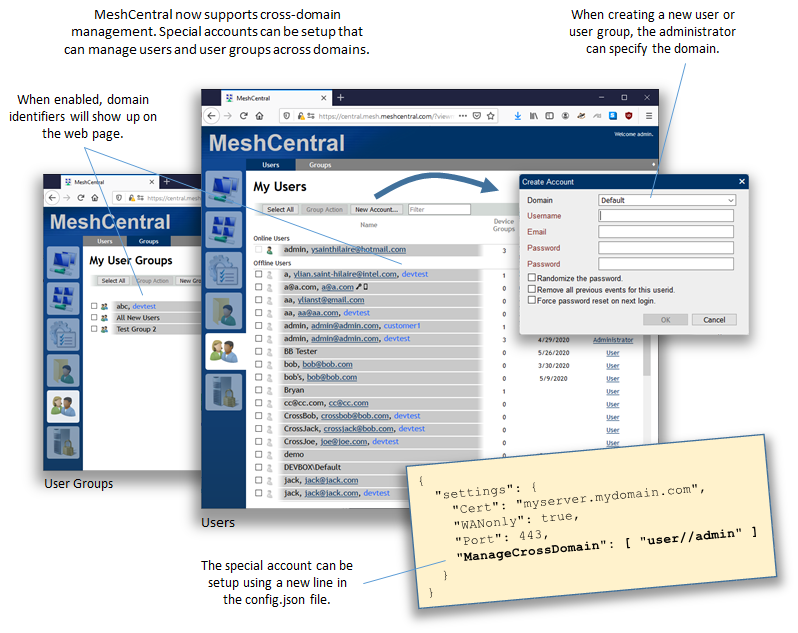
Just published MeshCentral v0.5.46 with support for cross-domain administrator. You need to add the following line in the settings section of config.json:
"ManageCrossDomain": [ "user//admin" ]
The user//admin is the userid of the user that will get cross-domain admin rights. That user must already have full site administrator rights. Once this is enabled, you can manage other domain's users and user groups (but not devices). MeshCtrl was also upgraded to allow creation on removal of users from different domains. Feedback appreciated.
Ylianst
on 28 May 2020
Sorry for the delay, thanks so much for implementing this! I have some follow up questions:
- If we add
ManageCrossDomain": [ "user//admin" ]to the settings, does this mean that every domain will no longer need to have the first user created? - When you say "but not devices" what does that mean exactly? I can't see devices? I can't modify devices? I cannot create device groups? or something else all together? (If so, and 1. is true, then we still need an account created that can see/modify/create device groups, correct?)
- If we add
ManageCrossDomain": [ "user//user1" ]to the settings, does this mean that we can make more than 1 crossdomain admin account? More specifically, can there be more than 1 crossdomain account? (Here, we have a team of admins, so having more than 1 account would be useful for auditing) - If we add
ManageCrossDomain": [ "user//admin" ]to the settings, does this mean that we would
only need to have a single 2FA? (This would be amazing!) - If we add
ManageCrossDomain": [ "user//admin" ]to the settings, what happens if we try to make an account in a new domain with the same account name? (I would expect it to fail, but want to set expectations.) - If we add
ManageCrossDomain": [ "user//admin" ]to the settings, will we be able to generate a valid authentication token? (Will that work if the user doesn't exist on said domain, or do we give the login token for the user//admin account instead of the technically non existent user/domain1/admin?) - If we add
ManageCrossDomain": [ "user//admin" ]to the settings, this means that users can be removed from any domain now?
I'll try and test these scenario's and post the answer when I can.
As always, thanks for all your hard work, very appreciated!
darryl-h
on 8 Jun 2020
1) If we add ManageCrossDomain": [ "user//admin" ] to the settings, does this mean that every domain will no longer need to have the first user created?
In version 0.5.58, the first user will still need to be created. In the config.json if the "NewAccounts": false is set, I still observe "Don't have an account? Create one." on the web portal. Additionally, trying to login to the web portal with the ManageCrossDomain user fails. (using the username admin and password admin, also tried with the username user//admin but it also did not work.)
5) If we add ManageCrossDomain": [ "user//admin" ] to the settings, what happens if we try to make an account in a new domain with the same account name? (I would expect it to fail, but want to set expectations.)
In version 0.5.58, I created domain6 and I am allowed to create a user with the same name admin and the password admin
Will test more scenario's in the near future, and add those findings to this report.
darryl-h
on 12 Jun 2020
Related issues
 M1CK431
·
3Comments
M1CK431
·
3Comments
 whalehub
·
3Comments
darryl-h
·
3Comments
whalehub
·
3Comments
darryl-h
·
3Comments
 MailYouLater
·
3Comments
MailYouLater
·
3Comments
 Julien-asv
·
3Comments
Julien-asv
·
3Comments
Most helpful comment
Just published MeshCentral v0.5.46 with support for cross-domain administrator. You need to add the following line in the settings section of config.json:
The
user//adminis the userid of the user that will get cross-domain admin rights. That user must already have full site administrator rights. Once this is enabled, you can manage other domain's users and user groups (but not devices). MeshCtrl was also upgraded to allow creation on removal of users from different domains. Feedback appreciated.