Meshcentral: Can't get Letsencrypt Certificate
Hello,
I've been trying to get my server SSL setup with let's encrypt, but it's not downloading any certificates, nor is it creating the letsencrypt folder. I've tried troubleshooting on my own, but I've also been unable to locate the error log files.
I'm using Windows Server 2012 with Nodejs, and I've also tested with letsdebug, which says everything is fine.
Here's my config:
{
  "settings": {
    "RedirPort": 80,
    "syslog": "meshcentral",
    "syslogjson": "meshcentral-json",
    "syslog": true,
    "syslogjson": true,
    "letsencrypt": {
      "email": "[email protected]",
      "names": "mydomain.com",
      "rsaKeySize": 3072,
      "production": false
    },
    "plugins": {
      "enabled": true
    }
  }
}
 trentdavis
All 32 comments
The problem is that the Let's Encrypt section must not be within the settings section, rather it's own own separate section. Try this instead:
{
  "settings": {
    "RedirPort": 80,
    "syslog": "meshcentral",
    "syslogjson": "meshcentral-json",
    "syslog": true,
    "syslogjson": true,
    "plugins": {
      "enabled": true
    }
  },
  "letsencrypt": {
    "email": "[email protected]",
    "names": "mydomain.com",
    "rsaKeySize": 3072,
    "production": false
  }
}
Since someone else on Reddit did the same, if you can let me know if there is an example online or some documentation that causing this, let me know so I can fix it. Thanks.
 Ylianst
on 27 Apr 2020
Ylianst
on 27 Apr 2020
Hi again,
Thanks for your quick response! I made the changes, and this time it created the letsencrypt folder, however it's been around 12 hours and I haven't yet received any certificates. I also don't see any log files to help troubleshoot. What can I do at this point?
trentdavis
on 27 Apr 2020
You need to have port 80 exposed to the Internet and own the DNS name you are asking for. That is, the DNS name needs to already point to your MeshCentral server. Also, use https://letsdebug.net/ to test your setup.
Ylianst
on 27 Apr 2020
Hi Ylianst,
Prior to your last message, port 80 was pointing to my IIS webserver, but it was fully exposed to the web. I subsequently removed it from my IIS bindings, and then added the line "Port": 80 at the top of my config file. Now, I'm receiving the following error in letsdebug (it was fine before):
_RateLimit
ERROR
xxxxxxx.xxx is currently affected by Let's Encrypt-based rate limits (https://letsencrypt.org/docs/rate-limits/). You may review certificates that have already been issued by visiting https://crt.sh/?q=%xxxxxxx.xxx . Please note that it is not possible to ask for a rate limit to be manually cleared._
_The Duplicate Certificate limit (5 certificates with the exact same set of domains per week) has been exceeded and is affecting the domain "xxxxxxx.xxx". The exact set of domains affected is: "xxxxxxx.xxx". It may be possible to avoid this rate limit by issuing a certificate with an additional or different domain name._
trentdavis
on 28 Apr 2020
Ok, I just removed the "Port": 80 line, and now letsdebug says everything is fine again. But still no certificates. I'm confused.
trentdavis
on 28 Apr 2020
Looks like I spoke too soon. letsdebug is failing again. Same error.
trentdavis
on 28 Apr 2020
Hi again,
I'm having another go at this and discovered the following:
I've removed the "Port": 80 line in config and letsdebug once again says everything is fine. However, when I check the verbose list (I missed this earlier) I am seeing the following errors:
HTTPCheck
Requests made to the domain
Request to: mydomain.com/xx.xxx.xxx.xxx, Result: [Address=xx.xxx.xxx.xxx,Address Type=IPv4,Server=Microsoft-HTTPAPI/2.0,HTTP Status=404], Issue:
Trace:
@0ms: Making a request to http://mydomain.com/.well-known/acme-challenge/letsdebug-test (using initial IP xx.xxx.xxx.xxx)
@0ms: Dialing xx.xxx.xxx.xxx
@196ms: Server response: HTTP 404 Not Found
HTTPRecords
A and AAAA records found for this domain
mydomain.com. 0 IN A xx.xxx.xxx.xxx
InternalProblem
An internal error occurred while checking the domain
Failed to query certwatch database to check rate limits: pq: canceling statement due to user request
LetsEncryptStaging
Challenge update failures for mydomain.com in order https://acme-staging-v02.api.letsencrypt.org/acme/order/######/########
acme: error code 403 "urn:ietf:params:acme:error:unauthorized": Invalid response from http://mydomain.com/.well-known/acme-challenge/1PV-lNLoyyxQtL-fXU5-pHHDIYic3ar20-uw2E2vcfA [xx.xxx.xxx.xxx]: "rn
Also, please clarify: Should my IIS server be on at all during this process? Even though I've removed the port 80 bindings, it still seems to be responding to http requests on port 80.
Thanks!
trentdavis
on 28 Apr 2020
So, your MeshCentral server needs to prove to Let's Encrypt that you have control over your domain and you get a limited amount of tries to do this. MeshCentral needs to have a clear view to the Internet on port 80 and Let's Encrypt will make a series of challenges MeshCentral must respond to.
If you miss to many times, or have a different HTTP server on port 80, your out of luck. You need to fix the configuration and wait for the rate limit to lift.
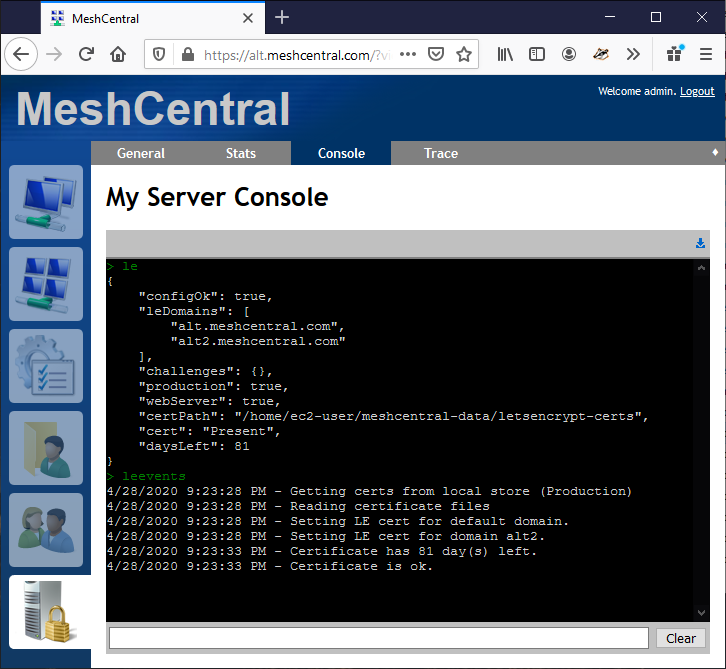
Also, you can use the "le" and "leevents" commands in the "My Server" / "Console" tab to see that is going on.
Ylianst
on 29 Apr 2020
Thanks very much for your reply! I will wait for the restrictions to be lifted, but in the meantime, what should be done about port 80? Should my IIS server be running on port 80? At the moment, if I browse to my domain using port 80, it returns a "Not found" error. If I switch on my IIS server, it returns the default Microsoft IIS webpage. I have been unable to get Meshcentral to respond on port 80.
This is what the le commands produce:
le
{
"configOk": false,
"leDomains": null,
"challenges": {},
"production": false,
"webServer": false,
"certPath": "C:\Program Files\Open Source\MeshCentral\meshcentral-data\letsencrypt-certs", "error": "ERROR: Redirection web server must be active on port 80 for Let's Encrypt to work.", "cert": "None"
}
leevents
4/29/2020 9:08:22 AM - Getting certs from local store (Staging)
4/29/2020 9:08:22 AM - ERROR: Redirection web server must be active on port 80 for Let's Encrypt to work.
trentdavis
on 29 Apr 2020
I now realize a problem you may have. When IIS is not "binded" to port 80, it still does not release that port. You will get the "Not Found" error, but that is because the Microsoft HTTP library is still using it. You will need to look online to see how to free up port 80, but just changing IIS settings will not free it up.
After it's free, restart MeshCentral and it should grab port 80 and everything should work.
Hope that helps,
Ylian
Ylianst
on 30 Apr 2020
I have completely uninstalled IIS on the server, however I'm still getting "Not found" on Port 80. This is what Letsdebug shows in verbose mode: (Bear in mind that it does first show the green screen that says everything is fine.)
HTTPCheck
DEBUG
Requests made to the domain
Request to: mydomain.com/xxx.xxx.xxx.xxx, Result: [Address=xxx.xxx.xxx.xxx,Address Type=IPv4,Server=Microsoft-HTTPAPI/2.0,HTTP Status=404], Issue:
Trace:
@0ms: Making a request to http://mydomain.com/.well-known/acme-challenge/letsdebug-test (using initial IP xxx.xxx.xxx.xxx)
@0ms: Dialing xxx.xxx.xxx.xxx
@217ms: Server response: HTTP 404 Not Found
trentdavis
on 30 Apr 2020
Been working on this all day. Here are my le and leevents results now:
le
{
"configOk": true,
"leDomains": [
"mydomain.com" ],
"challenges": {},
"production": false,
"webServer": true,
"certPath": "C:\Program Files\Open Source\MeshCentral\meshcentral-data\letsencrypt-certs", "cert": "None" }
leevents
4/30/2020 12:57:41 PM - Getting certs from local store (Staging)
4/30/2020 12:57:41 PM - No certificate files found
4/30/2020 12:57:46 PM - Got no certificates, asking for one now.
4/30/2020 12:57:46 PM - Generating private key...
4/30/2020 12:57:46 PM - Setting up ACME client...
4/30/2020 12:57:46 PM - Creating certificate request...
4/30/2020 12:57:46 PM - Requesting certificate from Let's Encrypt...
4/30/2020 12:57:50 PM - Succesful response to challenge.
4/30/2020 12:58:10 PM - Failed to obtain certificate: Fetching http://mydomain.com/.well-known/acme-challenge/mCBOg7cJ7FJuDFI0wiuFT5WU... Timeout during connect (likely firewall problem)
trentdavis
on 30 Apr 2020
If you're getting "not found" on port 80 instead of the MeshCentral page, DO NOT run letsencrypt or letsdebug- you'll just be wasting your attempts.
If you cannot navigate to http://mydomain.com from a public computer and see your MeshCentral site (or be redirected to your MeshCentral site with a self-signed cert) DO NOT run letsencrypt or letsdebug.
First things first, you should be able to navigate to your domain (http://mydomain.com) from a public computer outside of your network and either see MeshCentral or be redirected to a self-signed SSL version of MeshCentral.
What is your setup goal here? Is MeshCentral going to be the only web site on this Server 2012 instance? Or are you going to be hosting multiple sites? Is MeshCentral going to be accessible via the public internet at https://mydomain.com?
 ryanblenis
on 30 Apr 2020
ryanblenis
on 30 Apr 2020
I think I've got it! After uninstalling several windows services which were using port 80, I discovered that I now needed to manually open port 80 in the firewall as well. I was able to successfully receive the staging certificates, but of course once I changed the production line to "true", I received the certificate limits error. I think I will leave it at that because from my calculations the limits should begin lifting in a couple of days. I will let you know how it goes.
To answer your question, the only server I want running on this machine is Meshcentral. Windows just wouldn't co-operate and release the ports. And when it finally did release them, it blocked them with the firewall.
Thanks so much for your assistance!!!
trentdavis
on 30 Apr 2020
No problem, in the future (or for others who come across this), you can typically just open services.msc and stop/disable the IIS services rather than uninstalling them (assuming you want to replace the only HTTP/S server with MeshCentral vs proxy it).
ryanblenis
on 30 Apr 2020
I just realized that after all of this I seem to have lost all of my remote agents. They are now showing as offline. I have tried using the CertUrl command, but no luck. How can I get my remote agents back online. Can't afford to lose them.
trentdavis
on 1 May 2020
Try adding this line to the settings section of config.json:
"ignoreagenthashcheck": true
Also, you can run MeshCentral like this:
node node_modules/meshcentral -- debug agents
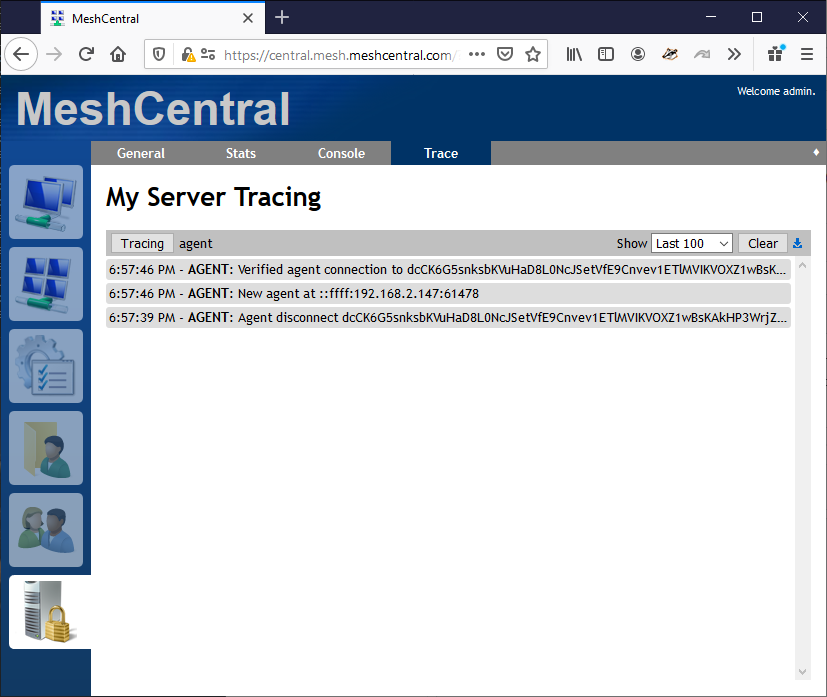
You will see messages indicating the connection status of the agents. You can also go in "My Server" / "Trace" panel and enabling "Agent Traffic" tracing.
Ylianst
on 1 May 2020
Also, try changing "letsencrypt" section to "_letsencrypt" in config.json to return to original certificate and see if that works. Let me know what you find.
Ylianst
on 1 May 2020
Yeah, I tried the ignoreagenthashcheck function, but no joy. I'll try the others.
trentdavis
on 1 May 2020
Unfortunately, none of the options seem to work, and the debug options don't work either. When I use the trace, no information is displayed whatsoever, and when I run the debug command, the command window freezes as though Meshcentral is running, but the service remains unresponsive. I'm at a complete loss at this point. Should I restore from backup?
trentdavis
on 1 May 2020
I suspect I may know the root cause of the problem: When I initially setup the server (before this whole SSL certificate thing) I used the server's IP address along with port 444 to setup all the remote agents. However, I now notice that port 444 no longer seems to be working for some reason. And I'm pretty sure that's where the agents are looking, which is why they're missing. What can I do to restore port 444?
trentdavis
on 1 May 2020
Hi guys, please bear with me, as I'm slowly figuring this out.
I've finally gotten the remote agents to return by removing the "RedirPort": 80 command, and manually setting the port to 444 using the "Port": 444 command. Of course, this now means that when my certificates limitations are finally lifted by Letsencrypt, I will not be able to successfully apply for a production certificate using this config. So here's the big question: How to I instruct the remote agents to migrate to the new SSL config so that they don't disappear when I next update to SSL?
trentdavis
on 1 May 2020
Hi. Ok, I am glad you figured this out. If you have access to one of your agents, go in the agent folder and edit the "meshagent.msh" file with a text editor. It should look like this:
MeshName=MyGroup
MeshType=2
MeshID=0x5F70A4AC00B1...
ServerID=DC393B51...
MeshServer=wss://alt.meshcentral.com:443/agent.ashx
The MeshServer line will make it clear what server name and port the agent is trying to connect to. If you setup a lot of agents on port 444 and now you want your server on port 443, you need to change the .msh file of each agent and restart the agent. Also, if you used an IP address, you should really change it to a DNS name.
As for "redirport" (HTTP) and "port" (HTTPS), these can be set any way you like. So you can do this in config.json:
"redirport" : 80,
"port": 444
You need the "redirport" to be 80 to get a let's Encrypt certificate. Once you get it, not sure if browsers like seeing a Let's Encrypt certificate on any port other than 443, but you certainly should move your agents to a more appropriate .msh "MeshServer" url.
Ylianst
on 2 May 2020
Ok this works, but is it possible to push the meshagent.msh file from the server to the remote agents? And one more question: Today my Letsencrypt restrictions were lifted, and I received my production certificates. However, when I log into the server, It's still using the old certificate, even though I've restarted multiple times. How can I get the new certificates to kick in?
trentdavis
on 3 May 2020
Sorry, I just got the new certificates to kick in using the CertUrl command. So I guess the only question left is: Can I push the new MeshAgent.msh file from the server to the remote agests?
trentdavis
on 3 May 2020
I don't know of a vanilla way MeshCentral has this functionality, but if you enable plugins and install ScriptTask creating a script to change that line should be trivial in PowerShell / bash / etc.
ryanblenis
on 3 May 2020
There is no built-in functionality for replace the .msh file. If you have just a few machines, you can use the device files tab to upload the new .msh and using the "tools" button in remote desktop to force an agent restart. Otherwise, you can use @ryanblenis plugins.
Ylianst
on 3 May 2020
Thanks Ylianst, I do have a lot of machines, and this will help. My only issue however, is that once I change a machine to port 443, it disappears until I change the port command in the server to 443. Which means that I will lose access to machines until all is complete. Is there any way for me to get the server to listen on both ports until I have finished the migration? I really appreciate all your help thus far!
trentdavis
on 3 May 2020
I just published MeshCentral v0.5.22 with an additionnal option to start a web server on a different port that will only accept MeshAgent connections. You can now do this:
{
  "settings": {
    "Cert": "central.mesh.meshcentral.com",
    "RedirPort": 80,
    "Port": 443,
    "AgentPort": 444
  }
}
Agent can still connect on 443, but 444 is for agents only. I been wanted to add this for a while because it's useful for people that want to put authentication portals in front of MeshCentral, but will need the agents to connect, but it's also useful in your case. Let me know if this works.
Ylianst
on 3 May 2020
Ylian you're a gentleman and a scholar!! This works perfectly, and I can now see all my agents. Thanks So much for your assistance!
trentdavis
on 4 May 2020
@Ylianst how new AgentPort differs from already existing AliasPort?
 uldiseihenbergs
on 4 May 2020
uldiseihenbergs
on 4 May 2020
The following will create real incoming ports on the server and start listening on them for network traffic: port (HTTPS), redirport (HTTP), agentport (HTTPS). The difference between port and agentport is that only agents can connect to the agent port.
The alias options are used to tell the server what port will be actually used externally. So if you use port: 123 but use aliasport: 234 then the server will know to listen on 123 but to advertise that you need to connect on port 234.
Hope that helps. I am going to close this issue since it's far off the original problem. Feel free to open a new issue even if it's just a question.
Ylianst
on 4 May 2020
Related issues
 unguzov
·
3Comments
unguzov
·
3Comments
 haxmachine
·
3Comments
haxmachine
·
3Comments
 MailYouLater
·
3Comments
MailYouLater
·
3Comments
 whalehub
·
3Comments
whalehub
·
3Comments
 vish84
·
3Comments
vish84
·
3Comments