Meshcentral: Unknown Agents Added to Server
I'm not sure how much detail should be provided in public for this particular issue but I did think it warranted reporting regardless. This morning, two agents were added to my server that I do not recognize. Each was online briefly and has not been seen since so it's possible the owners of those machines saw the issue as well and uninstalled the agent themselves. According to IP addresses, both agents were added from different countries but that's about all I can see. Does anyone have any idea what's going on here?
 PetieM
All 13 comments
That is weird. Obviously, not sure about the specifics here but agents don't get at rights to the server or to other agents, so there should be no benefits since agents grant rights to the server, but get to rights back. Maybe if an agent is used behind a privacy VPN, you may see them show up from other countries. Also, someone would need to get a valid .msh file for your server to properly connect.
 Ylianst
on 23 Apr 2020
Ylianst
on 23 Apr 2020
Perhaps adding a default robots.txt to the project with a content of:
User-agent: *
Disallow: *
would prevent some of these reports? Running a search on Google I can find quite a few MC installs that should probably not be indexed.
 ryanblenis
on 23 Apr 2020
ryanblenis
on 23 Apr 2020
That definitely wouldn't hurt but just landing on the login page shouldn't be enough to get you an agent installer, should it? I'm not concerned about security in this case since really, the only one who is at risk is the stranger installing remote management software on their machine (correct? - I imagine a computer with the agent software installed should have no access back to the server or any other agents) but I'd still like to get to the bottom of what happened here.
My server has only been up for a week or so and the group these two agents were added to was only created a few days ago so it seems unlikely this is just an accidental VPN mixup.
PetieM
on 23 Apr 2020
@ryanblenis I did not think of the robot.txt file, that is a good idea.
@PetieM Correct, just accessing the portal is not sufficient. If one of the machines you manage has been hacked and the meshagent.exe/meshagent.msh where obtained, they could run it and connect back to your server. In any case, they would not gain any access, but would grant you access to their system.
Ylianst
on 23 Apr 2020
if you go to https://yoururl.com/meshagents you'll get the agent download versions for your server. I'd imagine the case here is that your server is available via IP directly (vs hostname based directive) and you simply got scanned for port 80/443 and they found the login page and ended up at the meshagents page. Perhaps a honeypot that downloads executables and runs them in a sandbox environment- which is why they were only online briefly.
You're correct that they're the ones at risk since you technically control them at that point.
ryanblenis
on 23 Apr 2020
That makes a lot of sense. I just tested and it is indeed available via IP though there is a hostname assigned as well. Regardless, I think that seems to be the most likely explanation. The /meshagents URL is good to know though so thanks for both looking into this and for the new info!
PetieM
on 23 Apr 2020
Interesting topic: @ryanblenis out of curiosity how can your guess be effective since the simple download link (i.e. without mesh id "token") results in this?
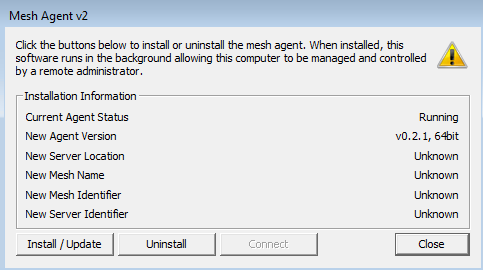
What am I missing here? Thanks!
 amenolo
on 24 Apr 2020
amenolo
on 24 Apr 2020
That agents link just gets you the agent binary, this is needed when you run the Linux install script, it will fetch (wget) the right agent for the platform. However, with just the agent, you can't connect to anything, you need a .msh file added into the Windows agent executable or downloaded separately.
Ylianst
on 24 Apr 2020
Hmm, that's a good point @amenolo. I suppose we might not have an answer here just yet after all. The two agents that were added to my system were assigned to a group and (briefly) connected so somehow, they got more than a binary from the /meshagents page.
PetieM
on 24 Apr 2020
Ah, I have never actually downloaded an agent from there, so I didn't know it lacked the server info- just that the page with download links existed. Curious indeed.
Any chance you emailed a link to anyone to download the MeshAgent? Perhaps the recipients spam filtering solution parses links to test in a sandboxed environment.
ryanblenis
on 24 Apr 2020
I considered that as I was working with a colleague as we both set this up for the first time but the group these were added to didn't exist at the time and the group we tested with still does so it wasn't an accidental install. As for spam filtering, I sent him the link on MS Teams, I believe, and it was days ago so that seems unlikely to be the cause. No other links have been distributed since that one.
PetieM
on 24 Apr 2020
i reported a very similar case in #1119, so you can read about possible workarounds to prevent this..
 uldiseihenbergs
on 24 Apr 2020
uldiseihenbergs
on 24 Apr 2020
I had a similar issue a week ago - an agent appeared for "Phil-PC" in a group less than a week old. Seems odd. I'm the only person using it. Only have a dozen legitimate PCs connecting in 3 groups.
MC 0.5.67 on AWS.
 alasdaircs
on 1 Jul 2020
alasdaircs
on 1 Jul 2020
Related issues
 MailYouLater
·
4Comments
MailYouLater
·
4Comments
 guerby
·
3Comments
guerby
·
3Comments
 penguinthingie
·
4Comments
penguinthingie
·
4Comments
 robclay
·
3Comments
robclay
·
3Comments
 haxmachine
·
3Comments
haxmachine
·
3Comments
Most helpful comment
Perhaps adding a default robots.txt to the project with a content of:
would prevent some of these reports? Running a search on Google I can find quite a few MC installs that should probably not be indexed.