Meshcentral: Cpu usage on MeshAgent in Windows 10 Desktop
One more question according CPU usage. i'm connected to MC Windows 10 Desktop, it's almost idle, nothing happening, but MeshAgent is using about 10-15% CPU. is this expected behaviour?
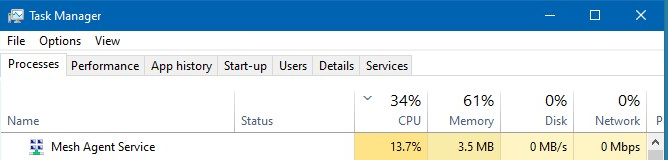
_Originally posted by @uldiseihenbergs in https://github.com/Ylianst/MeshCentral/issues/1156#issuecomment-615902920_
 uldiseihenbergs
All 9 comments
So this is with KVM connected? How many displays are connected and what's the resolution?
 krayon007
on 21 Apr 2020
krayon007
on 21 Apr 2020
Yes, with KVM, 1 display, resolution 1920x1080.
uldiseihenbergs
on 21 Apr 2020
Having a high CPU usage while the KVM session is active is normal since the MeshAgent needs to quickly capture screens, look for any changes and encode using JPEG any differences. This said, Bryan is looking at ways to improve the performance.
 Ylianst
on 21 Apr 2020
Ylianst
on 21 Apr 2020
ok, thanks - in my testing there was no other windows active but Task Manager only. when i minimize it, i see the same CPU usage.
uldiseihenbergs
on 21 Apr 2020
I ran the agent with a performance analyzer, and found the only non-negligable cpu usage, was when it was grabbing the bitmap from windows, and how frequently it does it... Even if you minimize all windows, the agent does not know that nothing has changed on the screen. The agent will continually capture the screen at a particular frame rate, then run a crc on the tiles, to mark the dirty tiles, so that it will only encode/send the dirty tiles... Even if you move nothing on the screen, the agent still does this, to figure out what (if anything) changed...
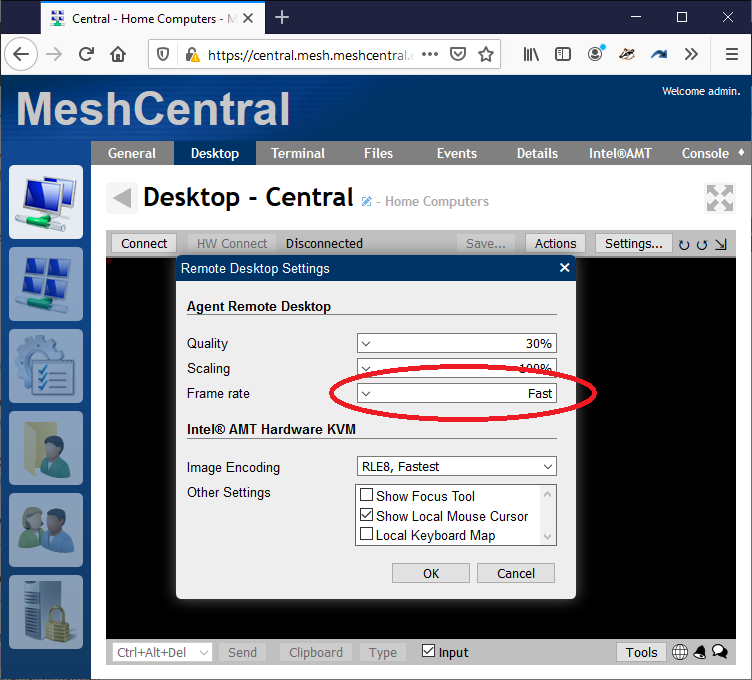
However, the easiest way to lower CPU usage, is to lower the capture rate... To do this, on the KVM tab, click on the settings button. On frame rate, the default is "Fast"... Change this to Medium.
When I ran the profiler, and did testing, the default "Fast" resulted in 10% cpu utilization by the agent, while "Very Slow" resulted in 1% cpu utilization, while the others were somewhere in between...
@Ylianst can probably let you know if you can change the default, server side.
krayon007
on 21 Apr 2020
@krayon007 thanks for detailed explanation! sure, if i lower frame rate to Low, CPU usage goes down to aprox 5% (this is two cpu Windows 10 VM). in this case my UX goes down too of course.
then you have something to do with your protocol, just tested with Nomachine(very similat to Teamviewer) on the same machine - with 30 frames per second it eats about 10% cpu, but UX is very well..
uldiseihenbergs
on 22 Apr 2020
That's because other solutions typically install a virtual display driver. If you have that, you don't need to poll to scrape the display.
We elected to not go this approach, because we want to support a diverse set of devices in as portable way as possible.
krayon007
on 22 Apr 2020
Ok, i can live with that, just wanna make sure it works as expected.
so, i'm closing this now..
uldiseihenbergs
on 22 Apr 2020
Another point is that MeshCentral has to be "web friendly", so our image encoding must be JPEG or a format the is quickly decoded by browsers. It's unlikely that we will change capture system on the agent anytime soon. Of course, if we find more optimizations, we will apply them.
Ylianst
on 22 Apr 2020
Related issues
 Julien-asv
·
3Comments
Julien-asv
·
3Comments
 petervanv
·
3Comments
petervanv
·
3Comments
 MailYouLater
·
3Comments
MailYouLater
·
3Comments
 hellofaduck
·
3Comments
petervanv
·
3Comments
hellofaduck
·
3Comments
petervanv
·
3Comments