Meshcentral: Terminal and File Transfer Timeouts when using NGINX as a reverse proxy
Problem Description
As per https://github.com/Ylianst/MeshCentral/issues/607 we can see that another user had a similar issue with terminal timeouts. We observe that in our case, even when we set proxy_read_timeout in NGINX to 330s (or higher), the terminal still gets timed out.
Unfortunately the pastebin files have since been removed from the previous bug, we are unsure if there is something else in our configuration that could be tuned.
Environment
Agent OS: Ubuntu 16.04.4 LTS
MeshCentral Version: v0.5.1-j
NGINX Configuration
server {
 listen      192.168.1.3:80;
 server_name meshcentral.company.com;
 return      301 https://$server_name$request_uri;
 server_tokens off;
  }
server {
  listen       192.168.1.3:443 ssl;
  server_name  meshcentral.company.com;
  server_tokens off;
  access_log  /var/log/nginx/meshcentral_access.log;
  error_log  /var/log/nginx/meshcentral_error.log;
  ssl_certificate       /etc/nginx/certs/wildcard_company.crt;
  ssl_certificate_key   /etc/nginx/certs/wildcard_company.key;
  proxy_send_timeout 770s;
  proxy_read_timeout 660s;
  ssl_session_cache shared:WEBSSL:10m;
  ssl_ciphers HIGH:!aNULL:!MD5;
  ssl_prefer_server_ciphers on;
  location /{
  proxy_pass https://192.168.1.4;
  proxy_http_version 1.1;
  proxy_set_header Upgrade $http_upgrade;
  proxy_set_header Connection "upgrade";
  proxy_set_header X-Forwarded-Host $host:$server_port;
  proxy_set_header X-Forwarded-For $proxy_add_x_forwarded_for;
  proxy_set_header X-Forwarded-Proto $scheme;
  }
}
Terminal Testing
Local Lab (Without NGINX)
In my local lab, without NGINX, we can see that connections can stay alive for more than 24 hours
10:55:56 AM - admin → Ended terminal session "nra4bkn9koq" from 192.168.1.106 to 192.168.1.179, 88776 second(s)
Development Server (With NGINX)
When we increased the proxy_read_timeout in NGINX to *330s we saw this:*
12:02:47 PM - root → Ended terminal session "guwtf2g4m69" from 192.168.1.1 to 192.168.1.2, 331 second(s)
When we increased the proxy_read_timeout in NGINX to *660s we saw this:*
12:19:26 PM - root → Ended terminal session "xmjo04q1ws" from 192.168.1.1 to 192.168.1.2, 659 second(s)
File Upload Testing on Development Server with NGINX
Interestingly (not sure if this is related), we also observe that some large file transfers also fail.
Attempt 1, proxy_read_timeout in NGINX to 300s: File uploaded terminated prematurely after 2574 seconds (42.9 minutes, ~700MB):
12:26:43 PM - v051j → Ended file management session "ork2lwwd8is" from 192.168.1.1 to 192.168.1.2, 2574 second(s)
11:48:28 AM - v051j → Ended file management session "mws3gfeb939" from 192.168.1.1 to 192.168.1.2, 307 second(s)
11:45:02 AM - v051j → Upload: "/root/1GB.zip"
Attempt 2, proxy_read_timeout in NGINX to 300s: Successful; 1,073,741,824 bytes uploaded after 3900 seconds (65 minutes):
1:49:10 PM - v051j → Ended file management session "zpel76azu4" from 192.168.1.1 to 192.168.1.2, 3900 second(s)
12:46:32 PM - v051j → Ended file management session "asard4ty5a7" from 192.168.1.1 to 192.168.1.2, 303 second(s)
12:45:12 PM - v051j → Upload: "/root/1GB.zip"
Attempt 3, proxy_read_timeout in NGINX to 660s: Failed after 843 seconds
12:53:26 PM - root → Ended file management session "z6sndpgpd2" from 192.168.1.1 to 192.168.1.2, 843 second(s)
12:42:26 PM - root → Ended file management session "xebu3qqsocf" from 192.168.1.1 to 192.168.1.2, 165 second(s)
Attempt 4, proxy_read_timeout in NGINX to 660s: Failed after 659 seconds
1:34:06 PM - root → Ended file management session "ptp84t7ei4" from 192.168.1.1 to 192.168.1.2, 659 second(s)
1:33:57 PM - root → Ended file management session "ypnp7sos7js" from 192.168.1.1 to 192.168.1.2, 665 second(s)
Ask
Other than setting the proxy_read_timeout to something astronomically high (which, as per the other bug "it will cause NGINX to not free resources and be unstable after a long time") is there anything we can do or try to keep terminal and file connections alive?
In our case, we are more concerned with the file uploads, we can probably get away with something like screen to circumvent the terminal timeouts.
 darryl-h
All 17 comments
Hi. Sorry for the delay. By default, the MeshAgent will send WebSocket ping/pong data about every 2 minutes, so the timeouts given in the MeshCentral User Guide are for 330 seconds which is plenty.
        proxy_send_timeout 330s;
        proxy_read_timeout 330s;
Anything longer is not useful and will cause NGINX memory to start getting used up. A long time ago, I would set the timeout to 9999999 and that was bad. Anything above 2 minutes should be ok.
This said, in the settings section of the config.json, you can try this "AgentIdleTimeout":"10000". This should cause MeshCentral to "Ping" the agents every 10 seconds. This will only affect the Agent's control connection, not the relay connections (desktop, terminal, files)
Another thing you can do is go in the "My Server" / "Trace" tab and enable tracing for "Web Socket Relay". Then, use a different tab to connect to the desktop and wait for a disconnect.
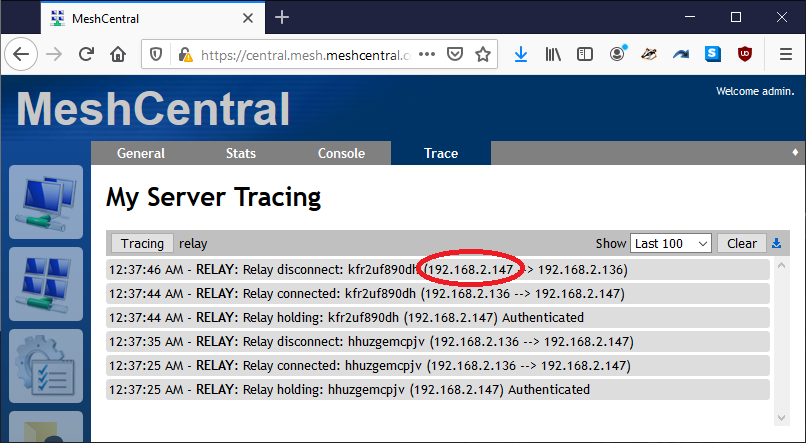
If you see a disconnect message, the first IP address is the address that initiated the disconnection. This way, you can know if the browser or agent broke the connection.
I will ask Bryan, I think he has additional agent settings to make the agent "Ping" over the websocket more often.
 Ylianst
on 14 Apr 2020
Ylianst
on 14 Apr 2020
Bryan just pointed out that you can add this line in the meshagent.msh file:
controlChannelIdleTimeout=10
Note that capitalization is important here, the 10 is the number of seconds between agent pings. If this works, there is a way to setup the server to auto-add this line to the .msh file.
Ylianst
on 14 Apr 2020
Just to clarify, that value is the idle timeout value, so if you specify 10, that's 10 seconds of idle time on the connection, not necessarily 10 seconds between pings... Also, even tho this flag mention control channel, the agent will use the same value for tunnel connections.
 krayon007
on 14 Apr 2020
krayon007
on 14 Apr 2020
Oh, I got the completely wrong then. Is there a way to set the websocket "ping" time? Maybe I can look at this on the serve side.
Ylianst
on 14 Apr 2020
That should still be what you're looking for. If the idle timeout is set to 10, then it will send a ping after 10 seconds if inactivity in the websocket. Sending a ping exactly every 10 seconds is unnecessary if there is active traffic on the websocket. This setting basically sets the maximum time/gap between packets. This is exactly what you need if you are trying to prevent a proxy from closing a socket due to inactivity.
krayon007
on 14 Apr 2020
Unless the grammar of the nginx documentation is poor, it looks like 'proxy_send_timeout' and 'proxy_send_timeout' only operate on the http request/response, not the websocket connection. If that is the case, it makes sense that file transfer, desktop session, and terminal session all end prematurely. Looking on github, it look like I might be right... There is an outstanding issue on github for nginx timeouts not working at all for websockets. It looks like nginx doesn't reset the timeout correctly when receiving websocket control frames, only data frames.
krayon007
on 16 Apr 2020
You guys are awesome, thanks so much for this assistance! Thanks for the tracing tools, this is helpful, and unfortunate (for me) at the same time, bear with me here...
Testing controlChannelIdleTimeout=10 in the agent, or "AgentIdleTimeout":"10000" in the server did not improve the situation, but good to know! :)
In our case, we are using 2 NGINX servers, one is customer facing, one is employee facing, they both point to the same MeshCentral server. (Pardon my terrible drawing)
[Mesh Agents] --> [NGINX1-CustomerFacing] --\
                                              > [MeshCentral]
[Employee]    --> [NGINX2-EmployeeFacing] --/
The reason for the second employee facing server is to:
- Add another layer of security (TLS Client Certificates which are required by our organization) so only employees with a valid TLS Client cert can connect. (This is also good for when someone leaves the company, we can add their cert to the revoked cert list (ssl_crl), then remove them from all the domains incrementally and later)
- Lock down specific office IPs that are allowed to connect via NGINX (allow [Office_IP1];) and have that managed by a separate team that doesn't have access to MeshCentral (We understand that MeshCentral also has this functionality)
- Only allow certain URIs to be exposed to the public (IE: meshrelay.ashx) thus reducing the attack surface.
The MeshCentral agents are pointed at the customer facing NGINX, when we do the tracing, and connect to the web portal using the Company Internal NGINX, we see this for terminal sessions:
10.0.0.20 - Company Internal NGINX
10.0.0.30 - Public Facing NGINX
11:48:54 PM - RELAY: Relay disconnect: n9zemd73b7 (10.0.0.20 --> 10.0.0.30)
11:43:45 PM - RELAY: Relay connected: n9zemd73b7 (10.0.0.30 --> 10.0.0.20)
11:43:40 PM - RELAY: Relay holding: n9zemd73b7 (10.0.0.20) Authenticated
Specific to the file upload process
Interestingly, when we transfer smaller files (200mb) these work without issue consistently (100% of the time in my testing), but larger (1GB files) have a much lower success rate, but we understand that having 2 NGINX servers is somewhat of an unusual situation, I'm still doing more testing to narrow this down a bit, but again, thanks for the suggestions. I will update this bug when I have a better handle on whats happening.
darryl-h
on 16 Apr 2020
I just published what is hopefully a fix for this (however, not an ideal one). Update the server to MeshCentral v0.5.1-z and add the following line in the settings section of config.json:
"AgentPong": 60
This will cause the server to send dummy data to the agents each 60 seconds. Feel free to adjust the time in seconds as needed, the higher the better of course to lower amount of network traffic.
Let us know if this works.
Ylianst
on 17 Apr 2020
OK, so this solution does seem to resolve part of the issue. I'm still testing to try and figure out more.
Often times the file transfer does not start, this is characterized by the following:
1) Event logs not showing the name of the file being uploaded
IE, this line is not created/displayed 2:54:36 PM - root → Upload: "/root/1GB.zip"
2) No file is created
3) The upload progress indicator does not move from 0%
It seems (need to continue testing) that if the file transfer does start, the file transfer will complete, which was not happening before, so the AgentPong setting seems to have helped.
Thank you again for your efforts!!
darryl-h
on 18 Apr 2020
Thanks for the excellent report. This is probably a side-effect of the "pong", I will test and fix.
Ylianst
on 18 Apr 2020
I don't think this was a result of your pong code, this behavior was happening before as well, but I neglected to note it in my initial report as the unfinished uploads were more prevalent and (from an event log point of view) easier to look at after the fact.
I will be increasing the NGINX log level on both the NGINX servers and comparing the output from a failed upload start to a successful upload start. If you would like, you can close this problem report, and I will open a new one about the file upload start when we have more information / a work around / fix, as the timeout issue has been resolved as far as I can tell.
Thank you very much again, you guys are amazing 👍
darryl-h
on 19 Apr 2020
Thanks. Yes, if it's unrelated to the original problem posted here, please open a new issue and close this one. Your detailed reports are most appreciated.
Ylianst
on 19 Apr 2020
Problem Description:
It looks like the agent pong is being inserted into the uploaded file, corrupting it. If the file uploaded is small, you may not notice a difference possibly becuase the pong did not occur. (IE 6kb files worked fine) but larger (20MB files) did exhibit the issue.
20MB File Upload Test Log Review
12:31:22 PM - root → Started file management session "ejp6s0jwln" from 192.168.1.1 to 192.168.1.2
12:30:55 PM - root → Ended file management session "0d8pkb2yyxea" from 192.168.1.2 to 192.168.1.1, 77 second(s)
12:29:41 PM - root → Upload: "/root/20MB.zip"
20MB File Size Differences
20,971,542 bytes uploaded of 20,971,520 bytes (+22 bytes -- file too large)
Testing Process
1) Download the 20MB file from here: https://www.thinkbroadband.com/download
2) Use the file manager in MeshCentral to upload the file
3) Rename the original 20MB file
4) Download the 20MB file from the server
5) Use something like WinMerge to observe the differences (If you use WinMerge, rename the files to .bin from .zip)
Differences are on line 109d000
{"ctrlChannel":"102938","type":"pong"}
darryl-h
on 20 Apr 2020
Just fixed this, will be in MeshCentral v0.5.11 when it's next published. Should not not be seeing pong's in your files anymore.
Ylianst
on 21 Apr 2020
Published MeshCentral v0.5.11 with a fix for this. Let me know if it works.
Ylianst
on 21 Apr 2020
File size and content (md5sum) appear to match! Thanks for the quick fix!
Files and Terminal sessions appear to be working as expected as well, but I will do a more in through test in the near future and report back.
darryl-h
on 22 Apr 2020
Terminal and files session is still connected almost 4 hours later, closing this request. Will open a new PR and refer to this one if need be.
Thanks for your awesome work!
darryl-h
on 22 Apr 2020
Related issues
 M1CK431
·
3Comments
M1CK431
·
3Comments
 petervanv
·
3Comments
petervanv
·
3Comments
 haxmachine
·
3Comments
haxmachine
·
3Comments
 whalehub
·
3Comments
whalehub
·
3Comments
 unguzov
·
3Comments
unguzov
·
3Comments
Most helpful comment
I just published what is hopefully a fix for this (however, not an ideal one). Update the server to MeshCentral v0.5.1-z and add the following line in the
settingssection ofconfig.json:This will cause the server to send dummy data to the agents each 60 seconds. Feel free to adjust the time in seconds as needed, the higher the better of course to lower amount of network traffic.
Let us know if this works.