Meshcentral: can't load certificate from Apache reverse proxy
Hi, i have a very similar issue like #1031 but with Apache as proxy server. and i'm running on docker version.
my problem is that i cant see in the log where MC is trying to load certificate from Apache.
i got it to work when i manually copied certificate from apache to webserver-cert-public.crt file.
then it kinda works, agents are connecting to server.
i tried then setup router for RDP connection and can't get it to work - on RDP connect it ends with TLS Handshake error.
i think it's something related to my certificate problem. should i copy any addition files from apache? it's a letsencrypt certificate with multiple alternative names, so mesh.mydomain.lv is one of alternative certificate names.
my config bellow, 192.168.50.248 is my apache proxy LAN side IP.
{
"settings": {
"Cert": "mesh.mydomain.lv",
"WANonly": true,
"Minify": 1,
"SessionKey": "someverylongkey",
"CookieIpCheck": false,
"CookieEncoding": "hex",
"_IgnoreAgentHashCheck": true,
"Port": 448,
"AliasPort": 443,
"RedirPort": 80,
"WebRTC": false,
"AgentPong": 300,
"AllowHighQualityDesktop": true,
"TlsOffload": "192.168.50.248",
"TrustedProxy": "192.168.50.248",
"Log": "main,web,webrequest,cert",
"Plugins": {
"enabled": true
}
},
"_domains": {
"": {
"Title": "MyServer",
"Title2": "Servername",
"CertUrl": "https://mesh.mydomain.lv:443/",
},
},
}
how should i proceed next?
thanks,
Uldis
 uldiseihenbergs
All 13 comments
just installed a RoutePlus plugin, and looks like routing is working - a can RDP to one of my Win devices..
uldiseihenbergs
on 3 Apr 2020
Hi. A few things here, first, you can run MeshCentral with --debug cert to get extra information about the loading of the certificate from Apache. Also, when MeshCentral tries to resolve "mesh.mydomain.lv", it will get an external IP address that may not always work for loading the Apache certificate, feel free to put the private IP address instead like this:
"CertUrl": "https://192.168.2.100:443/"
As long as MeshCentral is able to load the same TLS certificate as the agent will see, you can use a private DNS name or private IP address to load that certificate. Let me know if this works or what you see with the --debug cert option.
 Ylianst
on 3 Apr 2020
Ylianst
on 3 Apr 2020
Hello!
just tried your suggestions:
- changed Certurl to proxy LAN address, no changes;
- added --debug cert to startmeshcentral.sh file, and still see no additional log on docker log, see below:
`+ [email protected]
added 26 packages from 9 contributors, removed 3 packages, updated 4 packages and audited 454 packages in 11.412s
1 package is looking for funding
run npm fund for details
found 0 vulnerabilities
Installing semver...
Installing [email protected]...
MeshCentral HTTP redirection server running on port 80.
MeshCentral v0.5.0-z, WAN mode.
MeshCentral Intel(R) AMT server running on mesh.mydomain.lv:4433.
MeshCentral HTTP server running on port 448, alias port 443.
uldiseihenbergs
on 3 Apr 2020
Oh! I just noticed that in your config.json above, there is "_domain", the underscore will cause the domain section and everything within it to be ignored. Change _domain to domain and try again.
Ylianst
on 3 Apr 2020
Doh, what a mess from my side.. now i'm seeing it reads certificate from proxy, but only, if i choose LAN side address in certUrl. BTW, where it saves it? webserver-cert-public.crt stays untouched..
uldiseihenbergs
on 4 Apr 2020
just a side note , i see interesting undocumented option in settings part:
"AllowHighQualityDesktop": true,
"Log": "main,web,webrequest,cert"
what are they for?
are there any others worth to be mentioned ?
thank's
 tradexsrl
on 4 Apr 2020
tradexsrl
on 4 Apr 2020
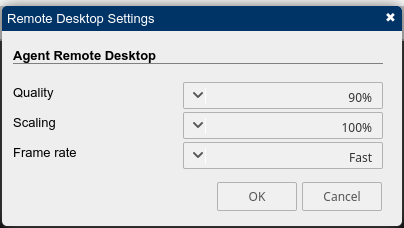
"AllowHighQualityDesktop": true - allow higher quality settings on Desktop - on my server, it 90% now max.
"Log": "main,web,webrequest,cert" - it's for debuging, it writes log.txt file in meshcentral-data folder with appropriate logs.
and for others: "_IgnoreAgentHashCheck": true, - another one for debugging to deal with certificate problems - in my case it was the first way i got it working at all(agents started connecting), and then next tried to resolve certificate issues. once resolved, then you should switch it off.
uldiseihenbergs
on 4 Apr 2020
thank's .
where do you get these undocumented option?
tradexsrl
on 4 Apr 2020
huh, google is your friend :)
uldiseihenbergs
on 4 Apr 2020
yes of course , i hoped there was a page or pdf that explain all the undocumented options.. ;-)
tradexsrl
on 4 Apr 2020
@uldiseihenbergs, to answer your original question above:
BTW, where it saves it? webserver-cert-public.crt stays untouched.
The certificate that is loaded by CerlURL is not saved anywhere, it is hashed and the result is kept in memory. When an agent connects, the agent will report that is saw TLS cert with that hash, if it matches, everything is ok.
Note that if agents start connecting with reports of a different TLS cert hash, MeshCentral will re-load the certificate from the reverse proxy to see if it changed. This should handle the case where the certificate on the reverse proxy is changed on the fly. Hope that helps.
Ylianst
on 5 Apr 2020
@tradexsrl I do agree that I keep adding configuration options and documentation has not followed. I think I will need to write documentation on just the config.json, but another option as some point is to have a web control panel that guide you thru all the options.
Ylianst
on 5 Apr 2020
I am going to close this one as I think the original issue was addressed. However, please feel free to open new issues for the other topics.
Ylianst
on 5 Apr 2020
Related issues
 haxmachine
·
3Comments
haxmachine
·
3Comments
 unguzov
·
3Comments
unguzov
·
3Comments
 MailYouLater
·
3Comments
MailYouLater
·
3Comments
 PathfinderNetworks
·
3Comments
PathfinderNetworks
·
3Comments
 nroach44
·
3Comments
nroach44
·
3Comments
Most helpful comment
"AllowHighQualityDesktop": true - allow higher quality settings on Desktop - on my server, it 90% now max.

"Log": "main,web,webrequest,cert" - it's for debuging, it writes log.txt file in meshcentral-data folder with appropriate logs.
and for others: "_IgnoreAgentHashCheck": true, - another one for debugging to deal with certificate problems - in my case it was the first way i got it working at all(agents started connecting), and then next tried to resolve certificate issues. once resolved, then you should switch it off.