Meshcentral: Feedback Requested: Individual device rights in v0.5.0-x
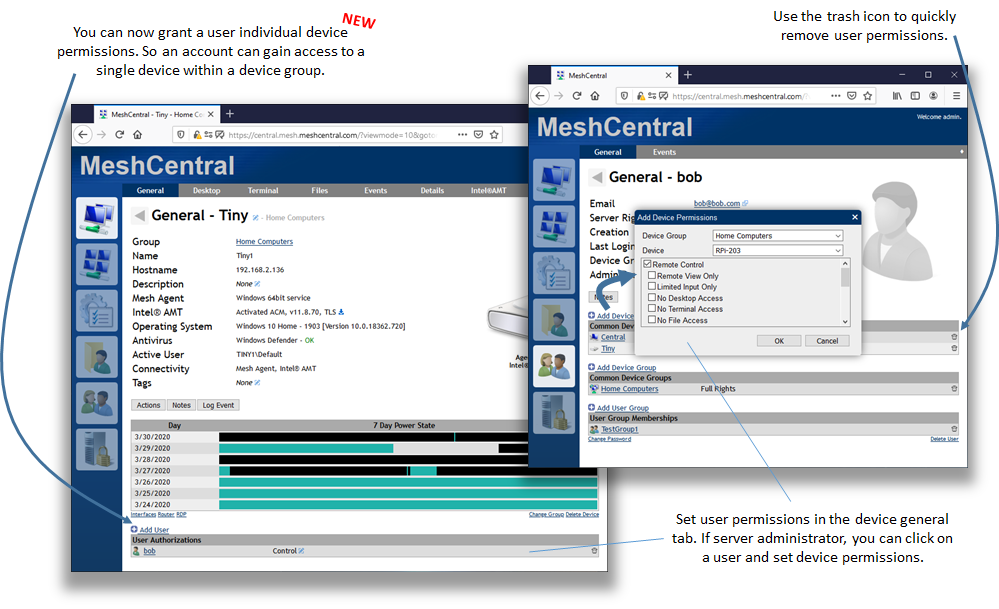
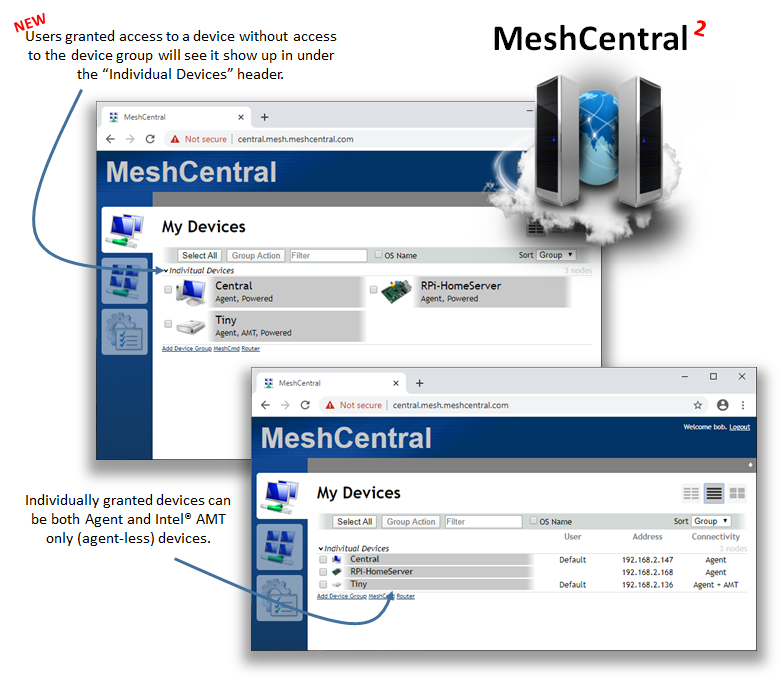
Just published MeshCentral v0.5.0-x that includes a lot of changes to allow users to be granted permissions on individual devices. In the past, you could only assign right to a device group so, that limited what you could do as an administrator. Now, you can click on a device and add a user so that they can control just that one device. Since it's a lot of code change, I would like to get community feedback on the feature - Thanks.
 Ylianst
All 41 comments
I had limited a user to remote view only, i was able to execute the reboot action, also use the terminal to reboot the device and acces files
The screenshot below show the used settings.

 petervanv
on 31 Mar 2020
petervanv
on 31 Mar 2020
Thanks for the report. I will test this.
Ylianst
on 31 Mar 2020
One addition to this feature would be the ability to allow groups to be granted permissions on individual devices.
 asasin114
on 1 Apr 2020
asasin114
on 1 Apr 2020
@Ylianst : more of questions than testing yet ...
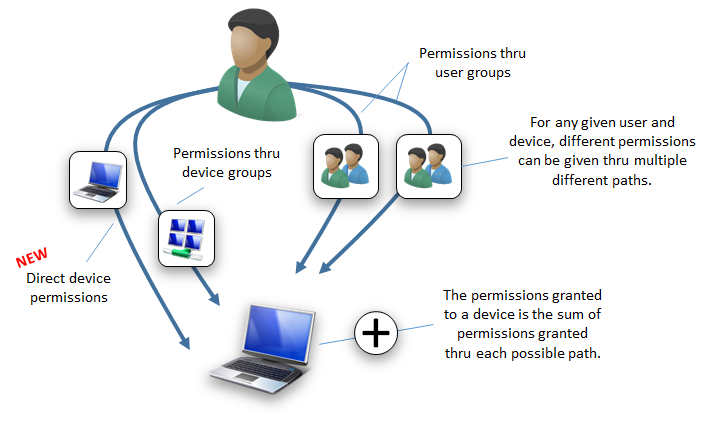
- Regarding the bottom part of the illustration: permission arrows "thru user groups" should go "thru device groups" as well, right?
- Is all that (permissions thru "any path") supposed to work for all variants of forwarding ports (MeshCentralRouter.exe, meshcmd, plugin "RoutePlus") in the end?
That is something i would have use for and could test. iirc "thru user groups" did not work with MeshCentralRouter & meshcmd the last time it tried.
 baikal
on 1 Apr 2020
baikal
on 1 Apr 2020
unfortunately there is a serious bug: i delete users from each group and added only to specific device.
now no ones connecting via rdp through meshcmd + meshaction.txt are allowed to connect and get an internal error.
if added again into group it works again but we loose the feature to see only his specific device when login into meshcentral portal.
please let me know :-(
 tradexsrl
on 1 Apr 2020
tradexsrl
on 1 Apr 2020
i'm using 0.5.0-y version
tradexsrl
on 1 Apr 2020
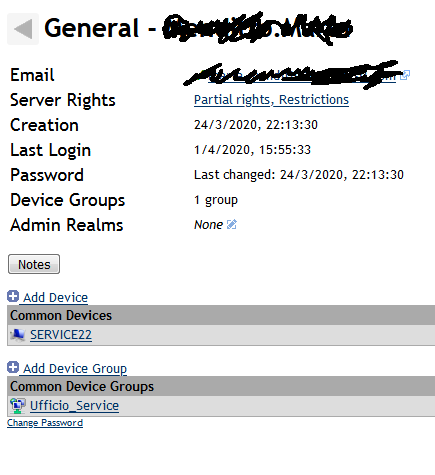
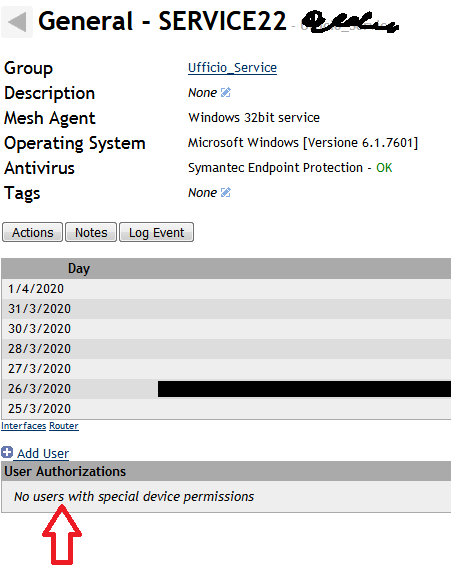
another strange situation.
why i see user added to a specific device in this view and why not if i select that device in the other view?
tradexsrl
on 1 Apr 2020
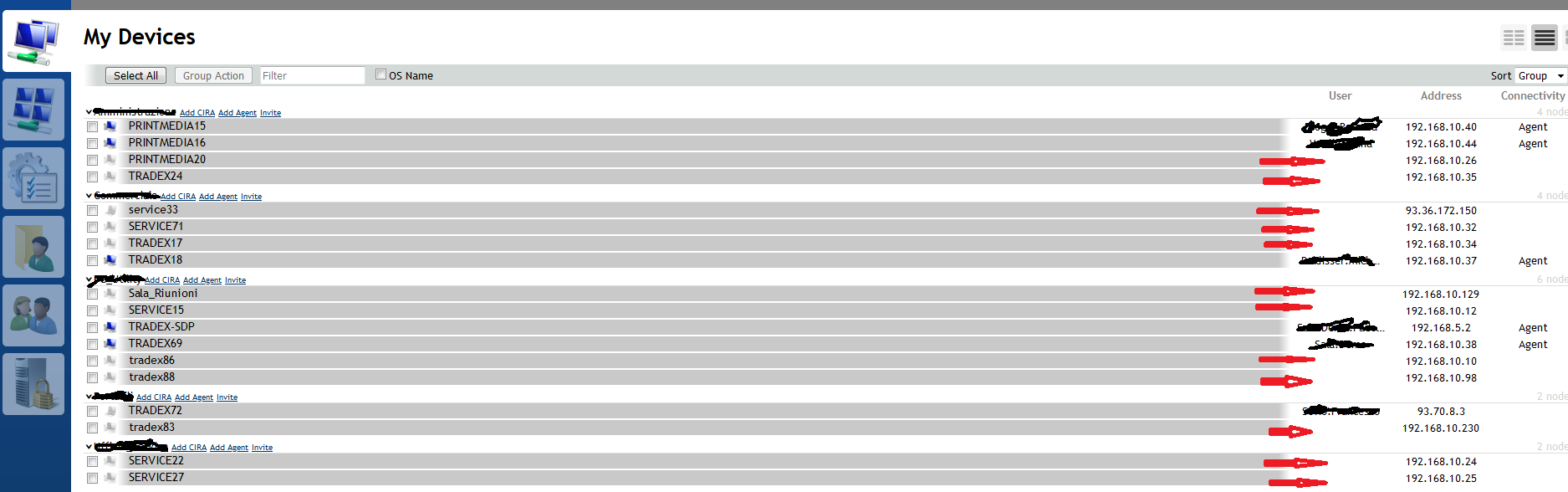
and why on this view some pc have the logged user and some are blank?
(all of these pc during the day were online,connected to meshcentral and with user logged in)
tradexsrl
on 1 Apr 2020
Thanks for the feedback. Yes, being able to add user groups into devices will come in the future, I did not want to put that in now until I fix stuff. Let me take a look at these reports in the coming days and do some fixes.
@baikal 1 - Right, the picture needs more fixing. You can be granted rights to a device directly or thru a device group.
@baikal 2 - Yes, but I need to fix the tools. Looks like it's not working now.
@tradexsrl MeshCentral Router, MeshCmd and all other tools should work. I will work on fixing this.
@tradexsrl Yes, the two views should show the same, something is off.
Ylianst
on 1 Apr 2020
FYI. Working on fixing MeshCentral Router now, it needs to support displaying devices without having the device group information for that device.
Ylianst
on 1 Apr 2020
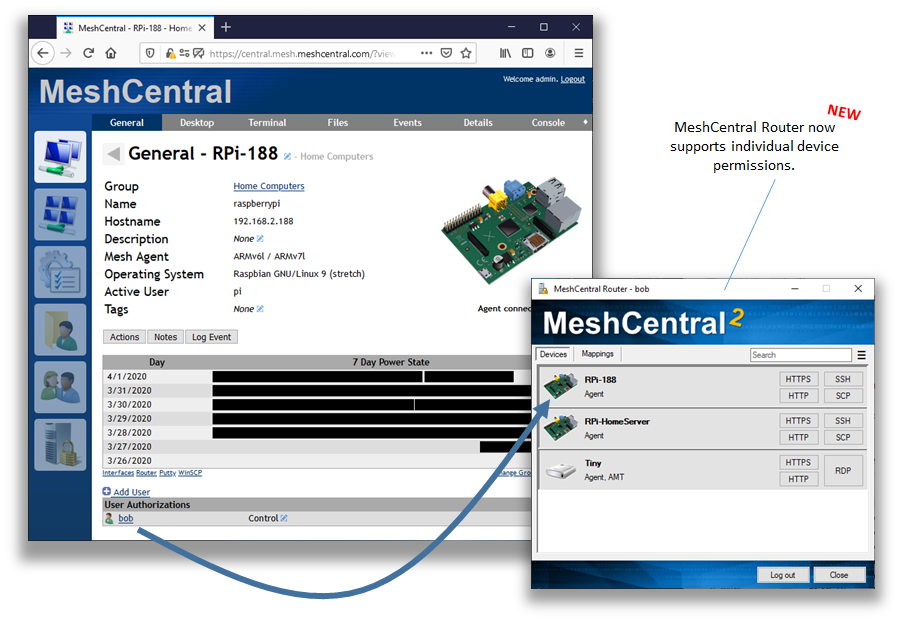
Just published MeshCentral v0.5.1-a with a new version of MeshCentral Router that supports individual device permissions. So far, looks like it's working well, but testing appreciated.
Ylianst
on 2 Apr 2020
question: when meshcmd will be update in a new version of meshcentral server , the users need to download it again with a new meshaction file?
i'm asking this because to keep it simple for end user , i upload to each user directory on meshcentral server meshcmd and meshaction already modified with their password so they only need to run meshcmd and an rdp file to connect to their office pc.
tradexsrl
on 2 Apr 2020
Hi,
See issue https://github.com/Ylianst/MeshCentral/issues/1103 about the keyboard not working.
Thanks
 vedran-dobos
on 2 Apr 2020
vedran-dobos
on 2 Apr 2020
@vedran-dobos Thanks for reporting, #1103 fixed in MeshCentral v0.5.1-b.
@tradexsrl MeshCmd is not automatically updated, so users would have to re-download it. However, for individual device permissions, if you update the server to MeshCentral v0.5.1-b, MeshCmd should work correctly without update. I just tested it and it seems to be working.
Hope that helps.
Ylianst
on 3 Apr 2020
yes i've done and seems to be ok even with the old MeshCmd version.thank's
tradexsrl
on 3 Apr 2020
@Ylianst I did test MeshCmd routing, works well for all 3 variants (not if 2FA is involved)
- user ==> device
- user ==> device group --> device
- user ==> user group --> device group --> device
There is a glitch and a typo in the web UI (0.5.1-b) under 'My devices' for that user, though:
- case 1: typo "Indivitual Devices"
- case 3: needs logout/login for the devices to show up (1. and 2. they show up immediately).
Using the RoutePlus plugin, cases 2. and 3. do work, in case 1. the device does not show up on the RoutePlus Page ...
(but with RoutePlus, 2FA obviously works out of the box)
In any case, thanks for all the work an the nice tools!
baikal
on 3 Apr 2020
@baikal What type of 2FA are you using? MeshCMD should work with 2FA except for the USB keys. You should be able to pass in the login token when you run MeshCMD.
Ylianst
on 3 Apr 2020
@Ylianst Authenticator App, meshcmd never asked for a token.
Grepping and reading through source and docs, i guess MeshCtrl supports 2FA (--token), no signs thereof in MeshCmd source. There is also #479 (MeshCMD if 2fa enabled).
baikal
on 3 Apr 2020
You are probably right that --token was a miss on my part in MeshCMD. I will add it. It should also indicate that this option is required if needed and not present.
Ylianst
on 3 Apr 2020
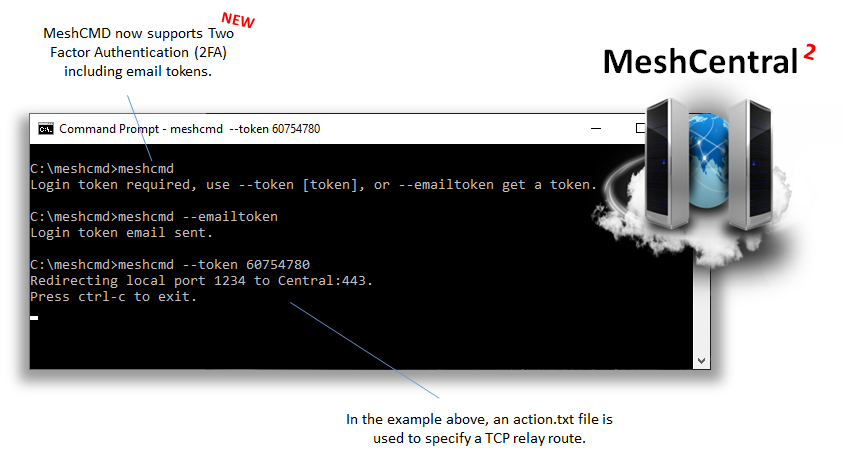
Just published MeshCentral v0.5.1-c with updated MeshAgents and 2FA support in MeshCMD. I also fixed the "Indivitual Devices" typo.
Ylianst
on 4 Apr 2020
@baikal I see the problem with "case 3: needs logout/login for the devices to show up (1. and 2. they show up immediately)." Working on it now.
Update: Fixed it, it will be in MeshCentral v0.5.1-d when I update it next.
Ylianst
on 4 Apr 2020
@Ylianst thank you. Tested 2FA (Authenticator App) for a "direct device rights" user, works fine.
baikal
on 4 Apr 2020
@Ylianst I tested (0.5.1-e) if in "case 3 - via user group" the devices do show up/disappear "in live mode" under MyDevices when these rights are granted/removed by an admin. They do - as in cases 1 and 2.
baikal
on 5 Apr 2020
@Ylianst @ryanblenis
In the RoutePlus plugin, devices with individual device rights do not show up. I do not know if that is a bug in the plugin itself or in meshcentral proper. If i understood correctly, the plugin does nothing special in that regard, just iterates through 'parent.nodes' (see doOnLoad and updateNodesTable) so maybe that 'parent.nodes' is not populated with these individual devices by meshcentral?
baikal
on 5 Apr 2020
I haven't used the new "individual device rights" feature yet, but I will take a look at what was done to implement it and see if there is a workaround / viable update for any affected plugins. Thanks for bringing it to my attention!
 ryanblenis
on 5 Apr 2020
ryanblenis
on 5 Apr 2020
I took a look and it appears that the mesh name for individually assigned devices is now assigned '*'.
This has been updated in RoutePlus, and I'll be reviewing other plugins. Feel free to open an issue with any other plugin you find before me on that project's issue tracker. Thank you.
ryanblenis
on 6 Apr 2020
@ryanblenis Thank you for tackling it so quick.
Yes, I had to decide where to place it. As I was already talking about the plugin in combination with individually assigned devices on this "testing" issue for here and the changes happend here, I did it here...
(I did notice another very minor glitch with RoutePlus - see you over there)
baikal
on 6 Apr 2020
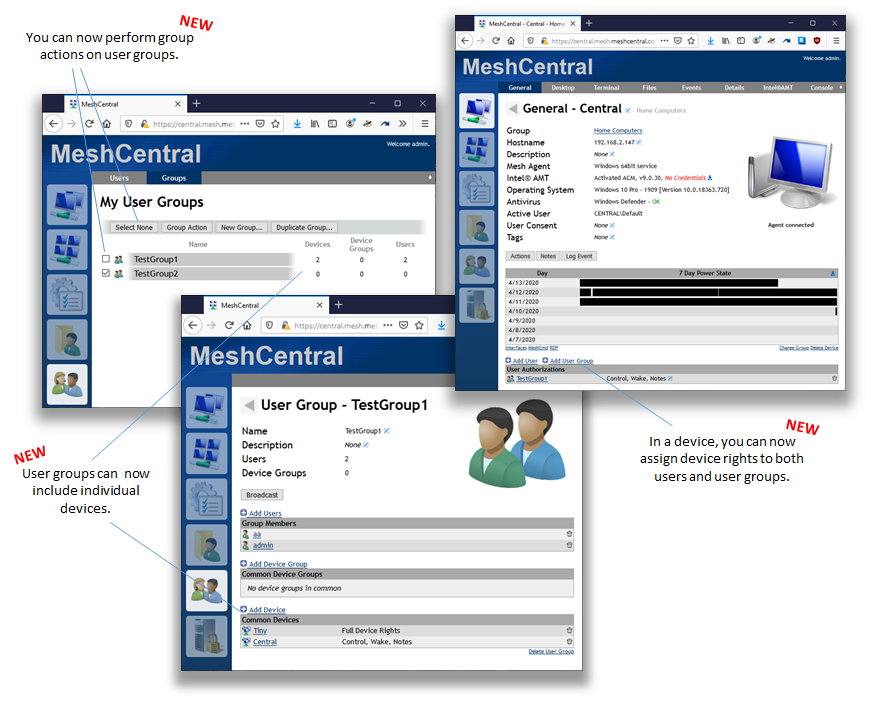
FYI. Just posted MeshCentral v0.5.1-s where you can assign user group permissions to individual devices. Hopefully this will be the last big change to the access control system. Feedback and bug reports on this feature would be much appreciated.
Ylianst
on 14 Apr 2020
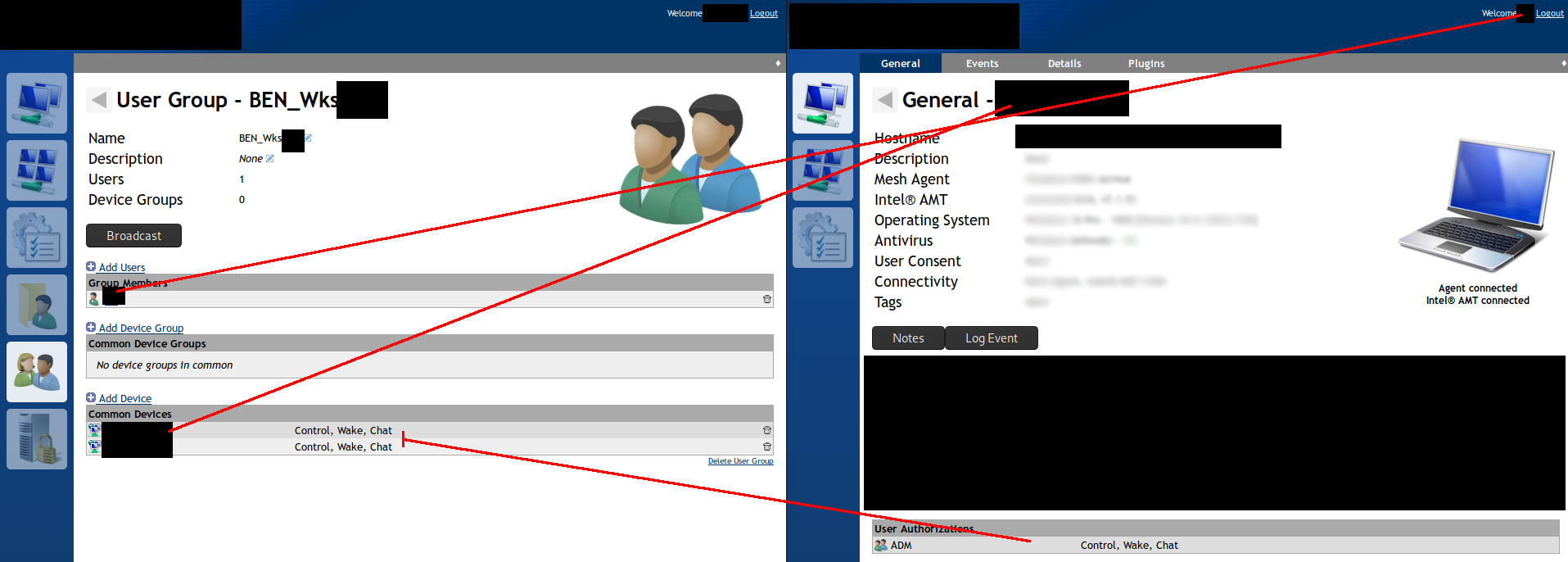
I think I've found an issue - I created a test user, added them to a group, and then granted the group "control, wake, chat" - and after a while (a few minutes) the permissions stop showing on the computer page, and they no longer seem to apply for the user. The permissions still show on the user group, but not on the device. If I re-apply them the same behaviour repeats.
While the permissions do apply I seem to be able to see the desktop tab, but not connect.
 nroach44
on 14 Apr 2020
nroach44
on 14 Apr 2020
Even before that latest addition of individual device rights through user groups, I notices something strange where I had I user with "admin rights" on an device group - all fine. When the same user was give "some rights" through a user group, he had only those and lost the other ones. More like "the latest" wins or the "most restrictive" wins and not "additive" ... will try again with when testing this newest channel.
baikal
on 14 Apr 2020
@nroach44 Ok, investigating this now.
@baikal If you have an exact set of steps to make a problem occur, please send the steps over, I will fix. Permissions should be additive.
Ylianst
on 14 Apr 2020
@nroach44 I can't make your problem happen, if there is any more information or hints, I would love to know. Also, if by any chance you have a new server but there is something caching so .js files and you get older .js, you may see some permission issues. hit shift-reload or alt-reload on the browser and trying again could help, but not sure if that is a problem at all.
Ylianst
on 15 Apr 2020
@baikal I found an the issue to rights not being cumulative and fixed it in MeshCentral v0.5.1-u. Let me know if it works.
Ylianst
on 15 Apr 2020
@Ylianst I am on 0.5.1-t at the moment, and I can recreate the issue:
- device group "bdevices", user "buser", user group "bgroup"
- buser has 'Full Rights' on bdevices
- all fine, e.g. Desktop access, Files, ... for buser on devices of bdevices
- buser is member of bgroup
- bgroup has just 'Control' (ticked [Remote Control]) on bdevices
- now, Desktop/Files/Terminal all gone for buser on devices of bdevices, only General/Events/Details/Console/Plugins left
I will update to 0.5.1-u or later the next time I can without disturbing real users and check that exact same configuration.
baikal
on 15 Apr 2020
@Ylianst @baikal That behaves the same way my issue does - I loose the desktop/files/terminal tab when 'Control' is enabled
Yilan I tested with a browser that had never seen the page before and it still did it - should I spin up another copy and let you log in?
nroach44
on 15 Apr 2020
It's working as intended.
You gather final permissions from 3 places:
Device-> user
Device group - > user
Device group -> user group -> user
Being a cumulative implementation, is a sum of checked permissions from all checked above.
Tricky to follow and tricky to obtain desired final permissions, because some permissions are allow type and some are deny type, when summed, the result may not be as desired.
@Ylianst I propose a different approach, based on precedence where rules are defined. not cumulative as it is now:
- if it is defined at level device ->user, use that for final permissions, don' look anymore for other permissions;
- if it is defined at level Device group - > user, use that for final permissions, don' look anymore for other permissions;
- if it is defined at level Device group -> user group, cumulative permissions from groups that user is in;
 iviamandi
on 15 Apr 2020
iviamandi
on 15 Apr 2020
@iviamandi I do see (and was all the time aware of) the point of _cumulative_ deny-type permissions resulting in restriction. Though that is not the issue in my example from above, as that has only allow-type permissions and it only happens if the second permission path is "via user groups".
But as said there, that is under 0.5.1-t and was only the response to @Ylianst's request to properly document a testcase. My test of the assumed fix in 0.5.1-u is not yet done, so I am not saying anything about that yet.
With the (understandable - adding at least on deny is "denied") quirks of deny-type permissions, I would rather prefer to keep cumulative behavior and not any sort of "first wins" - because then, somehow that order has to be fixed and will certainly be the "wrong" one for someones use cases. Just my 2c
baikal
on 15 Apr 2020
Cumulative is for checked permissions (either allow - for example, Full Administrator, Edit device group, etc or deny type - only Remote view only, No Desktop, No Terminal, etc).
What it's checked at any level (device, device group - user or user group, remains checked on final resultant permissions.
@baikal Order it's fixed, from small level, device-user, to upper level, device group-user, and most upper level device group-users group.
So you can allow or deny exactly what you want, with no problem, if you assign correct permissions at group level and individual level.
Example: With cumulative permissions, if you define a user group with no terminal permission, you cant' allow a user in that group to access terminal, if you need that only for a device.
With precedence, you can do that just fine, without break anything from permissions set at group level, just define a rule at level device-user, and done.
When I said allow or deny type I meant that respective permission allow or deny something,
iviamandi
on 15 Apr 2020
@Ylianst Okay I think I have part of the issue pinned down - I created the group BEN_Wks_Abc, and then also created a user called Abc - this exhibits the same issue that I got before, but couldn't replicate with other names:
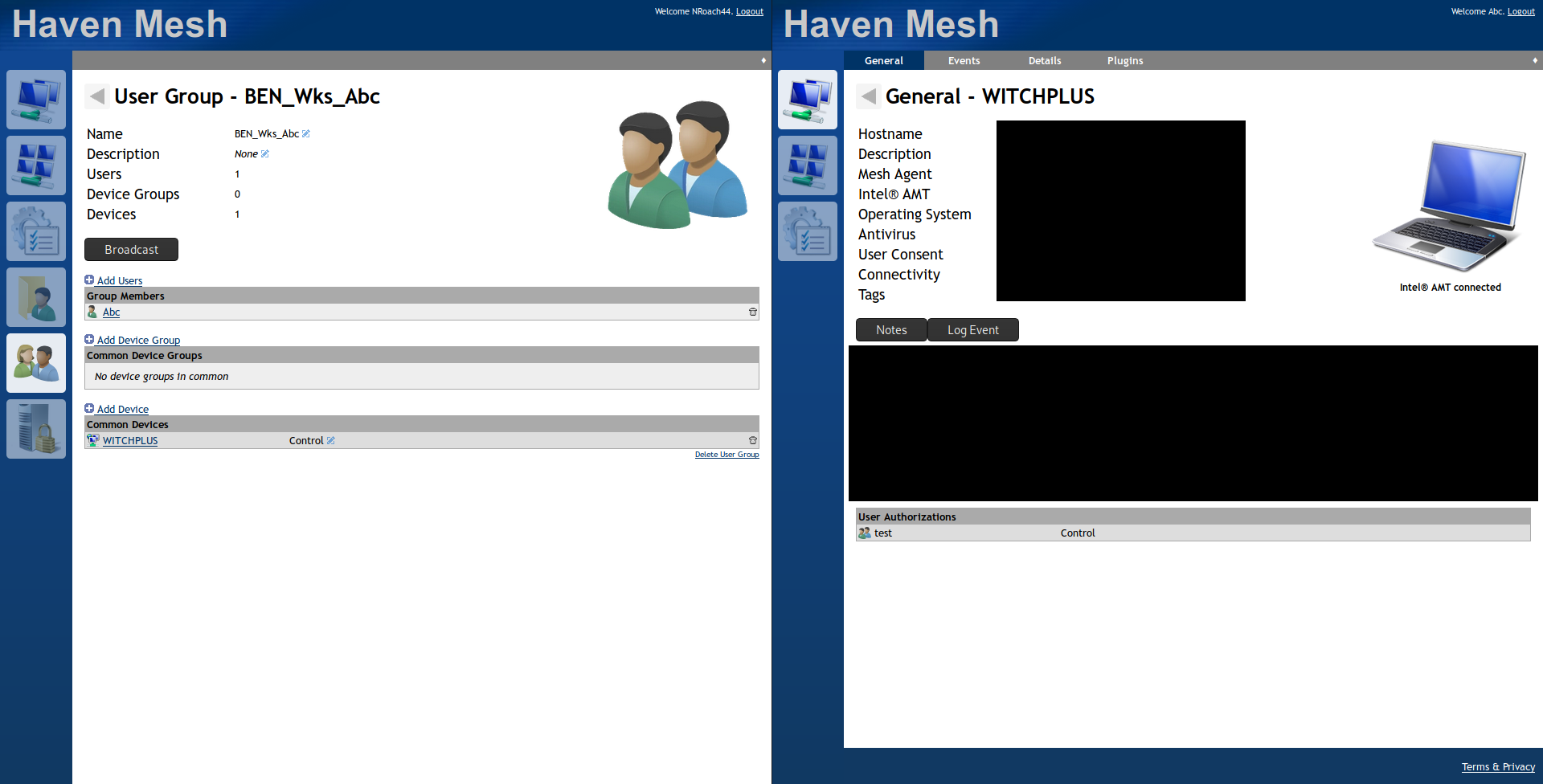
You can see that despite the admin user on the left showing the group having permission on the computer, but the member of the group can't use the control permissions, or even see the permissions granted on the computer.
nroach44
on 15 Apr 2020
@Ylianst Tested exactly that case on 0.5.1-u: Yes, it works now as expected - buser can access Desktop, Files etc on bdevices as he is in 'Full Rights' and has additional but not needed 'Control' through bgroup
Thank you
baikal
on 15 Apr 2020
@iviamandi I just value the "cumulativeness" more than the currently imposed restriction "do not have groups with deny-type rights if you want relax those individually again". Is I said, that's just my 2c.
baikal
on 15 Apr 2020
Related issues
 PathfinderNetworks
·
3Comments
PathfinderNetworks
·
3Comments
 haxmachine
·
3Comments
haxmachine
·
3Comments
 robclay
·
3Comments
robclay
·
3Comments
 veitw
·
4Comments
veitw
·
4Comments
 guerby
·
3Comments
guerby
·
3Comments