Meshcentral: Let's Encrypt problem
Hi
I have problem with let's encrypt cert.
I created new server with clean install and I can't get lestencrypt cert.
This is Ubuntu 18.0.4 server
This is my config
"letsencrypt": {
"email": "[email protected]",
"names": "remote.xxxxxxxxxxxxxxx.pl",
"rsaKeySize": 3072,
"production": true
}
and this is debug log.
sudo node node_modules/meshcentral/ --debug cert,web,webrequest
MeshCentral HTTP redirection server running on port 80.
CERT: Initializing Let's Encrypt support, using GreenLock v4.0.4
[staging] ACME Staging Directory URL: https://acme-staging-v02.api.letsencrypt.org/directory
ERR: FAKE CERTIFICATES (for testing) only
CERT: Getting certs from local store
CERT: Checking staging certificate remote.xxxxxxxxxxxxxxx.pl...
[default] challenges.http-01.module: acme-http-01-standalone
[default] renewOffset: -45d
[default] renewStagger: 3d
[default] accountKeyType: EC-P256
[default] serverKeyType: RSA-2048
ACME Directory URL: https://acme-v02.api.letsencrypt.org/directory
CERT: Notify: error: {"context":"cert_issue","subject":"remote.xxxxxxxxxxxxxxx.pl","altnames":["*.xxxxxxxxxxxxxxx.pl","remote.xxxxxxxxxxxxxxx.pl"]}
CERT: Notify: error: {"length":0}
CERT: No staging certificate present
MeshCentral v0.4.9-o, Hybrid (LAN + WAN) mode.
MeshCentral Intel(R) AMT server running on remote.xxxxxxxxxxxxxxx.pl:4433.
MeshCentral HTTPS server running on remote.xxxxxxxxxxxxxxx.pl:443.
SMTP mail server XXXXXXXXXXXXXXXXX
CERT: Checking certificate for remote.xxxxxxxxxxxxxxx.pl (Staging)
CERT: Notify: error: {"errno":-111,"code":"ECONNREFUSED","syscall":"connect","address":"xxxxxxxxxxxxx","port":80,"context":"cert_issue","subject":"remote.xxxxxxxxxxxxxxx.pl","altnames":["remote.xxxxxxxxxxxxxxx.pl"]}
CERT: Notify: error: {"length":0}
CERT: Unable to get a certificate (Staging, 5700ms): [{"site":{"subject":"remote.xxxxxxxxxxxxxxx.pl","altnames":["remote.xxxxxxxxxxxxxxx.pl"]},"error":{"0":"e","1":"r","2":"r","3":"o","4":"r","length":5}}]
All the Let's debug test are OK.
Files rights:
-rw-r--r-- 1 meshcentral meshcentral 2494 lut 23 21:20 agentserver-cert-private.key
-rw-r--r-- 1 meshcentral meshcentral 1534 lut 23 21:20 agentserver-cert-public.crt
-rw-r-xr-- 1 meshcentral meshcentral 878 lut 29 21:10 config.json
drwxr-xr-x 2 meshcentral meshcentral 4096 lut 29 11:11 letsencrypt
drwxr-xr-x 2 root root 4096 lut 29 21:10 letsencrypt3
drwxr-xr-x 3 root root 4096 lut 29 21:10 letsencrypt3-staging
drwxr-xr-x 2 meshcentral meshcentral 4096 lut 29 11:05 mail-templates
-rw-r-xr-- 1 meshcentral meshcentral 1673 lut 24 20:21 meshcentral.db
-rw-r-xr-- 1 meshcentral meshcentral 1540 lut 29 11:04 meshcentral-events.db
-rw-r-xr-- 1 meshcentral meshcentral 0 lut 29 11:04 meshcentral-plugins.db
-rw-r-xr-- 1 meshcentral meshcentral 406 lut 29 11:04 meshcentral-power.db
-rw-r-xr-- 1 meshcentral meshcentral 0 lut 29 11:01 meshcentral-smbios.db
-rw-r-xr-- 1 meshcentral meshcentral 142 lut 29 11:04 meshcentral-stats.db
-rw-r--r-- 1 meshcentral meshcentral 975 lut 29 21:30 mesherrors.txt
-rw-r--r-- 1 meshcentral meshcentral 1702 lut 24 20:21 mpsserver-cert-private.key
-rw-r--r-- 1 meshcentral meshcentral 1480 lut 24 20:21 mpsserver-cert-public.crt
-rw-r--r-- 1 meshcentral meshcentral 2494 lut 29 10:58 root-cert-private.key
-rw-r--r-- 1 meshcentral meshcentral 1562 lut 23 21:20 root-cert-public.crt
-rw-r--r-- 1 meshcentral meshcentral 179 lut 29 21:30 serverstate.txt
-rw-r--r-- 1 meshcentral meshcentral 2494 lut 23 21:20 webserver-cert-private.key
-rw-r--r-- 1 meshcentral meshcentral 1646 lut 23 21:20 webserver-cert-public.crt
When I change letsencrypt3 and letsencrypt3-staging to meshcentral:meshcentral it's this same.
 motapek
All 33 comments
Can you open the file "/node_modules/greenlock/package.js" and look for "version": "x.x.x" and tell me what version of GreenLock you are using?
When, go in the folder over "node_modules" and type "npm install greenlock", then run MeshAgent again and let me know if is works now?
I will add code to display the GreenLock version in the debug logs and if updating GreenLock fixes the problem, I will automate this operation. Thanks in advance.
 Ylianst
on 2 Mar 2020
Ylianst
on 2 Mar 2020
I am a dummy, the logs above already show the GreenLock version:
CERT: Initializing Let's Encrypt support, using GreenLock v4.0.4
Your using the latest one, so that is not the problem. Ignore the instructions above, I need to figure something else.
Ylianst
on 2 Mar 2020
I just noticed that you are attempting to get a wildcard certificate from Let's Encrypt, one of your alt names starts with a star "*.xxxxxxxxxxxxxxx.pl".
{"context":"cert_issue","subject":"remote.xxxxxxxxxxxxxxx.pl","altnames":["*.xxxxxxxxxxxxxxx.pl","remote.xxxxxxxxxxxxxxx.pl"]}
However, your configuration does not have a star present in the names?!?!? I have never tested obtaining a wild card cert with Let's Encrypt. Not sure why the alt names request includes that "*".
Ylianst
on 2 Mar 2020
Hi Ylianst
I don't know where I can change this setting.
In my config I use only remote.xxx.pl domain.
"letsencrypt": {
"email": "[email protected]",
"names": "remote.xxxxxxxxxxxxxxx.pl",
"rsaKeySize": 3072,
"production": true
}
motapek
on 2 Mar 2020
That is super weird! I am looking at the code now to see how that entry could have been added.
Ylianst
on 2 Mar 2020
OK
I'm waiting patiently
motapek
on 2 Mar 2020
Just openned an issue on GreenLock here: https://git.rootprojects.org/root/greenlock.js/issues/16
Still looking for a solution, but the behavior is weird and not explained.
Ylianst
on 2 Mar 2020
I think I found a way to fix it, working on it now.
Ylianst
on 2 Mar 2020
Just published MeshCentral v0.4.9-q with hopefully a fix for this. Can you give it a try and let me know what you see? Thanks.
Ylianst
on 2 Mar 2020
Sorry
sudo node node_modules/meshcentral/ --debug cert,web,webrequest
MeshCentral HTTP redirection server running on port 80.
CERT: Initializing Let's Encrypt support, using GreenLock v4.0.4
[staging] ACME Staging Directory URL: https://acme-staging-v02.api.letsencrypt.org/directory
ERR: FAKE CERTIFICATES (for testing) only
CERT: Getting certs from local store
CERT: Checking staging certificate remote.XXXXX.pl...
[default] challenges.http-01.module: acme-http-01-standalone
[default] renewOffset: -45d
[default] renewStagger: 3d
[default] accountKeyType: EC-P256
[default] serverKeyType: RSA-2048
ACME Directory URL: https://acme-v02.api.letsencrypt.org/directory
CERT: Notify: error: {"errno":-111,"code":"ECONNREFUSED","syscall":"connect","address":"XXXXXXXXX","port":80,"context":"cert_issue","subject":"remote.XXXXX.pl","altnames":["remote.XXXXX.pl"]}
CERT: Notify: error: {"length":0}
CERT: No staging certificate present
MeshCentral v0.4.9-q, Hybrid (LAN + WAN) mode.
MeshCentral Intel(R) AMT server running on remote.XXXXX.pl:4433.
MeshCentral HTTPS server running on remote.XXXXX.pl:443.
SMTP mail server smtp.gmail.com working as expected.
CERT: Checking certificate for remote.XXXXX.pl (Staging)
CERT: Notify: error: {"errno":-111,"code":"ECONNREFUSED","syscall":"connect","address":"XXXXXXX","port":80,"context":"cert_issue","subject":"remote.XXXXX.pl","altnames":["remote.XXXXX.pl"]}
CERT: Notify: error: {"length":0}
CERT: Unable to get a certificate (Staging, 5653ms): [{"site":{"subject":"remote.XXXXX.pl","altnames":["remote.XXXXX.pl"]},"error":{"0":"e","1":"r","2":"r","3":"o","4":"r","length":5}}]
If you want I can send you true domain and IP data.
motapek
on 2 Mar 2020
sudo systemctl status meshcentral
● meshcentral.service - MeshCentral Server
Loaded: loaded (/etc/systemd/system/meshcentral.service; enabled; vendor preset: enabled)
Active: active (running) since Mon 2020-03-02 21:32:13 UTC; 5s ago
Main PID: 4802 (node)
Tasks: 22 (limit: 4915)
CGroup: /system.slice/meshcentral.service
├─4802 /usr/bin/node /opt/meshcentral/node_modules/meshcentral
└─4813 /usr/bin/node /opt/meshcentral/node_modules/meshcentral --launch 4802
mar 02 21:32:13 remote systemd[1]: Started MeshCentral Server.
mar 02 21:32:13 remote node[4802]: MeshCentral HTTP redirection server running on port 80.
mar 02 21:32:14 remote node[4802]: [staging] ACME Staging Directory URL: https://acme-staging-v02.api.letsencrypt.org/directory
mar 02 21:32:14 remote node[4802]: ERR: FAKE CERTIFICATES (for testing) only
mar 02 21:32:14 remote node[4802]: [default] challenges.http-01.module: acme-http-01-standalone
mar 02 21:32:14 remote node[4802]: [default] renewOffset: -45d
mar 02 21:32:14 remote node[4802]: [default] renewStagger: 3d
mar 02 21:32:14 remote node[4802]: [default] accountKeyType: EC-P256
mar 02 21:32:14 remote node[4802]: [default] serverKeyType: RSA-2048
mar 02 21:32:14 remote node[4802]: ACME Directory URL: https://acme-v02.api.letsencrypt.org/directory
motapek
on 2 Mar 2020
Ok, the *.xxxx.pl is not being requested anymore, but that was not the problem. Note that even if you put "production":true in the configuration file, MeshCentral will always try to get a test certificate first before getting the real one. This is because I don't want to get anyone banned because they do to many requests on the production Let's Encrypt server.
Ylianst
on 3 Mar 2020
Hi
I deleted lestencrypt3 and letsencrypt3..... folders, stoped meshcentral, changed config to "production": false and again started meshcentral.
All the errors was this same.
motapek
on 3 Mar 2020
Whats in the caa dns records? Does this article effect MeshCentral servers Ylianst?
https://www.neowin.net/amp/lets-encrypt-to-revoke-certain-certificates-on-march-4/
 SomeGuru
on 4 Mar 2020
SomeGuru
on 4 Mar 2020
@SomeGuru, it will only affect you if you have one of the affected certificates, which you can check here: https://checkhost.unboundtest.com/
Other than that, no.
 ryanblenis
on 4 Mar 2020
ryanblenis
on 4 Mar 2020
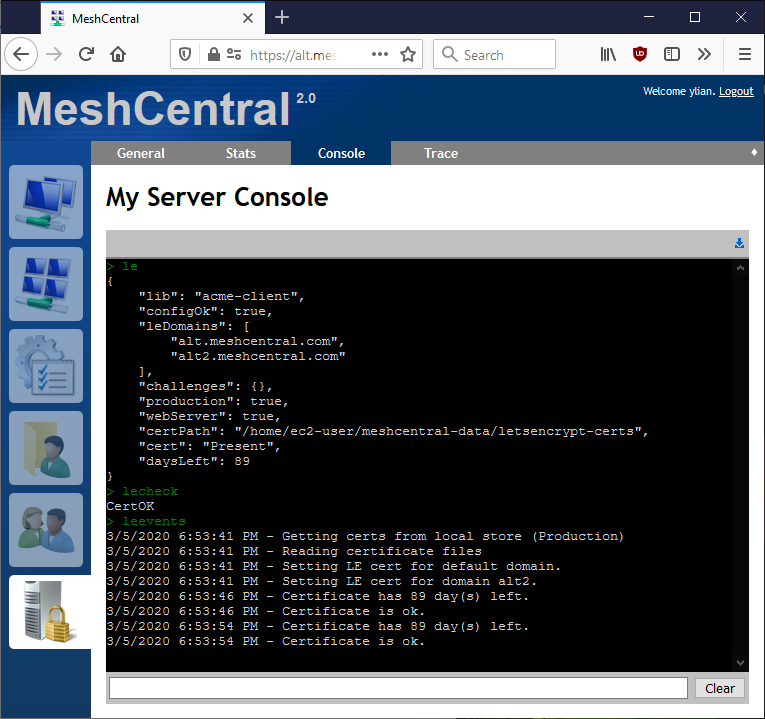
I am going to start doing on Let's Encrypt testing on my server. Before starting, I published MeshCentral v0.4.9-v with new "le" and "lecheck" commands. "le" just gives you the status on MeshCentral Let's Encrypt and "lecheck" should force a check/renew of the certificate if needed.
Example of the "le" command below. Hopefully that will help me figure out issues.

Ylianst
on 5 Mar 2020
Just to let everyone know, I launched into a big rework of Let's Encrypt support in MeshCentral. I should have an update in a few days.
Ylianst
on 5 Mar 2020
Just published MeshCentral v0.4.9-w. I was getting frustrated with GreenLock and so, I implemented "acme-client" support. It's much lighter weight, works with Node 8.x and higher and has better integration with MeshCentral. In the Let's Encrypt configuration section, add "lib": "acme-client" to use the new system. I like it so much, I will likely make it the default if is all works.
  "letsencrypt": {
    "email": "[email protected]",
    "names": "xxxxxxxxxxx.com",
    "production": false,
    "lib": "acme-client"
  }
Then, in the "meshcentral-data" folder, you will see a new folder called "letsencrypt-certs" and it will contain staging and production certificates. Just 4 files (.crt and .key). Super simple.
Lastly, in the "My Server" console, there is a "le", "lecheck" and "leevents" commands to see what is going on. You can also run "node node_modules/meshcentral --debug cert" to see what is going on in real time.
I would love to have some testing and feedback on the new system. Thanks in advance.
Ylianst
on 5 Mar 2020
the update 0.4.9-w isn't installing, it says its there, server restarts and its stuck at 0.4.9-v so testing is not possible.
 petervanv
on 5 Mar 2020
petervanv
on 5 Mar 2020
Arg! Do you have any details? Is there anything in the meshcentral-data\mesherrors.txt file? Any additional info appreciated.
Ylianst
on 5 Mar 2020
Error: connect ETIMEDOUT 34.208.62.34:443
at TCPConnectWrap.afterConnect [as oncomplete] (net.js:1134:16) {
errno: 'ETIMEDOUT',
code: 'ETIMEDOUT',
syscall: 'connect',
address: '34.208.62.34',
port: 443
}
petervanv
on 5 Mar 2020
996
petervanv
on 5 Mar 2020
Thank you for the help. Much appreciate. Once you get the new version installed, let me know if Let's Encrypt works.
Ylianst
on 5 Mar 2020
works for me, no problems found at this moment
petervanv
on 5 Mar 2020
sudo node node_modules/meshcentral/ --debug cert,web,webrequest
MeshCentral HTTP redirection server running on port 80.
CERT: LE: Getting certs from local store (Staging)
CERT: LE: No certificate files found
MeshCentral v0.4.9-y, Hybrid (LAN + WAN) mode.
MeshCentral Intel(R) AMT server running on remote.xxxxx.pl:4433.
MeshCentral HTTPS server running on remote.xxxxx.pl:443.
SMTP mail server smtp.gmail.com working as expected.
CERT: LE: Got no certificates, asking for one now.
CERT: LE: Generating private key...
CERT: LE: Setting up ACME client...
CERT: LE: Creating certificate request...
CERT: LE: Requesting certificate from Let's Encrypt...
WEBREQUEST: /.well-known/acme-challenge/letsdebug-test (RedirServer)
CERT: LE: Failed to respond to challenge.
WEBREQUEST: / (RedirServer)
WEBREQUEST: /.well-known/acme-challenge/vwKZ2taE706zvgTXiZIzTFtIPayDsTPV-W2SUmrUNcU (RedirServer)
CERT: LE: Failed to respond to challenge.
WEBREQUEST: /.well-known/acme-challenge/vwKZ2taE706zvgTXiZIzTFtIPayDsTPV-W2SUmrUNcU (RedirServer)
CERT: LE: Failed to respond to challenge.
WEBREQUEST: /.well-known/acme-challenge/vwKZ2taE706zvgTXiZIzTFtIPayDsTPV-W2SUmrUNcU (RedirServer)
CERT: LE: Failed to respond to challenge.
WEBREQUEST: /.well-known/acme-challenge/vwKZ2taE706zvgTXiZIzTFtIPayDsTPV-W2SUmrUNcU (RedirServer)
CERT: LE: Failed to respond to challenge.
CERT: LE: Failed to obtain certificate: connect ECONNREFUSED xxx.xxx.xxx.xxx:80
BUT IN THIS SAME TIME Let's Debug HTTP-01 test is OK
motapek
on 5 Mar 2020
le
{
"lib": "acme-client",
"configOk": true,
"leDomains": [
"remote.xxxxx.pl"
],
"challenges": {},
"production": false,
"webServer": true,
"certPath": "/opt/meshcentral/meshcentral-data/letsencrypt-certs",
"cert": "None"
}
lecheck
Request:NoCert
leevents
5.03.2020 22:25:46 - Getting certs from local store (Staging)
5.03.2020 22:25:46 - No certificate files found
5.03.2020 22:25:51 - Got no certificates, asking for one now.
5.03.2020 22:25:51 - Generating private key...
5.03.2020 22:25:52 - Setting up ACME client...
5.03.2020 22:25:52 - Creating certificate request...
5.03.2020 22:25:52 - Requesting certificate from Let's Encrypt...
5.03.2020 22:27:02 - Failed to obtain certificate: connect ECONNREFUSED xxx.xxx.xxx.xxx:80
5.03.2020 22:40:50 - Got no certificates, asking for one now.
5.03.2020 22:40:50 - Generating private key...
5.03.2020 22:40:50 - Setting up ACME client...
5.03.2020 22:40:50 - Creating certificate request...
5.03.2020 22:40:50 - Requesting certificate from Let's Encrypt...
motapek
on 5 Mar 2020
My hostname was remote but not remote.xxx.pl
After change it all works OK.
motapek
on 6 Mar 2020
Can you explain exactly what you did to fix the problem? I would like to add code so that if someone has the same problem, MeshCentral can suggest a way to fix it. Thanks.
Ylianst
on 6 Mar 2020
FYI. MeshCentral v0.4.9-z now defaults to using "acme-client" as I am going to be removing GreenLock support in the coming weeks. acme-client is just a lot simpler and better to deal with.
Ylianst
on 6 Mar 2020
Hi. Updated meshcentral from O to Z version. Lets encrypt now only issues a test certificate.
CERT: LE: Getting certs from local store (Staging)
CERT: LE: Reading certificate files
CERT: LE: Setting LE cert for default domain.
MeshCentral v0.4.9-z, WAN mode.
CERT: LE: Certificate has 89 day(s) left.
CERT: LE: Certificate is ok.
 vyacheslav25
on 7 Mar 2020
vyacheslav25
on 7 Mar 2020
Did you put "production":true in the let's encrypt section of config.json? Look to see that you put that exactly.
From the log above, MeshCentral thinks it's in staging mode. Thanks.
Ylianst
on 7 Mar 2020
Set true - helped, thanks.
vyacheslav25
on 7 Mar 2020
Can you explain exactly what you did to fix the problem? I would like to add code so that if someone has the same problem, MeshCentral can suggest a way to fix it. Thanks.
My server is Ubuntu 18.0.4.
In file /etc/hostname host name was only remonte.
I changed it to full FQDN name remote.xxxx.pl
Additional in hosts file I added external IP number and full FQDN name of my host.
motapek
on 8 Mar 2020
Related issues
 darryl-h
·
3Comments
darryl-h
·
3Comments
 unguzov
·
3Comments
unguzov
·
3Comments
 LPJon
·
3Comments
LPJon
·
3Comments
 robclay
·
3Comments
robclay
·
3Comments
 veitw
·
4Comments
veitw
·
4Comments
Most helpful comment
Set true - helped, thanks.