Meshcentral: Meshagent problem on MacOS
Hello.
When starting a macbook, the agent is not always monitored, sometimes you need to write in the terminal sudo launchctl stop mesh agent, sudo launchctl start meshagent.
And not working Power Actions on mac.
 vyacheslav25
All 35 comments
Hi,
I think this is related to a previous issue on macOS someone pointed out, where the service sometimes starts before the networking stack is up. I think when this happens, my networking calls to the OS, hang instead of erroring out, which is what normally is supposed to happen if the interface is disabled, disconnected, etc, so it can retry later.
I'll modify the code for macOS, to wait for the networking stack to be ready, before attemping to use the socket APIs.
As far as the power actions, I'll take a look at it when I get in the office. I don't think they were ever implemented on MacOS and FreeBSD for the Agent. But I think I know how to do it...
 krayon007
on 27 Feb 2020
krayon007
on 27 Feb 2020
Published MeshCentral v0.4.9-m with Bryan's latest MeshAgent on all platforms including MacOS. Should fix the MacOS start up problem and power actions. Let us know if it works.
 Ylianst
on 28 Feb 2020
Ylianst
on 28 Feb 2020
As a side note, for now, I only implemented Shutdown and Restart
krayon007
on 28 Feb 2020
Power Actions works, but mesh agent still doesn’t always start when macbook starts (catalina)
solution: restart mac os or restart meshagent
Thanks for help
vyacheslav25
on 3 Mar 2020
Are you able to post the log when controlChannelDebug is set? There should be a log entry where it says [waiting for network] and [OK]
where it waits for the system network service to be ready.
krayon007
on 3 Mar 2020
How to do it?
 trenton92
on 4 Mar 2020
trenton92
on 4 Mar 2020
The easiest way, is to edit the .msh file where the agent is installed. Add the following line, then restart the agent.
controlChannelDebug=1
krayon007
on 6 Mar 2020
I registered the command in the file meshagentx64.msh does not display anything, sorry if I do not understand what needs to be output
I also noticed that this problem just appears if you turn off the macbook using meshcentral.
After that, the MacBook stops being visible and the usual reboot does not help, only the restart agent.
trenton92
on 10 Mar 2020
A .log file wasn't generated?
krayon007
on 10 Mar 2020
[2020-03-10 08:57:11 AM] Attempting to connect to Server...
[2020-03-10 08:57:11 AM] Connecting to: wss://xxxxxxx.co,:443/agent.ashx
[2020-03-10 08:57:12 AM] Control Channel Connection Established...
[2020-03-10 08:57:12 AM] TLS Server Cert matches Mesh Server Cert...
[2020-03-10 08:57:12 AM] Sending Authentication Data...
[2020-03-10 08:57:12 AM] ProcessCommand(1)...
[2020-03-10 08:57:12 AM] Processing Authentication Request...
[2020-03-10 08:57:12 AM] ProcessCommand(4)...
[2020-03-10 08:57:12 AM] Authentication Complete...
[2020-03-10 08:57:12 AM] ProcessCommand(12)...
[2020-03-10 08:57:12 AM] BinaryCommand(12, 0)...
[2020-03-10 08:57:12 AM] ProcessCommand(11)...
[2020-03-10 08:57:12 AM] BinaryCommand(11, 0)...
[2020-03-10 08:57:12 AM] ProcessCommand(16)...
[2020-03-10 08:57:12 AM] BinaryCommand(16, 0)...
[2020-03-10 08:57:13 AM] ProcessCommand(31522)...
[2020-03-10 08:57:40 AM] ProcessCommand(31522)...
[2020-03-10 08:58:11 AM] Waiting for network...
[2020-03-10 08:58:11 AM] ...[OK]
[2020-03-10 08:58:13 AM] Attempting to connect to Server...
[2020-03-10 08:58:13 AM] Connecting to: wss://xxxxxxxxxxx:443/agent.ashx
[2020-03-10 08:59:53 AM] Waiting for network...
[2020-03-10 08:59:53 AM] ...[OK]
[2020-03-10 08:59:55 AM] Attempting to connect to Server...
Sorry, generates
[2020-03-10 08:59:55 AM] Connecting to: wss://xxxxxxxxxxxxxx:443/agent.ashx
[2020-03-10 09:00:31 AM] Waiting for network...
[2020-03-10 09:00:31 AM] ...[OK]
[2020-03-10 09:00:31 AM] Attempting to connect to Server...
[2020-03-10 09:00:31 AM] Connecting to: wss://xxxxxxxxxxxxxxxxxx/agent.ashx
[2020-03-10 09:00:32 AM] Control Channel Connection Established...
[2020-03-10 09:00:32 AM] TLS Server Cert matches Mesh Server Cert...
[2020-03-10 09:00:32 AM] Sending Authentication Data...
[2020-03-10 09:00:32 AM] ProcessCommand(1)...
[2020-03-10 09:00:32 AM] Processing Authentication Request...
[2020-03-10 09:00:32 AM] ProcessCommand(4)...
[2020-03-10 09:00:32 AM] Authentication Complete...
[2020-03-10 09:00:32 AM] ProcessCommand(12)...
[2020-03-10 09:00:32 AM] BinaryCommand(12, 0)...
[2020-03-10 09:00:32 AM] ProcessCommand(11)...
[2020-03-10 09:00:32 AM] BinaryCommand(11, 0)...
[2020-03-10 09:00:32 AM] ProcessCommand(16)...
[2020-03-10 09:00:32 AM] BinaryCommand(16, 0)...
[2020-03-10 09:00:33 AM] ProcessCommand(31522)...
trenton92
on 10 Mar 2020
Any updates on this? Mac connections work perfectly for me until restarting and then I have to stop and start the agent process to get it to show up in MeshCentral again. Not the end of the world but complicates remote support a bit.
 PetieM
on 20 May 2020
PetieM
on 20 May 2020
@PetieM
Please share the logs with the developers. I think this will help in solving this problem.
vyacheslav25
on 21 May 2020
Finally getting around to actually looking into the logs here. Where is the .msh file actually stored on Mac?
PetieM
on 4 Jun 2020
It'll probably be at:
/usr/local/mesh_services/meshagent
krayon007
on 4 Jun 2020
Above path for Catalina
Others have a path /usr/local/bin/mesh_services/*
I managed to write a plist that runs the agent directly without your plist. And a script that restarts the agent service. For all mac os, it works except Catalina.
I tried everything but with Catalina I did not succeed.
trenton92
on 5 Jun 2020
I'm on Catalina so the above path worked, thanks. Log file is attached. It connected fine after restarting the agent manually but will not connect at all after a reboot until that agent restart is performed. Let me know if you need anything else.
meshagent_osx64.log
PetieM
on 5 Jun 2020
New to using this project, but am seeing the same thing on the first install test machine. On a reboot the agent binary was running but no connection. launchctl stop/start makes it work. I turned on the log as requested above and I only see a single entry of "Connecting to:" with the right information. Doesn't seem to be timing out or retrying. How long should I be waiting to see if that happens?
 n9yty
on 6 Jun 2020
n9yty
on 6 Jun 2020
New to using this project, but am seeing the same thing on the first install test machine. On a reboot the agent binary was running but no connection. launchctl stop/start makes it work. I turned on the log as requested above and I only see a single entry of "Connecting to:" with the right information. Doesn't seem to be timing out or retrying. How long should I be waiting to see if that happens?
So you don't see:
[2020-03-10 08:59:53 AM] Waiting for network...
[2020-03-10 08:59:53 AM] ...[OK]
If not that is wierd. I used the apple documented API, to wait for the network stack to be ready, because from what I can tell, launchd services don't seem to have a dependency order. I have retry logic for the connection, but that only works if the connection actually fails... From what I can tell, if the agent runs before the network stack is ready, the connection doesnt' actually fail, it just hangs... Once thing I can try, is to see if I can add a timeout, so I kill the connection and try again, if the connection doesn't complete. (I do an async connection, so it would be easy to do...)
I'll add some logic to do this and see... I haven't been able to reproduce this issue on my machine, so I can post a binary here when I get it implemented, if people wanted to help me test to see if that kind of logic helps or not...
krayon007
on 6 Jun 2020
I would test anything you want, if it helps. No, I do not see the Waiting for Network, the last item put in the log is the "Connecting to:" and it just hangs at that point.
n9yty
on 6 Jun 2020
Hi @n9yty,
I have several macOS's with MeshAgent installed that work fine (on 10.15.X), but can replicate the problem consistently on 10.13.6 (unfortunately it is remote so I can't test with it). What macOS version do you have, as it may help in identifying the issue in these cases?
 ryanblenis
on 6 Jun 2020
ryanblenis
on 6 Jun 2020
10.13.6 as luck would have it. :)
n9yty
on 6 Jun 2020
Great, that will hopefully give @krayon007 a good starting point for testing/debugging. I only have Mojave and Catalina ISO's lying around, so hopefully Brian has a High Sierra ISO/VM for testing this one out!
ryanblenis
on 6 Jun 2020
Interesting, that explains why I havne't reproduced it. My main dev systems are Mojave and Catalina.
What's funny tho, is that I have VMs for everything from Mavericks to Catalina, except for High Sierra. So hopefully I can reproduce this on Sierra or Yosemite. One of my older Macbooks is running Yosemite, so I'll see if I can reproduce it on that thing.
krayon007
on 6 Jun 2020
I found an ISO from archive.org for High Sierra.... Going to download it and check the MD5 and SHA hashes against known values, and will email to you a link if it appears legit.
ryanblenis
on 6 Jun 2020
I should point out that I’m seeing this problem on Catalina and High Sierra. I’d be happy to help test as well and I also have installers for Mavericks through Catalina that can be used to create install media with something like DiskMaker X from any other Mac which I can provide tomorrow if needed.
PetieM
on 6 Jun 2020
On my Catalina system, which has not rebooted, the agent was offline. I have it connected via ethernet as the default route and WiFi as a secondary internal network. I had switched WiFi earlier today, not sure when the agent went offline, but I couldn't get it back online until I restarted it with launchctl.
n9yty
on 9 Jun 2020
I think I finally have a workaround for this. It'll be in the next update which will be very soon. I managed to sporadically reproduce a scenario when I was enabling and disabling the network interface, where the socket descriptor on connect would not signal. (Normally it signals an error when it can't connect)
So I added a separate timeout, to cancel the connect and retry.
krayon007
on 9 Jun 2020
Confirming that this fix seems to have worked, at least from my testing on my Catalina MacBook Pro over the last few days. Just tested on my High Sierra Mac mini which also came back up after a restart.
PetieM
on 14 Jun 2020
I think this is connected with #1420 - and after these recent fixes the agent is coming up on the three workstations I am testing on, two on High Sierra and one on Catalina.
n9yty
on 14 Jun 2020
Have you tried to fix this already?
I'm testing 0.5.65. Problem still exists.
trenton92
on 17 Jun 2020
Have you tried to fix this already?
I'm testing 0.5.65. Problem still exists.
What macOS are you running, and how is your platform connected to the network? The way I have it now, the agent will specify a 20 second timeout to catch scenarios where the network stack doesn't respond, on top of the normal exponential backoff.
If the agent still isn't connecting in your scenario, it seems the agent is unable to connect to the network.
krayon007
on 18 Jun 2020
Wi-Fi, Catalina
trenton92
on 18 Jun 2020
The problem is valid at system startup.
If you stop meshagent.plist and start manually, then everything works.
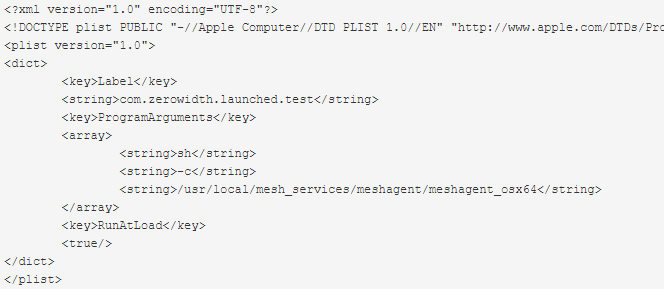
You said that add a timer of 20 seconds to check the network stack. If possible, then you can put here a modified p.list.
I am actively trying to make p.list work. I’m trying to write my own, but the result is the same. If you restart it using unload -w / load -w, then everything works. Maybe you need to make a timer before running / usr / local / ...
trenton92
on 19 Jun 2020
Have you tried using launchctl kickstart -k?
That's normally how I restart the service. I can always make the timeout restart the service, instead of trying to reconnect the socket.
krayon007
on 19 Jun 2020
I can’t use this command.
It gives only an example of use.
And if you write a script that will restart plist meshagent? In theory, it is enough that he would restart the service 20-30 seconds after the start of the system.
trenton92
on 19 Jun 2020
Related issues
 hellofaduck
·
3Comments
hellofaduck
·
3Comments
 vish84
·
3Comments
vish84
·
3Comments
 PathfinderNetworks
·
3Comments
PathfinderNetworks
·
3Comments
 nroach44
·
3Comments
nroach44
·
3Comments
 haxmachine
·
3Comments
haxmachine
·
3Comments