Meshcentral: Incorrect encoding on xterm and console
When connecting to a windows 10 machine on bulgarian language using Xterm and Console - results are different. Via console shows all cirillyc characters fine, while via Xterm not. See below.
Using latest 0.4.7-s
Console:
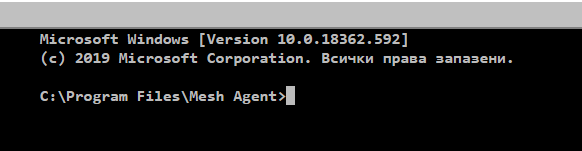
Xterm:

 vitko-bg
All 13 comments
If you type osinfo on the console tab, does it say ConPTY true or false?
 krayon007
on 24 Jan 2020
krayon007
on 24 Jan 2020
That is the reply from osinfo:
OS: Microsoft Windows [Version 10.0.18362.592] [ConPTY: YES]
What ConPTY states for? What does this means?
vitko-bg
on 24 Jan 2020
So are you saying if you use the classic terminal, it works, but it does not via xterm?
krayon007
on 24 Jan 2020
Yes, that is right. via classic terminal - cyrillic is fine, but via xterm - strange symbols ....
vitko-bg
on 24 Jan 2020
I can confirm this problem. Cyrlic not working in xterm.js when connect to Windows.
 GusevVictor
on 24 Jan 2020
GusevVictor
on 24 Jan 2020
Published MeshCentral v0.4.8-g with improved XTerm.js support, if you can test this again and let us know if it works now.
 Ylianst
on 30 Jan 2020
Ylianst
on 30 Jan 2020
Published MeshCentral v0.4.8-g with improved XTerm.js support, if you can test this again and let us know if it works now.
Classic shell works:
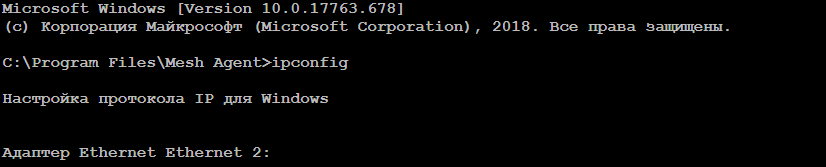
Xterm.js not... :(

GusevVictor
on 31 Jan 2020
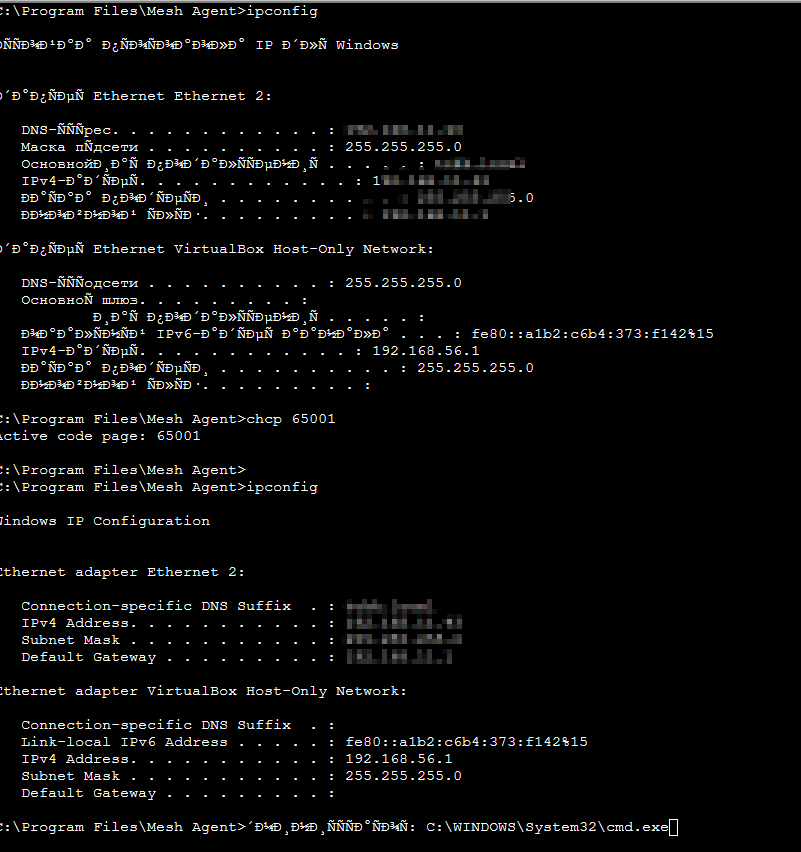
Hi. Can you try this. Go on XTerm and type chcp 65001, then try ipconfig again and let us know what happens on your system. Thanks.
Ylianst
on 31 Jan 2020
Hi! It just switch to Englist after that command :)
GusevVictor
on 3 Feb 2020
If you just type chcp, what does it say? It should give us your codepage. That will be useful so we can test it on our systems. Thanks.
Ylianst
on 3 Feb 2020
If you just type
chcp, what does it say? It should give us your codepage. That will be useful so we can test it on our systems. Thanks.
it returns: current code page 0 :(
GusevVictor
on 3 Feb 2020
@GusevVictor that is interesting.
Ylianst
on 3 Feb 2020
@GusevVictor that is interesting.
I hope you will hant and fix that. :) I have entered the same command in a classic shell with the same result but in classic shell Cyrlic works fine...
GusevVictor
on 4 Feb 2020
Related issues
 guerby
·
3Comments
guerby
·
3Comments
 M1CK431
·
3Comments
M1CK431
·
3Comments
 PathfinderNetworks
·
3Comments
PathfinderNetworks
·
3Comments
 Julien-asv
·
3Comments
Julien-asv
·
3Comments
 haxmachine
·
3Comments
haxmachine
·
3Comments