Meshcentral: Improvement suggestion- customize privacy bar
I was playing around with the new Privacy bar option. I notice the default setting is that it shows the MeshCentral username as who is controlling the device. I'd like to change this to something else as my MeshCentral username is not anything any of my clients would recognize as being me (nor do I want anyone knowing my MeshCentral username in the first place). I'd like to be able to enter my own name and business name- so they know, without any doubt, who it is connecting to their device should I choose to use the privacy bar option.
Maybe have an option in the 'My Users' area where we can customize or setup a 'profile' for each user and the privacy bar (and other features where it interacts with the EU- such as the chat function) can use the data we enter in the profile?
 PathfinderNetworks
All 14 comments
I agree, this is a good ask. For others reading this, "EU" likely stands for "End User".
 Ylianst
on 4 Dec 2019
Ylianst
on 4 Dec 2019
You have a good point about not wanting to publicize your MeshCentral user name, as that puts the remote user one step closer to gaining access to all of your devices. They'd still have to get your password, but why publicize the username unnecessarily. It would be nice if you could (optionally) enter a name during user creation just for this purpose, and the toolbar should default to showing the name instead of the username.
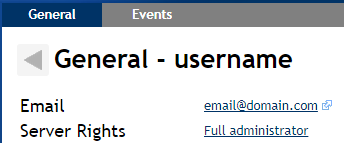
The user's real name (either Full Name, or First Name and Last Name) should be editable after clicking the user in the "My Users" section.
 MailYouLater
on 4 Dec 2019
MailYouLater
on 4 Dec 2019
I agree, this is a good ask. For others reading this, "EU" likely stands for "End User".
You are correct, I mean to say End User when I say EU (that shorthand comes from a tech group I'm part of). ;-)
PathfinderNetworks
on 5 Dec 2019
I just published MeshCentral v0.4.5-r where can set "desktopPrivacyBarText" in the domain section, for example:
  "domains": {
    "": {
      "title": "Server Title",
      "desktopPrivacyBarText": "This is a test: {0}"
    }
  }
This will be used as the privacy bar text for that domain. The "{0}" is replaced with the comma separated list of user names that have active desktop sessions, but you don't have to include {0} in the string. So you can just set "This desktop is being managed remotely" and that will work.
Feedback appreciated,
Ylian
Ylianst
on 12 Dec 2019
For improved usability, I'd recommend that something more descriptive than {0} be used, e.g. {users}, and it would nice if there were some other options too, e.g. {userfullnames} (once full names can be added), {timeelapsed}, etc..
MailYouLater
on 12 Dec 2019
Yes, I was thinking of {users}, until I realized that there is chance that {users} would get translated into other languages and break. I guess it's not a huge deal, you just have to know not to translate it.
Ylianst
on 13 Dec 2019
This works for me
 OutbackMatt
on 21 Dec 2019
OutbackMatt
on 21 Dec 2019
The privacy bar appears in different sized text on different screen resolutions.
On some screens I can easily read all of my text, on other screens some of the text is truncated as it doesn't all fit.
It would be good to have the text in this bar set to use HTML, and then colour and fonts can set, and relative (%) size can be used on text.
OutbackMatt
on 5 Jan 2020
Arg. So the privacy bar is not HTML, it's a window title and so, the color and font is mostly set by the OS. Bryan could look into improving it, but it's not going to be a short term thing. There is no way that is going to be HTML, the alternative is for us to manually "paint" the bar but it's a bunch of work.
Ylianst
on 6 Jan 2020
Hi @Ylianst,
great enhancement, thank you very much!
I noticed that the privacy bar, unlike both consent window and toasts, does not support UTF-8 characters. Is this on purpose/necessity, or is it an error and will be corrected in a future release?
Best regards,
// Veit
 veitw
on 17 Jun 2020
veitw
on 17 Jun 2020
Hi @Ylianst,
great enhancement, thank you very much!
I noticed that the privacy bar, unlike both consent window and toasts, does not support UTF-8 characters. Is this on purpose/necessity, or is it an error and will be corrected in a future release?
Best regards,
// Veit
This was a bug... I just fixed it, and tested with chinese characters... It will be in the next agent update.
 krayon007
on 19 Jun 2020
krayon007
on 19 Jun 2020
Well, I fixed it on windows... Looking into linux right now...
krayon007
on 19 Jun 2020
Ok, Linux is fixed now too...
krayon007
on 19 Jun 2020
@krayon007 : Thank you very much! :)
veitw
on 19 Jun 2020
Related issues
 M1CK431
·
3Comments
M1CK431
·
3Comments
 haxmachine
·
3Comments
haxmachine
·
3Comments
 petervanv
·
3Comments
petervanv
·
3Comments
 Julien-asv
·
3Comments
Julien-asv
·
3Comments
 vish84
·
3Comments
vish84
·
3Comments
Most helpful comment
You have a good point about not wanting to publicize your MeshCentral user name, as that puts the remote user one step closer to gaining access to all of your devices. They'd still have to get your password, but why publicize the username unnecessarily. It would be nice if you could (optionally) enter a name during user creation just for this purpose, and the toolbar should default to showing the name instead of the username.
The user's real name (either Full Name, or First Name and Last Name) should be editable after clicking the user in the "My Users" section.
