Meshcentral: Allow non-admin terminal access on Windows
I've been wanting to ask for this for a while, but hadn't got around to posting an issue about it till now. I was prompted to bring it up because of certain similarities to #670, but it should be a separate issue, even if you may decide to make this available on other OSes too.
Basically, I noticed that right clicking on the "Connect" button in the Terminal tab brings up two options "Normal Connect" and "PowerShell Connect":
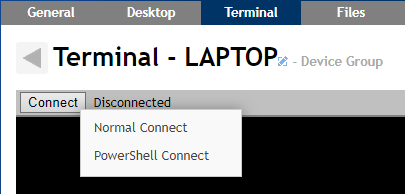
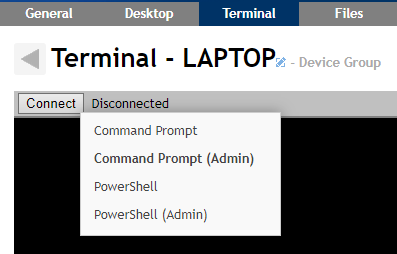
First, I feel like the way that's worded could be improved by switching it to "Command Prompt" and "PowerShell", and I think it might also be a good idea to borrow the concept of making the option that would have occurred by default if you had left clicked instead bold, as is used in context menus in Windows, but my main request is that I'd like to be able to connect to the Command Prompt as the currently logged in user. I'm imagining it looking like this, where each of the non-admin ones will be launched as the currently logged in user:
 MailYouLater
All 5 comments
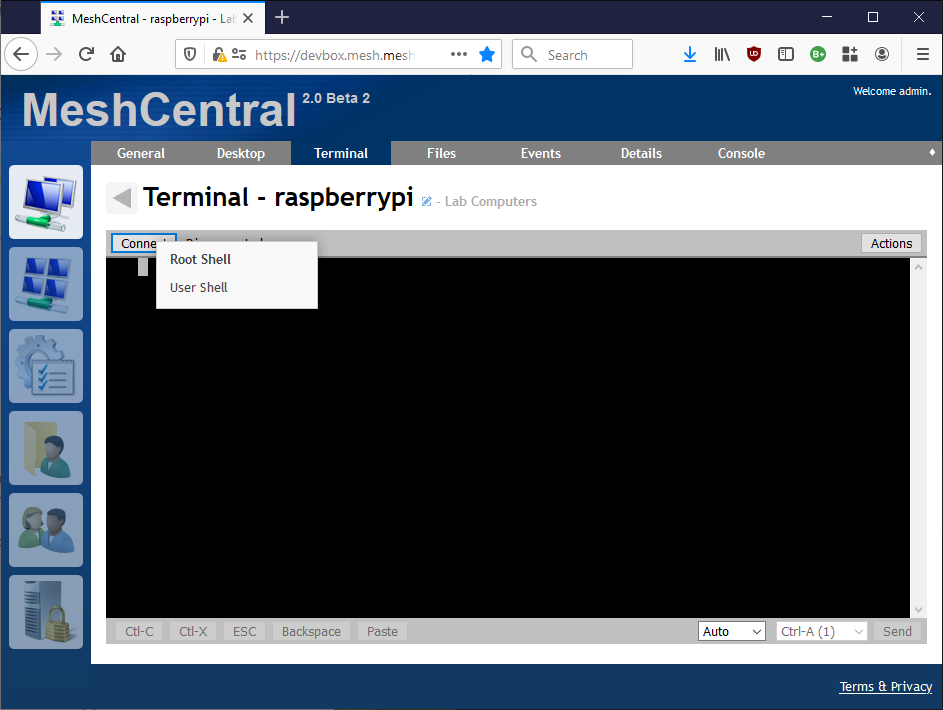
Published MeshCentral v0.4.4-v. For Linux computers, you can now launch a shell under the currently logged in user (instead of root) by right clicking on the connect button or, holding shift and clicking connect. Same feature will be on Windows when @krayon007 adds support for it in the agent. Feedback welcome.
 Ylianst
on 26 Nov 2019
Ylianst
on 26 Nov 2019
I thought the agent was already supposed to be able to launch things as the currently logged in user on Windows because it was necessary to be able to make the chat window open on the currently logged in user's desktop. Is this not working? (That would explain why that feature still doesn't work for me.)
MailYouLater
on 27 Nov 2019
The agent does support launching things as the logged in user. (If the chat thing still doesn't work for you, that is a separate issue). But this is separate from the terminal. I'm working to add this functionality to the terminal. The terminal is a special case, because processes are spawned differently for the terminal then they are for other things, because it needs to be attached to a console.
 krayon007
on 27 Nov 2019
krayon007
on 27 Nov 2019
Thanks for the info, I look forward to seeing all the work you guys have been doing to the agent when the new version is ready.
Regarding the chat issue, I'm not too worried about it (at least for now) as I don't use that feature very often (yet?) and I can work around it by going to the URL from the window it opens on my side on the remote computer. If I have some extra time in the future I may try to look into it more, as it would be nice to have that feature work properly.
MailYouLater
on 27 Nov 2019
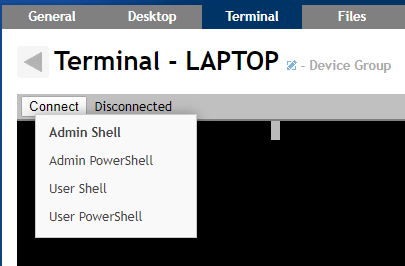
Sorry, just noticed this issue was still open. I would prefer using the "Command Prompt" term instead of "Shell", since that's what Windows users are used to it being called, but hey, it works. Thanks guys.
MailYouLater
on 21 Jan 2020
Related issues
 LPJon
·
3Comments
LPJon
·
3Comments
 haxmachine
·
3Comments
haxmachine
·
3Comments
 hellofaduck
·
3Comments
hellofaduck
·
3Comments
 vish84
·
3Comments
vish84
·
3Comments
 Julien-asv
·
3Comments
Julien-asv
·
3Comments