Meshcentral: Lets Encrypt Cert Issues on 0.4.4-c
Upgraded to 0.4.4-c last night and started having issues with my Lets Encrypt certs. I went and deleted my new letsencrypt3 folder and then rebooted the server and noticed that my primary domain was no longer using the Lets Encrypt cert but the root cert and my secondary domain was now holding the primary Lets Encrypt cert. When I removed the secondary domain everything worked fine until today. Now my domain is just grabbing the root cert again.
This is what I have in my mesherrors log:
-------- 11/15/2019, 12:28:47 AM ---- 0.4.4-c --------
(node:6312) UnhandledPromiseRejectionWarning: ReferenceError: func is not defined
at C:\Program Files\Open Source\MeshCentral\node_modules\meshcentral\letsencrypt.js:166:55
-------- 11/15/2019, 12:28:47 AM ---- 0.4.4-c --------
(node:6312) UnhandledPromiseRejectionWarning: Unhandled promise rejection. This error originated either by throwing inside of an async function without a catch block, or by rejecting a promise which was not handled with .catch(). (rejection id: 3)
(node:6312) [DEP0018] DeprecationWarning: Unhandled promise rejections are deprecated. In the future, promise rejections that are not handled will terminate the Node.js process with a non-zero exit code.
-------- 11/15/2019, 12:58:43 PM ---- 0.4.4-c --------
(node:5508) UnhandledPromiseRejectionWarning: ReferenceError: func is not defined
at C:\Program Files\Open Source\MeshCentral\node_modules\meshcentral\letsencrypt.js:166:55
-------- 11/15/2019, 12:58:43 PM ---- 0.4.4-c --------
(node:5508) UnhandledPromiseRejectionWarning: Unhandled promise rejection. This error originated either by throwing inside of an async function without a catch block, or by rejecting a promise which was not handled with .catch(). (rejection id: 4)
(node:5508) [DEP0018] DeprecationWarning: Unhandled promise rejections are deprecated. In the future, promise rejections that are not handled will terminate the Node.js process with a non-zero exit code.
 asasin114
All 74 comments
I reproduced this same exact issue also on my domains.
 SomeGuru
on 15 Nov 2019
SomeGuru
on 15 Nov 2019
same here
 johnnyq
on 15 Nov 2019
johnnyq
on 15 Nov 2019
This is not good. Published MeshCentral v0.4.4-d with a fix for the exception, but it may not fix the root problem. So, you can also run MeshCentral like this:
node node_modules/meshcentral --debug cert
This will show what is going on with Let's Encrypt in the background. If you still get into trouble, run it like this and post the results.
 Ylianst
on 15 Nov 2019
Ylianst
on 15 Nov 2019
My domains are certing again but they are still using the cert from the subdomain as the primary. Here's my scrubbed debug log:
MeshCentral HTTP redirection server running on port 80.
CERT: Initializing Let's Encrypt support
CERT: Getting certs from local store
ACME Directory URL: https://acme-v02.api.letsencrypt.org/directory
CERT: error: {"context":"cert_issue","subject":"mesh.domain.ca","altnames":["*.domain.ca","mesh.domain.ca"]}
CERT: error: {"length":0}
CERT: Unable to get certs from local store
MeshCentral v0.4.4-d, WAN mode.
MeshCentral Intel(R) AMT server running on mesh.yxetech.ca:4433.
MeshCentral HTTPS server running on mesh.yxetech.ca:443.
SMTP mail server smtp.office365.com working as expected.
CERT: Checking certs
CERT: Challenge customer1.mesh.domain.ca/test-
CERT: Challenge mesh.domain.ca/test-
CERT: certificate_order: {"account":{"key":{"kid":"https://acme-v02.api.letsencrypt.org/acme/acct/acct#"}},"subject":"customer1.mesh.domain.ca","altnames":["customer1.mesh.domain.ca","mesh.domain.ca"],"challengeTypes":["http-01"]}
CERT: challenge_select: {"altname":"mesh.yxetech.ca","type":"http-01","keyAuthorization":"RC1XV_uySjegQPlWUCw3n-hwh3usFZmMLy1AaeIdktI.AEKuVxF1BfJfJm7cUpj89Hr8QIi1vv9rDq49MNTVi1A"}
CERT: challenge_select: {"altname":"customer1.mesh.domain.ca","type":"http-01","keyAuthorization":"key"}
CERT: Challenge mesh.domain.ca/RC1XV_uySjegQPlWUCw3n-hwh3usFZmMLy1AaeIdktI
CERT: Challenge customer1.mesh.domain.ca/o3hSOCKKzzjcr0yO5mdtCq0R9N9bSJt8Lk9ecmm7yBM
CERT: challenge_status: {"status":"pending","type":"http-01","altname":"mesh.yxetech.ca"}
CERT: Challenge mesh.domain.ca/string
CERT: Challenge mesh.domain.ca/string
CERT: challenge_status: {"status":"valid","type":"http-01","altname":"mesh.yxetech.ca"}
CERT: challenge_status: {"status":"pending","type":"http-01","altname":"reed.mesh.yxetech.ca"}
CERT: Challenge customer1.mesh.domain.ca/string
CERT: Challenge customer1.mesh.domain.ca/string
CERT: Challenge customer1.mesh.domain.ca/string
CERT: Challenge customer1.mesh.domain.ca/string
CERT: challenge_status: {"status":"valid","type":"http-01","altname":"customer1.mesh.domain.ca"}
CERT: certificate_status: {"subject":"customer1.mesh.domain.ca","status":"valid"}
CERT: cert_issue: {"renewAt":1577737131700,"subject":"mesh.domain.ca","altnames":["customer1.mesh.domain.ca","mesh.domain.ca"]}
CERT: Certificate has been set
CERT: error: {"context":"_cert_issue"}
CERT: Checks completed
CERT: Certs changed, restarting...
Updating server certificates...
MeshCentral HTTP redirection server running on port 80.
CERT: Initializing Let's Encrypt support
CERT: Getting certs from local store
ACME Directory URL: https://acme-v02.api.letsencrypt.org/directory
CERT: Got certs from local store
MeshCentral v0.4.4-d, WAN mode.
MeshCentral Intel(R) AMT server running on mesh.yxetech.ca:4433.
MeshCentral HTTPS server running on mesh.yxetech.ca:443.
SMTP mail server smtp.office365.com working as expected.
asasin114
on 16 Nov 2019
5:~$ sudo node node_modules/meshcentral --debug cert
MeshCentral HTTP redirection server running on port 80.
CERT: Initializing Let's Encrypt support
CERT: Getting certs from local store
ACME Directory URL: https://acme-v02.api.letsencrypt.org/directory
CERT: error: {"length":0}
CERT: Unable to get certs from local store
MeshCentral v0.4.4-c, WAN mode.
MeshCentral Intel(R) AMT server running on connected.xxxxxxxxxxxxx.com:4433.
Server customer1 has no users, next new account will be site administrator.
Server info has no users, next new account will be site administrator.
MeshCentral HTTPS server running on connected.xxxxxxxxxxxxx.com:443.
SMTP mail server mail.xxxxxxxxxxxxx.com working as expected.
CERT: Checking certs
CERT: error: {"length":0}
CERT: Checks completed
Any idea what the fix should be? Delete folders again? missing a dependency?
-SomeGuru
SomeGuru
on 16 Nov 2019
Let me do some testing... hopefully I can figure this out. This is annoying, GreenLockv3 is so different from the old one.
Ylianst
on 16 Nov 2019
So I've heard. I'll do some digging around as well.
asasin114
on 16 Nov 2019
Oh, if you can send your anonymized "letencrypt" config block... something like this.
  "letsencrypt": {
    "email": "[email protected]",
    "names": "meshcentral.com,www.meshcentral.com",
    "rsaKeySize": 3072,
    "production": false
  }
I will test using similar settings...
Ylianst
on 16 Nov 2019
Looks ok... I am starting tests now. Of course, I am testing with production:false.
Ylianst
on 16 Nov 2019
For sure! Mine is as follows:
"letsencrypt": {
"email": "[email protected]",
"names": "mesh.domain.ca,customer1.mesh.domain.ca",
"rsaKeySize": 3072,
"production": true
}
asasin114
on 16 Nov 2019
With this config:
  "letsencrypt": {
    "email": "[email protected]",
    "production": false
  }
I run and get this:
node node_modules/meshcentral --debug cert
MeshCentral HTTP redirection server running on port 80.
CERT: Initializing Let's Encrypt support
CERT: Getting certs from local store
ACME Directory URL: https://acme-staging-v02.api.letsencrypt.org/directory
CERT: error: {"context":"cert_issue","subject":"alt.meshcentral.com","altnames":["*.meshcentral.com","alt.meshcentral.com"]}
CERT: error: {"length":0}
CERT: Unable to get certs from local store
MeshCentral v0.4.4-d, WAN mode.
MeshCentral Intel(R) AMT server running on alt.meshcentral.com:4433.
MeshCentral HTTPS server running on alt.meshcentral.com:443.
SMTP mail server smtp.gmail.com working as expected.
CERT: Checking certs
CERT: Challenge alt.meshcentral.com/test-0cb44c0b63b64d0c5ef99d8d1c2a21be-0
CERT: certificate_order: {"account":{"key":{"kid":"https://acme-staging-v02.api.letsencrypt.org/acme/acct/11579134"}},"subject":"alt.meshcentral.com","altnames":["alt.meshcentral.com"],"challengeTypes":["http-01"]}
CERT: challenge_select: {"altname":"alt.meshcentral.com","type":"http-01","keyAuthorization":"HBK0MbJGjVZzrQ-KlfA2eX5M6SHT2javR612bqCU6Bw.Fsv4YdBLkC1cyQNy9Qa1sQrj1pCwmOl4jRl8wT_rXoE"}
CERT: Challenge alt.meshcentral.com/HBK0MbJGjVZzrQ-KlfA2eX5M6SHT2javR612bqCU6Bw
CERT: challenge_status: {"status":"pending","type":"http-01","altname":"alt.meshcentral.com"}
CERT: Challenge alt.meshcentral.com/HBK0MbJGjVZzrQ-KlfA2eX5M6SHT2javR612bqCU6Bw
CERT: Challenge alt.meshcentral.com/HBK0MbJGjVZzrQ-KlfA2eX5M6SHT2javR612bqCU6Bw
CERT: Challenge alt.meshcentral.com/HBK0MbJGjVZzrQ-KlfA2eX5M6SHT2javR612bqCU6Bw
CERT: Challenge alt.meshcentral.com/HBK0MbJGjVZzrQ-KlfA2eX5M6SHT2javR612bqCU6Bw
CERT: challenge_status: {"status":"valid","type":"http-01","altname":"alt.meshcentral.com"}
CERT: certificate_status: {"subject":"alt.meshcentral.com","status":"valid"}
CERT: cert_issue: {"renewAt":1577712031045,"subject":"alt.meshcentral.com","altnames":["alt.meshcentral.com"]}
CERT: Certificate has been set
CERT: error: {"context":"_cert_issue"}
CERT: Checks completed
CERT: Certs changed, restarting...
Updating server certificates...
MeshCentral HTTP redirection server running on port 80.
CERT: Initializing Let's Encrypt support
CERT: Getting certs from local store
ACME Directory URL: https://acme-staging-v02.api.letsencrypt.org/directory
CERT: Got certs from local store
MeshCentral v0.4.4-d, WAN mode.
MeshCentral Intel(R) AMT server running on alt.meshcentral.com:4433.
MeshCentral HTTPS server running on alt.meshcentral.com:443.
SMTP mail server smtp.gmail.com working as expected.
So, it works for me. It does the challenge and gets the certificate. If I stop and re-run I get:
node node_modules/meshcentral --debug cert
MeshCentral HTTP redirection server running on port 80.
CERT: Initializing Let's Encrypt support
CERT: Getting certs from local store
ACME Directory URL: https://acme-staging-v02.api.letsencrypt.org/directory
CERT: Got certs from local store
MeshCentral v0.4.4-d, WAN mode.
MeshCentral Intel(R) AMT server running on alt.meshcentral.com:4433.
MeshCentral HTTPS server running on alt.meshcentral.com:443.
SMTP mail server smtp.gmail.com working as expected.
Now, it got the cert from the local store and working ok. Any ideas to make a problem occur appreciated.
Ylianst
on 16 Nov 2019
I am getting the same thing you are but it's reading the customer1.mesh.domain.ca domain as the cert holder instead of mesh.domain.ca.
asasin114
on 16 Nov 2019
Ok, hold on. I think I can fix that.
Ylianst
on 16 Nov 2019
Cool! Just so my syntax is a little better. It's reading customer1.mesh.domain.ca as the cert subject. If that makes more sense.
asasin114
on 16 Nov 2019
Ok. I am certainly mixing up subjectName and altNames in the certificate request and missing things up. I am working on this now, should take like 15 minutes.
Ylianst
on 16 Nov 2019
Wow! Thank you! This is absolutely the best! I'm coming to Mesh Central from ITarian due to the fact that ITarian was free but is no longer and we were looking for a solid, open source RMM solution. Not only does this fit the bill so far but you're community engagement is incredible! Keep up the good work!
asasin114
on 16 Nov 2019
Oh thanks. I feel bad when this don't go right on such critical things. Hopefully it will be fixed shortly.
Ylianst
on 16 Nov 2019
Ok... will take a bit more than 15 minutes... but I am doing well, should not be long.
Ylianst
on 16 Nov 2019
Published MeshCentral v0.4.4-f which hopefully will fix a lot of issues with GreenLockv3. Feedback appreciated.
Ylianst
on 16 Nov 2019
Hello @Ylianst Mine is still broken, I rebooted the MAchine as well still no go, i'm on ubuntu 18.04.3, latest meshcentral
johnnyq
on 16 Nov 2019
Heres my LE Config in config.json
"letsencrypt": {
"email": "[email protected]",
"names": "radicated.radicated.com",
"rsaKeySize": 3072,
"production": true
},
johnnyq
on 16 Nov 2019
This is what I'm getting now.
MeshCentral HTTP redirection server running on port 80.
CERT: Initializing Let's Encrypt support
CERT: Getting certs from local store
ACME Directory URL: https://acme-v02.api.letsencrypt.org/directory
CERT: error: {"context":"cert_issue","subject":"mesh.domain.ca","altnames":["*.domain.ca","mesh.domain.ca"]}
CERT: error: {"length":0}
CERT: Unable to get certs from local store
MeshCentral v0.4.4-f, WAN mode.
MeshCentral Intel(R) AMT server running on mesh.domain.ca:4433.
MeshCentral HTTPS server running on mesh.domain.ca:443.
SMTP mail server smtp.office365.com working as expected.
CERT: Checking certs
CERT: Challenge mesh.domain.ca/test-15d9028a94ae101e9a36e7a9ba3030cd-0
CERT: Challenge customer1.mesh.domain.ca/test-0b64a89e1b11e90167f26f0e12c508a5-0
CERT: certificate_order: {"account":{"key":{"kid":"https://acme-v02.api.letsencrypt.org/acme/acct/71880933"}},"subject":"mesh.domain.ca","altnames":["mesh.domain.ca","customer1.mesh.domain.ca"],"challengeTypes":["http-01"]}
CERT: error: {"context":"cert_issue","subject":"mesh.domain.ca","altnames":["mesh.domain.ca","customer1.mesh.domain.ca"]}
CERT: error: {"length":0}
CERT: Checks completed
asasin114
on 16 Nov 2019
The altSubject shows up on the cert as follows:
DNS Name=mesh.domain.ca
URL=http://mesh.domain.ca/
DNS Name=localhost
URL=http://localhost/
IP Address=127.0.0.1
asasin114
on 16 Nov 2019
@johnnyq @asasin114 Do you guys have a reverse-proxy in front of your server? Is port 80 open to the outside world? You can do this if you like:
node node_modules/meshcentral --debug cert webrequest
This should should both certificate stuff and HTTP requests and should show Let's Encrypt servers trying to call your server on port 80. By the way, you should probably turn production to false until the server gets a success so not to spam the Let's Encrypt server and get banned.
Ylianst
on 16 Nov 2019
@asasin114 If you are talking about the default TLS cert that is generated by MeshCentral at startup, that is normal. That certificate is not the one issued by Let's Encrypt and not relevant to the request.
Also, make sure you can access port 80 from the external Internet. Let's Encrypt will try to access your server to verify that you control that domain.
Ylianst
on 16 Nov 2019
It seems to be working ok with prod set to false which makes me think I may have been banned. I should be able to verify tomorrow when I clear the rate limit.
asasin114
on 16 Nov 2019
That makes sense. You may have to wait a bit and try again tomorrow or in a few days.
Ylianst
on 16 Nov 2019
One thing I could do is require a first successful run using the test Let's Encrypt server before trying to get a production cert. This would avoid people hitting the production server unless there is a good chance it will work.
Ylianst
on 16 Nov 2019
That sounds like a great idea!
asasin114
on 16 Nov 2019
Ok, will look into it. My pile of work is really huge right now.
Ylianst
on 16 Nov 2019
Well... after a bunch of hours of work, I have improved Let's Encrypt support that I will publish tomorrow.
When you get a staging certificate, it will go on "meshcentral-data/letsencrypt3-staging". Production certificate will go in "meshcentral-data/letsencrypt3". This way, both don't get mixed up.
I also made it so that if you are in production mode, you must get a staging certificate first. Once MeshCentral gets the staging cert, it will automatically move to asking for a production certificate. This is important because users are probably not being nice to Let's Encrypt as much as they should.
Hopefully this will make Let's Encrypt support pretty good.
Ylianst
on 16 Nov 2019
Published MeshCentral v0.4.4-g with the new Let's Encrypt system described above. Will now always ask for a staging certificate before asking for a production one, staging cert is in "letsencrypt3-staging".
Ylianst
on 16 Nov 2019
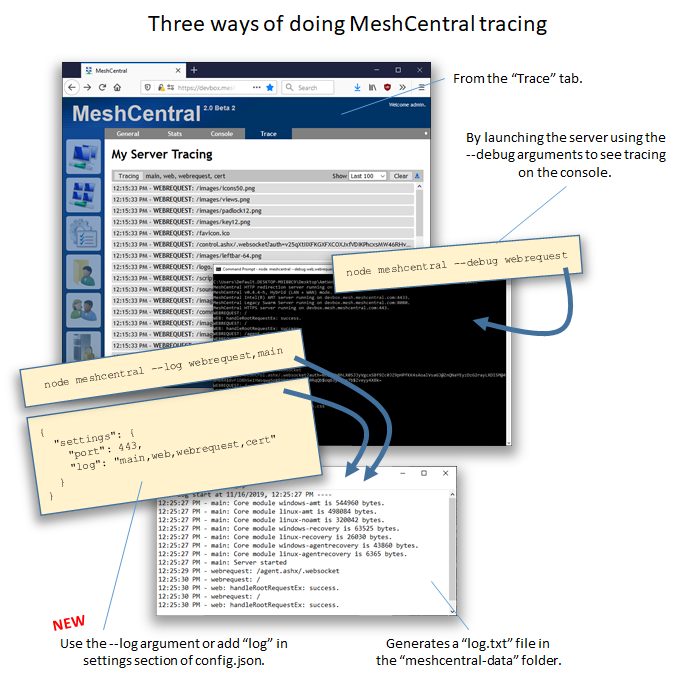
Just published MeshCentral v0.4.4-i with improved logging. you can now add "log":"cert" in the settings section of config.json and you will see a full log of what is going on with Let's Encrypt in a "log.txt" file in "meshcentral-data". Hopefully this will help make debugging this and other issues easier.
Ylianst
on 16 Nov 2019
I just updated to 0.4.4-i from 0.4.3-q and no issues on my end. The new Greenlock v3 implementation seems to be working correctly. After starting up the server it correctly pulled a production certificate from LetsEncrypt and is showing it as being a x3 cert (I assume that means it's the new version). I only have a single domain (no subdomains) though. And running on Windows Server 2019. But all looks good from that standpoint.
 PathfinderNetworks
on 16 Nov 2019
PathfinderNetworks
on 16 Nov 2019
Ylian,
Bravo, This solved my issue after I did a little debugging of the logs, I realized that in the process somewhere I had fat fingered one of the directory permissions and was denied users access. I went root, added the folder to the groups and a few users I need to have access again at all time for W/R that solved some of the drop out items that didn't align with your work. Then I did a non-production mode check, and verified the system was kicking in gear, then I changed my config to a true statement and was able to get the domain back online before my Taiwan outfit starts their weekly run of required security checks around the world. This has saved countless hours of long distance work related security issues among other issues also addressed via having the MeshCentral available at times of crashes or glitches as some say.
Thanks for all your hard work to resolve this issue that was created by Greenlock changes outside of your controls.
Thanks,
-SomeGuru
SomeGuru
on 17 Nov 2019
@SomeGuru Oh nice! Thanks. I should have done more to allow user debugging earlier on. Do you have a suggestion for something I could do to solve the problem you had? For example, I could test that the "meshcentral-data/letsencrypt3" and "meshcentral-data/letsencrypt3-staging" are both writable, if not I could fault and display a clear error? Not try to go forward with a Let's Encrypt attempt? If your experience can be used to improve the experience a bit, that would be great. Feedback welcome.
Ylianst
on 17 Nov 2019
Seemed that node was depending on a folder that another application felt they needed to bump permissions during their scripted install... Since removed that functional install and reset the folder permissions on the superusers.Therefore I don't know that MeshCentral has any issue here, as this was a dependency set outside of meshcentral.
Wish I could remember the module that was installed as superuser... I have since made sure that scripts are sandbox prior to production installs.
-SomeGuru
SomeGuru
on 17 Nov 2019
Ok, thanks for the report.
Ylianst
on 18 Nov 2019
I'm still having issues, the date and time is UTC On Server
here is the log
cat log.txt
---- Log start at 11/18/2019, 1:28:56 AM ----
1:28:56 AM - cert: Initializing Let's Encrypt support
1:28:56 AM - cert: Getting certs from local store
1:28:56 AM - cert: Checking staging certificate radicated.radicated.com...
1:28:56 AM - cert: error: {"length":0}
1:28:56 AM - cert: No staging certificate present
1:29:06 AM - cert: Checking certs (Staging)
1:29:06 AM - cert: error: {"length":0}
1:29:06 AM - cert: Checks completed (Staging)
johnnyq
on 18 Nov 2019
I have the following 3 directories on meshcentral-data
letsencrypt
letsencrypt3
letsencrypt3-staging
They all have nothing in it except letsencrypt directory
johnnyq
on 18 Nov 2019
That is weird, it should work. Between these two lines, the server should be trying to get a certificate, but instead does nothing.
1:29:06 AM - cert: Checking certs (Staging)
1:29:06 AM - cert: Checks completed (Staging)
Tomorrow morning, I will make a few changes in the code next to where it prints the "Checks completed" and display more information in the log. Hopefully, you can update and try again and see why it's skipping trying to get a certificate.
While I am at it, other things you can look at (but if this seems ok, just wait for the new version):
Make sure that the "letsencrypt3" and "letsencrypt3-staging" folders are writable by the server.
In the config.json, make sure you have exactly an "email", "names" set to one name in lower case, production:false like this, no extra spaces or anything weird. If you have something more complex, start with something easy with one name with staging and see if it works.
  "letsencrypt": {
    "email": "[email protected]",
    "names": "test.meshcentral.com",
    "production": false
  }
You could also try stopping the server, rename "node_modules" to "node_modules_bak" and install MeshCentral again using "npm install meshcentral" and run again. This way, we know you are getting a clean latest version of GreenLockv3.
Ylianst
on 18 Nov 2019
Well... Not fixed here : Ubuntu 18.04.3 LTS + 0.4.4-j
Done all, remove reinstall / node_modules + install meshcentral... No way.
CERT: Initializing Let's Encrypt support
CERT: Getting certs from local store
ACME Directory URL: https://acme-staging-v02.api.letsencrypt.org/directory
CERT: error: {"length":0}
CERT: Unable to get certs from local store (Staging)
MeshCentral v0.4.4-j, WAN mode.
MeshCentral Intel(R) AMT server running on controle.tranbert.com:4433.
MeshCentral HTTPS server running on controle.tranbert.com:443.
SMTP mail server smtp.office365.com working as expected.
CERT: Checking certs (Staging)
CERT: error: {"length":0}
CERT: Checks completed (Staging)
 tranbert
on 18 Nov 2019
tranbert
on 18 Nov 2019
Ok, everyone is now getting:
CERT: Checking certs (Staging)
CERT: error: {"length":0}
CERT: Checks completed (Staging)
This includes (#662). This is top priority, working on it now.
Ylianst
on 18 Nov 2019
Just published MeshCentral v0.4.4-k with more Let's Encrypt logging. Can someone update, try again and post the results? Thanks.
Ylianst
on 18 Nov 2019
ubuntu@meshcentral:~$ node ./node_modules/meshcentral --cert controle.tranbert.com --debug cert
MeshCentral HTTP redirection server running on port 80.
CERT: Initializing Let's Encrypt support, using GreenLock v3.1.5
CERT: Getting certs from local store
ACME Directory URL: https://acme-staging-v02.api.letsencrypt.org/directory
CERT: error: {"length":0}
CERT: Unable to get certs from local store (Staging)
MeshCentral v0.4.4-k, WAN mode.
MeshCentral Intel(R) AMT server running on controle.tranbert.com:4433.
MeshCentral HTTPS server running on controle.tranbert.com:443.
SMTP mail server smtp.office365.com working as expected.
CERT: Checking certs for controle.tranbert.com (Staging)
CERT: error: {"length":0}
CERT: Unable to get a certificate (Staging, 3ms): [{"site":{"subject":"controle.tranbert.com","altnames":["controle.tranbert.com"]},"error":{"0":"e","1":"r","2"]
tranbert
on 18 Nov 2019
mike@mesh:~$ !node
node node_modules/meshcentral --debug cert
MeshCentral HTTP redirection server running on port 80.
CERT: Initializing Let's Encrypt support, using GreenLock v3.1.5
CERT: Getting certs from local store
ACME Directory URL: https://acme-staging-v02.api.letsencrypt.org/directory
CERT: error: {"length":0}
CERT: Unable to get certs from local store (Staging)
MeshCentral v0.4.4-k, WAN mode.
MeshCentral Intel(R) AMT server running on mesh.colecomputerservices.com:4433.
MeshCentral HTTPS server running on mesh.colecomputerservices.com:443.
SMTP mail server smtp.gmail.com working as expected.
CERT: Checking certs for mesh.colecomputerservices.com (Staging)
CERT: error: {"length":0}
CERT: Unable to get a certificate (Staging, 3ms): [{"site":{"subject":"mesh.colecomputerservices.com","altnames":["mesh.colecomputerservices.com"]},"error":{"0":"e","1":"r","2":"r","3":"o","4":"r","length":5}}]
 mikecole79
on 18 Nov 2019
mikecole79
on 18 Nov 2019
Wow, well. It's not even trying to contact Let's Encrypt. It fails immediately. You can see the "(Staging, 3ms)" that indicates the call returns after 3 milliseconds. Now, I have to try to dig into the GreenLock code and see what is going on. I also see your using GreenLock v3.1.5 above, that is the correct latest version. There must be something different in the setup of the server that is causing this. Looking into it.
Ylianst
on 18 Nov 2019
me too have problem with certificate. Clean install of 0.4.4-k.
egonet@egonetcentral:~$ node node_modules/meshcentral --debug cert
Installing nodemailer...
Installing otplib...
MeshCentral HTTP redirection server running on port 80.
CERT: Initializing Let's Encrypt support, using GreenLock v3.1.5
Creating /home/egonet/node_modules/meshcentral/.greenlockrc
CERT: Getting certs from local store
CERT: Checking staging certificate egonetcentral.egonet.it...
ACME Directory URL: https://acme-staging-v02.api.letsencrypt.org/directory
CERT: error: {"length":0}
CERT: No staging certificate present
MeshCentral v0.4.4-k, Hybrid (LAN + WAN) mode.
MeshCentral Intel(R) AMT server running on egonetcentral.egonet.it:4433.
Server _customer1 has no users, next new account will be site administrator.
Server _info has no users, next new account will be site administrator.
MeshCentral HTTPS server running on egonetcentral.egonet.it:443.
SMTP mail server smtp.egonet.it working as expected.
CERT: Checking certs for egonetcentral.egonet.it (Staging)
CERT: error: {"length":0}
CERT: Unable to get a certificate (Staging, 27ms): [{"site":{"subject":"egonetce ntral.egonet.it","altnames":["egonetcentral.egonet.it"]},"error":{"0":"e","1":"r ","2":"r","3":"o","4":"r","length":5}}]
config.json:
...
"letsencrypt": {
"__comment__": "Go to https://letsdebug.net/ first before trying Let's Encrypt.",
"email": "[email protected]",
"names": "egonetcentral.egonet.it",
"rsaKeySize": 3072,
"production": true
},
 leleb
on 18 Nov 2019
leleb
on 18 Nov 2019
I may be on to something... should have a new version soon.
Ylianst
on 18 Nov 2019
Published MeshCentral v0.4.4-l, if you can try again and post back the log, that would be really appreciated. I am not sure what is going on.
Ylianst
on 18 Nov 2019
ubuntu@meshcentral:~$ node ./node_modules/meshcentral --cert controle.tranbert.com --debug cert
MeshCentral HTTP redirection server running on port 80.
CERT: Initializing Let's Encrypt support, using GreenLock v3.1.5
CERT: Getting certs from local store
ACME Directory URL: https://acme-staging-v02.api.letsencrypt.org/directory
CERT: Notify: error: {"length":0}
CERT: Unable to get certs from local store (Staging)
MeshCentral v0.4.4-l, WAN mode.
MeshCentral Intel(R) AMT server running on controle.tranbert.com:4433.
MeshCentral HTTPS server running on controle.tranbert.com:443.
SMTP mail server smtp.office365.com working as expected.
filesinFolder []
CERT: Adding domains: {"subject":"controle.tranbert.com","altnames":["controle.tranbert.com"]}
CERT: Checking certificate for controle.tranbert.com (Staging)
CERT: Certificate has been set: {"subject":"controle.tranbert.com","altnames":["controle.tranbert.com"]}
CERT: Notify: error: {"length":0}
CERT: Unable to get a certificate (Staging, 20ms): [{"site":{"subject":"controle.tranbert.com","altnames":["controle.tranbert.com"]},"error":{"0":"e","1":"r","2]
tranbert
on 18 Nov 2019
Interesting. This is the reply I got back from the API with my account #
{
"type": "urn:ietf:params:acme:error:malformed",
"detail": "Method not allowed",
"status": 405
}
asasin114
on 18 Nov 2019
This is not good, I have no idea what is going on and my server's don't have the same problem.
For this...
{
"type": "urn:ietf:params:acme:error:malformed",
"detail": "Method not allowed",
"status": 405
}
Where did you see this? Can you give more context?
Ylianst
on 18 Nov 2019
When I run "node node_modules\meshcentral --debug cert it spits out all its normal info for the staging cert like it's supposed to then I get the following:
CERT: Staging certificate received, moving to production...
filesinFolder []
CERT: Adding domains: {"subject":"mesh.domain.ca","altnames":["mesh.domain.ca","customer1.mesh.domain.ca"]}
CERT: Checking certificate for mesh.domain.ca (Production)
CERT: Certificate has been set: {"subject":"mesh.domain.ca","altnames":["mesh.domain.ca","customer1.mesh.domain.ca"]}
ACME Directory URL: https://acme-v02.api.letsencrypt.org/directory
CERT: Challenge mesh.domain.ca/test-18acfbd6441cb02b3bdb9b03efdc2125-0
CERT: Challenge customer1.mesh.domain.ca/test-61b19acd311ac41c74ba3424d26e1f85-0
CERT: certificate_order: {"account":{"key":{"kid":"https://acme-v02.api.letsencrypt.org/acme/acct/XXXXXXXX"}},"subject":"mesh.domain.ca","altnames":["mesh.domain.ca","customer1.mesh.domain.ca"],"challengeTypes":["http-01"]}
CERT: error: {"context":"cert_issue","subject":"mesh.domain.ca","altnames":["mesh.domain.ca","customer1.mesh.domain.ca"]}
CERT: error: {"length":0}
CERT: Unable to get a certificate (Production, 6360ms): [{"site":{"subject":"mesh.domin.ca","altnames":["mesh.domain.ca","customer1.mesh.domain.ca"]},"error":{"0":"e","1":"r","2":"r","3":"o","4":"r","length":5}}]
The string in my previous comment came from pulling up the https://acme-v02.api.letsencrypt.org/acme/acct/XXXXXXXX domain in my browser.
asasin114
on 18 Nov 2019
From system left running during upgrade:
Update completed...
MeshCentral HTTP redirection server running on port 80.
CERT: Initializing Let's Encrypt support, using GreenLock v3.1.5
Creating /home/mike/node_modules/meshcentral/.greenlockrc
CERT: Getting certs from local store
ACME Directory URL: https://acme-staging-v02.api.letsencrypt.org/directory
CERT: Notify: error: {"length":0}
CERT: Unable to get certs from local store (Staging)
MeshCentral v0.4.4-l, WAN mode.
MeshCentral Intel(R) AMT server running on mesh.colecomputerservices.com:4433.
MeshCentral HTTPS server running on mesh.colecomputerservices.com:443.
SMTP mail server smtp.gmail.com working as expected.
filesinFolder []
CERT: Adding domains: {"subject":"mesh.colecomputerservices.com","altnames":["mesh.colecomputerservices.com"]}
CERT: Checking certificate for mesh.colecomputerservices.com (Staging)
CERT: Certificate has been set: {"subject":"mesh.colecomputerservices.com","altnames":["mesh.colecomputerservices.com"]}
CERT: Notify: error: {"length":0}
CERT: Unable to get a certificate (Staging, 7ms): [{"site":{"subject":"mesh.colecomputerservices.com","altnames":["mesh.colecomputerservices.com"]},"error":{"0":"e","1":"r","2":"r","3":"o","4":"r","length":5}}]
Would it be helpful if I gave you credentials for my machine to look at it directly? I'm running Ubuntu 18.04 on GCP.
mikecole79
on 18 Nov 2019
having this in error log:
-------- 11/19/2019, 12:01:08 AM ---- 0.4.4-l --------
(node:17575) DeprecationWarning: collection.count is deprecated, and will be removed in a future version. Use Collection.countDocuments or Collection.estimatedDocumentCount instead
-------- 11/19/2019, 12:03:07 AM ---- 0.4.4-l --------
(node:17633) DeprecationWarning: collection.count is deprecated, and will be removed in a future version. Use Collection.countDocuments or Collection.estimatedDocumentCount instead
-------- 11/19/2019, 12:10:59 AM ---- 0.4.4-l --------
(node:1311) DeprecationWarning: collection.count is deprecated, and will be removed in a future version. Use Collection.countDocuments or Collection.estimatedDocumentCount instead
-------- 11/19/2019, 12:31:16 AM ---- 0.4.4-l --------
(node:1631) UnhandledPromiseRejectionWarning: TypeError: Cannot read property 'then' of null
at /home/egonet/node_modules/@root/greenlock/manager-underlay.js:157:38
at
at process._tickCallback (internal/process/next_tick.js:188:7)
-------- 11/19/2019, 12:31:16 AM ---- 0.4.4-l --------
(node:1631) UnhandledPromiseRejectionWarning: Unhandled promise rejection. This error originated either by throwing inside of an async function without a catch block, or by rejecting a promise which was not handled with .catch(). (rejection id: 4)
(node:1631) [DEP0018] DeprecationWarning: Unhandled promise rejections are deprecated. In the future, promise rejections that are not handled will terminate the Node.js process with a non-zero exit code.
-------- 11/19/2019, 12:31:56 AM ---- 0.4.4-l --------
(node:1631) DeprecationWarning: collection.count is deprecated, and will be removed in a future version. Use Collection.countDocuments or Collection.estimatedDocumentCount instead
leleb
on 19 Nov 2019
This is interesting. Thanks for posting that, I can fix the "collection.count is deprecated" warning easily. I need to work on the rest a bit harder.
Ylianst
on 19 Nov 2019
@mikecole79 What version of node are you using (do "node -v")? I will try to setup a Ubuntu server and see if I can replicate the problem.
Ylianst
on 19 Nov 2019
8.10.0
mikecole79
on 19 Nov 2019
@mikecole79 If you have a test virtual machine that had this problem and did not have any important data, I think i would take you up on your offer. It would speed things a lot if I could debug a computer that had this problem. If you want to send over credentials, you can use contact information here. If course, I would prefer a virtual machine that you would trash afterwards.
Ylianst
on 19 Nov 2019
Published MeshCentral v0.4.4-m with the "DeprecationWarning: collection.count is deprecated" fixed.
Ylianst
on 19 Nov 2019
@Ylianst Just sent you login info to your email. Cloned my setup and created a new VM out of it, so you can beat the hell out of it or trash it in whatever way you want and not cause me any harm.
Let me know if you need anything else.
mikecole79
on 19 Nov 2019
So here's some good news. My server will grab a cert correctly when I use only one domain. It fails when I try with multiples. This is what I want my letsencrypt settings to look like that is currently not working:
"letsencrypt": {
"email": "[email protected]",
"names": "mesh.domain.ca,customer1.mesh.domain.ca",
"rsaKeySize": 3072,
"production": true
}
And this is what is working:
"letsencrypt": {
"email": "[email protected]",
"names": "mesh.domain.ca",
"rsaKeySize": 3072,
"production": true
}
I have upgraded to 0.4.4-m with these settings.
asasin114
on 19 Nov 2019
Pretty sure I found the problem thanks to @mikecole79 server. GreenLock v3 uses "require('crypto').generateKeyPair()" which was added in Node v10.12.0 as documented here (you have to open the "history"). The error was generated when trying to create a cryptographic key.
Since @mikecole79 server is running v8.10.0, there is no way it can work. My servers are running Node v10.15.1 and it works. I also tried on node v12.13.0. It's really bad that there is no warning about this. I will file a bug against GreenLock v3 now.
So, I am going to add detection to make sure this gets displayed correctly when running MeshCentral. I guess the only option is to update the NodeJS v10.15.1 or better.
Ylianst
on 19 Nov 2019
Ok, filed issues against GreenLock here:
Fails to notify that Node v10.12.0 or better is needed
Add support for getting RSA3072 certificates
Ylianst
on 19 Nov 2019
Ok, test on my ubuntu : upgrade node
curl -sL https://deb.nodesource.com/setup_10.x | sudo -E bash -
sudo apt install nodejs
ubuntu@meshcentral:~$ node --version
v10.17.0
then
sudo setcap cap_net_bind_service=+ep /usr/bin/node
and reinstall meshcentral with cert conf :
"letsencrypt": {
"__comment__": "Go to https://letsdebug.net/ first before trying Let's Encrypt.",
"email": "[email protected]",
"names": "controle.tranbert.com",
"rsaKeySize": 2048,
"production": true
},
Got cert OK.
Had to tweek for service autostart. But its OK now.
tranbert
on 19 Nov 2019
Node v10 fixed the certificate issue for me
great work
thanks
leleb
on 19 Nov 2019
I updated to the newest stable (12.13.0) and it's working great now! Thank you @Ylianst for getting this taken care of so quickly!
mikecole79
on 19 Nov 2019
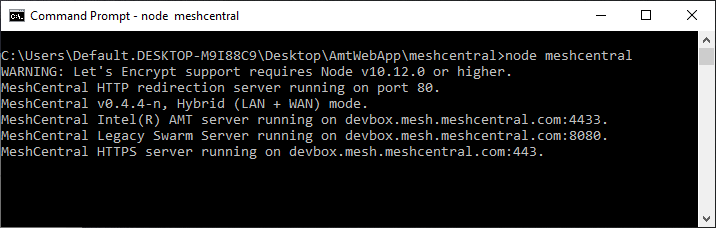
Ohhh.... this is so nice. I just published MeshCentral v0.4.4-n that shows a proper warning if you try to use Let's Encrypt to an older version of NodeJS. Many thanks to @mikecole79 for his help solving this.
Ylianst
on 19 Nov 2019
It worked when I upgraded to the latest nodejs as specified
nodejs - v10.17.0
A suggestion would be to add the nodejs apt repo to ubuntu when you install meshcentral or when you update meshcentral.
johnnyq
on 20 Nov 2019
Nice! not sure it's a good idea to start changing the OS configuration automatically, that seems a bit much. I could add documentation on how to update NodeJS in different operating systems.
Ylianst
on 20 Nov 2019
Interesting. When I start the app calling node directly with --debug cert it starts right up with the certs installed. When I sudo service meshcentral start it uses the self signed cert.
Anyone have thoughts on this? Perhaps related to this ticket, or maybe I'm just dumb and have some user permissions set incorrectly.
mikecole79
on 20 Nov 2019
@mikecole79 This is probably something minor. Could be a few things, for example, make sure the working directory in the meshcentral.service file is correct, it should point to the folder that is the parent of the node_modules folder, example below for user "pi".
[Unit]
Description=MeshCentral Server

[Service]
Type=simple
LimitNOFILE=1000000
ExecStart=/usr/bin/node /home/pi/node_modules/meshcentral
WorkingDirectory=/home/pi
Environment=NODE_ENV=production
User=pi
Group=pi
Restart=always
# Restart service after 10 seconds if node service crashes
RestartSec=10
# Set port permissions capability
Capabilities=cap_net_bind_service+ep
SecureBits=keep-caps

[Install]
WantedBy=multi-user.target
Another thing to do it that could help is to enabling logging in the config.json and take a look at the output, it's just like "--debug cert" but you enable it for the background service.
{
  "settings": {
    "port": 4430,
    "log": "main,cert"
  }
}
Then run the server in the background and you should see a log.txt file in "meshcentral-data". Hopefully you will see what is going on.
Ylianst
on 20 Nov 2019
Woo! Fell off the rate limit today and setup my certs. Everything is working as it should now. Thank you for the quick work @Ylianst. I really appreciate it!
asasin114
on 22 Nov 2019
Related issues
 guerby
·
3Comments
guerby
·
3Comments
 LPJon
·
3Comments
LPJon
·
3Comments
 vish84
·
3Comments
vish84
·
3Comments
 M1CK431
·
3Comments
M1CK431
·
3Comments
 whalehub
·
3Comments
whalehub
·
3Comments
Most helpful comment
Ylian,
Bravo, This solved my issue after I did a little debugging of the logs, I realized that in the process somewhere I had fat fingered one of the directory permissions and was denied users access. I went root, added the folder to the groups and a few users I need to have access again at all time for W/R that solved some of the drop out items that didn't align with your work. Then I did a non-production mode check, and verified the system was kicking in gear, then I changed my config to a true statement and was able to get the domain back online before my Taiwan outfit starts their weekly run of required security checks around the world. This has saved countless hours of long distance work related security issues among other issues also addressed via having the MeshCentral available at times of crashes or glitches as some say.
Thanks for all your hard work to resolve this issue that was created by Greenlock changes outside of your controls.
Thanks,
-SomeGuru