Meshcentral: Remote agent uninstall not fully uninstalling
Hi,
I was trying to look over the WEBGUI but could not find how to uninstall a client remotely, would it be possible?
Thank you
 killmasta93
All 19 comments
Click the console tab, and type uninstallAgent
 krayon007
on 18 Oct 2019
krayon007
on 18 Oct 2019
Thanks for the reply, does it also uninstall from the control panel?
killmasta93
on 18 Oct 2019
There is no uninstall in the web interface right now. I could look at adding it, i just don't want someone to do this accidentally and it would have it's own device group permission just for that task. Feedback and suggestion on if and where I should put this in the web app appreciated. I guess the logical place in the "Group Actions".
 Ylianst
on 19 Oct 2019
Ylianst
on 19 Oct 2019
Personally I think the logical place would to present it as a "Uninstall Agent" checkbox in the dialog that appears when you choose to delete a device, but it should definitely require an extra confirmation to make it harder to do accidentally, and I like your idea of hiding it behind it's own permission setting.
 MailYouLater
on 19 Oct 2019
MailYouLater
on 19 Oct 2019
I remember requesting this functionality some time ago and i believe at the time i was looking for it to be an option within "Action" and also within "Group Action" to manipulate multiple devices in one go.
Either way, this is a great feature to see available. Thanks!
 penguinthingie
on 21 Oct 2019
penguinthingie
on 21 Oct 2019
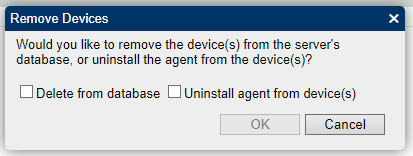
One of the options in "Group Action" is "Delete Devices". My suggestion would be to add another screen that appears after choosing "Delete Devices", and before the "Confirm delete selected device(s)?" which asks if you want to delete the device(s) from the database, or if you want to uninstall the agent from the device, and gives a checkbox for each.
Also, I'd recommend that you change the terminology from Delete Device(s) to Remove Device(s).
| Currently it looks like this: | My suggestion would be to make it more like this: |
| --- | --- |
|  |
|  |
|
|  |
|  |
|
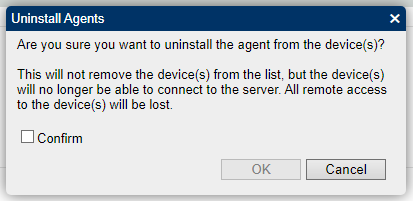
| Then depending what they check, you could have it say things like these: |
| --- |
|  |
|
|  |
|
| For the case when both were checked, it should show a message where it warns about all the stuff above, and the caveats I mentioned in the above mockups should be removed. |
MailYouLater
on 22 Oct 2019
This is excellent. I will work on this.
Ylianst
on 22 Oct 2019
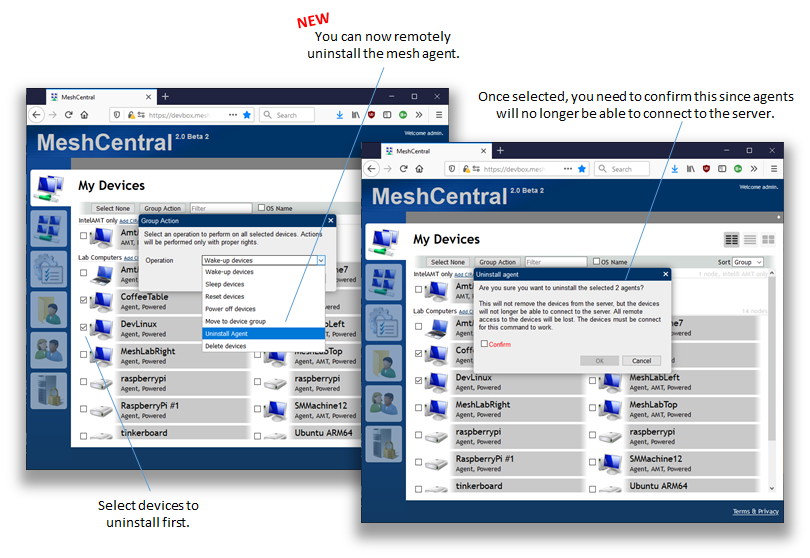
Published MeshCentral v0.4.3-b with support for remote agent uninstall in the web application. You can only do this on connected agents and it's separate from deleting the device from the server. I kinda need to keep them separate because Intel AMT could still be alive after agent uninstall. I also added a new "uninstall agent" permission in the device group for this operation. Feedback appreciated.
Ylianst
on 24 Oct 2019
connect->connected
MailYouLater
on 24 Oct 2019
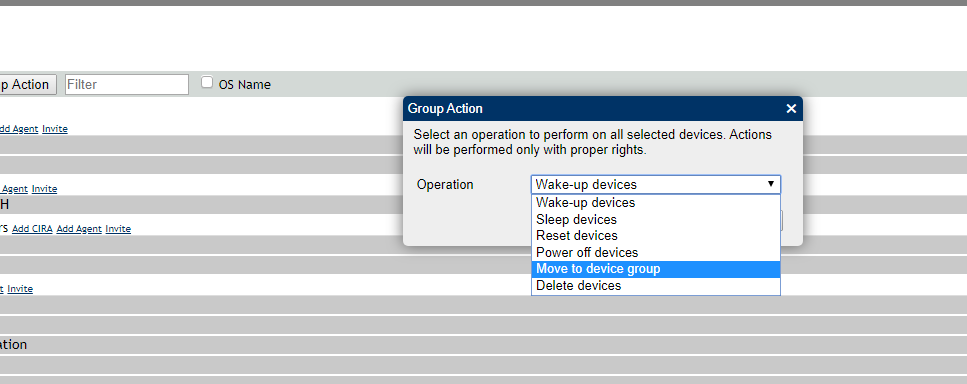
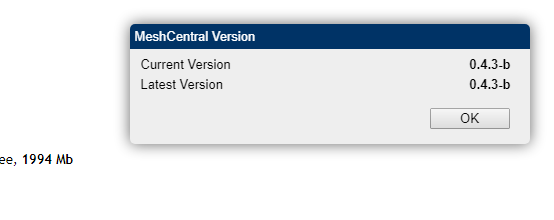
Awesome to have the feature, but somehow it isn't in v0.4.3-b.
See below:
 infineonnetworks
on 25 Oct 2019
infineonnetworks
on 25 Oct 2019
Thanks @MailYouLater, "Connected" will be in the next version.
For the "Uninstall agent" option to be displayed in the group action, you must have checked at least one device that is connected. Let me know if that works.
Ylianst
on 25 Oct 2019
@Ylianst: I had the option yesterday and earlier today, but after I rebooted one of the computers connected to my server, the option disappeared. I checked again after the device reconnected, I also tried after executing resetserver, and then after running serverupdate to update to 0.4.3-c, and the "Uninstall agent" option is just gone.
MailYouLater
on 25 Oct 2019
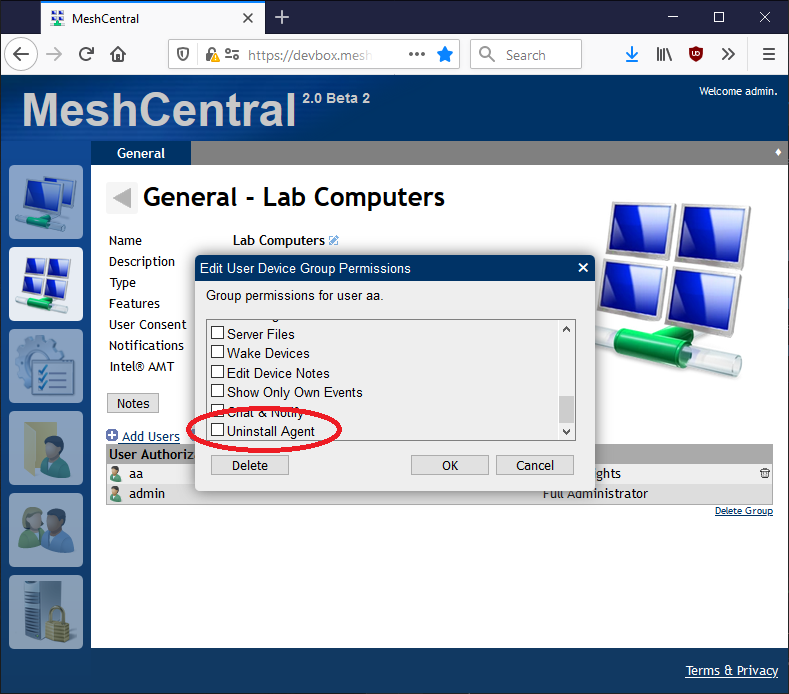
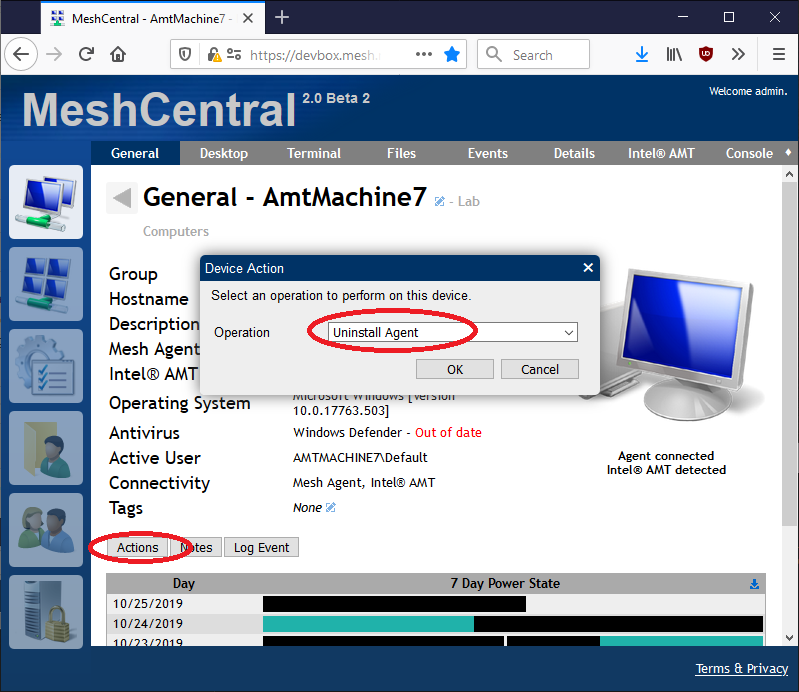
Note that you also need to have the "uninstall agent" permission for the given device group. You can also access "uninstall agent" from a device's "Actions" button. Let me know if that works.
Ylianst
on 25 Oct 2019
@Ylianst: Awesome for this, and managed to get it to work. One has to go to the machine itself not from the group actions, as was shown in the original pictures above. However I am not sure if it just disconnects the agent or actually uninstalls the agent from the machine. As a test I have done this and the agent seems to remain installed as shown below:
Before "Uninstall Agent":

After "Uninstall Agent":

Also, I believe the MeshCentral agent is reporting the wrong install size to the registries. I can't believe it would be 2.03GB in size.
infineonnetworks
on 25 Oct 2019
I should have permissions:
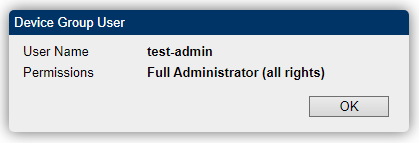
Interestingly, the "Uninstall Agent" option is available when clicking the "Actions" button of a single device, but checking some device(s) on the "My Devices" screen and clicking "Group Action", it's not one of the options.
Looking at the source, I think it may be that var nodeids = getCheckedDevices(); is inside a if that may not always be true, so it'll only show optional Group Actions when a feature I don't use is enabled. Honestly, looking at the source, I'm curious how it showed for me before, when I haven't done anything with MQTT.
MailYouLater
on 25 Oct 2019
Oh! You are right, the line "var nodeids = getCheckedDevices();" is not at the right place. It works on my server because I enabled MQTT support... doh! I will fix this tomorrow.
Ylianst
on 26 Oct 2019
Published MeshCentral v0.4.3-g with a fix for the device group uninstall. Thanks @MailYouLater for debugging this, that was a pretty dummy bug on my part.
Ylianst
on 26 Oct 2019
@Ylianst, @MailYouLater: this patch fixed the group action to remove the agent from the web panel, thank you. The agent stops checking in, but the machine isn't deleted, which may want to be added to this uninstall action.
The problem however still exists that the actual meshagent is not actually uninstalled of the machine, which is a problem. As well as the agent is reporting an incorrect size to the windows installer. It could possibly be a bug ticket for the agent side itself, however.
infineonnetworks
on 26 Oct 2019
Your right, it does not fully uninstall and this a problem with the agent. @krayon007 would need to look into in. If another issue can be open for the agent not fully uninstalling, I will close this issue and assign the new one.
Ylianst
on 27 Oct 2019
Related issues
 hellofaduck
·
3Comments
hellofaduck
·
3Comments
 darryl-h
·
3Comments
darryl-h
·
3Comments
 guerby
·
3Comments
guerby
·
3Comments
 petervanv
·
3Comments
petervanv
·
3Comments
 PathfinderNetworks
·
3Comments
PathfinderNetworks
·
3Comments
Most helpful comment
One of the options in "Group Action" is "Delete Devices". My suggestion would be to add another screen that appears after choosing "Delete Devices", and before the "Confirm delete selected device(s)?" which asks if you want to delete the device(s) from the database, or if you want to uninstall the agent from the device, and gives a checkbox for each.
Also, I'd recommend that you change the terminology from Delete Device(s) to Remove Device(s).
| Currently it looks like this: | My suggestion would be to make it more like this: | |
|  |
| |
|  |
|
| --- | --- |
|
|
| Then depending what they check, you could have it say things like these: | |
| |
|
| --- |
|
|
| For the case when both were checked, it should show a message where it warns about all the stuff above, and the caveats I mentioned in the above mockups should be removed. |