Meshcentral: MeshAgent on Windows 10 Enterprise LTSC doesn't show up in MeshCentral
I'm not sure if this issue is related to updating MeshCentral or because I'm using a different OS now. I previously used MeshAgent on a Windows 10 Pro for Workstation machine without any issues. Today, I installed MeshAgent on a Windows 10 Enterprise LTSC machine, but it doesn't show up in the device group. I did a server trace in the web GUI and this was the output:
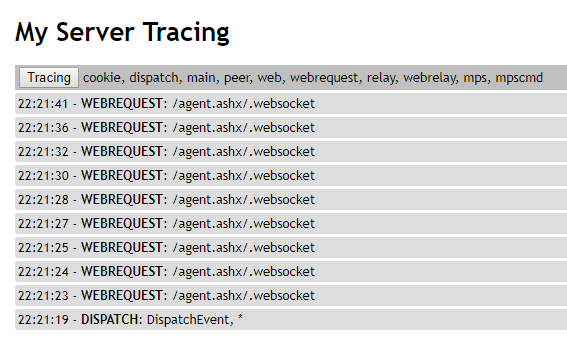
Please note that MeshAgent is working fine for me on Linux and FreeBSD machines.
 whalehub
All 21 comments
Bryan will have try this. If you can run the agent manually by typing "agent.exe run" in the command prompt, would be interesting to see what is displayed.
 Ylianst
on 15 Oct 2019
Ylianst
on 15 Oct 2019
What version of Windows 10 LTSC are you using?
I setup a Windows 10 Enterprise LTSC 10.0.17763.316 machine, and everything works correctly
 krayon007
on 16 Oct 2019
krayon007
on 16 Oct 2019
@Ylianst I'm getting this output when I run MeshAgent that way:
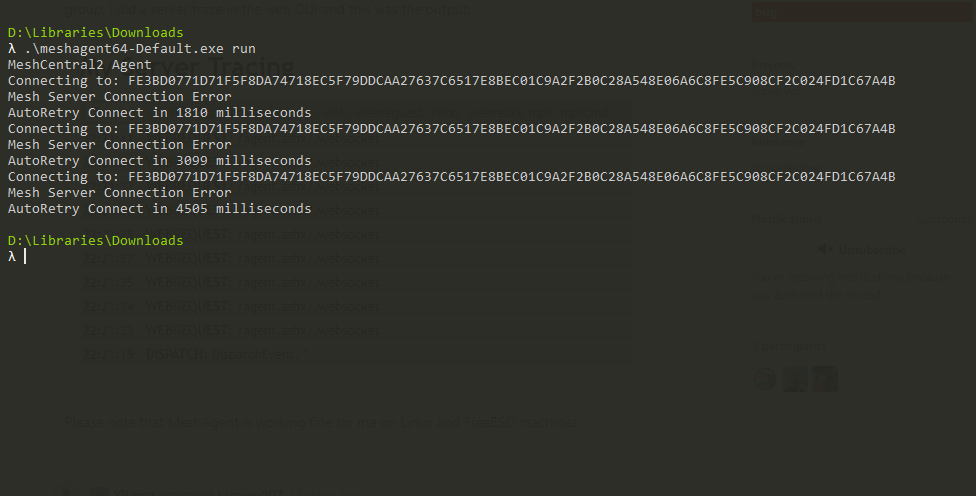
@krayon007 I'm running Windows 10 Enterprise LTSC 10.0.17763.832.
whalehub
on 26 Oct 2019
@Ylianst @krayon007 Any update on this? I tried it on a fresh installation of Windows 10 Pro (the latest version) today with virtually zero 3rd party software installed and had the same result.
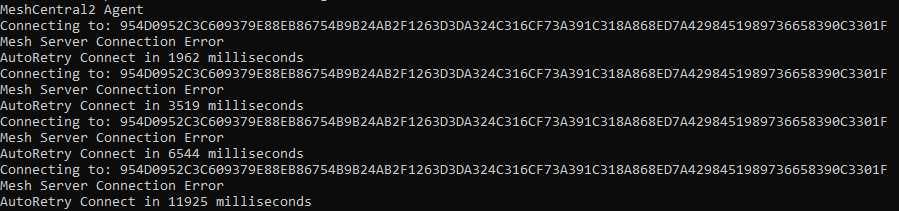
MeshAgent has worked for me on Windows 10 since at least December last year. I don't know when this issue started to occur but I can try to downgrade sequentially to find out.
whalehub
on 8 Nov 2019
What's your network topology? That looks like it could be cause by a certificate authentication failure.
krayon007
on 8 Nov 2019
If it was an issue with the certificate, I don't think MeshAgent on Linux and FreeBSD machines would be able to connect successfully. My network topology in this case is
Windows 10 → WAN → reverse proxy → MeshCentral server
Nothing about this topology has changed since I first set up MeshCentral, only the version of MeshCentral has. I'll try downgrading to a version from a few months ago to narrow it down to a specific version.
whalehub
on 8 Nov 2019
@krayon007 Turns out it's not even possible to downgrade MeshCentral that far back and still have it work. Anything older than the 3.x.x series of releases and you'll get errors like Internal Server Error or Error: ENOENT: no such file or directory, open '/views/layouts/main.handlebars' in the browser.
whalehub
on 8 Nov 2019
I get the Error: ENOENT: no such file or directory, open '/views/layouts/main.handlebars' issue with version 0.3.4-j and earlier.
Edit: If I run npm install [email protected] I can install and run version 0.3.4-j or older.
 MailYouLater
on 8 Nov 2019
MailYouLater
on 8 Nov 2019
@Ylianst @krayon007 Any input on this? This bug is a complete showstopper for me since it means I can't use MeshAgent on any Windows devices.
whalehub
on 4 Dec 2019
Try this. Add this line to the "Settings" section of your config.json and restart your server:
"ignoreagenthashcheck": true
If this works, let us know.
Also, when installing the agent, go in "C:\Program FilesMesh Agent" and see if there is a "meshagent.proxy" file. If there is one, edit it with Notepad and check that it's the correct proxy. If you are not using a proxy, make sure there is no "meshagent.proxy" file.
Ylianst
on 4 Dec 2019
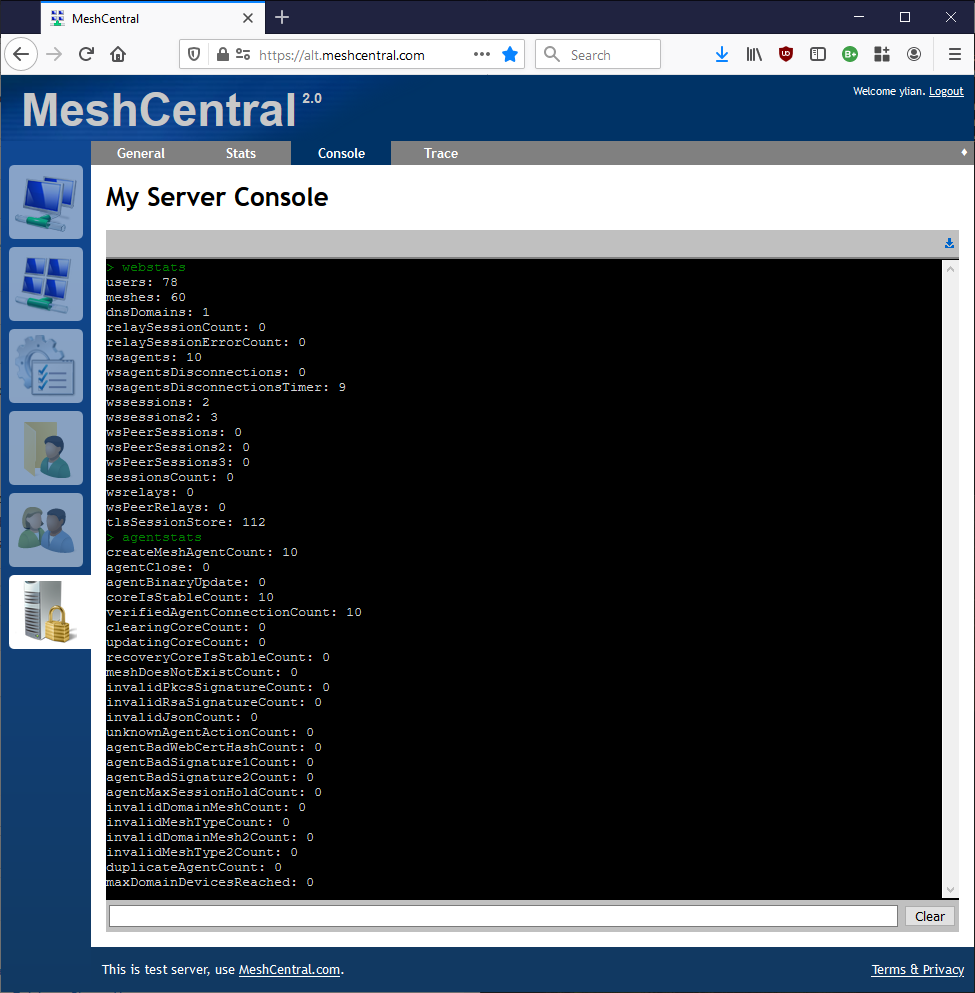
One more thing, once the agents try to connect... go in the "My Server" tab and "Console" and type "webstats" and "agentstats". It will show a bunch of counters, cut & paste there counters here. Below is what I get for my dev server.
Ylianst
on 4 Dec 2019
Of course, go back to the latest version before doing all this. Also, any reverse proxy related settings you have, would be interesting to know. For example, do you alias any ports and do you use "certurl" or "tlsoffload" in your settings? - Thanks.
Ylianst
on 4 Dec 2019
@Ylianst Adding "ignoreagenthashcheck": true to my settings unfortunately made no difference. I am not using a proxy and didn't find a meshagent.proxy file in the MeshAgent directory. This is the output from running those two commands:
> webstats
users: 2
meshes: 2
dnsDomains: 0
relaySessionCount: 0
relaySessionErrorCount: 0
wsagents: 2
wsagentsDisconnections: 0
wsagentsDisconnectionsTimer: 8
wssessions: 1
wssessions2: 1
wsPeerSessions: 0
wsPeerSessions2: 0
wsPeerSessions3: 0
sessionsCount: 0
wsrelays: 0
wsPeerRelays: 0
tlsSessionStore: 0
> agentstats
createMeshAgentCount: 22
agentClose: 20
agentBinaryUpdate: 0
coreIsStableCount: 2
verifiedAgentConnectionCount: 2
clearingCoreCount: 0
updatingCoreCount: 0
recoveryCoreIsStableCount: 0
meshDoesNotExistCount: 0
invalidPkcsSignatureCount: 0
invalidRsaSignatureCount: 0
invalidJsonCount: 0
unknownAgentActionCount: 0
agentBadWebCertHashCount: 0
agentBadSignature1Count: 0
agentBadSignature2Count: 0
agentMaxSessionHoldCount: 0
invalidDomainMeshCount: 0
invalidMeshTypeCount: 0
invalidDomainMesh2Count: 0
invalidMeshType2Count: 0
duplicateAgentCount: 0
maxDomainDevicesReached: 0


md5-cf32caf58c79da0ffb9b437096e9cb53


{
  "settings": {
    "AliasPort": 443,
    "AllowFraming": true,
    "AllowHighQualityDesktop": true,
    "AllowLoginToken": true,
    "Cert": "<redacted>",
    "DbRecordsEncryptKey": "<redacted>",
    "Minify": 1,
    "MongoDb": "mongodb://172.30.0.26:27017/meshcentral",
    "MongoDbCol": "meshcentral",
    "MpsPort": 7448,
    "MpsTlsOffload": true,
    "Port": 7450,
    "RedirPort": 7449,
    "SessionKey": "<redacted>",
    "SessionTime": 30,
    "TlsOffload": "127.0.0.1"
  },
   "smtp": {
   "host": "<redacted>",
   "port": 587,
   "from": "<redacted>",
   "user": "<redacted>",
   "pass": "<redacted>",
   "tls": false
  },
  "domains": {
    "": {
      "certUrl": "<redacted>:443",
      "newAccounts": 0,
      "Title": "<redacted>",
      "Title2": "",
      "TitlePicture": "logoback.png",
      "SessionRecording": {
        "filepath": "/opt/meshcentral/meshcentral-data/recordings/default",
        "protocols": [ 1, 2, 100, 101 ]
      }
    }
  }
}


md5-835cf060b65cd0645b93a06ffd47013b


<domain redacted> {

  proxy / 127.0.0.1:7450 {
    transparent
    websocket
  }

  header / {
    Strict-Transport-Security "max-age=31536000; includeSubDomains; preload"
    X-XSS-Protection "1; mode=block"
    X-Content-Type-Options "nosniff"
    X-Frame-Options "allow-from <redacted>"
    Referrer-Policy "same-origin"
    Expect-CT "max-age=86400, enforce, report-uri=\"<redacted>\""
    Feature-Policy "camera 'none'; geolocation 'none'; microphone 'none'"
    Content-Security-Policy "
      default-src 'none';
      base-uri 'self';
      script-src 'self';
      style-src 'self';
      img-src *;
      font-src 'self' data:;
      connect-src 'self' data:;
      media-src 'self' data:;
      object-src 'none';
      worker-src 'self';
      manifest-src 'self';
      frame-ancestors 'self' <redacted>;
      form-action 'self';
      upgrade-insecure-requests;
      block-all-mixed-content;
      report-uri <redacted>;"
    -Server
    -X-Powered-By
  }

  gzip {
    ext *
  }

  tls {
    protocols tls1.2 tls1.3
    dns gandiv5
    ciphers ECDHE-ECDSA-AES128-GCM-SHA256 ECDHE-ECDSA-WITH-CHACHA20-POLY1305 ECDHE-ECDSA-AES256-GCM-SHA384
    key_type p384
    must_staple
    wildcard
  }
}
Your settings all look correct. I am going to look into the code a bit and see if I can find a solution.
Ylianst
on 5 Dec 2019
I am running out of ideas. If you want, mail be directly and send me a .msh file for me to try to connect to your server or a guest account on your server so I can create a device group and try myself. I will run the agent in debug mode and see why it's failing. Once I find the issue, I can report back with a fix. Let me know if that would work for you.
Ylianst
on 5 Dec 2019
@Ylianst That works for me. I have just sent an .msh file from my server to you via email.
whalehub
on 9 Dec 2019
@whalehub did you get this solved? I might be having the same issue as you. It happened right after updating Caddy Reverse Proxy....
 southeasterntech
on 18 Jan 2020
southeasterntech
on 18 Jan 2020
@Ylianst any progress here Ylian?
southeasterntech
on 18 Jan 2020
Closed in favor of #838.
whalehub
on 19 Jan 2020
Thanks for closing this one. I think #838 fixed this.
Ylianst
on 23 Jan 2020
@Ylianst I can confirm that this issue was fixed in #838.
whalehub
on 25 Jan 2020
Related issues
 robclay
·
3Comments
robclay
·
3Comments
 unguzov
·
3Comments
unguzov
·
3Comments
 penguinthingie
·
4Comments
penguinthingie
·
4Comments
 guerby
·
3Comments
guerby
·
3Comments
 LPJon
·
3Comments
LPJon
·
3Comments