Meshcentral: Install agent 32 bits for windows
Hello Ylianst, all right?
I am trying to install 32bit agent for windows but it is not working, can you help me?
 geanferrani123
All 21 comments
Can you explain what is not working? Any details appreciated. Also, what version of Windows are you using? (We don't support XP / Vista).
 Ylianst
on 7 Oct 2019
Ylianst
on 7 Oct 2019
I am running agent installer on windows 7 and windows 10 machines, and none of them worked. Nothing works, I have to install, it signals that installed but when I go to the list of machines in meshcentral, the machine itself does not install. I also take the opportunity to inform you that the installation was the same on Windows Server 2008, 2012 and 2016 machines.
geanferrani123
on 7 Oct 2019
Is your antivirus removing or stopping the MeshCentral agent? There was an issue not too long ago where some antivirus apps were flagging it as malware- especially the 32bit version.
 PathfinderNetworks
on 7 Oct 2019
PathfinderNetworks
on 7 Oct 2019
no, I don't have this problem anymore after I installed SSL
geanferrani123
on 7 Oct 2019
So ... you're saying you were able to fix your own issue? Meaning this ticket can be closed, right?
Were you trying to run it with the notls config option enabled? or were you trying to run the server on a machine that didn't have an SSL library (e.g. OpenSSL) installed? or was your issue something else?
 MailYouLater
on 7 Oct 2019
MailYouLater
on 7 Oct 2019
So ... you're saying you were able to fix your own issue? Meaning this ticket can be closed, right?
Were you trying to run it with the
notlsconfig option enabled? or were you trying to run the server on a machine that didn't have an SSL library (e.g. OpenSSL) installed? or was your issue something else?
sorry but this has nothing to do with my problem, i said i solved the part of my antivirus block by installing SSL, my problem is that when generating 32 bit agent i cannot install on 32 bit machines. I also used to say that Agent 64 does not work correctly on windows server systems.
geanferrani123
on 8 Oct 2019
Are you getting an error? Can you post a log or a screenshot?
MailYouLater
on 8 Oct 2019
Friends, i'm not getting any erro, simply the machine doesn't show up in meshcentral
geanferrani123
on 8 Oct 2019
If you go into the windows service manager, does the service show up there, and show as running?
 krayon007
on 8 Oct 2019
krayon007
on 8 Oct 2019
If you go into the windows service manager, does the service show up there, and show as running?
Yes
geanferrani123
on 8 Oct 2019
If you go to the folder where it's installed (Usually C:\Program Files\Mesh Agent) is there a .log file next to the .exe and .msh? If so, can you post the contents of it? and the .msh file too?
MailYouLater
on 8 Oct 2019
Another thing you can do that will help, is to stop the service in service manager, then open an elevated command prompt, and navigate to the folder where the binary is. (Usually program files/mesh or something similar)
And run the command:
Meshagent run
This will run the agent in console mode, which will show a bunch of connection related messages on the screen. I suspect there is something going on with proxy detection...
krayon007
on 9 Oct 2019
Outra coisa que você pode fazer para ajudar é interromper o serviço no gerenciador de serviços, abrir um prompt de comando elevado e navegar até a pasta onde está o binário. (Geralmente, programa arquivos / malha ou algo semelhante)
E execute o comando:
Meshagent runIsso executará o agente no modo do console, que mostrará várias mensagens relacionadas à conexão na tela. Eu suspeito que há algo acontecendo com a detecção de proxy ...
Hello friends, good morning!
Bryan, I don't think it's a proxy, because if not the 64-bit agent would also have a problem, but give me a minute I'll perform the test that the friend above asked you to better view.
geanferrani123
on 9 Oct 2019
Bryan, I identified the problem and saw that it's only happening on windows 7 32 bits, following print from the command you asked me to execute
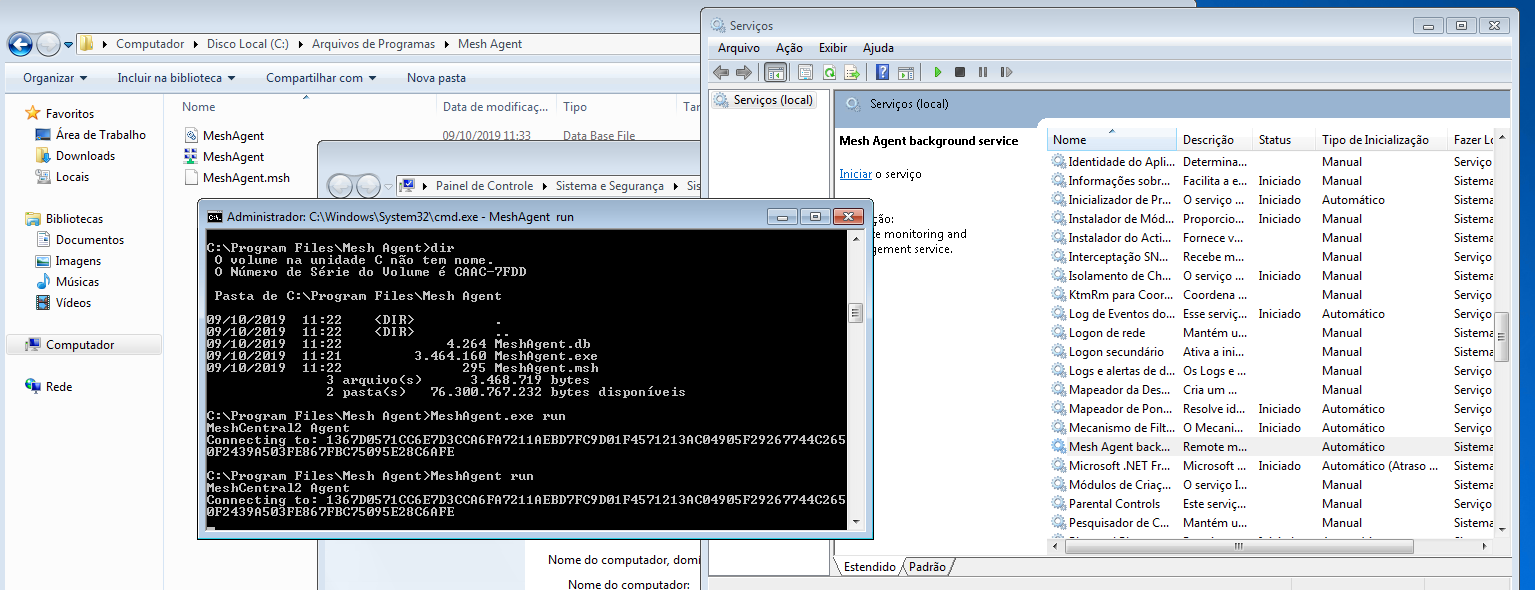
geanferrani123
on 9 Oct 2019
was supposed to appear in this group called test but it doesn't appear

The machine name is pc-pc
geanferrani123
on 9 Oct 2019
Which Service Pack is your Windows 7 machine?
krayon007
on 9 Oct 2019
I tested on one with service pack 1 and one without service pack
geanferrani123
on 9 Oct 2019
Is your machine behind a proxy tho?
krayon007
on 9 Oct 2019
Yes, however all machines are running on LAN, including meshcentral server. Proxy is not taking any action on meshcentral, otherwise all machines would be in trouble.
geanferrani123
on 9 Oct 2019
Hmmm... I'm trying to reproduce the scenario. I have a Windows 7 SP1 machine, and the only anomaly I found was that it wasn't using a proxy when it should have been, but otherwise it connected correctly, and everything seemed to work.
The output you showed earlier suggests that it is having connection related issues. Is your server referenced in the .msh file directly by IP address/dns name, or is it shown as 'local', meaning the agent needs to find it?
krayon007
on 9 Oct 2019
Bryan, he is referenced by name. This machine I sent you the print is one that has no service pack 1. I don't know what it can be
geanferrani123
on 9 Oct 2019
Related issues
 whalehub
·
3Comments
PathfinderNetworks
·
3Comments
whalehub
·
3Comments
PathfinderNetworks
·
3Comments
 guerby
·
3Comments
guerby
·
3Comments
 nroach44
·
3Comments
nroach44
·
3Comments
 M1CK431
·
3Comments
M1CK431
·
3Comments