Meshcentral: Feature Request : Method to create Invite ID without human intervention
Problem Description: I'm trying to create some automation around Mesh Central, but generating the Invite ID is not possible currently without a human and a browser (Unless there's an API I am unaware of, I assume this is MeshCtrl)
It would be nice to specify some unit of time (like hours or days) or unlimited, to mimic the features of the GUI
Example:
meshctrl GenerateInvite --id <GroupID> --hours <Hours>
meshctrl GenerateInvite --id <GroupID> --days <days>
meshctrl GenerateInvite --id <GroupID> --unlimited
it would also be nice to be able to expire a key, in the event you have created a universal one and it has been compromised, for example:
meshctrl RevokeInvite --invitekey <key>
If these are already implemented, I'm unable to find it in the documentation, feel free to point me in the right direction.
 darryl-h
All 16 comments
This is a good request and should not be too difficult to add. I will take a look at adding it when I am back in the office.
 Ylianst
on 22 Sep 2019
Ylianst
on 22 Sep 2019
Published MeshCentral v0.4.1-c with new "GenerateInviteLink" in MeshCtrl. --hours [hours] will set the timeout, zero for infinite. Let me know if that works. For example:
MeshCtrl GenerateInviteLink --id [devicegroupid] --hours 24
Ylianst
on 23 Sep 2019
Thanks! I'll test this out today and let you know!
darryl-h
on 24 Sep 2019
It would also be really nice to be able to see a list of active and recently expired invite links somewhere in the GUI, preferably with the option to manually expire/revoke an active one and maybe the ability to extend a soon-to-expire or recently-expired link, in case we're still waiting for someone to connect through it.
Come to think of it, being able to request a list of active invite links via MeshCtrl would be nice too.
 MailYouLater
on 24 Sep 2019
MailYouLater
on 24 Sep 2019
Right now, the server has no such list. It just encrypts a cookie with an expire time in it, so the server keeps no state. Could be added, but it's more work (of course).
Ylianst
on 24 Sep 2019
Technically this works, but unfortunately this isn't exactly what I was looking for, let me know if I should file a new feature request with the name MeshID (I wasn't aware of this nomenclature before I got the error today)
From the GUI, this is what gets generated when I try to create a link for Linux
(wget https://10.60.30.12/meshagents?script=1 --no-check-certificate -O ./meshinstall.sh || wget https://10.60.30.12/meshagents?script=1 --no-proxy --no-check-certificate -O ./meshinstall.sh) && chmod 755 ./meshinstall.sh && sudo ./meshinstall.sh https://10.60.30.12 'gMxf5Fco1RrqPeqzl3IvHLcGUKrjz1k6cvdkRU5OdpO25U17g5r@1PBa4Lf3qumt'
What I'm trying to do is create the 64 character MeshID for meshinstall in an automated way to be used like this:
/meshinstall.sh https://10.60.30.12 'gMxf5Fco1RrqPeqzl3IvHLcGUKrjz1k6cvdkRU5OdpO25U17g5r@1PBa4Lf3qumt'
What gets output from meshctrl with the new feature is this:
https://un-configured:443/agentinvite?c=YpUNHi1KU7y0ydOXjRn07pjHJL8ZSfjf8ebTg7G3TZd10SdwLSBWncZ4p3bWWdgXDMVekFgj81ZGF9cmRySfX$54sfmW9ABpKyuhPcwrJecqmFecrK4GMcm@mAjwT3ZaTjuxQ3JylsWQaQ7Rg495fFBjflUKdZDwC7TNVFevHX@cHz6G@J$rYGJMQeokY@uZvmtfVGc=
This looks like it created the URL for me to go to, to then select my desired OS, but, I'm trying to use it with the meshinstall script, which I should have been more clear about in my initial request.
Just for kicks, if I try and use this as the MeshID with MeshInstall, I get the expected error, but I did learn the name MeshID (used in this reply)
Failed to disable unit: Unit file meshagent.service does not exist.
Failed to stop meshagent.service: Unit meshagent.service not loaded.
Agent uninstalled.
MeshID is not correct, must be 64 characters long.
The implemented method works for interactive installations (where, the user would then choose the OS etc) but this cannot be done in an automated way (easily)
With the implemented method there are still two minor issues:
1) It doesn't know the URL (states "un-configured:") , but the GUI does (10.60.30.12)
2) When I run meshctrl help the output is different from --help (Missing this new function, as well as all in one line, --help is more useful IMO, not sure if help can just call --help, when help is called that, seems easier to maintain)
darryl-h
on 24 Sep 2019
@Ylianst: Well, for what it's worth, the URL is what I was expecting, and it will be helpful to me.
@darryl-h: If you're just trying to find out what the MeshID for a specific 'Device Group' is, run MeshCtrl ListDeviceGroups, you'll get output similar to this:
id, name
---------------
"ZEraEshVUsdojPfxq@i$6v3OtMyOeXFv$YuQsiZhoZqILjSiaAmXoGd2IJnODnA7", "test"
"t6AbZ9IoPuoeh9eATLyMmPkKJ8CDworSGpjpAV276jnfbI08qaPYfPEeOUxcOjzJ", "temporary"
We are looking at more long term automation, but I think that this method will be exactly what we need for a new interim solution.
@MailYouLater Ironically I had to run that command to get the ID of the node to generate the invite ID, I just never thought to use that directly with the meshinstall (Also didn't know that was a MeshID until the error message, but I'll test this out tomorrow)
I'll report more after I test.
darryl-h
on 24 Sep 2019
@MailYouLater : This is indeed the MeshID! I need to figure out why I'm getting an invalid login when I try to append the option --domain customer1 though. Thank you kind sir!
I'll run the newest version and comment on the following two very minor issues:
1) It output URL states "un-configured:"
- [x] Will test with a server with a FQDN (Tested this in my lab at home)
2) When I run meshctrl help the output is different from --help (Missing this new function)
- [x] Will test with the newest version
darryl-h
on 25 Sep 2019
Working on 1 now. The problem is that your server is setup in "LAN mode" with no static DNS name or IP address. In this mode, generating an invitation link should not be supported, so I will be returning an error explaining this. You can setup your server with a name using "--cert" or "cert" in the config.json. That will fix this.
For 2, can you detail the problem? Thanks.
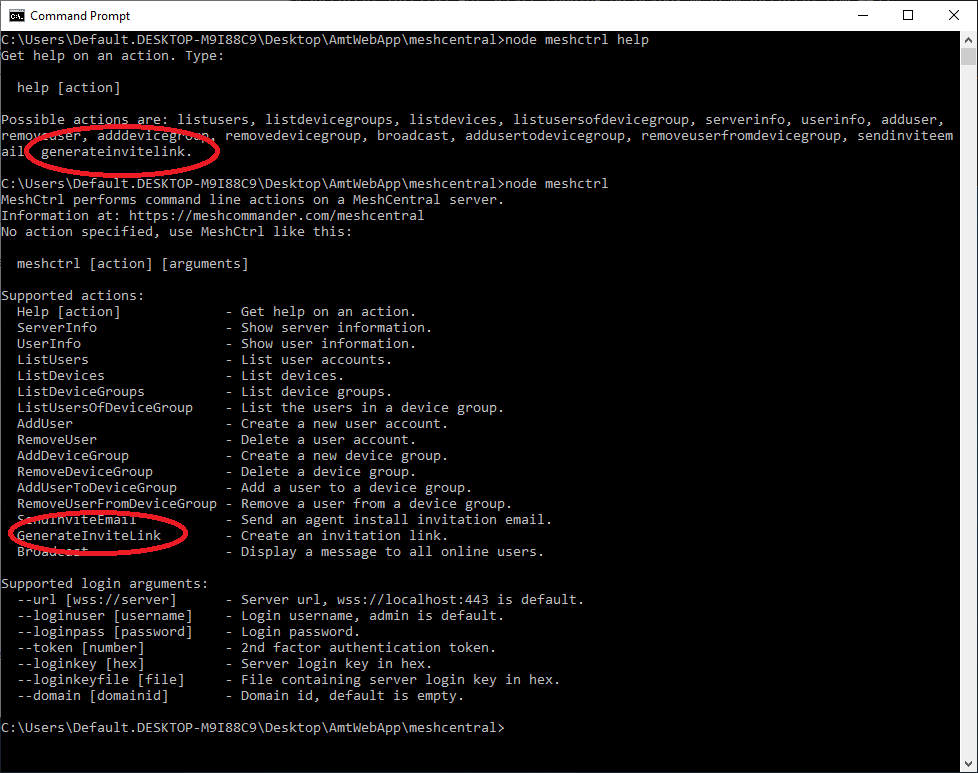
Ylianst
on 25 Sep 2019
Ok, when MeshCentral v0.4.1-g comes out later today, you can't create invitation links for a server with no static IP/DNS anymore. The invite option will be hidden until the server is given a static location. Does not really makes sense to send an invitation link for a server on a DHCP IP with no name. Hope it makes sense.
Ylianst
on 25 Sep 2019
MeshCentral v0.4.1-g is live. Feedback appreciated.
Ylianst
on 25 Sep 2019
It would be nice if there was an override for this lockout, at least in MeshCtrl if not the GUI, as I (and potentially others may) primarily use MeshCentral in LAN mode, but it's much easier (even when the server may not have a static IP) to generate an unlimited invite link, then set a redirect (e.g. get-agent) in config.json to point to it using a relative url (/agentinvite?c=<long string>). Then when we want to install the agent, we check the server's IP, then start a browser on the computer we're installing the agent on, instead of having to log in and download the agent, just go to the redirect (e.g. http://192.168.0.5/get-agent) and download the agent.
Personally I'd keep it accessible from the GUI, and just have a warning appear when you generate a link that it may not work as expected because the server isn't configured with a static IP or FQDN, but I can understand if you'd rather just hide it from the GUI. I think MeshCtrl should be able to do it anyway though, even if it's behind an extra switch like --force or something.
MailYouLater
on 26 Sep 2019
Agreed. MeshCtrl is an expert tool, so I removed the block in the server and meshctrl will return the URL regardless of server state. I am still hiding the "Invite" in the web interface, this seems fair. MeshCtrl will return "/agentinvite?c=..." if the server name was no set.
This will be in MeshCentral v0.4.1-j when it's next published.
Ylianst
on 26 Sep 2019
Sorry wasn't able to test this sooner, @MailYouLater thanks for testing and providing suggestions.
For 1, either solution is fine.
For 2, I think this was specific to one version, I'll test and report back today hopefully. (Although, tbh, if it's fixed in the newest version, I would consider this issue closed)
darryl-h
on 27 Sep 2019
Can confirm help is in version 0.4.1-j, closing request. Thanks guys!!
Version: 0.4.1-j
help
# /usr/bin/node /opt/meshcentral/node_modules/meshcentral/meshctrl help
Get help on an action. Type:

  help [action]

Possible actions are: listusers, listdevicegroups, listdevices, listusersofdevicegroup, serverinfo, userinfo, adduser, removeuser, adddevicegroup, removedevicegroup, broadcast, addusertodevicegroup, removeuserfromdevicegroup, sendinviteemail, generateinvitelink.
--help
# /usr/bin/node /opt/meshcentral/node_modules/meshcentral/meshctrl --help
MeshCtrl performs command line actions on a MeshCentral server.
Information at: https://meshcommander.com/meshcentral
No action specified, use MeshCtrl like this:

  meshctrl [action] [arguments]

Supported actions:
  Help [action]             - Get help on an action.
  ServerInfo                - Show server information.
  UserInfo                  - Show user information.
  ListUsers                 - List user accounts.
  ListDevices               - List devices.
  ListDeviceGroups          - List device groups.
  ListUsersOfDeviceGroup    - List the users in a device group.
  AddUser                   - Create a new user account.
  RemoveUser                - Delete a user account.
  AddDeviceGroup            - Create a new device group.
  RemoveDeviceGroup         - Delete a device group.
  AddUserToDeviceGroup      - Add a user to a device group.
  RemoveUserFromDeviceGroup - Remove a user from a device group.
  SendInviteEmail           - Send an agent install invitation email.
  GenerateInviteLink        - Create an invitation link.
  Broadcast                 - Display a message to all online users.

Supported login arguments:
  --url [wss://server]      - Server url, wss://localhost:443 is default.
  --loginuser [username]    - Login username, admin is default.
  --loginpass [password]    - Login password.
  --token [number]          - 2nd factor authentication token.
  --loginkey [hex]          - Server login key in hex.
  --loginkeyfile [file]     - File containing server login key in hex.
  --domain [domainid]       - Domain id, default is empty.
Related issues
MailYouLater
·
4Comments
 penguinthingie
·
4Comments
penguinthingie
·
4Comments
 guerby
·
3Comments
guerby
·
3Comments
 whalehub
·
3Comments
whalehub
·
3Comments
 petervanv
·
3Comments
petervanv
·
3Comments
Most helpful comment
Published MeshCentral v0.4.1-c with new "GenerateInviteLink" in MeshCtrl. --hours [hours] will set the timeout, zero for infinite. Let me know if that works. For example:
MeshCtrl GenerateInviteLink --id [devicegroupid] --hours 24