How do I enable remote user chat? Is it possible to also chat small on the same remote access page?
 geanferrani123
All 24 comments
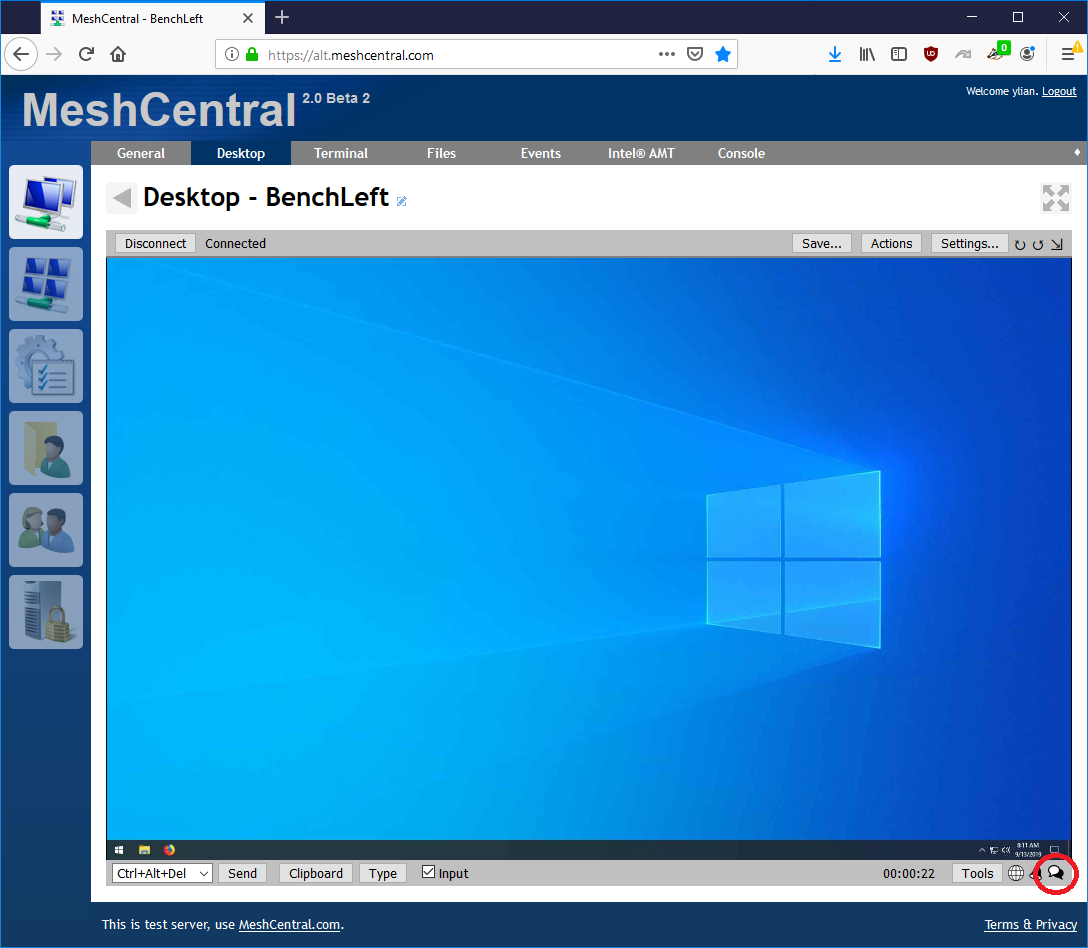
Hi. The chat icon is in the bottom right of the desktop tab. When you click this icon it will try to open a web page on the remote machine and on the management side to chat. Let me know if that answer's your question.
 Ylianst
on 13 Sep 2019
Ylianst
on 13 Sep 2019
hello Ylianst, how are you?
No friend, my question is related to this particular screen, look please:

in my remote host don't none chat screen
geanferrani123
on 13 Sep 2019
This can happen if the remote computer can't open the browser or the remote computer's browser can't connect to the server. Look at the remote desktop and see what is going on with the remote system.
Ylianst
on 13 Sep 2019
nothing happens
geanferrani123
on 13 Sep 2019
What is the OS and OS version of the remote machine?
Ylianst
on 13 Sep 2019
The remote computer is running Windows 7 and the machine I'm accessing the system is Windows 10. The Meshcentral server is installed on an Ubuntu server 18.04.
geanferrani123
on 13 Sep 2019
For now I'm in the testing and study phase of the tool, but I will need this feature when applying it in production.
geanferrani123
on 13 Sep 2019
FYI, this was discussed in another ticket, and a workaround is to copy the URL from the page that opens on your computer, then use the remote desktop feature to open a browser, and paste the URL in their browser, so that you're both on the same page.
 MailYouLater
on 14 Sep 2019
MailYouLater
on 14 Sep 2019
Hello guys.
Ylianst, can you help me?
geanferrani123
on 16 Sep 2019
FYI, this was discussed in another ticket, and a workaround is to copy the URL from the page that opens on your computer, then use the remote desktop feature to open a browser, and paste the URL in their browser, so that you're both on the same page.
yep hes right you can copy the URL of the chat but you have to do it quick if not it closes
 killmasta93
on 17 Sep 2019
killmasta93
on 17 Sep 2019
Right, but must other option, so i need to know the Ylianst. I belive as much as the tool is open source, the goal is to get as close to a tool as possible.
geanferrani123
on 17 Sep 2019
Bryan is working on a new version of the MeshAgent that may fix things like this. Worked all day on it and it's not really to be published yet, but hopefully when it gets release, it will open the chat window correctly on the remote computer.
Ylianst
on 17 Sep 2019
Bryan está trabalhando em uma nova versão do MeshAgent que pode corrigir coisas assim. Trabalhou o dia inteiro e ainda não foi publicado, mas espero que, quando for lançado, abra a janela de bate-papo corretamente no computador remoto.
I understand, have any predictions?
geanferrani123
on 17 Sep 2019
@killmasta93: I've never had it close on me. And even if it did, after you copied the URL to paste on the remote computer, you can also paste it again on your own computer to re-open it.
MailYouLater
on 17 Sep 2019
@MailYouLater i guess then its me very odd on the chat log it shows closed then open then closed but i dont mind much im so happy with this software its really the most amazing thing ever
killmasta93
on 17 Sep 2019
Published MeshCentral v0.4.1-a with all new MeshAgents. When you click on the chat icon, the chat browser window should show up on the remote side. Once updated to the new version, let us know if this is fixed or not. Thanks.
Ylianst
on 21 Sep 2019
Friend, I would like to update just the agent directory or the whole system? Can I upgrade via npm install meshcentral?
geanferrani123
on 21 Sep 2019
@Ylianst so i updated today, worked great just few things, for internet explorer 9 and below it says connecting trying to find user. I was wondering if maybe instead of internet explorer could always open chrome?
killmasta93
on 22 Sep 2019
Yes, you can update using "npm install meshcentral". Just stop the server, do "npm install meshcentral" and start the server again.
For IE9, if there is a problem, please open a new issue. I will take a look at it. MeshCentral should work with IE9.
Ylianst
on 22 Sep 2019
Ylianst, could you tell me if when I upgrade if my customizations will be kept?
geanferrani123
on 23 Sep 2019
@geanferrani123 yes you keep your customization i updated mine all is working well
killmasta93
on 23 Sep 2019
Okay, I will test and return with a result.
geanferrani123
on 23 Sep 2019
Friends, my updates have not been kept, but before upgrading I backed up and restored the relevant files, the update apparently solved my problem, thanks a lot
geanferrani123
on 23 Sep 2019
I few days back, MeshCentral fixed the chat feature. The browser on the remote computer was opening in the system user instead of the currently logged in user. This is fixed and should make the chat feature work fine.
For customization, please open a different issue. I am going to close this issue since I am pretty sure it's fixed now and it's getting a bit out of topic.
Ylianst
on 27 Sep 2019
Related issues
 darryl-h
·
3Comments
darryl-h
·
3Comments
 hellofaduck
·
3Comments
hellofaduck
·
3Comments
 coolwormgit
·
3Comments
coolwormgit
·
3Comments
 nroach44
·
3Comments
nroach44
·
3Comments
 penguinthingie
·
4Comments
penguinthingie
·
4Comments
Most helpful comment
Bryan is working on a new version of the MeshAgent that may fix things like this. Worked all day on it and it's not really to be published yet, but hopefully when it gets release, it will open the chat window correctly on the remote computer.