Meshcentral: MeshCMD if 2fa enabled
I tried to make a port forward, but if authenticator app is enabled, than it is not working, in the trace i can see:
8:37:33 - WEB: checkUserOneTimePassword: fail (2).
8:37:33 - WEB: checkUserOneTimePassword()
I'm running it from linux client, in the terminal there is no error (I think this can be improved).
And a Feature request. From windows we can use the router app, and make a relay port forward. Can we have this option with meshcmd as well (I mean we can forward any computer's port which is behind the agent)?!
Thanks
 pczolee
All 6 comments
I will check on this. Yes, a proper error should be displayed and yes, routing thru an agent should be possible with MeshCMD.
 Ylianst
on 12 Sep 2019
Ylianst
on 12 Sep 2019
Thank you!
pczolee
on 13 Sep 2019
Concerning the "relay port mapping" with meshcmd (as with the MeshCentral Router win-only Application): the attached patch adds a 'remoteTarget' field to set the target ip/hostname in addition to the remotePort - feel free to include in the main codebase.
You need to copy agents/meshcmd.js to agents/meshcmd.min.js, too.
(does not address 2fa at all)
 baikal
on 20 Oct 2019
baikal
on 20 Oct 2019
@baikal: It's generally better to fork the project, commit your changes to a branch in your fork, then use that branch to submit a "Pull Request" to this project.
@Ylianst: That .txt file baikal uploaded is a diff patch:
--- a/agents/meshcmd.js
+++ b/agents/meshcmd.js
@@ -141,6 +141,7 @@ function run(argv) {
     if ((typeof args.serverid) == 'string') { settings.serverid = args.serverid; }
     if ((typeof args.serverhttpshash) == 'string') { settings.serverhttpshash = args.serverhttpshash; }
     if ((typeof args.remoteport) == 'string') { settings.remoteport = parseInt(args.remoteport); }
+    if ((typeof args.remotetarget) == 'string') { settings.remotetarget = args.remotetarget; }
     if ((typeof args.out) == 'string') { settings.output = args.out; }
     if ((typeof args.output) == 'string') { settings.output = args.output; }
     if ((typeof args.debug) == 'string') { settings.debuglevel = parseInt(args.debug); }
@@ -1983,10 +1984,10 @@ function startRouter() {
     tcpserver.on('error', function (e) { console.log('ERROR: ' + JSON.stringify(e)); exit(0); return; });
     tcpserver.listen(settings.localport, function () {
         // We started listening.
-        if (settings.remotename == null) {
+        if (settings.remotetarget == null) {
             console.log('Redirecting local port ' + settings.localport + ' to remote port ' + settings.remoteport + '.');
         } else {
-            console.log('Redirecting local port ' + settings.localport + ' to ' + settings.remotename + ':' + settings.remoteport + '.');
+            console.log('Redirecting local port ' + settings.localport + ' to ' + settings.remotetarget + ':' + settings.remoteport + '.');
         }
         console.log('Press ctrl-c to exit.');

@@ -2003,7 +2004,7 @@ function OnTcpClientConnected(c) {
         c.on('end', function () { disconnectTunnel(this, this.websocket, 'Client closed'); });
         c.pause();
         try {
-            options = http.parseUri(settings.serverurl + '?user=' + settings.username + '&pass=' + settings.password + '&nodeid=' + settings.remotenodeid + '&tcpport=' + settings.remoteport);
+            options = http.parseUri(settings.serverurl + '?user=' + settings.username + '&pass=' + settings.password + '&nodeid=' + settings.remotenodeid + '&tcpport=' + settings.remoteport + ( settings.remotetarget == null ? '' : '&tcpaddr=' + settings.remotetarget ) );
         } catch (e) { console.log('Unable to parse \"serverUrl\".'); process.exit(1); return; }
         options.checkServerIdentity = onVerifyServer;
         options.rejectUnauthorized = false;
--- a/webserver.js
+++ b/webserver.js
@@ -2950,6 +2950,7 @@
                         localPort: 1234,
                         remoteName: node.name,
                         remoteNodeId: node._id,
+                        remoteTarget: '',
                         remotePort: 3389,
                         username: '',
                         password: '',
 MailYouLater
on 22 Oct 2019
MailYouLater
on 22 Oct 2019
Thanks! Made this change, it will be in the next published release tomorrow.
Ylianst
on 25 Oct 2019
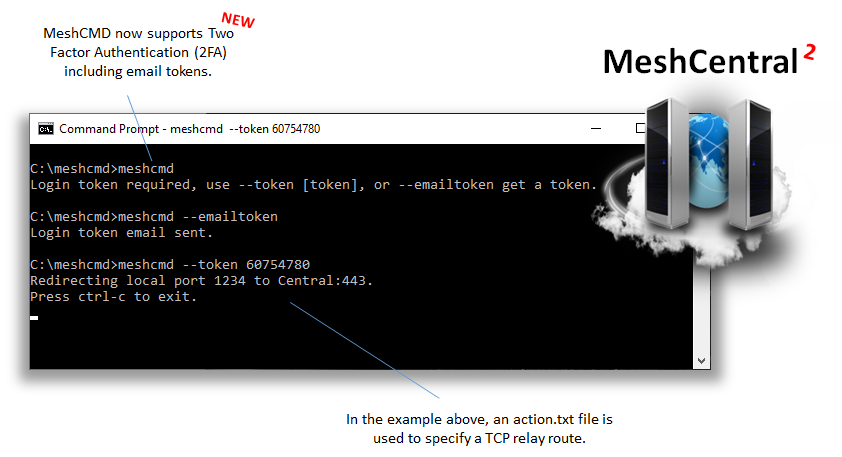
Just published MeshCentral v0.5.1-c with updated MeshAgents and 2FA support in MeshCMD.
Ylianst
on 4 Apr 2020
Related issues
 hellofaduck
·
3Comments
hellofaduck
·
3Comments
 M1CK431
·
3Comments
M1CK431
·
3Comments
 petervanv
·
3Comments
petervanv
·
3Comments
petervanv
·
3Comments
petervanv
·
3Comments
 haxmachine
·
3Comments
haxmachine
·
3Comments