Hi,
i already posted my question #120 but since it's closed iam not sure anyone is noticing it.
The german umlaute such as äöü are working fine, but i can't get the backslash-key to get working.
On a german keyboard you have to press "alt-gr + ß" to get a backslash.
The only thing i get on the remote computer is the german letter ß .
It looks like the alt-gr key is completly ignored. Any ideas on that?
Thank you!
 bostich83
All 43 comments
I can confirm this as well. The following keys seem to be ignored when both local and remote machine are configured for German Keyboard:
"<>|"
"ß?"
"´`" (interpreted as "ö")
"+*~"
"#'"
I use the Windows On-Screen Keyboard (osk.exe) as a temporary workaround.
 Sleepw4lker
on 11 Sep 2019
Sleepw4lker
on 11 Sep 2019
I will need to look into this, I do some testing myself with the French keyboard. Just to test my testing, what browser are you using?
I just got back from traveling, it will take me a while to catch up on all the requests.
 Ylianst
on 12 Sep 2019
Ylianst
on 12 Sep 2019
Firefox 69.0 (64-bit). Just noticed that it's working correctly with Edge on Windows 10 1903.
Sleepw4lker
on 13 Sep 2019
French keyboard, w10 1903 french, firefox 69.0.1 (64 bits) same problem,
$$ ** ùù !! :: ignored
; replaced by $
. replaced by £
Ok too with edge / Chrome /Brave
 tranbert
on 26 Sep 2019
tranbert
on 26 Sep 2019
I can confirm the issue and I have found the problem to differ between agent remote desktop and hardware/AMT remote desktop:
Tested with German de-DE keyboard layout on both browser and managed machine, browser machine is running Firefox on Wayland on Linux, managed machine is running Windows 10.
After testing every single key, these are the results:
Explanation: [+*~] describes a key that should emit + when pressed without modifier key, * when pressed holding [Shift] key and ~ when pressed while holding [AltGr] key.
Keys not working as expected in hardware/AMT desktop mode
- [<>|] does not work at all
- numpad [/] generates - instead
- numpad [*] generates ( instead
- numpad [-] generates ß, [Shift]+[-] generates ?, [AltGr]+[-] generates \ instead
- numpad [+] generates ` instead
- numpad [,] generates . instead
Keys not working as expected in agent desktop mode
- [^°] does not work except for [Shift]+[^°] generates Ö instead of °
- [AltGr]+[2"²] does not generate ²
- [AltGr]+[3§³] does not generate ³
- [AltGr]+[7/{] does not generate {
- [AltGr]+[8([] does not generate [
- [AltGr]+[9)]] does not generate ]
- [AltGr]+[0=}] does not generate }
- [ß?\] does not work at all
- ['`] does not work at all
- [AltGr]+[qQ@] does not generate @
- [AltGr]+[eE€] does not generate €
- [üÜ] generates ß, [Shift]+[üÜ] generates ? (as expected by [ß?\] key except for \)
- [+*~] does not work at all
- [öÖ] generates ü, [Shift]+[öÖ] generates Ü (as expected by [üÜ] key)
- [#'] does not work at all
- [<>|] does not work at all
- [AltGr]+[mMµ] does not generate µ
- numpad [,] does not work at all
 veitw
on 2 Oct 2019
veitw
on 2 Oct 2019
Hi, so this is my best approximation of a real German keyboard, with a legend at the top and the incorrectly handled keys highlighted in red.

All of those keys, and only those keys are misbehaving, right? Could someone who actually uses a German keyboard verify please?
 MailYouLater
on 2 Oct 2019
MailYouLater
on 2 Oct 2019
Hi @MailYouLater,
All of those keys, and only those keys are misbehaving, right? Could someone who actually uses a German keyboard verify please?
the image does not reflect that the misbehaviour is completely different for agent and AMT remote console.
Unfortunately I found more keys not working correctly (I will edit the report above after posting this comment):
- [AltGr]+[2"²] does not generate ²
- [AltGr]+[3§³] does not generate ³
- [AltGr]+[7/{] does not generate {
- [AltGr]+[8([] does not generate [
- [AltGr]+[9)]] does not generate ]
- [AltGr]+[0=}] does not generate }
- [AltGr]+[üÜ] does NOT emit \ as previously stated, but it still misbehaves pressing alone and using [Shift]
Also other inofficial/OS specific characters are not emitted that require AltGr, such as ¢, –, ·, …, ẞ (uppercase ß), ¿ etc.
As there is a problem with every single combination that employs AltGr, I think it is safe to say that all the "[AltGr]+xxx does not generate y" on otherwise functioning keys in agent mode are just symptoms of the AltGr key not being handled correctly.
I am sure that the AltGr key on German keyboard layouts works the same as it does for all other layouts utilising AltGr such as English International layout. As far as I know, of all major layouts only English US does not employ an AltGr key.
I hope this helps.
Best regards,
// Veit
veitw
on 4 Oct 2019
Sorry, somehow I missed the distinction between your 2 lists. (I wondered why they were split up. 🤦♂)
Here's a new version that shows the AMT and Agent input differences.

Separately, can you please verify that the Alt Gr key _is_ fully functional when connecting remotely via AMT?
Regarding the input discrepancies when connected via the MeshAgent, it seems like it's more than just not understanding the Alt Gr key (though that does look like it's probably part of it), but I noticed that most of the keys that are labeled differently between the US English and German keyboards are affected. Can you possibly verify that these keys do in fact work as expected?
Ä
ä ;
, :
. _
-
MailYouLater
on 4 Oct 2019
Wow, thank you for all the details on this. I am a french speaker myself and used the French-Canadian keyboard a lot. I will need to go investigate this in detail. Lots going on, but certainly something I need to fix.
Ylianst
on 4 Oct 2019
Here's a new version that shows the AMT and Agent input differences.
This looks right to me, except I'd have [AltGr] marked red, too.
Separately, can you please verify that the Alt Gr key _is_ fully functional when connecting remotely via AMT?
I can confirm that [AltGr] is fully functioning in AMT mode except for the [<>|] key. But that key is simply dead, it does not seem like an [AltGr] issue.
Regarding the input discrepancies when connected via the MeshAgent, it seems like it's more than just not understanding the Alt Gr key (though that does look like it's probably part of it),
I regard only the "[AltGr]+xxx not generating y" problems being caused by the missing interpretation of [AltGr], not all the other misbehaviours.
but I noticed that most of the keys that are labeled differently between the US English and German keyboards are affected. Can you possibly verify that these keys do in fact work as expected?
[Ää]
Works as expected.
[,;]
Works as expected.
[.:]
Works as expected.
[-_]
Works as expected.
veitw
on 7 Oct 2019
Could we know the status of this issue ?
In fact I have made a fresh install of an agent on a Debian Buster and my french keyboard is not working.
For example normally to type numbers I have to press shift and the key but here I don't need to press the shift key.
May be I have made a mistake. Could somebody help me ?
 elric72
on 24 Jan 2020
elric72
on 24 Jan 2020
Hi @elric72,
unfortunately, the erroneous behaviour still persists for both AMT and Agent remote console.
Best regards,
// Veit
veitw
on 24 Jan 2020
Ok thank you for your feedback.
I will wait ;-)
elric72
on 24 Jan 2020
I will need to look into this, I do some testing myself with the French keyboard. Just to test my testing, what browser are you using?
I just got back from traveling, it will take me a while to catch up on all the requests.
May be you can help me, I am french and I have some issues about key mapping.
The numbers are not displayed correctly on a Linux agent.
This agent is under a Debian Buster.
This is the keyboard configuration :
localectl
System Locale: LANG=fr_FR.UTF-8
VC Keymap: n/a
X11 Layout: fr
X11 Model: pc105
X11 Variant: azerty
Could you help me ? Or do you need to additional informations ?
elric72
on 1 Apr 2020
If it could help I can debug this issue.
I just need some informations to enable debug on both meshcentral and mesh agent to see all keyboard code received and may be fix some mapping problems.
Can somebody tell me how to activate such debbuging features ?
elric72
on 10 Apr 2020
I do have the same trouble. I use a belgian keyboard. The MeshCentral is on a Debian server with no graphics session and with belgian locale. I connect to Windows 10 computers with belgian localization too. I connect from a laptop with Firefox latest stable release on an ArchLinux with KDE Plasma (all X and console in Belgian too)
When I hit ALT-GR something, nothing happened. Some key are either "disabled" or misinterpreted. For example, the right parenthesis ")" is not output. Nor the $. The arrow keys output numbers (indeed, the number is the one corresponding to the num keypad for the arrow. 2 for down arrow, 4 for left, 6 for right and 8 for up)
The / of the num keypad acts as the = key on the alphabetical part (if you shift that / key, it will output +)
The < > key is inactive too. That's the one I need the most on Windows... File path, etc. :) I try to work around by typing the ASCII key code with ALT+keycode. For example ALT+92 is
None to say about Firefox or Linux special key combinations. But that's a matter of the host then.
It looks like it uses a 101 ANSI keyboard layout.
I then a look at the source code. The agent-desktop...js script in particular. I put some debug info in the obj.SendKeyMsg to see the content of this event.
There, I saw there, you use the event.keyCode value. Is there any specific reason for ?
Plus, you modify this keycode for three key codes (';', '=' and another one) with a comment saying something like "Fix Firefox". But in above this, the comment tells that this works best with EN-US. Is those fixes concerns EN-US only ?
I did not have a look at the client agent source code yet. It's tool late for now, will look tomorrow.
 PaliPalo
on 11 May 2020
PaliPalo
on 11 May 2020
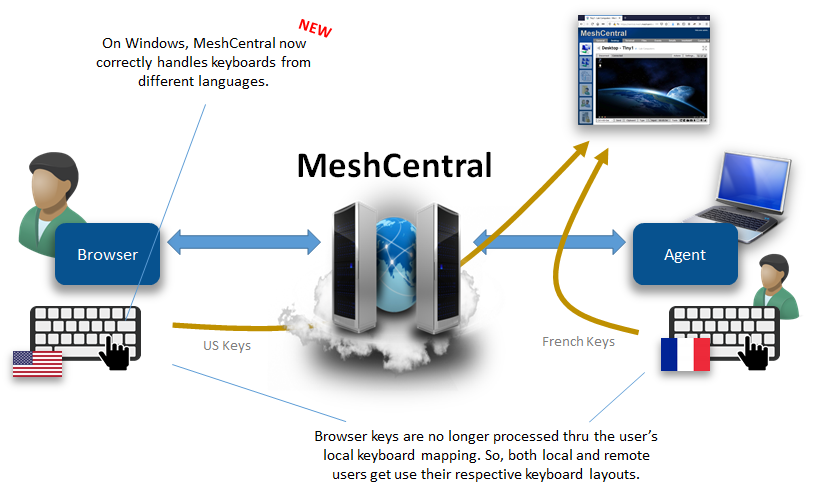
MeshCentral v0.6.93 was published with correct keyboard handling on Windows. Bryan is working on doing the same for other platforms (Linux, macOS, FreeBSD). Let us know if it works.
Ylianst
on 18 Nov 2020
What else to say except "Yeeeeaaaaah !" ?
I tried the 0.6.95 on my configuration (cf. my previous message) and all seems OK. The ALT-GR concerned keys are working correctly (@#), the numpad too. Then, AFAIK, the keyboard layout seems well managed.
Thanks having kept this issue in your guidelines. Thanks Bryan having solved this :+1: ! I can now make room in my mind and forget all ASCII codes to reproduce needed keys :)
PaliPalo
on 19 Nov 2020
@krayon007, @Ylianst: Speaking for German keyboard layout, it works like a charm for controlling Windows agents -- thank you very much! :smiley:
As Linux, FreeBSD and macOS are still to follow, I am not sure whether the issue should really be closed.
Also this ticket describes similar key mapping problems with AMT Remote Desktop/HW Console, which still persist; some keys are incorrectly mapped, others (notably AltGr) do not work at all. Shall we transfer the AMT mapping problem to a separate issue?
Edit: Interestingly, the keyboard misbehaviour in the AMT console differs completely from the previously described pattern. Shall I create a new list of problems that occur for German keyboard layout in the AMT console?
veitw
on 19 Nov 2020
Argh... There's still a problem... I can no more input text in my VirtualBox VM hosted on the Windows machines that I accessed through MeshCentral.
In other words: My computer -> MeshCentral -> Windows Machine -> VM
The keyboard react correctly with the Windows host. But when I type something with the alphabetic part of the keyboard, this is completely weird !
1 = l (lowercase L), 2 does nothing, 3 = g, 4 = m, 5 = ù, 6 = m, 7 does nothing, 8 = f
SHIFT + 1 = N, 2 = ?, 3 = ., 4 = /, 5 = +
(These MAJ+something looks like the key row sequence in the down right of the belgian keyboard)
SHIFT-LOCK + 1 = L, 2 = nothing, 3 = G
(Seems uppercasing)
I restored MeshCentral to version 0.6.70 and the keyboard reacts as before.
Maybe there's something more to do with VM. I have a qemu/KVM system too, I will perform some test this week-end to see if the same trouble arose with it.
PaliPalo
on 19 Nov 2020
@PaliPalo : I tried to confirm your problem, but I was unable to reproduce.
This setup works fine:
Client: Firefox on Wayland with German/Germany layout on Linux
Machine being managed: Windows 10 Pro with German/Germany layout on VirtualBox 6.1 on Linux
veitw
on 23 Nov 2020
@krayon007, @Ylianst: In my setup (Client: Firefox on Wayland with German/Germany dead keys layout on Linux / Managed machines: Windows 10 Enterprise/Pro with German/Germany dead keys layout), I noticed that the accent keys (dead keys) are not working correctly.
Therefore it is not possible to create either the single characters ^, ´ (by some layouts translated to ') or ` using key press + space, nor is it possible to type accented characters such as â, á, à.
All other keys are working perfectly now, which is great. :D
veitw
on 23 Nov 2020
My issue is when I type something in the terminal of a Linux (Debian or Fedora) which is a VirtualBox VM on a Windows host which I'm connected on via MeshCentral.
My PC is a Linux (Arch), with Firefox as Web client.
Connecting through a MeshCentral server which is on a Debian
(Funny fact: this server is exactly the VM I tried to reach too; it's hosted on a VM :smile: But the trouble also occurs on another Windows host with an Ubuntu VM)
When I type something on the Windows Host, key mapping really seems OK. But when type in the VM, keys are mangled.
NB: I think I reboot the Windows host once the new agent version had been installed.
(by the way, I did not realize the test on Linux Host with QEmu/KVM this week-end due to some personal duties)
PaliPalo
on 23 Nov 2020
Which server version are you guys using? I redid the keyboard logic for linux on server version v0.6.99.
 krayon007
on 23 Nov 2020
krayon007
on 23 Nov 2020
v0.6.95, I will try the v0.6.99 right now
PaliPalo
on 23 Nov 2020
By the way, what keyboard mapping do you have inside your VM? At least with VM Ware, I found the guest does not respect the Host's keyboard layout. So in my case, I had fr-be set on the host, but when you type in the guest, the guest os was using us-en.
krayon007
on 23 Nov 2020
No difference with 0.6.99.
There's really something strange with the VM.... At least Virtualbox one... I tried an inception approach... I connect to the windows host, than open an remote desktop on another host which has a VirtualBoxVm. The first host, ok. The remote accessed one, ok too. The VM inside ? Bim! Keyboard mismatched...
I always use fr-BE on each.
I try for now ah Linux agent, and the keyboard are quite well handle (except maybe the shift+arrow combinations to select line in a text editor)
I try with the KVM/Qemu Vm on my Debian host. All seems to be good. The keyboard reacts correctly on both the host and the guest. Even better, I connect to the KVM host through a remote access from a Windows machine that I access from MeshCentral. And the keyboard reacts correctly too.
All let me tell me that there is something special with VirtualBox VMs...
About my mapping. I always used be-FR layout. I checked and delete this layout to see what happened. But no chance, again
I edit just to tell that my plan is to move all my VMs on a Linux cluster with HA and fencing. So, the VirtualBox should disapear some days.
PaliPalo
on 23 Nov 2020
Just another thing. Quite frustrating for a french, the diacritics are not well handled with version 0.6.99. For example, typing ê requests first keying the ^ then the key E. The same for the backward or forward tick ' ` or the tilde ~. Those chars need to press the space bar after keying the corresponding touch. That does not work with the version 0.6.99.
PaliPalo
on 25 Nov 2020
diacritics are not well handled with version 0.6.99. For example, typing ê requests first keying the ^ then the key E. The same for the backward or forward tick ' ` or the tilde ~.
@PaliPalo : Same for de-DE dead keys layouts, as already described here:
https://github.com/Ylianst/MeshCentral/issues/469#issuecomment-732085851
veitw
on 25 Nov 2020
What browser version are you guys using? This is what you guys are trying to do right? The way the foreign characters work, is that they are sent from the browser and injected as unicode. The agent does not do any translation between layouts. The linked clip below I captured using a fr-be keyboard typing on Chrome 87 on Windows, connected to a Ubuntu 20 LTS agent.
krayon007
on 25 Nov 2020
What I meant to say was that, if the other characters are showing up correctly, the agent is working correctly to inject unicode characters. When you use the two key combo to type ê or ^ that is not sent as two key presses. The browser is supposed to send the resultant character to the agent for injection.
krayon007
on 25 Nov 2020
I just tested with Firefox and Edge, and it seems to work too ¯\_(ツ)_/¯
Maybe @Ylianst can chime in with how to enable debug to see what is actually sent from the browser.
krayon007
on 25 Nov 2020
At Bryan's request, in the next version of MeshCentral v0.7.3 you can add &debug=1 to the URL and in the browser console, you will see what unicode character the browser is sending to the agent.

For example a "é" is value 233. This test will allow us to know if the problem is on the browser side.
Ylianst
on 25 Nov 2020
Thanks Ylianst ! I will check that as soon as possible.
A few more input to investigate. I did the following. I connected remotely to one of my Windows host. From there I connected to MeshCentral from it via Firefox. And then tried the same thing. And, in that case, the keys were correctly output.
It seems that this only happened in Linux. (I tried Konqueror and Firefox, the problem occurs on both)
Plus, as you mentioned the Developer tools from Firefox, I check if I can see something somewhere. And I felt on this message on the console part (CTRL+SHIFT+K)
"Failed to create WebGL context: failIfMajorPerformanceCaveat: Compositor is not hardware-accelerated."
Is this a potential clue ?
No, this seems to be a bug in Firefox. Some other people have got the same message since going from version 82 to 83. (In my case the update occurs on the 17 Nov.)
PaliPalo
on 25 Nov 2020
A few more input to investigate. I did the following. I connected remotely to one of my Windows host. From there I connected to MeshCentral from it via Firefox. And then tried the same thing. And, in that case, the keys were correctly output.
It seems that this only happened in Linux. (I tried Konqueror and Firefox, the problem occurs on both)
When you say this only happens in Linux... Are you talking about when the browser is Linux, or when the agent is Linux?
krayon007
on 25 Nov 2020
:smile: this is confusing, I admit ! I'll try to synthesize my realm.
1) The MeshCentral runs under a Debian on a VM in a Windows 10 host.
2) The agent is on a Windows 10 where another Debian VM stands too.
3) My laptop is an Arch Linux. When I use Firefox here, the problem arose.
4) Then I passed through a VPN connection to connect via RDP to a Windows machine. There if I use Firefox, the problem does not occur
PaliPalo
on 25 Nov 2020
Gotcha... Ok. The most likely culprit is that the key events that the browser gives us in linux is not the same as the ones we get in windows... We can look into this...
krayon007
on 25 Nov 2020
At Bryan's request, in the next version of MeshCentral v0.7.3 you can add &debug=1 to the URL and in the browser console, you will see what unicode character the browser is sending to the agent.
Thank you, I will try this when 0.7.3 is available. :+1: :)
veitw
on 26 Nov 2020
Just another thing... I have a strange behavior with Edge.
So when I'm connected to the windows agent from my ArchLinux with Firefox. I open Edge, I can type the URL in the address field but I cannot write anything in the page area.
PaliPalo
on 27 Nov 2020
Hi @PaliPalo,
So when I'm connected to the windows agent from my ArchLinux with Firefox. I open Edge, I can type the URL in the address field but I cannot write anything in the page area.
this is an independent, already known issue described in #454. Also it only affects the original Edge, not the current, Chromium-based Edge.
Best regards,
// Veit
veitw
on 27 Nov 2020
Oh, OK, thanks for info, veitw ! I just wander if this was not related to the actual subject. ;)
PaliPalo
on 27 Nov 2020
FYI. I did more keyboard fixes in MeshCentral v0.7.4. The international keyboard now work on Linux Chromium, but not FireFox. Not sure how I will fix FireFox on Ubuntu, the key events don't include any internation characters: éâûôpi...
Ylianst
on 28 Nov 2020
@krayon007: Just tested the German layout controlling Linux agents and it works great, too. Thank you!
@Ylianst: I can confirm that dead keys work in Chromium now. Thank you!
For Firefox, my workaround is now to switch to the no dead keys layout, which works well for the common German user. For other languages, this is no solution though.
veitw
on 1 Dec 2020
Related issues
 haxmachine
·
3Comments
haxmachine
·
3Comments
 whalehub
·
3Comments
whalehub
·
3Comments
 hellofaduck
·
3Comments
hellofaduck
·
3Comments
 LPJon
·
3Comments
LPJon
·
3Comments
 petervanv
·
3Comments
petervanv
·
3Comments