Meshcentral: Ubuntu 18.04 meshinstall.sh incorrect startup type, install fails
When running beta 2 meshinstall.sh on Ubuntu 18.04, script returns starttype "init" instead of "systemd" on line 16. Installation of meshagent and meshagent.msh to /usr/local/mesh succeeds but creation of init script fails with error:
./meshinstall.sh: line 188: initctl: command not found
The following messages suggest it succeeded, but it does not:
meshagent installed as upstart/init.d service.
To start service: sudo initctl start meshagent
To stop service: sudo initctl stop meshagent
Mesh agent started.
Manually changing the starttype variable on line 16 to 'systemd' allows the systemd script to be created, the agent is started and connects as expected.
 JSDA123
All 12 comments
What version number of the server are you using?
 krayon007
on 13 Aug 2019
krayon007
on 13 Aug 2019
MeshCentral 2.0 Beta 2
JSDA123
on 13 Aug 2019
I had the same issue on Ubuntu 16.04 as well. Manually created the systemctl symlinks and etc.
 penguinthingie
on 13 Aug 2019
penguinthingie
on 13 Aug 2019
No, I meant which npm release. I think the current version is v0.3.9-q
That issue you are seeing should have been fixed quite a while ago.
krayon007
on 13 Aug 2019
Thanks for helping.
It was version 0.3.9-c, so I ran:
npm install meshcentral
sudo systemctl restart meshcentral
Installed version is now 0.3.9-r
I tried again but received the same result:
./meshinstall.sh: line 188: initctl: command not found
meshagent installed as upstart/init.d service.
To start service: sudo initctl start meshagent
To stop service: sudo initctl stop meshagent
Mesh agent started.
(the meshagent service is not actually started)
JSDA123
on 13 Aug 2019
What does your system show, when you run the command:
ps -p 1
Is it running busybox or something like that?
krayon007
on 13 Aug 2019
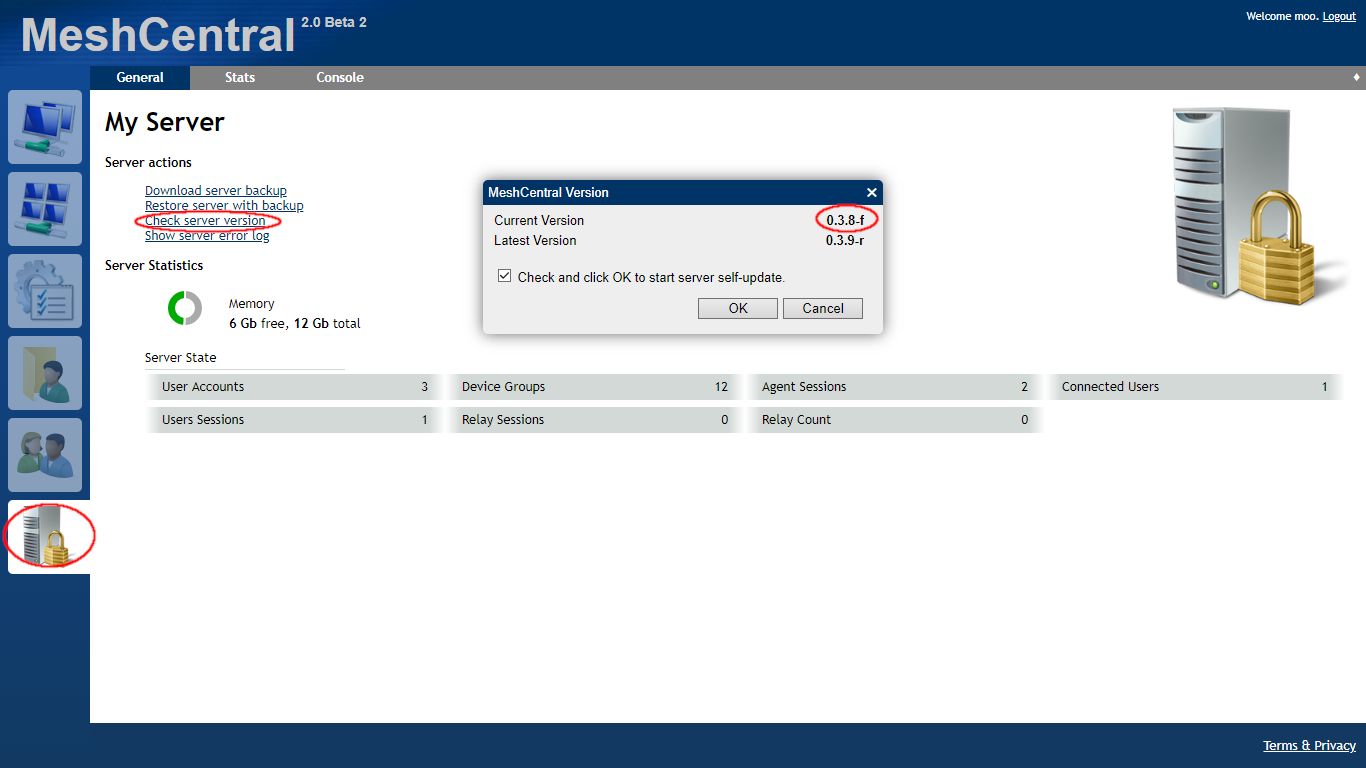
I saw your post, made this image, got busy doing something else, came back and you'd already figured out the version numbers.
Anyway, since I made it, I may as well post it in case it can be helpful to others. You can find the version number here, and if it's out of date, you can check the box & click OK and it will update.
 MailYouLater
on 13 Aug 2019
MailYouLater
on 13 Aug 2019
What does your system show, when you run the command:
ps -p 1
Is it running busybox or something like that?
No busybox:
~$ ps -p 1
  PID TTY          TIME CMD
    1 ?        00:00:17 systemd
Ok, this is fixed in v0.3.9-t
krayon007
on 14 Aug 2019
Wow that's great. Just 16 hours from report to fix!
JSDA123
on 14 Aug 2019
I have installed v0.3.9-t and can confirm this is fixed. Thank you!
JSDA123
on 14 Aug 2019
Thank you for confirming. Closing this issue.
 Ylianst
on 14 Aug 2019
Ylianst
on 14 Aug 2019
Related issues
penguinthingie
·
4Comments
 veitw
·
4Comments
veitw
·
4Comments
 nroach44
·
3Comments
nroach44
·
3Comments
 haxmachine
·
3Comments
haxmachine
·
3Comments
 coolwormgit
·
3Comments
coolwormgit
·
3Comments
Most helpful comment
I have installed v0.3.9-t and can confirm this is fixed. Thank you!