Meshcentral: On Windows: Update from 0.3.9-f to 0.3.9.n fails
I'm attempting to update my MeshCentral server from 0.3.9.f to 0.3.9.n using the MeshCentral Installer (tried both versions 1.6 and 1.8 with the same results).
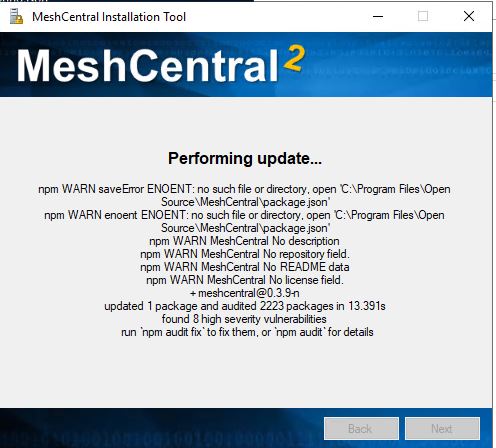
The update hangs at the below screen and results in a non-functioning MeshCentral server. It ends up removing the daemon folder from node_modules\meshcentral. I have to restore everything from the backup to get it up and running again (which also takes it back to 0.3.9.f).
 PathfinderNetworks
All 30 comments
I'm going through all of my notes and can't seem to find it- what is the npm command to upgrade the server from a command line? I recall, when this similar issue happened, I was able to use the npm command line option to see where the upgrade was failing and manually install whatever modules it wasn't liking.
PathfinderNetworks
on 9 Aug 2019
Arg. I just updated the server to make it self-updateable when running as a Windows service. To update from the command line, do:
npm install meshcentral
Do this just above the "node_modules" folder. I am checking problem now...
 Ylianst
on 9 Aug 2019
Ylianst
on 9 Aug 2019
Ok, here's the result of trying the update that way.
c:\Program Files\Open Source\MeshCentral>npm install meshcentral
npm WARN rollback Rolling back [email protected] failed (this is probably harmless): EBUSY: resource busy or locked, unlink 'c:\Program Files\Open Source\MeshCentral\node_modules\meshcentral\daemon\meshcentral.err.log'
npm WARN enoent ENOENT: no such file or directory, open 'c:\Program Files\Open Source\MeshCentral\package.json'
npm WARN MeshCentral No description
npm WARN MeshCentral No repository field.
npm WARN MeshCentral No README data
npm WARN MeshCentral No license field.
npm ERR! path c:\Program Files\Open Source\MeshCentral\node_modules\meshcentral
npm ERR! code EPERM
npm ERR! errno -4048
npm ERR! syscall rename
npm ERR! Error: EPERM: operation not permitted, rename 'c:\Program Files\Open Source\MeshCentral\node_modules\meshcentral' -> 'c:\Program Files\Open Source\MeshCentral\node_modules.meshcentral.DELETE'
npm ERR! { [Error: EPERM: operation not permitted, rename 'c:\Program Files\Open Source\MeshCentral\node_modules\meshcentral' -> 'c:\Program Files\Open Source\MeshCentral\node_modules.meshcentral.DELETE']
npm ERR! cause:
npm ERR! { Error: EPERM: operation not permitted, rename 'c:\Program Files\Open Source\MeshCentral\node_modules\meshcentral' -> 'c:\Program Files\Open Source\MeshCentral\node_modules.meshcentral.DELETE'
npm ERR! errno: -4048,
npm ERR! code: 'EPERM',
npm ERR! syscall: 'rename',
npm ERR! path:
npm ERR! 'c:\Program Files\Open Source\MeshCentral\node_modules\meshcentral',
npm ERR! dest:
npm ERR! 'c:\Program Files\Open Source\MeshCentral\node_modules\.meshcentral.DELETE' },
npm ERR! stack:
npm ERR! "Error: EPERM: operation not permitted, rename 'c:\Program Files\Open Source\MeshCentral\node_modules\meshcentral' -> 'c:\Program Files\Open Source\MeshCentral\node_modules\.meshcentral.DELETE'",
npm ERR! errno: -4048,
npm ERR! code: 'EPERM',
npm ERR! syscall: 'rename',
npm ERR! path:
npm ERR! 'c:\Program Files\Open Source\MeshCentral\node_modules\meshcentral',
npm ERR! dest:
npm ERR! 'c:\Program Files\Open Source\MeshCentral\node_modules\.meshcentral.DELETE' }
npm ERR!
npm ERR! The operation was rejected by your operating system.
npm ERR! It's possible that the file was already in use (by a text editor or antivirus),
npm ERR! or that you lack permissions to access it.
npm ERR!
npm ERR! If you believe this might be a permissions issue, please double-check the
npm ERR! permissions of the file and its containing directories, or try running
npm ERR! the command again as root/Administrator (though this is not recommended).
npm ERR! A complete log of this run can be found in:
npm ERR! C:\Users\xxxxxxxxx\AppData\Roaming\npm-cache_logs\2019-08-08T22_21_49_115Z-debug.log
PathfinderNetworks
on 9 Aug 2019
I just tested 0.3.9.f to 0.3.9.n using the latest 1.8 installer and it worked for me. The new installer should create a folder called "winservice" at the same level as "node_modules" than copy "node_modules\meshcentral\winservice.js" into "winservice" then call "node winservice\winservice.js --install". You can do this manually if you like.
The "daemon" folder should now be created in "winservice\deamon" and the service should run. Because the "daemon" is not longer in "node_modules", MeshCentral will be able to self-update.
However, I don't know why it's getting stuck... I will give it another try.
Ylianst
on 9 Aug 2019
Because "program files" is restricted access, make sure to run as administrator when doing "npm install meshcentral".
Ylianst
on 9 Aug 2019
I did that- the command prompt that npm was running in was opened as administrator.
PathfinderNetworks
on 9 Aug 2019
Ha! Make sure to stop the server and kill any "node.exe" processes and rename "node_modules" to "node_modules_backup" and try again.
I fixed a bug a while back that when you stopped the Windows service, it did not really stop the node processes and the server kept going.
BTW: Sorry about all this, I mostly run Linux servers. I am spending more time getting Windows servers working now.
Also, you can do "npm install [email protected]" is you want to setup a older version.
Ylianst
on 9 Aug 2019
I did one more full test run of the update from 0.3.9.f to 0.3.9.n and it worked for me. However, if there are running processes that are locking any of the files in "node_modules", I can see how it would cause problems.
Ylianst
on 9 Aug 2019
Ok, so I stopped all the MeshCentral and node services then renamed the node_modules folder. That seems to have allowed the npm install to finish. But now I can't start the MeshCentral Windows service because it can't find the file the service uses. Looking at the service I can see the npm install didn't update the existing MeshCentral service to point to the new location you mentioned.
Edit: looking at things closer I don't believe the npm install worked correctly as there is no daemon nor winservice\daemon folder to be found anywhere in the MeshCentral directory.
PathfinderNetworks
on 9 Aug 2019
For now I'm going back to 0.3.9-f until a fix is ready.
PathfinderNetworks
on 9 Aug 2019
Makes sense, 0.3.9-f works well.
npm install does not install the "winservice" or "daemon" folders. You need to run "node node_modules/meshcentral --install". That will create the "daemon" folder at the normal location and start the service. For "winservice", you need to install using MeshCentral installer.
In any case, killing all "node.exe" and renaming "node_modules" would have probably made MeshCentral Installer work just fine. I will add more code to the installer to kill all "node.exe" and do the "node_modules" rename to solve this.
Sorry for the trashing. Thanks for the detailed reports.
Ylianst
on 9 Aug 2019
I will try using the Windows installer again at a later time when I have more time to devote to it- maybe later this evening. I'll be sure to stop the service first and rename node_modules then try it and see what happens.
PathfinderNetworks
on 9 Aug 2019
FYI. I am working on MeshCentral Installer 1.9 with a lot of reliability improvements. You should probably wait until I release the new on. I am doing a lot of testing on it now.
Ylianst
on 9 Aug 2019
Just released MeshCentral Installer 1.9 with a bunch of improvements especially around MeshCentral upgrading. I would love to have feedback on it.
One change is that the update process now renames "node_modules" to "node_modules_bak" first, then performs a new install and remove the old folder when the server launches correctly. This will solve the problem that if something is locking the node_modules folder, it will stop the update process.
Ylianst
on 9 Aug 2019
I just tried the 1.9 version Windows installer. It looked like it was going smoothly- I watched it as it renamed and removed the folders you mentioned, etc. But then it got to the 'Installing service' portion and has hung. The old service still exists and it hasn't created the new service.
PathfinderNetworks
on 9 Aug 2019
Arg!! I must have done 50 install runs in my tests. Ok. Thanks for telling me know. I will see if I can display more error messages and/or find the problem.
Ylianst
on 10 Aug 2019
Just released MeshCentral Installer 2.0. This one should really work.
I noticed that if you where using Let's Encrypt or other optional features, the installer would not install these modules and the server would get stuck. The new installer installs all optional modules so, it should finally work. I also fixed the problem with the uninstall.
Ylianst
on 10 Aug 2019
I hate to say it, but this version 2.0 installer is doing the same thing. It's stalling at 'Installing service...'. I watched the process as closely as I could and think I might know what's going on (but no idea why). I can see that one of the first steps it takes is to uninstall the existing MeshCentral service. Only thing is, it doesn't actually uninstall the service. So I'm betting it's stalling later on during the install at the 'Installing service' phase because the old MeshCentral service is still present. Are there any log files this installer generates that I can send to you? If so, where would they be located?
PathfinderNetworks
on 10 Aug 2019
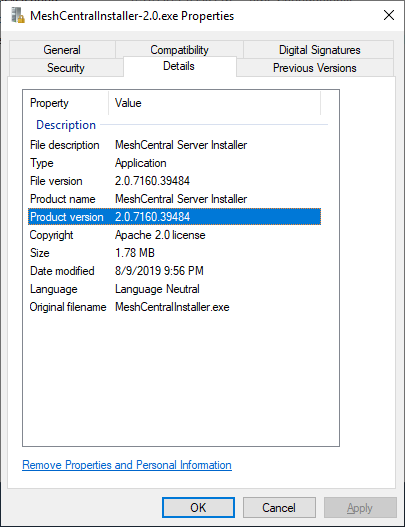
Thank you for the hint! I pushed a new MeshCentral Installer 2.0. I did not change the version number, but the build number shown below will have changed.
No more Mr. Nice Installer. In this version the installer directly stops the service and uninstalls it. It does that in addition to asking nicely MeshCentral to please stop. There is no way the service is going to still be running/installed now.
Ylianst
on 10 Aug 2019
You are getting closer but it's still not upgrading correctly. This time it did delete the 'old' service. But it still hung at the 'Installing service' section of the upgrade. However, it did create the new service. That said, if I start that new service I can see NodeJS fire up and start whatever it's doing but then it will quit and the MeshCentral server never comes up.
The only file I can find that seems to log errors is the meshcentral.err.log file that is located in \meshcentral\winservice\daemon.
That file has this as the error when I start the new MeshCentral Windows service.
C:\Program Files\Open Source\MeshCentral\node_modules\node-windows\lib\wrapper.js:177
child.send('shutdown');
^
TypeError: Cannot read property 'send' of null
at process.killkid (C:\Program Files\Open Source\MeshCentral\node_modules\node-windows\lib\wrapper.js:177:11)
at process.emit (events.js:197:13)
at process.exit (internal/process/per_thread.js:150:15)
at monitor (C:\Program Files\Open Source\MeshCentral\node_modules\node-windows\lib\wrapper.js:99:17)
at ChildProcess.
at ChildProcess.emit (events.js:197:13)
at Process.ChildProcess._handle.onexit (internal/child_process.js:254:12)
PathfinderNetworks
on 10 Aug 2019
On thing that is bad about the MeshCentral Installer is that the node.exe path is hard coded to: "C:\Program Files\nodejs\node.exe". Is it possible your node.exe is in a different path? - Regardless, I need to fix this.
Ylianst
on 13 Aug 2019
I just took a look at the sever. the NodeJS executable is at C:\Program Files\nodejs\nodejs.exe like you were expecting.
Is there any log files the installer creates that I can reference to try and narrow down what's happening? Or what step happens after the 'Installing Service' step?
PathfinderNetworks
on 13 Aug 2019
Thanks for confirming so quickly. No log files now, but I need to create one.
Ylianst
on 13 Aug 2019
Update to this.
I decided to manually update my server to 0.3.9-u using the command line. I'd still like to have the Windows installer working but I guess I'll see what happens the next time.
I updated manually by stopping the MeshCentral service and making sure all NodeJS instances had terminated. Then, at an elevated command prompt, ran "npm install meshcentral" at the C:\Program Files\Open Source\MeshCentral folder. After that I manually created the winservice folder in the MeshCentral directory and copied in to that winservice folder the winservice.js file from C:\Program Files\Open Source\MeshCentral\node_modules\meshcentral. I then, at an elevated command prompt, ran "node winservice\winservice.js --install" which created the daemon folder under winservice. It attempted to create the Windows Service for MeshCentral but, because the old MeshCentral service was already present, wasn't able to. But the fix for that was easy- just ran 'sc config meshcentral.exe binPath= "C:\Program Files\Open Source\MeshCentral\winservice\daemon\meshcentral.exe" at the elevated command prompt to update the executable path for the existing service. After that I was able to start the service and it's working correctly.
If anyone else needs to do a manual update like this you'll need to verify the path where your install of MeshCentral is located. It could be (and likely is) different than what mine is.
PathfinderNetworks
on 14 Aug 2019
Ever since I started using the windows installer (v1.6 I think) I had to manually start the meshcentral service after an update.
So my process is now to wait for the installer to get to the starting service part and use the services mmc to start the mesh central service. The installer then continues and finishes. In rare cases it succeeds in starting the service itself btw.
Nodejs in program files\nodejs and meshcentral in c:\meshcentral, running the installer as admin
 PTR-inc
on 14 Aug 2019
PTR-inc
on 14 Aug 2019
Yeah, I am having an issue all of a sudden updating from 0.3.9-f to even 0.4.0-b. I am using the same documented process to update which has worked fine up until now. The meshcentral service just keeps stopping after a few seconds. I should also mention that this happens on a brand new install of 0.4.0-b. When I look at the logs I see this:
c:\meshcentral\node_modules\node-windows\lib\wrapper.js:177
child.send('shutdown');
^
TypeError: Cannot read property 'send' of null
at process.killkid (c:\meshcentral\node_modules\node-windows\lib\wrapper.js:177:11)
at process.emit (events.js:198:13)
at process.exit (internal/process/per_thread.js:168:15)
at monitor (c:\meshcentral\node_modules\node-windows\lib\wrapper.js:99:17)
at ChildProcess.
at ChildProcess.emit (events.js:198:13)
at Process.ChildProcess._handle.onexit (internal/child_process.js:248:12)
 johnczer
on 16 Aug 2019
johnczer
on 16 Aug 2019
Also found this:
{ Error: Cannot find module 'c:\meshcentral\node_modules\meshcentral\node_modules\minimist'
at Function.Module._resolveFilename (internal/modules/cjs/loader.js:636:15)
at Function.Module._load (internal/modules/cjs/loader.js:562:25)
at Module.require (internal/modules/cjs/loader.js:690:17)
at require (internal/modules/cjs/helpers.js:25:18)
at start (c:\meshcentral\node_modules\meshcentral\winservice.js:39:22)
at Object.
at Module._compile (internal/modules/cjs/loader.js:776:30)
at Object.Module._extensions..js (internal/modules/cjs/loader.js:787:10)
at Module.load (internal/modules/cjs/loader.js:653:32)
at tryModuleLoad (internal/modules/cjs/loader.js:593:12) code: 'MODULE_NOT_FOUND' }
{ Error: Cannot find module 'c:\meshcentral\node_modules\meshcentral\node_modules\minimist'
at Function.Module._resolveFilename (internal/modules/cjs/loader.js:636:15)
at Function.Module._load (internal/modules/cjs/loader.js:562:25)
at Module.require (internal/modules/cjs/loader.js:690:17)
at require (internal/modules/cjs/helpers.js:25:18)
at start (c:\meshcentral\node_modules\meshcentral\winservice.js:39:22)
at Object.
at Module._compile (internal/modules/cjs/loader.js:776:30)
at Object.Module._extensions..js (internal/modules/cjs/loader.js:787:10)
at Module.load (internal/modules/cjs/loader.js:653:32)
at tryModuleLoad (internal/modules/cjs/loader.js:593:12) code: 'MODULE_NOT_FOUND' }
{ Error: Cannot find module 'c:\meshcentral\node_modules\meshcentral\node_modules\minimist'
at Function.Module._resolveFilename (internal/modules/cjs/loader.js:636:15)
at Function.Module._load (internal/modules/cjs/loader.js:562:25)
at Module.require (internal/modules/cjs/loader.js:690:17)
at require (internal/modules/cjs/helpers.js:25:18)
at start (c:\meshcentral\node_modules\meshcentral\winservice.js:39:22)
at Object.
at Module._compile (internal/modules/cjs/loader.js:776:30)
at Object.Module._extensions..js (internal/modules/cjs/loader.js:787:10)
at Module.load (internal/modules/cjs/loader.js:653:32)
at tryModuleLoad (internal/modules/cjs/loader.js:593:12) code: 'MODULE_NOT_FOUND' }
johnczer
on 17 Aug 2019
I figured this out. It appears that the { Error: Cannot find module 'c:\meshcentral\node_modules\meshcentral\node_modules\minimist' is referring to an expected folder with "minimist" , "ws" and "node-windows" folders inside of it. After I manually copied these folders I am able to upgrade to 0.4.0-b. One thing I noticed is the ability to select Self-Update checkbox when checking server version. Kinda weird that those folders above would have to be manually copied all of a sudden.
johnczer
on 17 Aug 2019
I'm missing MANY folders after upgrade:
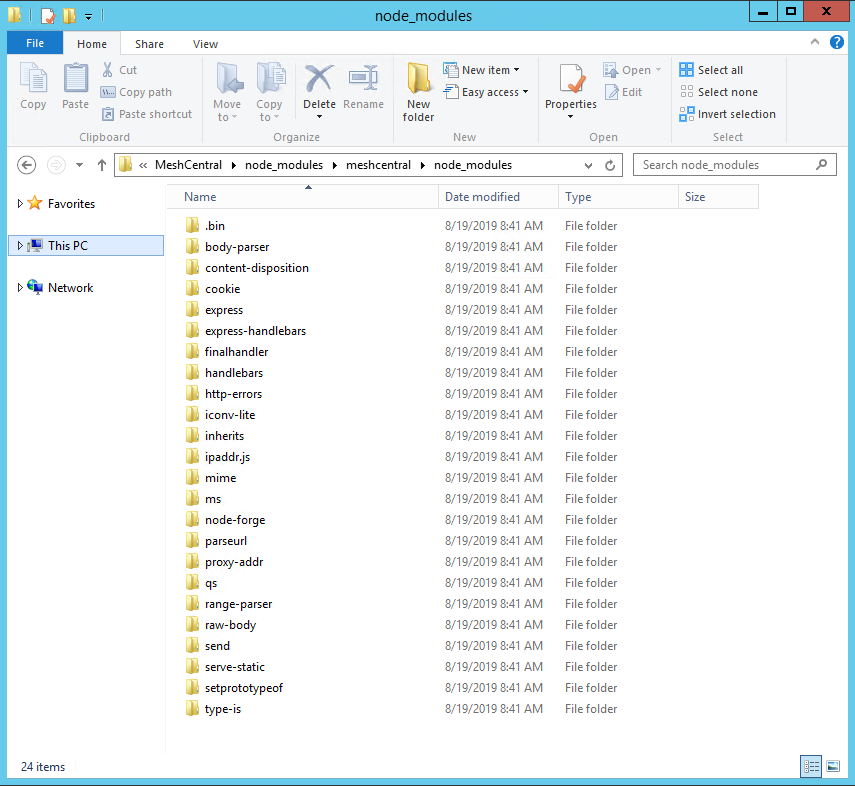
Of course, I went from 0.3.6-r to 0.4.0-b, so I'm not sure how many were deprecated during the interim version updates.
 mschubeck
on 19 Aug 2019
mschubeck
on 19 Aug 2019
Yeah, for some reason a node_modules folder at this path: C:\meshcentral\node_modules\meshcentral\ with the following folders (minimist, node-windows, and ws) were required to get the meshcentral service to stay running after the 0.4.0-b update. I've been pretty good about staying on top of updates, so not sure what I have missed with regards to changes. I have also noticed that when I check to see what version I am on and what updates are available in web portal it does not give me the option to click a box to self-update. I am fine with this and can do so manually.
johnczer
on 19 Aug 2019
Related issues
 robclay
·
3Comments
robclay
·
3Comments
 whalehub
·
3Comments
whalehub
·
3Comments
 petervanv
·
3Comments
petervanv
·
3Comments
 coolwormgit
·
3Comments
coolwormgit
·
3Comments
 veitw
·
4Comments
veitw
·
4Comments
Most helpful comment
FYI. I am working on MeshCentral Installer 1.9 with a lot of reliability improvements. You should probably wait until I release the new on. I am doing a lot of testing on it now.