Meshcentral: Keyboard accessibility is subpar
- [x] On the login screen, there's no way to select the "Create One" link with the keyboard.
- [x] In the "Account Creation" form (after clicking the "Create One" link) pressing enter in the second password field should equate to clicking "Create Account".
- Once logged in, there are a number of things you can't do using the keyboard.
- Switch between screens.
- [x] Sections down left side.
- [x] Subsections across top.
- [x] Style selector at top right
- [x] Open device group from My Devices section.
(You can click on the name of the device group with mouse, but can't tab to it with keyboard.) - [x] Open single device from My Devices section.
- [x] "Router" link on General - single-device subsection.
- [x] Open device group from My Account section when devices in device group.
- [ ] Open device group from My Account section when no devices in device group.
- [x] View user from General - device-group subsection.
- [x] Download events button.
- [x] Open single user.
- [x] Download Users button.
- [x] Batch create users button.
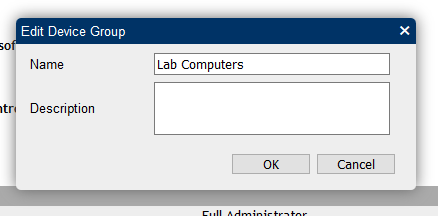
- [ ] When creating new device group, or editing existing device group, pressing enter while in name field should equate to clicking "OK".
- [ ] In console screens, you can't use the keyboard to leave the console screen.
- Switch between screens.
 MailYouLater
All 18 comments
I am glad you reported this, I had to do some research on how to fix this and realized that I was not using correctly. Published MeshCentral v0.3.7-j with a fix for the 2 first points on the login screen. I will have to work on the main site quite a bit to fix everything.
 Ylianst
on 7 Jul 2019
Ylianst
on 7 Jul 2019
Got a chance to check this. The fixes you've applied so far seem to be working. I understand the main UI will take some time and effort to make keyboard accessible, but I'm glad to see that it is something you are concerned with, and I look forward to future improvements in this regard.
MailYouLater
on 8 Jul 2019
For "creating new device group, or editing existing device group", I was looking at fixing this, but the description box is multi-line and so, I am not sure pressing enter when in the name should press "OK". Instead, it should move to the next field?
Ylianst
on 8 Jul 2019
I just fixed a lot of the links on the main web application so you could tab to them. Also, set the focus right after a dialog box show up. This will be in the next published version and going to be a lot of ongoing work.
Ylianst
on 8 Jul 2019
Published MeshCentral v0.3.7-k with lots of changes for keyboard input. For example, the "Files" tab would not work at all before and it's now ok. I am going to have to go screen-by-screen and fix things.
Ylianst
on 9 Jul 2019
If you're in the Name field, and want to go to the Description field, you'd probably hit Tab, not Enter. If you don't want to enter a description, or if the existing description is fine, and you only want to edit the name, I think you should be able to press Enter in the Name field to accept your changes.
MailYouLater
on 9 Jul 2019
I am going to have to go screen-by-screen and fix things.
If you edit the first post to have a list of screens, similar to the list I had to begin with, you can check them off as you go and easily see your progress.
MailYouLater
on 9 Jul 2019
Published MeshCentral v0.3.7-o with lots of keyboard improvements. If someone can verify what in the list above is working and what is not, that would be great. Thanks.
Ylianst
on 11 Jul 2019
If someone can verify what in the list above is working and what is not, that would be great. Thanks.
Edited opening post. Things are looking a lot better for keyboard accessibility. Thanks Ylian.
MailYouLater
on 11 Jul 2019
Wow! Thanks for updating so quickly. I will take a look at the rest soon.
Ylianst
on 11 Jul 2019
Just fixed "Open device group from My Devices section", will be in the next release.
Ylianst
on 12 Jul 2019
Feel free to check things off, and/or edit the post to add any more things that should be on there.
MailYouLater
on 12 Jul 2019
Next version of MeshCentral when I publish it should check off the last 3 boxes. I don't mind having you check them off, this way I know it works as expected :) Once done, if you can close this issue. You can then open a new one for more requests, that way we don't have issues that last forever and gets I "closed issues" score up!
Ylianst
on 14 Jul 2019
I'll take a look at those when you've uploaded the new version. There's one more thing though:
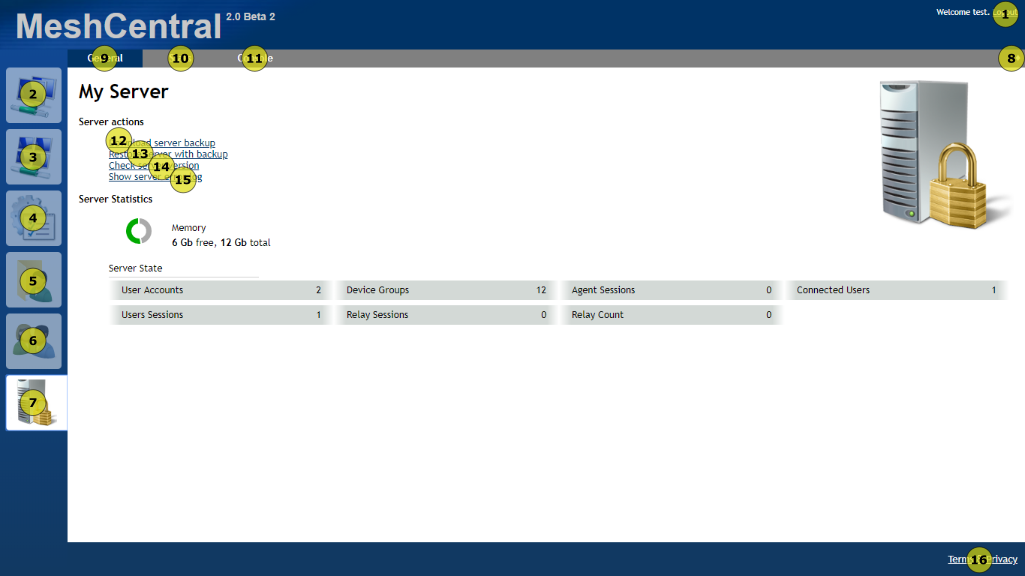
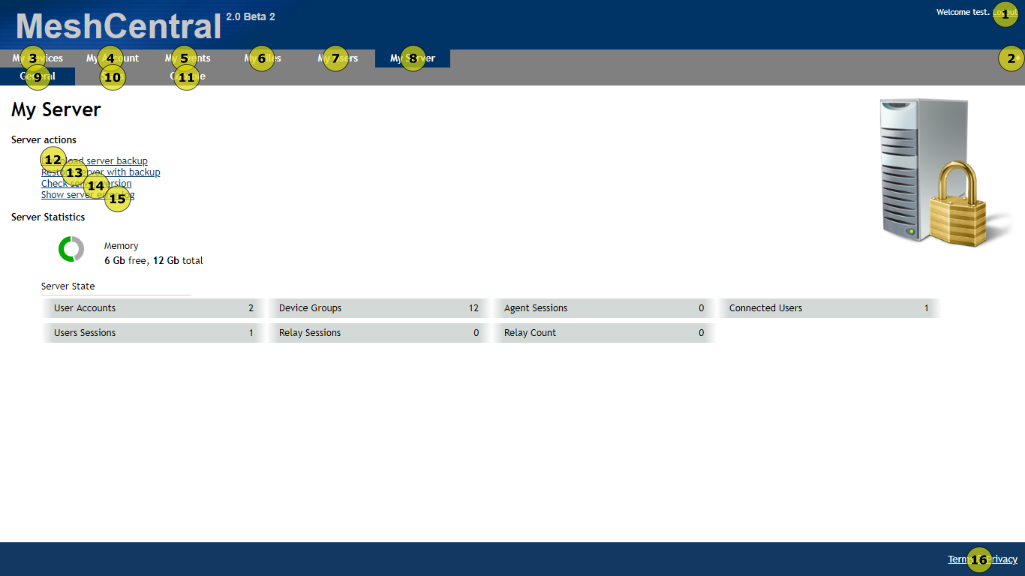
The tab order is different in different view modes. In particular, the user interface selection diamond is before either of the top navigation bars in the top bar interface, and between the left and top navigation bars in top bar and fixed width interfaces. I'm not necessarily sure where it should be in the tab order, but it should be consistent between all available views. (Actually come to think of it, the tab order is un-intuitive in other areas too, but that should probably get its own issue later. After this one is solved.)
| Current tab orders |
| - |
|  |
|
|  |
|
MailYouLater
on 15 Jul 2019
Yes, this is good feedback. By the way, I published MeshCentral v0.3.7-u that should check all of the original boxes from the first post above. I will have to take a look at tab ordering.
Ylianst
on 16 Jul 2019
I can't get any of those three remaining items on the above list to work with either v0.3.7-u or v0.3.7-p, in Firefox, Chrome, Edge or Opera.
Tab order usually reflects the order elements appear in the HTML.
MailYouLater
on 16 Jul 2019
Just updated to v0.3.7-y and that checks off one more box, but still can't hit enter to accept name change and can't leave console screens via keyboard because enter key is captured by console no matter where the keyboard focus is.
MailYouLater
on 18 Jul 2019
Ah, I see what was going on with my last couple of comments. I didn't think those recent versions should have changed anything regarding this issue. So in the one where the device groups weren't working, I didn't have any devices in any of my groups, 'cause I just installed meshcentral, created an empty device group, and tried to tab to the name. When it worked, it had a device in the group.
MailYouLater
on 18 Jul 2019
Related issues
 petervanv
·
3Comments
petervanv
·
3Comments
 darryl-h
·
3Comments
darryl-h
·
3Comments
 whalehub
·
3Comments
MailYouLater
·
4Comments
whalehub
·
3Comments
MailYouLater
·
4Comments
 penguinthingie
·
4Comments
penguinthingie
·
4Comments
Most helpful comment
I am glad you reported this, I had to do some research on how to fix this and realized that I was not using correctly. Published MeshCentral v0.3.7-j with a fix for the 2 first points on the login screen. I will have to work on the main site quite a bit to fix everything.