Meshcentral: Mesh Agent Invitation Link
Most of these questions have been answered and much to my surprise have already been implemented, thanks to Ylian! But I just wanted to share the comments I made and his answers for the benefit of others.
>
Hi Ylian,
Thank you for sharing these applications.
I had a question about the MeshCentral project that I was hoping you could answer. What lead me to your site was that I was looking for a self-hosted means that I could remotely support certain customers who were maybe outside of the office and working from home. When they are on the sites we manage I can and do of course use RDP over VPN but there are other circumstances where they will also work from home and I may have to use TeamViewer, GotoAssist, of similar means to connect to their computer.
I was hoping that your solution would be what I have been looking for but my questions is… much like TeamViewer or Bomgar or GToAssist, etc., I want to be able to make this as easy as possible for the end user or the customer and say… “Go to https://support.website.com and do this and this (something simple) so they can allow me to connect to their computer and then I can access it. It would seem that this would be possible with your tools but I have not found any tutorials or instructions on how to accomplish this. I am hoping that the functionality is already there and you could just point me in the right direction.
I really appreciate you taking the time to answer these questions.
>
<
Hi. Very good request. Currently if you setup your MeshCentral server with a SMTP server, you can sent an invite email with such instructions. However, it's probably best to have a URL you can give with the instructions. It would not be much work for me to add this. Do you happen to have screen shots or instructions for similar products? I will add something similar.
>
<
So is there a simple way to do this already where it’s just a few clicks for the end user I’m supporting? Kind of like TeamViewer where they have to download the agent and give me the session ID and password then I connect from my end. Is there a similar process for that now with MeshCentral or is it something I have to do to get the agent installed for them? I know I can create a generic user account for them to log in to https://support.website.com but to get the agent installed on their end so I can then RDP in seems like a lot of steps. In most cases I can’t get into their PC unless I’m using an app like TeamViewer which doesn’t care where the PC is at. I may be missing something because I wasn’t able to find a tutorial on this for MeshCentral. Hope this all makes sense what I’m describing.
>
<
Wow! That is awesome and easy Ylian. I think this app is going to help out a lot. Since I will be testing and using it I will definitely let you know if I come up with any other ideas but as it is now you made a great improvement! Thanks again
>
<
Ylian,
I just tested what you had already changed and you are the man! Definitely making this easy because I have some customers that are not too tech savvy so I will want to make this as easy for them as possible and also secure. Before you just sent me this email I was going to ask about the agent link and whether or not it would expire. I had thought about putting a link to “Support” on my site and have the user go through these steps:
- Go to https://www.website.com/support
- Login with the credentials I give them over the phone
- Click yes to download and install remote support agent
- Then I can see their PC and start the remote session to help them
This is much like a TeamViewer process or one of the others like Bomgar; except I now host it and it’s secure!
Another idea:
Initially I thought that by creating a user account in MeshCentral for the end user I could have them go through the steps mentioned above. They would do the following:
- Go to https://support.website.com/download-agent
- Log in to MeshCentral generic account
- The only thing they see is the choice to download the agent (32/64bit but most would be 64bit)
- There no other links on the customer portal page that would confuse them.
- Maybe just a big icon that says “Download Agent” for remote support. I don’t think I want them to change their email address/password/delete account, etc. because this would be just for them to get agent so I can connect. Maybe have that under Server Permissions in the Admin account so I can disable those other options I don’t want them to have-just to keep it simple for them.
>
<
 johnczer
All 32 comments
Hi and thanks for posting this here. So, I published MeshCentral v0.3.5-t with new icons to copy the mesh agent URL to clipboard.
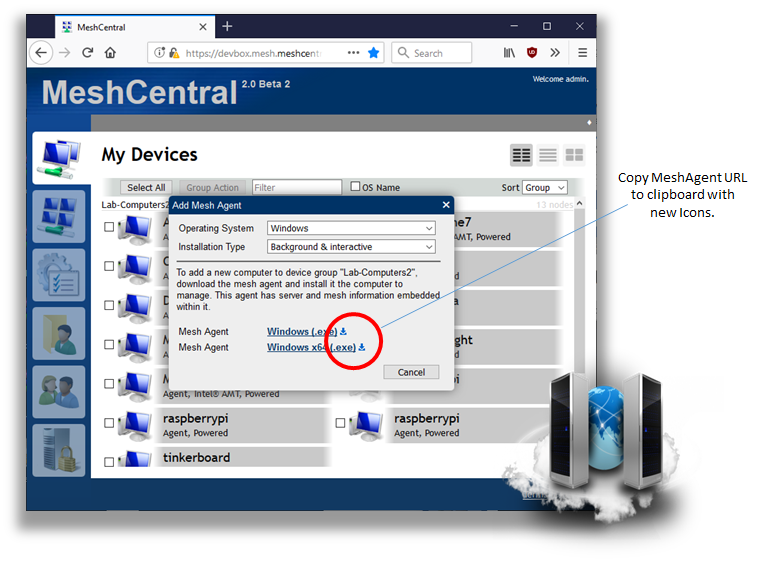
Right now this link never expires and anyone can join device to the device group specified by the link. Also, the URL does not require any login information, just download and go. From a security point of you, the person downloading the agent is granting you access, but does not get any rights on the server. My preference is to not have anyone create an account unless they needs some server rights. So, just support people and administrators should have server accounts.
I agree, having a web page URL that users to go to with instructions would be even better. Let me work on that.
 Ylianst
on 1 Jun 2019
Ylianst
on 1 Jun 2019
Sorry, I forgot to add your response with the screenshot Ylianst. I am super excited about this new tool/toy!!!
johnczer
on 1 Jun 2019
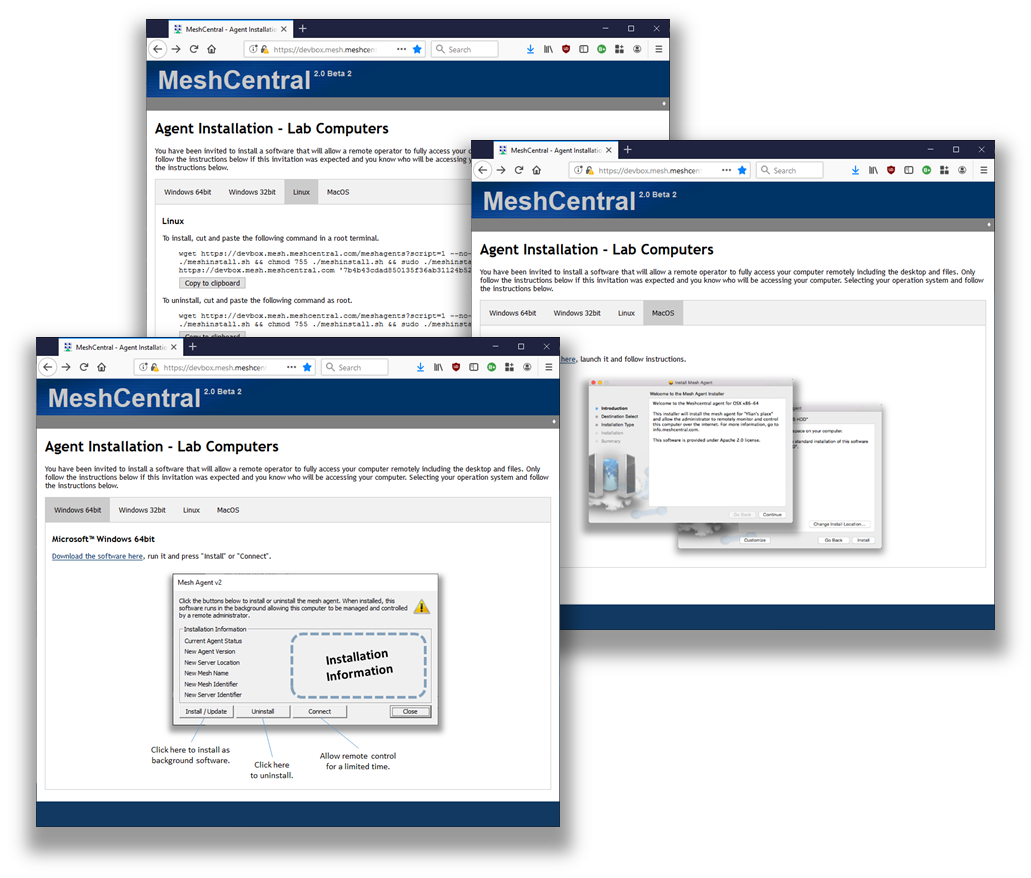
FYI. Made progress on the agent installation invitation page. Not released yet, but you will be able to give a URL to someone, they will then open this page and see how to install the agent. Should be released this week.
Ylianst
on 1 Jun 2019
Wow! That is slick and exactly what the doctor ordered. I can't wait to try it |:>)
johnczer
on 1 Jun 2019
hi, good work, it will be good if i have option to custimize the agent with company info and logo for windows
 pokernet
on 3 Jun 2019
pokernet
on 3 Jun 2019
For customizing the agent, open a new issue for that request. Bryan will have to look into that.
Ylianst
on 3 Jun 2019
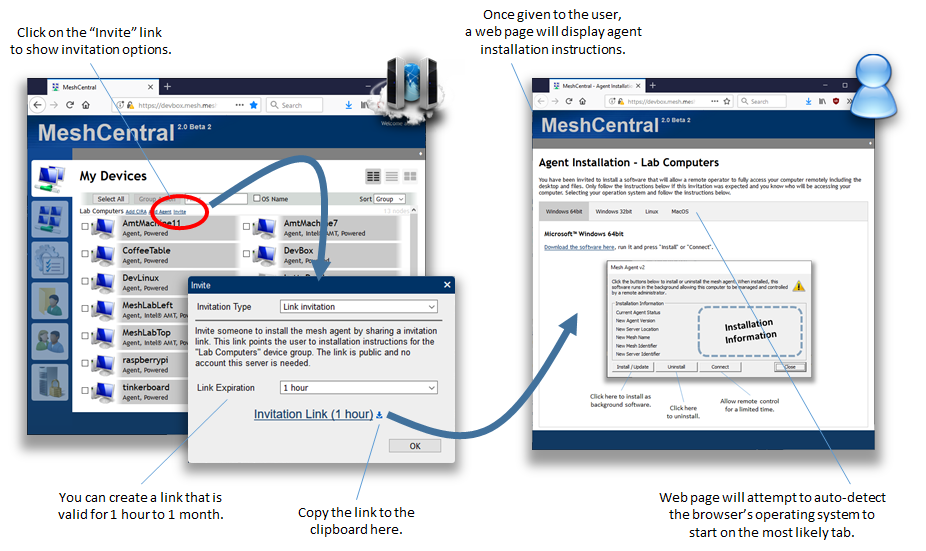
Published MeshCentral v0.3.5-x with the agent installation invitation link feature. You need to click on the "invite" link next to the group name to get started. Testing appreciated, anything from spelling to anything at all.
Ylianst
on 3 Jun 2019
Ylian, this looks great, simple and makes total sense! I will get this installed right now as a matter of fact and let you know how it goes. I am assuming that since I am installing this on a Windows platform that the MeshCentral for Windows installer will give me this more recent version...?
johnczer
on 3 Jun 2019
Yes, MeshCentral for Windows installer is just a small tool that does "npm install meshcentral" for you. It will get the latest version. If you are an expert user and familiar with NPM, I suggest you skip using the Windows Installer and do:
mkdir c:\meshcentral
cd c:\meshcentral
npm install meshcentral
node node_modules\meshcentral
node node_modules\meshcentral --install
Long term, you get more control over the server this way.
Ylianst
on 4 Jun 2019
Ylian, I have had a chance to look at the improvements you've made and experiment with it and it works great! I had another idea to run past you and wanted to see what you thought. In testing the available ways to get the remote agent to the end user needing support I thought about the possibility of the user's email being down. Is there a way to get another option that has the user just open their web browser and go to a simple link (i.e. https://remotesupport.companyname.com/agent?) to enter a session ID and password and then be directed to the remote agent download? Let me know your thoughts!
johnczer
on 7 Jun 2019
I also found a couple of spelling errors on the email invite:
Link Invitation:
- "sharing a invitation" > "sharing an invitation" Line 2710
- "no account this" > "no account for this" Line 2710
I've correct on my end but I know this will get overwritten when updated.
johnczer
on 7 Jun 2019
FYI. Just published MeshCentral v0.3.6-e with two new things. First, you can now create a "unlimited" invitation URL that will never expire. Second, I added a new "Redirects" in the domain section of config.json. You can redirect any /abc to any URL. For example:
    "Redirects": {
      "meshcommander": "https://www.meshcommander.com/"
    }
You can combine these two: Create a unlimited invitation URL and place a redirect from /joinmygroup to that URL. Users can now go to the simple URL and see the instructions.
I will fix the spelling errors now, will be in the next version. Also, for your suggestion of the user entering a "SessionID" and "Password", let me know if the change I just did it ok, if not, where would the user get the sessionid/password?
Thanks,
Ylian
Ylianst
on 7 Jun 2019
Good deal! I’ll check these changes out and let you know. I made a few css changes which get replaced when updated-no biggy but if if I send those to you would you consider? One is-I added an id class to the instruction page that highlights the OS selection in “green”. I can send you a list/copy if you’d like. Thanks again Ylian!
johnczer
on 7 Jun 2019
Yes, send over any proposed CSS changes.
Ylianst
on 7 Jun 2019
So when I add the redirect changes to the config.json and then restart the ms service the unlimited link has changed to something different. Am I doing something wrong?
johnczer
on 7 Jun 2019
Here are the proposed CSS Changes:
agentinvite: (moves the example image up and removes vertical scroll)
.winagent-img {
position: absolute;
top: 190px;
right: 500px;
z-index: 2;
}
and:
.tab button.active {
background-color: green;
}
Also:
Remote Agent Installation for
johnczer
on 7 Jun 2019
For the invitation link, it's going to be different every time the server generates it, even for the unlimited one. That is how the crypto works. That is normal, you don't even have to reset the server, just select another option and select "unlimited" again, it will be different each time.
For the CSS, I see the green color. I don't know "Remote Agent Installation for" and no idea what is ".winagent-img". I tried to do some guessing but failed. I you can attached the updated agentinvite page, that would be great.
Lastly, you mentioned that your changes are lost each time you update. A hidden feature of MeshCentral is to create a "meshcentral-web" folder (same level as "meshcentral-data") and copy the "public" folder into it. MeshCentral will use that folder instead of the public one if present. So, you can do your own customer UI without worry when updating.
Ylianst
on 8 Jun 2019
Could you show me an example of how you are using the redirect with a bogus agent link and let's say redirected from https://remotesupport.webserver.com/getagent
CSS is on line ~20 of agentinvite.handlebars:Remote Agent Installation for id="groupname">
The ".winagent-img" was just an id class I made up based on the original image name but here's the line:
~ line 98 and 106 so 2 places to add class for winagent.png
img class="winagent-img" src="images/winagent.png"
I was referring to changes when adding the unlimited agent link to the config.json and restarting the meshcentral service to apply changes. But as you said the agent link is going to change so I may not be using the redirect feature you added correctly.
johnczer
on 8 Jun 2019
After reading the last part of your comment I just realized what you were referring to...the css and .handlebars file changes I am making. I am doing the updates like this:
cd c:\meshcentral
npm meshcentral --install
My changes seem to disappear after updating. Should I not be doing it this way?
johnczer
on 8 Jun 2019
I need to be more clear, the link URL will change but should be valid even after a server restart. The server will decipher the link when the user makes use of it. So, you just do:
      "Redirects": {
        "getagent": "https://devbox.mesh.meshcentral.com/agentinvite?c=$Cex4h1..."
      }
Any version of the link, as long as it's a "unlimited" one will work. Taking a look at the CSS now...
Ylianst
on 8 Jun 2019
Ok, I see the title change, but the image change is not good at all, having it at a fixed location to the upper right of the browser does not work when scaling the page.

Ylianst
on 8 Jun 2019
CSS Changes look good! I do not see the "Remote" and "for" on my end though after update. (just checked and there is another update so maybe you saw this) Do you want me to come up with another way to move that image up?
So I did use the redirect method as you did and the link is good before I restart the service but after...it does not. I can paste the link in the browser and it comes up just fine-just not after restarting the service.
johnczer
on 8 Jun 2019
Now I see the H1 updated! You are awesome Ylian!
On the redirect link here is what I get after restarting the service:
- trying the link that worked before restart works but after restart it shows: "not found"
- then of course the actual simple link shows "Cannot GET /getagent"
johnczer
on 8 Jun 2019
Ok, let me check on this invite link, back in a few minutes...
Ylianst
on 8 Jun 2019
Oh, I see the problem... I will have a fix in 10 to 20 minutes.
Ylianst
on 8 Jun 2019
Nice! I'm looking at the css for the winagent.png on instruction page.
johnczer
on 8 Jun 2019
Published MeshCentral v0.3.6-i. Invitation link should remain valid even after a server reset.
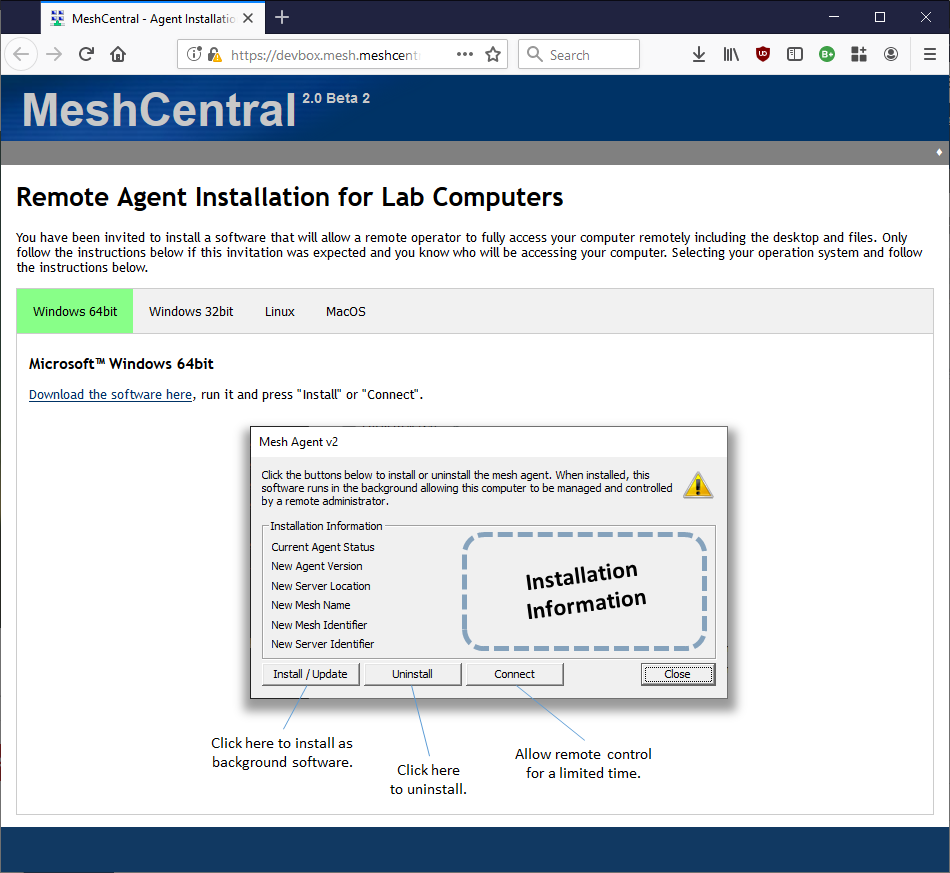
As for the CSS, I am not sure what your are looking for, I can't put the image any higher. Maybe an image of what you are looking for? This is what is look like to me...
Ylianst
on 8 Jun 2019
Bummer for me as I still get the error on the redirect link; "cannot Get /getagent" althought the link does stay valid after restart.
Hmmm...I get the vertical scroll bar and part of image hidden on two different browsers; Edge and FF

johnczer
on 8 Jun 2019
So, try this and make sure it's in the default "Domain" section of the config.json. If you put it anywhere else, it will not work. Something like this:
"domains": {
  "": {
      "Redirects": {
        "duck": "https://start.duckduckgo.com"
      }
  }
}
Then, when going to your server /duck, it should redirect you. Let me know if that works.
Ylianst
on 8 Jun 2019
You are the man-Ylian! I had to pick the wrong one from the sample json because it was in there twice: once above the domains section and then when I looked at it again just now I saw it at the bottom but in the domains section. I wish I wouldn't have wasted all of your time on this. I can't tell you how much I appreciate your willingness to help...
johnczer
on 8 Jun 2019
Nice! We can probably close this issue, feel free to open a different one for other issues, even if related. I need to create a system to check the config.json and error out if the sections are not in the right place. I just had the same issue with "autobackup", I need to address this problem.
Ylianst
on 8 Jun 2019
I agree and we can move on. I feel like this project is going to be a huge help for me in supporting clients remotely. Having the one click link will be super easy, if all that's left is their internet-which in some cases that's what I've run into. I can't thank you enough for helping and sharing this awesome tool!!!
johnczer
on 8 Jun 2019
Related issues
 PathfinderNetworks
·
3Comments
PathfinderNetworks
·
3Comments
 M1CK431
·
3Comments
M1CK431
·
3Comments
 MailYouLater
·
3Comments
MailYouLater
·
3Comments
 Julien-asv
·
3Comments
Julien-asv
·
3Comments
 nroach44
·
3Comments
nroach44
·
3Comments
Most helpful comment
Hi and thanks for posting this here. So, I published MeshCentral v0.3.5-t with new icons to copy the mesh agent URL to clipboard.
Right now this link never expires and anyone can join device to the device group specified by the link. Also, the URL does not require any login information, just download and go. From a security point of you, the person downloading the agent is granting you access, but does not get any rights on the server. My preference is to not have anyone create an account unless they needs some server rights. So, just support people and administrators should have server accounts.
I agree, having a web page URL that users to go to with instructions would be even better. Let me work on that.