Meshcentral: Agent being blocked by User Account Control
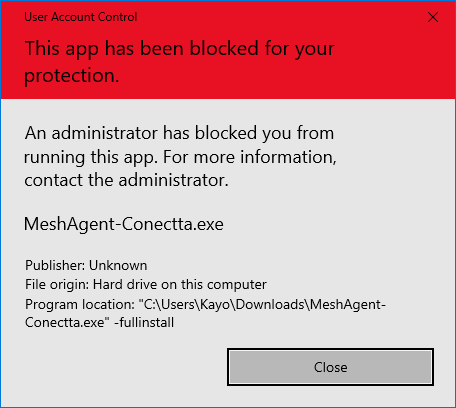
Hi, on the new Windows 10 May 2019 Update or 1903, build 18362.116, the mesh agent installation is being blocked by UAC. I already tested on some machines, if they are upgraded from 1809 the agent works just fine, but if i remove and try to install again or with a clean Windows 1903, the following UAC message is shown.
 Rafaeltck
All 26 comments
This is bad! I just confirmed this on a new Windows 10 1903 PC that is here in my office. Even though you choose the 'Run Anyway' option it still blocks the install with the message shown above. And this is being run from an account with full local admin privileges.
 PathfinderNetworks
on 29 May 2019
PathfinderNetworks
on 29 May 2019
I'm certain this is what is causing the issue. Looks like 10 is no longer going to allow you to install apps that don't have certificates signed by a global authority. No idea how we'd get around this now other than Ylian signing the agents with a certificate from Intel or some other trusted source?
https://support.microsoft.com/en-us/help/3082125/uac-blocks-the-elevation-of-executable-applications-that-are-signed-wi
PathfinderNetworks
on 29 May 2019
This issue appeared tonight with two installations. One uses McAfee and one has Symantec Endpoint SBE. Each are Win10 Home x64 1809.
 wcrlewis
on 29 May 2019
wcrlewis
on 29 May 2019
I'm certain this is what is causing the issue. Looks like 10 is no longer going to allow you to install apps that don't have certificates signed by a global authority. No idea how we'd get around this now other than Ylian signing the agents with a certificate from Intel or some other trusted source?
https://support.microsoft.com/en-us/help/3082125/uac-blocks-the-elevation-of-executable-applications-that-are-signed-wi
I do not believe this is the issue. It is difficult to believe MeshAgent's certificate was revoked. I would agree the certificate may in some form be the issue.
wcrlewis
on 29 May 2019
Arg. Thanks for noticing this. I just looked and my certificate does seem to have been revoked. It was signed by a trusted root. I am looking into it now.
 Ylianst
on 29 May 2019
Ylianst
on 29 May 2019
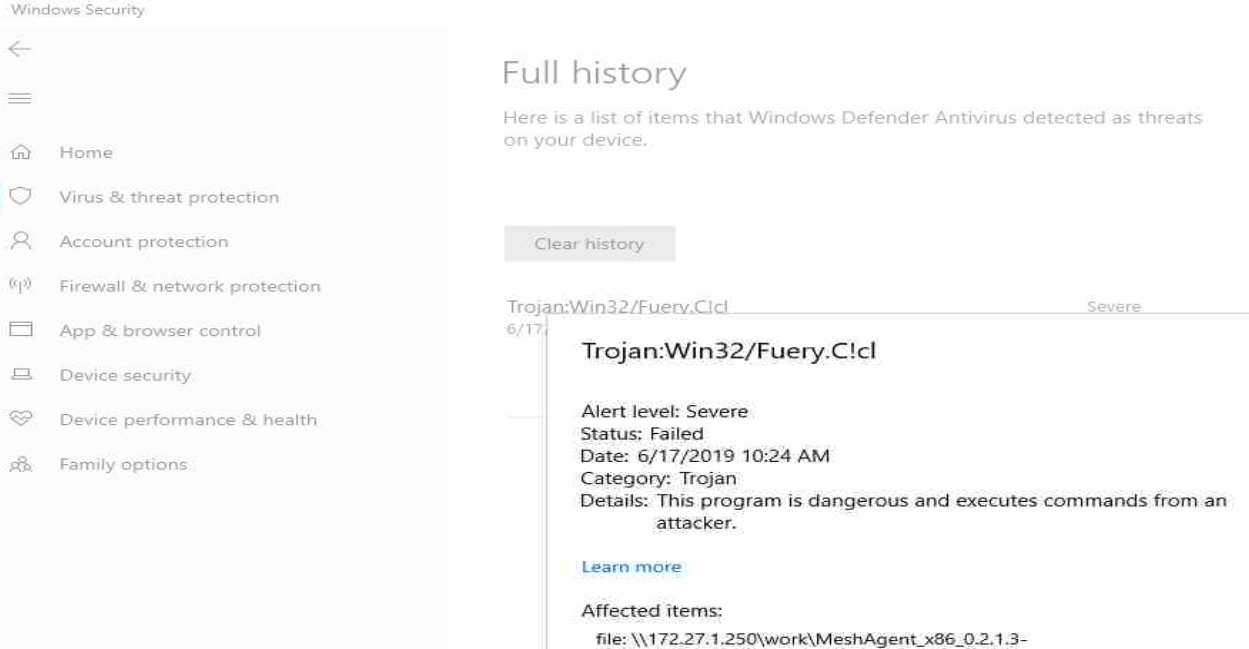
This could be the problem. I and many others used TotalVirus.com to check if the MeshAgent would pass a virus scan and the 32bit version did not. I imagine that two days ago a report was made that the MeshAgent was signed by my certificate and so, it got revoked. I contacted Sectigo support about this, hopefully I will get a response.
Ylianst
on 29 May 2019
Opening the agent from an admin powershell prompt (cd c:\users\xxx\downloads\|./MeshAgent_x64_Remote_Support.exe) and installing succeeds.
wcrlewis
on 29 May 2019
Because the Authenticode certificate is new revoked, I can't really use it anymore. I may still work on some computers, but in general it's not something I can use to sign. I will likely release a new version of MeshCentral tomorrow without code signing. If I get a new certificate, I will only be able to use it to sign software that passes the TotalVirus test.
Ylianst
on 29 May 2019
One more finding, my certificate is in fact on this list from TotalVirus.
Ylianst
on 29 May 2019
Released MeshCentral v0.3.5-m with self-signed MeshAgent, MeshCMD and MeshCentral Router. In the /node_modules/meshcentral/agents folder, there is a "codesign.cer" which is the public portion of the certificate used to sign the agent. Someone could install it as a trusted certificate if they want to get rid of the warning. Obviously, it's not ideal.
Ylianst
on 30 May 2019
Thanks Ylian. Will you, eventually, be signing it with a trusted Authenticode certificate down the road?
PathfinderNetworks
on 30 May 2019
Can we start a 'purchase a certificate' gofundme?
wcrlewis
on 30 May 2019
You guys are too nice. No need to do that, not about the money. The main problem is that if I get a new certificate, I can't use it to sign any binaries that don't pass the "totalvirus.com" test. I wish I would have known about this before hand. There is also the risk that the MeshAgent would be miss used.
One option would be to make it easy for for people deploying the MeshCentral server to sign their own agent, but we would have to make it so that a signed agent in this way could only connect to a specific server.
In any case, I opened a ticket with Comodo/Sectigo and they have not gotten back to me yet. Hopefully they will answer.
Ylianst
on 30 May 2019
Ylian,
We really do appreciate it's not about the money, but when someone takes on a project like this and keeps it regularly updated and responsive to its' users, then you can't imagine the relief that we feel. Therefore, I - for one - would welcome an ability to be able to show an appreciation towards the work you and your team put in. So, I've already reacted to @wcrlewis' post and I would expect others would do likewise. Therefore, please do reconsider.
 D4V3M0NK
on 30 May 2019
D4V3M0NK
on 30 May 2019
You guys are just amazing, thank you. I am not going to take any money, however there is something that can help. I work for Intel and customer feedback is really important to us. If you guys can take a moment to write why you use MeshCentral, why you or your users like it, why you think it's going in the right direction, what I and team do well and where you would want it to go in the future... I would love to send this feedback to my management. You can post it publically, or send me an email privately at ylian.saint-hilaire at intel.com. I will most certainly forward it up the chain and would be super grateful.
Ylianst
on 30 May 2019
Done ! Just a small step, hoping I can help in better way...
 merlinweb
on 31 May 2019
merlinweb
on 31 May 2019
Someone else had exactly the same thing happen and it went on the main page of Slashdot.
Ylianst
on 2 Jun 2019
FYI. Published MeshCentral v0.3.5-x that auto-updates all agents to the self-signed version. The past few versions had a self-signed agent but did not perform auto-update.
Ylianst
on 3 Jun 2019
Is it possible to update the certificate on the Windows installer binary?
The binary downloaded from the homepage https://www.meshcommander.com/meshcentral2 (specifically http://www.google.com/url?q=http%3A%2F%2Finfo.meshcentral.com%2Fdownloads%2FMeshCentral2%2FMeshCentralInstaller-1.6.exe&sa=D&sntz=1&usg=AFQjCNFBLcSemlflW5zQFeQNHOLuXc3PcQ) does not run due to the revoked certificate.
 plavirudar
on 4 Jun 2019
plavirudar
on 4 Jun 2019
Thanks for pointing that out! I just fixed it.
Ylianst
on 4 Jun 2019
Quick update: Sectigo sent me an email saying my trouble ticket was escalated. Hopefully we will get a happy resolution.
Ylianst
on 6 Jun 2019
wcrlewis
on 17 Jun 2019
What version of the server is this? Starting with MeshCentral v0.3.6-m, this should be fixed.
Ylianst
on 17 Jun 2019
Downloaded 6/3 at 6PM CDT from meshcentral.com. That is the best I can tell you right now. It would be easier to know which version if the files' version tag was updated or some other marker was made. Thank you for everything.
wcrlewis
on 17 Jun 2019
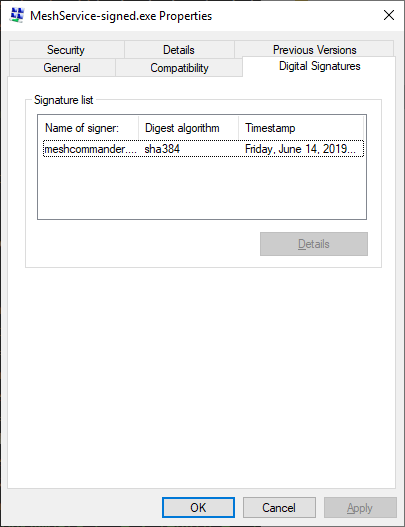
Yes, this certainly an early agent. You can right click on the executable, hit "properties" and look at the "Digital Signatures" tab. The current timestamp is June 14th. This is the version served by MeshCentral.com now and it does not have this issue. You can reinstall now if you like. Also, the 64bit version of the agent never had this problem. Hope it helps.
Ylianst
on 17 Jun 2019
Close this once as it's been fixed a while back and seems not to be a problem anymore.
Ylianst
on 14 Jul 2019
Related issues
 vish84
·
3Comments
vish84
·
3Comments
 veitw
·
4Comments
veitw
·
4Comments
 nroach44
·
3Comments
PathfinderNetworks
·
3Comments
nroach44
·
3Comments
PathfinderNetworks
·
3Comments
 whalehub
·
3Comments
whalehub
·
3Comments
Most helpful comment
You guys are just amazing, thank you. I am not going to take any money, however there is something that can help. I work for Intel and customer feedback is really important to us. If you guys can take a moment to write why you use MeshCentral, why you or your users like it, why you think it's going in the right direction, what I and team do well and where you would want it to go in the future... I would love to send this feedback to my management. You can post it publically, or send me an email privately at ylian.saint-hilaire at intel.com. I will most certainly forward it up the chain and would be super grateful.